
php导出doc文件_php生成word文档并下载
在php程序文件中生成内容到word文档中并提供下载功能的实现代码
1.前端代码
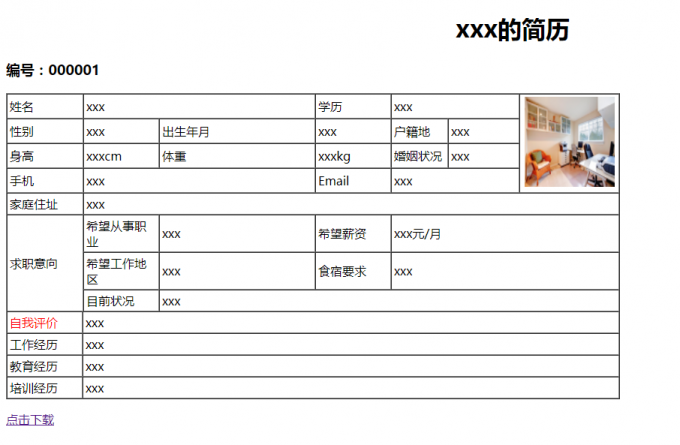
PHP生成Word文档xxx的简历
编号:000001
| 姓名 | xxx | 学历 | xxx | | ||||||||
| 性别 | xxx | 出生年月 | xxx | 户籍地 | xxx | |||||||
| 身高 | xxxcm | 体重 | xxxkg | 婚姻状况 | xxx | |||||||
| 手机 | xxx | xxx | ||||||||||
| 家庭住址 | xxx | |||||||||||
| 求职意向 | 希望从事职业 | xxx | 希望薪资 | xxx元/月 | ||||||||
| 希望工作地区 | xxx | 食宿要求 | xxx | |||||||||
| 目前状况 | xxx | |||||||||||
| 自我评价 | xxx | |||||||||||
| 工作经历 | xxx | |||||||||||
| 教育经历 | xxx | |||||||||||
| 培训经历 | xxx | |||||||||||

后台代码:
//获取1.html文档的内容(包括html代码)
$result = file_get_contents('./1.html');
echo "$result";
// /////////////////////保存///////////////////////////
//打开缓冲区
ob_start();
header("Cache-Control: public");
Header("Content-type: application/octet-stream");
Header("Accept-Ranges: bytes");
//判断浏览器类型
if (strpos($_SERVER["HTTP_USER_AGENT"],'MSIE')) {
header('Content-Disposition: attachment; filename=test.doc');
}else if (strpos($_SERVER["HTTP_USER_AGENT"],'Firefox')) {
Header('Content-Disposition: attachment; filename=test.doc');
} else {
header('Content-Disposition: attachment; filename=test.doc');
}
//不使用缓存
header("Pragma:no-cache");
//过期时间
header("Expires:0");
//输出全部内容到浏览器
ob_end_flush();
?>
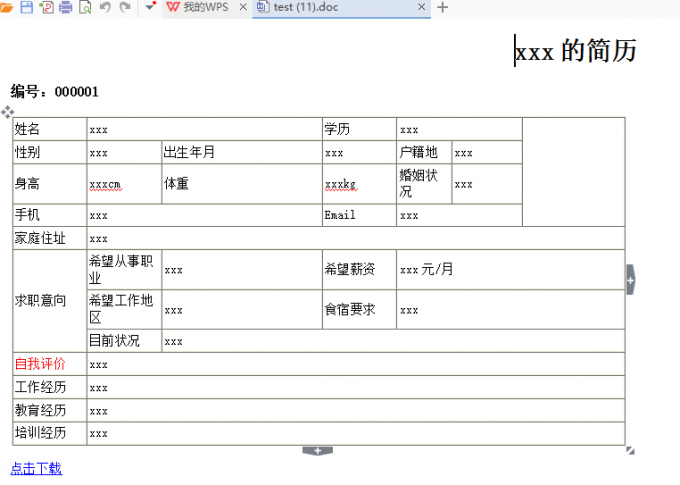
网页运行结果:
原理:
首先获取到要下载的前端页面的html代码(file_get_contents方法),然后对文档流进行相关配置,最后输出即可。
更多推荐

 0
0 0
0- 0


 已为社区贡献1条内容

所有评论(0)