
基于c语言使用http协议传输任意文件
一:前言
在使用http协议进行传输文件中有两种方式分别为:二进制流(Binary Stream) 和 multipart/form-data。
| 特性 | 二进制流 (Binary Stream) | multipart/form-data |
|---|---|---|
| 本质 | 直接将文件的原始字节作为 HTTP 请求体(Body)发送。 | 将文件数据封装在一个或多个“部分”(parts)中,每个部分可以有自己的元数据(如文件名、字段名)。 |
| 编码方式 | 无特殊编码,直接发送原始字节。 | 使用 boundary 分隔符将不同部分隔开,每个部分包含头部和数据体。 |
Content-Type | application/octet-stream 或 application/zip | multipart/form-data; boundary=----xxxxx |
| 适用场景 | API 接口上传单一文件、大文件流式上传/下载。 | HTML 表单文件上传、需要同时上传文件和文本字段的场景。 |
| 复杂性 | 简单直接。 | 相对复杂,需要构造和解析 boundary 结构。 |
| 可读性 | 二进制,不可读。 | 结构清晰,但二进制部分仍不可读。 |
| 标准 | 非标准,但广泛用于 API。 | 标准,定义于 RFC 7578(替代 RFC 2388)。 |
二:二进制流(Binary Stream)方式详解
1:原理
将整个文件或者一部分作为HTTP请求的主体,不进行额外的封装,当接收到请求体之后直接将其写入文件系统或进行处理。
2:传输方式
以POST为例子需要构建HTTP请求:
URL:指向服务器接收文件的断点,比如/api/upload
请求头:
Content-Type: application/octet-stream或application/zipContent-Length: <文件字节数>(必须)- (可选)
Content-Disposition: attachment; filename="example.zip"(提供文件名建议)
请求体(Body):直接是文件的原始二进制字节。
示例:
PUT /api/upload-zip HTTP/1.1
Host: example.com
Content-Type: application/zip
Content-Length: 1048576
Content-Disposition: attachment; filename="archive.zip"

<此处为 1048576 字节的 .zip 文件原始二进制数据>
3:优点
- 简单高效:没有额外的封装开销,传输效率高。
- 适合大文件:可以配合
Transfer-Encoding: chunked实现流式上传,无需预先知道文件大小。 - API 友好:RESTful API 中上传单一文件的常用方式。
三:multipart/form-data 方式详解
1:原理
multipart/form-data 是一种 MIME 类型,用于将文件和表单数据一起通过 HTTP 请求发送到服务器。
这是 HTML 表单文件上传的标准方式。它使用一个随机生成的 分隔符(boundary) 来将请求体分割成多个“部分”(parts)。每个部分可以包含:
- 一个文本字段(如
<input type="text" name="username">)。 - 一个文件字段(如
<input type="file" name="file">),包含文件名、MIME 类型和文件数据。
2:传输流程
- 构造请求体:
- 每个“部分”以
--<boundary>开始。 - 紧接着是该部分的头部(Headers),如
Content-Disposition和Content-Type。 - 然后是空行
\r\n。 - 最后是该部分的数据体(对于文件,就是二进制数据)。
- 所有部分结束后,以
--<boundary>--结束。
- 每个“部分”以
- 构造 HTTP 请求:
- 方法:
POST。 - URL:表单的
action地址。 - 请求头 (Headers):
Content-Type: multipart/form-data; boundary=<boundary>Content-Length: <整个请求体的总长度>(可选,但推荐)
- 请求体 (Body):由
boundary分隔的多个部分构成。
- 方法:
示例:
POST /upload HTTP/1.1
Host: example.com
Content-Type: multipart/form-data; boundary=----WebKitFormBoundary7MA4YWxkTrZu0gW
Content-Length: 1049234

------WebKitFormBoundary7MA4YWxkTrZu0gW
Content-Disposition: form-data; name="username"

Alice
------WebKitFormBoundary7MA4YWxkTrZu0gW
Content-Disposition: form-data; name="description"

My project archive
------WebKitFormBoundary7MA4YWxkTrZu0gW
Content-Disposition: form-data; name="file"; filename="project.zip"
Content-Type: application/zip

<此处为 .zip 文件的原始二进制数据>
------WebKitFormBoundary7MA4YWxkTrZu0gW--
3:优点
- 多功能:可以同时上传多个文件和多个文本字段。
- 标准化:是 HTML 表单上传的官方标准。
- 元数据丰富:每个部分都可以有自己的头部信息(文件名、类型等)。
四:使用c语言搭建HTTP服务器
HTTP属于应用层协议,其传输层协议使用的是TCP协议,具体的组成部分示意图如下

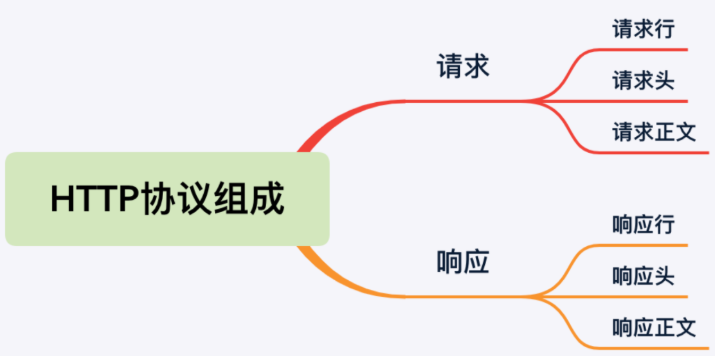
那么使用的传输层协议是基于TCP协议来实现的,那么在c语言中搭建TCP服务器就要使用socket网络编程了。网络编程搭建TCP服务器可以查考:
Linux 操作系统&TCP服务器搭建_linux搭建tcp服务器-CSDN博客
搭建服务器:
int main(int argc, char* argv[]) {
    int server_fd, client_fd;
    struct sockaddr_in server_addr, client_addr;
    socklen_t client_addr_len = sizeof(client_addr);
    pthread_t thread_id;
    int ret;

    // 解析命令行参数
    if (parse_args(argc, argv) != 0) {
        return EXIT_FAILURE;
    }

    // 打印配置信息
    printf("服务器配置:\n");
    printf("  端口号: %d\n", PORT);
    printf("  保存目录: %s\n", UPLOAD_DIR);
    printf("  保存文件名: %s\n", FIXED_FILENAME);

    // 创建上传目录(提前创建,避免上传时失败)
    if (create_directory(UPLOAD_DIR) != 0) {
        perror("[ERROR] 无法创建上传目录");
        return EXIT_FAILURE;
    }

    // 创建套接字
    server_fd = socket(AF_INET, SOCK_STREAM, 0);
    if (server_fd == -1) {
        perror("创建套接字失败");
        exit(EXIT_FAILURE);
    }

    // 允许端口复用
    int opt = 1;
    if (setsockopt(server_fd, SOL_SOCKET, SO_REUSEADDR, &opt, sizeof(opt)) == -1) {
        perror("设置端口复用失败");
        close(server_fd);
        exit(EXIT_FAILURE);
    }

    // 绑定端口
    memset(&server_addr, 0, sizeof(server_addr));
    server_addr.sin_family = AF_INET;
    server_addr.sin_port = htons(PORT);
    server_addr.sin_addr.s_addr = INADDR_ANY;

    if (bind(server_fd, (struct sockaddr*)&server_addr, sizeof(server_addr)) == -1) {
        perror("绑定端口失败");
        close(server_fd);
        exit(EXIT_FAILURE);
    }

    // 监听连接
    if (listen(server_fd, 5) == -1) {
        perror("监听连接失败");
        close(server_fd);
        exit(EXIT_FAILURE);
    }

    printf("服务器已启动,监听端口 %d,等待文件上传...\n", PORT);
    printf("请使用POST请求访问 /upload 接口上传文件\n");

    // 接受一个客户端连接
    client_fd = accept(server_fd, (struct sockaddr*)&client_addr, &client_addr_len);
    if (client_fd == -1) {
        perror("接受连接失败");
        close(server_fd);
        exit(EXIT_FAILURE);
    }

    printf("已连接客户端: %s:%d\n",
           inet_ntoa(client_addr.sin_addr),
           ntohs(client_addr.sin_port));

    // 创建客户端信息结构体
    ClientInfo* client_info = malloc(sizeof(ClientInfo));
    if (!client_info) {
        perror("内存分配失败");
        close(client_fd);
        close(server_fd);
        exit(EXIT_FAILURE);
    }
    client_info->fd = client_fd;
    client_info->addr = client_addr;

    // 创建线程处理请求
    if (pthread_create(&thread_id, NULL, handle_client, client_info) != 0) {
        perror("创建线程失败");
        free(client_info);
        close(client_fd);
        close(server_fd);
        exit(EXIT_FAILURE);
    }

    // 等待线程处理完成
    pthread_join(thread_id, NULL);

    // 处理完成后退出
    printf("文件处理完成,服务器退出\n");
    close(server_fd);
    return 0;
}
接收文件和保存
// 保存上传的文件
void save_uploaded_file(int client_fd, uint8_t* rbuf, size_t rbuf_len) {
    // 解析请求行
    char method[10], path[100], version[20];
    if (sscanf((char*)rbuf, "%s %s %s", method, path, version) != 3) {
        fprintf(stderr, "[ERROR] Invalid request line\n");
        send_json_response(client_fd, 400, NULL);
        return;
    }

    // 解析HTTP头部
    HttpHeader headers[MAX_HEADERS];
    int header_count = parse_headers((char*)rbuf, headers, MAX_HEADERS);

    // 调试:打印所有解析到的头部
    printf("[DEBUG] Parsed %d headers:\n", header_count);
    for (int i = 0; i < header_count; i++) {
        printf("[DEBUG] %s: %s\n", headers[i].name, headers[i].value);
    }

    // 1. 获取Content-Length
    const char* content_length_str = find_header(headers, header_count, "Content-Length");
    if (!content_length_str) {
        fprintf(stderr, "[ERROR] Missing Content-Length header\n");
        send_json_response(client_fd, 400, NULL);
        return;
    }

    long content_length = strtol(content_length_str, NULL, 10);
    if (content_length <= 0 || content_length > 1024 * 1024 * 100) { // 限制最大100MB
        fprintf(stderr, "[ERROR] Invalid Content-Length: %ld\n", content_length);
        send_json_response(client_fd, 400, NULL);
        return;
    }

    // 2. 获取Content-Type
    const char* content_type = find_header(headers, header_count, "Content-Type");
    if (!content_type) {
        fprintf(stderr, "[WARNING] Missing Content-Type, using default\n");
        content_type = "application/octet-stream";
    }
    printf("[INFO] Content-Type: %s\n", content_type);

    // 3. 定位HTTP头结束位置(\r\n\r\n)
    char* header_end = memmem(rbuf, rbuf_len, "\r\n\r\n", 4);
    if (!header_end) {
        fprintf(stderr, "[ERROR] Malformed HTTP headers (no end marker)\n");
        send_json_response(client_fd, 400, NULL);
        return;
    }
    uint8_t* body_start = (uint8_t*)header_end + 4; // 跳过\r\n\r\n
    size_t body_initial = rbuf_len - (body_start - rbuf);

    // 4. 读取完整请求体
    uint8_t* full_body = malloc(content_length);
    if (!full_body) {
        perror("[ERROR] Memory allocation failed");
        send_json_response(client_fd, 501, NULL);
        return;
    }
    memcpy(full_body, body_start, body_initial); // 拷贝已接收的body部分

    // 读取剩余的body数据
    if (read_all(client_fd, full_body + body_initial, content_length - body_initial, 30) != 0) {
        fprintf(stderr, "[ERROR] Failed to read complete request body\n");
        free(full_body);
        send_json_response(client_fd, 501, NULL);
        return;
    }

    // 5. 解析multipart/form-data格式
    size_t file_data_start = 0;
    size_t file_data_length = content_length;
    int is_multipart = (strstr(content_type, "multipart/form-data") != NULL);

    if (is_multipart) {
        char boundary[MAX_BOUNDARY_LEN] = {0};
        const char* boundary_start = strstr(content_type, "boundary=");

        if (!boundary_start) {
            fprintf(stderr, "[ERROR] Missing boundary in multipart request\n");
            free(full_body);
            send_json_response(client_fd, 400, NULL);
            return;
        }

        // 提取boundary
        boundary_start += 9; // 跳过"boundary="
        while (*boundary_start && (isspace((unsigned char)*boundary_start) || *boundary_start == '"')) {
            boundary_start++;
        }

        char* boundary_end = strchr(boundary_start, ';');
        if (!boundary_end) boundary_end = boundary_start + strlen(boundary_start);

        size_t boundary_len = boundary_end - boundary_start;
        if (boundary_len >= MAX_BOUNDARY_LEN) boundary_len = MAX_BOUNDARY_LEN - 1;
        memcpy(boundary, boundary_start, boundary_len);
        boundary[boundary_len] = '\0';
        printf("[INFO] Multipart boundary: %s\n", boundary);

        // 构造完整边界标记
        char full_boundary[MAX_BOUNDARY_LEN + 4];
        snprintf(full_boundary, sizeof(full_boundary), "--%s", boundary);
        size_t full_boundary_len = strlen(full_boundary);

        // 构造结束边界标记
        char end_boundary[MAX_BOUNDARY_LEN + 6];
        snprintf(end_boundary, sizeof(end_boundary), "--%s--", boundary);
        size_t end_boundary_len = strlen(end_boundary);

        // 定位文件数据的起始位置
        char* first_boundary = memmem(full_body, content_length, full_boundary, full_boundary_len);
        if (!first_boundary) {
            fprintf(stderr, "[ERROR] Could not find multipart boundary in body\n");
            free(full_body);
            send_json_response(client_fd, 400, NULL);
            return;
        }

        // 跳过第一个边界,查找该部分的头结束符(\r\n\r\n)
        char* part_header_end = memmem(
            first_boundary + full_boundary_len,
            content_length - (first_boundary - (char*)full_body) - full_boundary_len,
            "\r\n\r\n", 4
        );

        if (!part_header_end) {
            fprintf(stderr, "[ERROR] Could not find end of part headers\n");
            free(full_body);
            send_json_response(client_fd, 400, NULL);
            return;
        }

        // 文件数据从part_header_end + 4(跳过\r\n\r\n)开始
        file_data_start = (part_header_end - (char*)full_body) + 4;

        // 定位文件数据的结束位置
        char* end_pos = memmem(
            (char*)full_body + file_data_start,
            content_length - file_data_start,
            full_boundary,
            full_boundary_len
        );

        // 如果没找到普通边界,查找结束边界
        if (!end_pos) {
            end_pos = memmem(
                (char*)full_body + file_data_start,
                content_length - file_data_start,
                end_boundary,
                end_boundary_len
            );
        }

        if (end_pos) {
            // 计算文件长度(减去边界前的\r\n)
            file_data_length = (end_pos - (char*)full_body) - file_data_start;
            // 去掉末尾可能的\r\n
            if (file_data_length >= 2 && memcmp(end_pos - 2, "\r\n", 2) == 0) {
                file_data_length -= 2;
            }
        } else {
            // 如果没找到结束边界,使用剩余所有数据
            file_data_length = content_length - file_data_start;
            fprintf(stderr, "[WARNING] No end boundary found, using remaining data\n");
        }

        // 验证数据范围有效性
        if (file_data_start + file_data_length > content_length) {
            file_data_length = content_length - file_data_start;
            fprintf(stderr, "[WARNING] Adjusted data length to valid range\n");
        }
    } else {
        // 非multipart请求,直接使用整个body作为文件内容
        file_data_start = 0;
        file_data_length = content_length;
    }

    // 6. 确定文件保存路径
    char filepath[512];
    snprintf(filepath, sizeof(filepath), "%s%s", UPLOAD_DIR, FIXED_FILENAME);
    printf("[INFO] Saving to: %s\n", filepath);

    // 创建上传目录
    if (create_directory(UPLOAD_DIR) != 0) {
        perror("[ERROR] Failed to create upload directory");
        free(full_body);
        send_json_response(client_fd, 501, NULL);
        return;
    }

    // 7. 写入文件内容
    FILE* fp = fopen(filepath, "wb");
    if (!fp) {
        perror("[ERROR] Failed to open file for writing");
        free(full_body);
        send_json_response(client_fd, 501, NULL);
        return;
    }

    // 只写入提取出的有效数据
    size_t written = fwrite(full_body + file_data_start, 1, file_data_length, fp);
    fclose(fp);
    free(full_body);

    if (written != file_data_length) {
        fprintf(stderr, "[ERROR] Incomplete write to file (expected %zu, wrote %zu)\n",
                file_data_length, written);
        send_json_response(client_fd, 501, NULL);
        return;
    }

    // 8. 根据文件名执行不同的操作
    printf("[INFO] Received file: %s\n", FIXED_FILENAME);

    if (strcmp(FIXED_FILENAME, "config_save.tar.gz") == 0) {
        // 检查文件是否存在
        if (file_exists(filepath) != 0) {
            fprintf(stderr, "[ERROR] File not found: %s\n", filepath);
            send_json_response(client_fd, 401, NULL);
            return;
        }

        // 解压文件
        char cmd[512];
        snprintf(cmd, sizeof(cmd), "tar -xvf \"%s\" -C /opt/", filepath);
        printf("[INFO] Executing: %s\n", cmd);

        int status = system(cmd);
        if (status == -1) {
            perror("[ERROR] system() failed");
            send_json_response(client_fd, 401, NULL);
            return;
        } else if (WIFEXITED(status)) {
            int exit_status = WEXITSTATUS(status);
            if (exit_status != 0) {
                fprintf(stderr, "[ERROR] Command failed with exit code %d\n", exit_status);
                send_json_response(client_fd, 401, NULL);
                return;
            }
            printf("[SUCCESS] Extracted %s to /opt/\n", filepath);
        }
    }
    else if (strcmp(FIXED_FILENAME, "mainapp.tar.gz") == 0) {
        // 确保目标目录存在
        if (create_directory("/opt/app") != 0) {
            perror("[ERROR] Failed to create /opt/app");
            send_json_response(client_fd, 401, NULL);
            return;
        }

        // 检查文件是否存在
        if (file_exists(filepath) != 0) {
            fprintf(stderr, "[ERROR] File not found: %s\n", filepath);
            send_json_response(client_fd, 401, NULL);
            return;
        }

        // 解压文件
        char cmd[512];
        snprintf(cmd, sizeof(cmd), "tar -xvf \"%s\" -C /opt/app/", filepath);
        printf("[INFO] Executing: %s\n", cmd);

        int status = system(cmd);
        if (status == -1) {
            perror("[ERROR] system() failed");
            send_json_response(client_fd, 401, NULL);
            return;
        } else if (WIFEXITED(status)) {
            int exit_status = WEXITSTATUS(status);
            if (exit_status != 0) {
                fprintf(stderr, "[ERROR] Command failed with exit code %d\n", exit_status);
                send_json_response(client_fd, 401, NULL);
                return;
            }
            printf("[SUCCESS] Extracted %s to /opt/app/\n", filepath);
        }
    }
    else {
        printf("[WARNING] No specific operation for file: %s\n", FIXED_FILENAME);
    }

    // 9. 返回成功响应
    printf("[SUCCESS] Saved file: %s (size: %zu bytes)\n", filepath, written);
    send_json_response(client_fd, 200, NULL);
}
完整的功能程序:
#include <stdio.h>
#include <stdlib.h>
#include <string.h>
#include <unistd.h>
#include <arpa/inet.h>
#include <netinet/in.h>
#include <pthread.h>
#include <ctype.h>
#include <sys/socket.h>
#include <sys/stat.h>
#include <fcntl.h>
#include <errno.h>
#include <time.h>
#include <cJSON.h>

// 默认参数定义
#define DEFAULT_PORT 55555
#define DEFAULT_UPLOAD_DIR "./uploads/"
#define DEFAULT_FILENAME "uploaded_file.dat"

// 全局配置(通过命令行参数设置)
int PORT;
const char* UPLOAD_DIR;
const char* FIXED_FILENAME;

// 常量定义
#define BUFFER_SIZE 16384  // 增大缓冲区避免头部截断
#define MAX_BOUNDARY_LEN 256
#define MAX_HEADERS 20
#define MAX_HEADER_NAME 50
#define MAX_HEADER_VALUE 200

// 客户端信息结构
typedef struct {
    int fd;
    struct sockaddr_in addr;
} ClientInfo;

// HTTP头部结构
typedef struct {
    char name[MAX_HEADER_NAME];
    char value[MAX_HEADER_VALUE];
} HttpHeader;

/**
 * 检查文件是否存在
 * @param filepath 文件路径
 * @return 存在返回 0,不存在返回 1
 */
int file_exists(const char *filepath) {
    FILE *fp = fopen(filepath, "r");
    if (fp != NULL) {
        fclose(fp);
        return 0; // 文件存在
    }
    return 1; // 文件不存在或无法访问
}

// 自定义内存查找函数
void* memmem(const void* haystack, size_t hlen, const void* needle, size_t nlen) {
    if (nlen == 0) return (void*)haystack;
    if (hlen < nlen) return NULL;

    const unsigned char* h = haystack;
    for (size_t i = 0; i <= hlen - nlen; i++) {
        if (memcmp(h + i, needle, nlen) == 0) {
            return (void*)(h + i);
        }
    }
    return NULL;
}

// 可靠读取指定字节数(带超时控制)
int read_all(int fd, void* buf, size_t n, int timeout_sec) {
    struct timeval tv = {timeout_sec, 0};
    setsockopt(fd, SOL_SOCKET, SO_RCVTIMEO, &tv, sizeof(tv));

    size_t total = 0;
    while (total < n) {
        ssize_t rd = read(fd, (char*)buf + total, n - total);
        if (rd < 0) {
            perror("read error");
            return -1;
        } else if (rd == 0) {
            fprintf(stderr, "Connection closed prematurely\n");
            return -1;
        }
        total += rd;
    }
    return 0;
}

// 创建多级目录
int create_directory(const char* path) {
    char tmp[256];
    char* p = NULL;
    size_t len;

    snprintf(tmp, sizeof(tmp), "%s", path);
    len = strlen(tmp);

    if (tmp[len - 1] == '/') {
        tmp[len - 1] = '\0';
    }

    for (p = tmp + 1; *p; p++) {
        if (*p == '/') {
            char orig = *p;
            *p = '\0';
            if (mkdir(tmp, 0755) != 0 && errno != EEXIST) {
                return -1;
            }
            *p = orig;
        }
    }

    if (mkdir(tmp, 0755) != 0 && errno != EEXIST) {
        return -1;
    }

    return 0;
}

// 错误码对应的描述字符串
const char* get_error_message(int code) {
    switch (code) {
        case 200: return "服务器成功返回请求的数据";
        case 201: return "保存成功";
        case 202: return "删除数据成功";
        case 401: return "保存失败";
        case 402: return "删除数据失败";
        case 404: return "传递的字段有误";
        case 405: return "服务器返回请求失败";
        case 501: return "服务不可用";
        default:  return "未知错误";
    }
}

// 获取HTTP状态码对应的文本
const char* get_http_status_text(int code) {
    switch (code) {
        case 200: return "OK";
        case 400: return "Bad Request";
        case 404: return "Not Found";
        case 500: return "Internal Server Error";
        default: return "Unknown";
    }
}

// 发送JSON格式的HTTP响应
void send_json_response(int client_fd, int code, cJSON *data) {
    cJSON *root = cJSON_CreateObject();
    if (!root) {
        close(client_fd);
        return;
    }

    // 添加code和msg到JSON响应
    cJSON_AddNumberToObject(root, "code", code);
    cJSON_AddStringToObject(root, "msg", get_error_message(code));

    // 添加data字段
    if (data) {
        cJSON_AddItemToObject(root, "data", data);
    } else {
        cJSON_AddNullToObject(root, "data");
    }

    // 转换为字符串
    char *json_str = cJSON_PrintUnformatted(root);
    if (!json_str) {
        cJSON_Delete(root);
        close(client_fd);
        return;
    }

    // 构建HTTP响应
    size_t json_len = strlen(json_str);
    char *response = malloc(json_len + 256);
    if (!response) {
        free(json_str);
        cJSON_Delete(root);
        close(client_fd);
        return;
    }

    snprintf(response, json_len + 256,
             "HTTP/1.1 %d %s\r\n"
             "Content-Type: application/json\r\n"
             "Content-Length: %zu\r\n"
             "Connection: close\r\n"
             "\r\n"
             "%s",
             code, get_http_status_text(code),
             json_len, json_str);

    // 发送响应
    send(client_fd, response, strlen(response), 0);

    // 清理资源
    free(response);
    free(json_str);
    cJSON_Delete(root);
}

// 解析HTTP头部
int parse_headers(const char* request, HttpHeader* headers, int max_headers) {
    const char* start = request;
    int count = 0;

    while (count < max_headers) {
        // 查找头部结束(空行)
        const char* end = strstr(start, "\r\n");
        if (!end || end == start) { // 空行表示头部结束
            break;
        }

        // 查找冒号分隔符
        const char* colon = strchr(start, ':');
        if (!colon || colon > end) {
            // 无效的头部格式,跳过
            start = end + 2;
            continue;
        }

        // 提取头部名称
        size_t name_len = colon - start;
        if (name_len >= MAX_HEADER_NAME) {
            name_len = MAX_HEADER_NAME - 1;
        }
        strncpy(headers[count].name, start, name_len);
        headers[count].name[name_len] = '\0';

        // 提取头部值(跳过冒号和可能的空格)
        const char* value_start = colon + 1;
        while (value_start < end && isspace((unsigned char)*value_start)) {
            value_start++;
        }
        size_t value_len = end - value_start;
        if (value_len >= MAX_HEADER_VALUE) {
            value_len = MAX_HEADER_VALUE - 1;
        }
        strncpy(headers[count].value, value_start, value_len);
        headers[count].value[value_len] = '\0';

        count++;
        start = end + 2; // 移动到下一个头部
    }

    return count;
}

// 查找指定头部的值
const char* find_header(const HttpHeader* headers, int count, const char* name) {
    for (int i = 0; i < count; i++) {
        if (strcasecmp(headers[i].name, name) == 0) {
            return headers[i].value;
        }
    }
    return NULL;
}

// 保存上传的文件
void save_uploaded_file(int client_fd, uint8_t* rbuf, size_t rbuf_len) {
    // 解析请求行
    char method[10], path[100], version[20];
    if (sscanf((char*)rbuf, "%s %s %s", method, path, version) != 3) {
        fprintf(stderr, "[ERROR] Invalid request line\n");
        send_json_response(client_fd, 400, NULL);
        return;
    }

    // 解析HTTP头部
    HttpHeader headers[MAX_HEADERS];
    int header_count = parse_headers((char*)rbuf, headers, MAX_HEADERS);

    // 调试:打印所有解析到的头部
    printf("[DEBUG] Parsed %d headers:\n", header_count);
    for (int i = 0; i < header_count; i++) {
        printf("[DEBUG] %s: %s\n", headers[i].name, headers[i].value);
    }

    // 1. 获取Content-Length
    const char* content_length_str = find_header(headers, header_count, "Content-Length");
    if (!content_length_str) {
        fprintf(stderr, "[ERROR] Missing Content-Length header\n");
        send_json_response(client_fd, 400, NULL);
        return;
    }

    long content_length = strtol(content_length_str, NULL, 10);
    if (content_length <= 0 || content_length > 1024 * 1024 * 100) { // 限制最大100MB
        fprintf(stderr, "[ERROR] Invalid Content-Length: %ld\n", content_length);
        send_json_response(client_fd, 400, NULL);
        return;
    }

    // 2. 获取Content-Type
    const char* content_type = find_header(headers, header_count, "Content-Type");
    if (!content_type) {
        fprintf(stderr, "[WARNING] Missing Content-Type, using default\n");
        content_type = "application/octet-stream";
    }
    printf("[INFO] Content-Type: %s\n", content_type);

    // 3. 定位HTTP头结束位置(\r\n\r\n)
    char* header_end = memmem(rbuf, rbuf_len, "\r\n\r\n", 4);
    if (!header_end) {
        fprintf(stderr, "[ERROR] Malformed HTTP headers (no end marker)\n");
        send_json_response(client_fd, 400, NULL);
        return;
    }
    uint8_t* body_start = (uint8_t*)header_end + 4; // 跳过\r\n\r\n
    size_t body_initial = rbuf_len - (body_start - rbuf);

    // 4. 读取完整请求体
    uint8_t* full_body = malloc(content_length);
    if (!full_body) {
        perror("[ERROR] Memory allocation failed");
        send_json_response(client_fd, 501, NULL);
        return;
    }
    memcpy(full_body, body_start, body_initial); // 拷贝已接收的body部分

    // 读取剩余的body数据
    if (read_all(client_fd, full_body + body_initial, content_length - body_initial, 30) != 0) {
        fprintf(stderr, "[ERROR] Failed to read complete request body\n");
        free(full_body);
        send_json_response(client_fd, 501, NULL);
        return;
    }

    // 5. 解析multipart/form-data格式
    size_t file_data_start = 0;
    size_t file_data_length = content_length;
    int is_multipart = (strstr(content_type, "multipart/form-data") != NULL);

    if (is_multipart) {
        char boundary[MAX_BOUNDARY_LEN] = {0};
        const char* boundary_start = strstr(content_type, "boundary=");

        if (!boundary_start) {
            fprintf(stderr, "[ERROR] Missing boundary in multipart request\n");
            free(full_body);
            send_json_response(client_fd, 400, NULL);
            return;
        }

        // 提取boundary
        boundary_start += 9; // 跳过"boundary="
        while (*boundary_start && (isspace((unsigned char)*boundary_start) || *boundary_start == '"')) {
            boundary_start++;
        }

        char* boundary_end = strchr(boundary_start, ';');
        if (!boundary_end) boundary_end = boundary_start + strlen(boundary_start);

        size_t boundary_len = boundary_end - boundary_start;
        if (boundary_len >= MAX_BOUNDARY_LEN) boundary_len = MAX_BOUNDARY_LEN - 1;
        memcpy(boundary, boundary_start, boundary_len);
        boundary[boundary_len] = '\0';
        printf("[INFO] Multipart boundary: %s\n", boundary);

        // 构造完整边界标记
        char full_boundary[MAX_BOUNDARY_LEN + 4];
        snprintf(full_boundary, sizeof(full_boundary), "--%s", boundary);
        size_t full_boundary_len = strlen(full_boundary);

        // 构造结束边界标记
        char end_boundary[MAX_BOUNDARY_LEN + 6];
        snprintf(end_boundary, sizeof(end_boundary), "--%s--", boundary);
        size_t end_boundary_len = strlen(end_boundary);

        // 定位文件数据的起始位置
        char* first_boundary = memmem(full_body, content_length, full_boundary, full_boundary_len);
        if (!first_boundary) {
            fprintf(stderr, "[ERROR] Could not find multipart boundary in body\n");
            free(full_body);
            send_json_response(client_fd, 400, NULL);
            return;
        }

        // 跳过第一个边界,查找该部分的头结束符(\r\n\r\n)
        char* part_header_end = memmem(
            first_boundary + full_boundary_len,
            content_length - (first_boundary - (char*)full_body) - full_boundary_len,
            "\r\n\r\n", 4
        );

        if (!part_header_end) {
            fprintf(stderr, "[ERROR] Could not find end of part headers\n");
            free(full_body);
            send_json_response(client_fd, 400, NULL);
            return;
        }

        // 文件数据从part_header_end + 4(跳过\r\n\r\n)开始
        file_data_start = (part_header_end - (char*)full_body) + 4;

        // 定位文件数据的结束位置
        char* end_pos = memmem(
            (char*)full_body + file_data_start,
            content_length - file_data_start,
            full_boundary,
            full_boundary_len
        );

        // 如果没找到普通边界,查找结束边界
        if (!end_pos) {
            end_pos = memmem(
                (char*)full_body + file_data_start,
                content_length - file_data_start,
                end_boundary,
                end_boundary_len
            );
        }

        if (end_pos) {
            // 计算文件长度(减去边界前的\r\n)
            file_data_length = (end_pos - (char*)full_body) - file_data_start;
            // 去掉末尾可能的\r\n
            if (file_data_length >= 2 && memcmp(end_pos - 2, "\r\n", 2) == 0) {
                file_data_length -= 2;
            }
        } else {
            // 如果没找到结束边界,使用剩余所有数据
            file_data_length = content_length - file_data_start;
            fprintf(stderr, "[WARNING] No end boundary found, using remaining data\n");
        }

        // 验证数据范围有效性
        if (file_data_start + file_data_length > content_length) {
            file_data_length = content_length - file_data_start;
            fprintf(stderr, "[WARNING] Adjusted data length to valid range\n");
        }
    } else {
        // 非multipart请求,直接使用整个body作为文件内容
        file_data_start = 0;
        file_data_length = content_length;
    }

    // 6. 确定文件保存路径
    char filepath[512];
    snprintf(filepath, sizeof(filepath), "%s%s", UPLOAD_DIR, FIXED_FILENAME);
    printf("[INFO] Saving to: %s\n", filepath);

    // 创建上传目录
    if (create_directory(UPLOAD_DIR) != 0) {
        perror("[ERROR] Failed to create upload directory");
        free(full_body);
        send_json_response(client_fd, 501, NULL);
        return;
    }

    // 7. 写入文件内容
    FILE* fp = fopen(filepath, "wb");
    if (!fp) {
        perror("[ERROR] Failed to open file for writing");
        free(full_body);
        send_json_response(client_fd, 501, NULL);
        return;
    }

    // 只写入提取出的有效数据
    size_t written = fwrite(full_body + file_data_start, 1, file_data_length, fp);
    fclose(fp);
    free(full_body);

    if (written != file_data_length) {
        fprintf(stderr, "[ERROR] Incomplete write to file (expected %zu, wrote %zu)\n",
                file_data_length, written);
        send_json_response(client_fd, 501, NULL);
        return;
    }

    // 8. 根据文件名执行不同的操作
    printf("[INFO] Received file: %s\n", FIXED_FILENAME);

    if (strcmp(FIXED_FILENAME, "config_save.tar.gz") == 0) {
        // 检查文件是否存在
        if (file_exists(filepath) != 0) {
            fprintf(stderr, "[ERROR] File not found: %s\n", filepath);
            send_json_response(client_fd, 401, NULL);
            return;
        }

        // 解压文件
        char cmd[512];
        snprintf(cmd, sizeof(cmd), "tar -xvf \"%s\" -C /opt/", filepath);
        printf("[INFO] Executing: %s\n", cmd);

        int status = system(cmd);
        if (status == -1) {
            perror("[ERROR] system() failed");
            send_json_response(client_fd, 401, NULL);
            return;
        } else if (WIFEXITED(status)) {
            int exit_status = WEXITSTATUS(status);
            if (exit_status != 0) {
                fprintf(stderr, "[ERROR] Command failed with exit code %d\n", exit_status);
                send_json_response(client_fd, 401, NULL);
                return;
            }
            printf("[SUCCESS] Extracted %s to /opt/\n", filepath);
        }
    }
    else if (strcmp(FIXED_FILENAME, "mainapp.tar.gz") == 0) {
        // 确保目标目录存在
        if (create_directory("/opt/app") != 0) {
            perror("[ERROR] Failed to create /opt/app");
            send_json_response(client_fd, 401, NULL);
            return;
        }

        // 检查文件是否存在
        if (file_exists(filepath) != 0) {
            fprintf(stderr, "[ERROR] File not found: %s\n", filepath);
            send_json_response(client_fd, 401, NULL);
            return;
        }

        // 解压文件
        char cmd[512];
        snprintf(cmd, sizeof(cmd), "tar -xvf \"%s\" -C /opt/app/", filepath);
        printf("[INFO] Executing: %s\n", cmd);

        int status = system(cmd);
        if (status == -1) {
            perror("[ERROR] system() failed");
            send_json_response(client_fd, 401, NULL);
            return;
        } else if (WIFEXITED(status)) {
            int exit_status = WEXITSTATUS(status);
            if (exit_status != 0) {
                fprintf(stderr, "[ERROR] Command failed with exit code %d\n", exit_status);
                send_json_response(client_fd, 401, NULL);
                return;
            }
            printf("[SUCCESS] Extracted %s to /opt/app/\n", filepath);
        }
    }
    else {
        printf("[WARNING] No specific operation for file: %s\n", FIXED_FILENAME);
    }

    // 9. 返回成功响应
    printf("[SUCCESS] Saved file: %s (size: %zu bytes)\n", filepath, written);
    send_json_response(client_fd, 200, NULL);
}

// 处理客户端请求的线程函数
void* handle_client(void* arg) {
    ClientInfo* client_info = (ClientInfo*)arg;
    uint8_t rbuf[BUFFER_SIZE];

    // 接收客户端请求
    ssize_t cnt = recv(client_info->fd, rbuf, BUFFER_SIZE - 1, 0);
    if (cnt <= 0) {
        fprintf(stderr, "Client disconnected prematurely\n");
        close(client_info->fd);
        free(client_info);
        return NULL;
    }
    rbuf[cnt] = '\0';

    // 调试:打印接收到的请求头部
    printf("[DEBUG] Received request:\n%s\n", rbuf);

    // 处理100 Continue期望
    if (strstr((char*)rbuf, "Expect: 100-continue") != NULL) {
        const char* continue_response = "HTTP/1.1 100 Continue\r\n\r\n";
        send(client_info->fd, continue_response, strlen(continue_response), 0);
    }

    // 处理上传请求
    if (strstr((char*)rbuf, "POST /_api/upload") != NULL) {
        save_uploaded_file(client_info->fd, rbuf, cnt);
    } else {
        send_json_response(client_info->fd, 404, NULL);
    }

    // 关闭连接
    close(client_info->fd);
    free(client_info);
    return NULL;
}

// 打印程序使用说明
void print_usage(const char* program_name) {
    printf("Usage: %s [OPTIONS]\n", program_name);
    printf("Options:\n");
    printf("  -p <port>        服务器端口号 (默认: %d)\n", DEFAULT_PORT);
    printf("  -d <directory>   上传文件保存目录 (默认: %s)\n", DEFAULT_UPLOAD_DIR);
    printf("  -f <filename>    保存的文件名 (默认: %s)\n", DEFAULT_FILENAME);
    printf("  -h               显示帮助信息\n");
}

// 解析命令行参数
int parse_args(int argc, char* argv[]) {
    // 设置默认值
    PORT = DEFAULT_PORT;
    UPLOAD_DIR = DEFAULT_UPLOAD_DIR;
    FIXED_FILENAME = DEFAULT_FILENAME;

    int opt;
    while ((opt = getopt(argc, argv, "p:d:f:h")) != -1) {
        switch (opt) {
            case 'p':
                PORT = atoi(optarg);
                if (PORT <= 0 || PORT > 65535) {
                    fprintf(stderr, "无效的端口号: %s\n", optarg);
                    return -1;
                }
                break;
            case 'd':
                UPLOAD_DIR = optarg;
                break;
            case 'f':
                FIXED_FILENAME = optarg;
                break;
            case 'h':
                print_usage(argv[0]);
                exit(EXIT_SUCCESS);
            default:
                print_usage(argv[0]);
                return -1;
        }
    }

    // 验证目录是否以/结尾,没有则添加
    if (UPLOAD_DIR[strlen(UPLOAD_DIR) - 1] != '/') {
        static char dir_buf[512];
        snprintf(dir_buf, sizeof(dir_buf), "%s/", UPLOAD_DIR);
        UPLOAD_DIR = dir_buf;
    }

    return 0;
}

int main(int argc, char* argv[]) {
    int server_fd, client_fd;
    struct sockaddr_in server_addr, client_addr;
    socklen_t client_addr_len = sizeof(client_addr);
    pthread_t thread_id;
    int ret;

    // 解析命令行参数
    if (parse_args(argc, argv) != 0) {
        return EXIT_FAILURE;
    }

    // 打印配置信息
    printf("服务器配置:\n");
    printf("  端口号: %d\n", PORT);
    printf("  保存目录: %s\n", UPLOAD_DIR);
    printf("  保存文件名: %s\n", FIXED_FILENAME);

    // 创建上传目录(提前创建,避免上传时失败)
    if (create_directory(UPLOAD_DIR) != 0) {
        perror("[ERROR] 无法创建上传目录");
        return EXIT_FAILURE;
    }

    // 创建套接字
    server_fd = socket(AF_INET, SOCK_STREAM, 0);
    if (server_fd == -1) {
        perror("创建套接字失败");
        exit(EXIT_FAILURE);
    }

    // 允许端口复用
    int opt = 1;
    if (setsockopt(server_fd, SOL_SOCKET, SO_REUSEADDR, &opt, sizeof(opt)) == -1) {
        perror("设置端口复用失败");
        close(server_fd);
        exit(EXIT_FAILURE);
    }

    // 绑定端口
    memset(&server_addr, 0, sizeof(server_addr));
    server_addr.sin_family = AF_INET;
    server_addr.sin_port = htons(PORT);
    server_addr.sin_addr.s_addr = INADDR_ANY;

    if (bind(server_fd, (struct sockaddr*)&server_addr, sizeof(server_addr)) == -1) {
        perror("绑定端口失败");
        close(server_fd);
        exit(EXIT_FAILURE);
    }

    // 监听连接
    if (listen(server_fd, 5) == -1) {
        perror("监听连接失败");
        close(server_fd);
        exit(EXIT_FAILURE);
    }

    printf("服务器已启动,监听端口 %d,等待文件上传...\n", PORT);
    printf("请使用POST请求访问 /upload 接口上传文件\n");

    // 接受一个客户端连接
    client_fd = accept(server_fd, (struct sockaddr*)&client_addr, &client_addr_len);
    if (client_fd == -1) {
        perror("接受连接失败");
        close(server_fd);
        exit(EXIT_FAILURE);
    }

    printf("已连接客户端: %s:%d\n",
           inet_ntoa(client_addr.sin_addr),
           ntohs(client_addr.sin_port));

    // 创建客户端信息结构体
    ClientInfo* client_info = malloc(sizeof(ClientInfo));
    if (!client_info) {
        perror("内存分配失败");
        close(client_fd);
        close(server_fd);
        exit(EXIT_FAILURE);
    }
    client_info->fd = client_fd;
    client_info->addr = client_addr;

    // 创建线程处理请求
    if (pthread_create(&thread_id, NULL, handle_client, client_info) != 0) {
        perror("创建线程失败");
        free(client_info);
        close(client_fd);
        close(server_fd);
        exit(EXIT_FAILURE);
    }

    // 等待线程处理完成
    pthread_join(thread_id, NULL);

    // 处理完成后退出
    printf("文件处理完成,服务器退出\n");
    close(server_fd);
    return 0;
}
搭建完毕服务器可以使用curl工具测试一下,比如上传一个.tar.gz文件可以使用:
curl -v -F "file=@config_save.tar.gz" http://IP:Port/_api/upload这个例子是使用multipart/form-data的方式来进行数据导入的,其中的原理简单来说就是客户端通过这个方式把要发送过来的数据发送过来,接收方根据打来的请求字段,从中提取响应的数据和提取数据体然后写入到想要保存的格式文件中,理论上支持任意格式文件的保存。其中这个程序的运行方式为:
./save_zip -p port -d 要保存的目录 -f 文件名(比如app.zip)
支持修改自定义端口号,自定义要保存的目录,任意格式的文件(我测试过常见的各种文件均没有问题)。这里没有进行二进制流的呈现,相比与二进制流的传输,使用multipart/form-data更规范,感兴趣的可以了解二进制流的传输。
测试验证:

我是上传了一个123.conf文件,这是程序的运行结果图。
文件内容:

源文件内容

图片测试:


更多推荐

 16
 0
- 0


 已为社区贡献5条内容

所有评论(0)