
上传本地包到私有maven仓库
·
- 通过脚本传参方式上传
脚本内容
#cat mavenimport.sh
#!/bin/bash
# copy and run this script to the root of the repository directory containing files
# this script attempts to exclude uploading itself explicitly so the script name is important
# Get command line params

while getopts ":r:u:p:" opt; do
	case $opt in
		r) REPO_URL="$OPTARG"
		;;
		u) USERNAME="$OPTARG"
		;;
		p) PASSWORD="$OPTARG"
		;;
	esac
done

find . -type f -not -path './mavenimport\.sh*' -not -path '*/\.*' -not -path '*/\^archetype\-catalog\.xml*' -not -path '*/\^maven\-metadata\-local*\.xml' -not -path '*/\^maven\-metadata\-deployment*\.xml' | sed "s|^\./||" | xargs -I '{}' curl -u "$USERNAME:$PASSWORD" -X PUT -v -T {} ${REPO_URL}/{} ;
上传的命令(账号和密码和地址根据实际的需求替换即可) # ./mavenimport.sh -u admin -p admin123 -r http://172.16.61.107:18881/nexus/content/repositories/thirdparty/ - 通过命令行上传
# mvn deploy:deploy-file -DgroupId=org.deppon.com -DartifactId=dop-sdk -Dversion=0.0.1-SNAPSHOT -Dpackaging=jar -Dfile=/nexus-bak/repository/dop-sdk-0.0.1-SNAPSHOT.jar  -Durl=http://172.16.61.107:18881/nexus/content/groups/public/   -DrepositoryId=public
如下根据实际情况替换
1、DgroupId
2、DartifactId
3、Dversion
4、Dfile
5、Durl
6、DrepositoryId
比如
<parent>
    <groupId>org.deppon.com</groupId>
    <artifactId>dop</artifactId>
    <version>0.0.1-SNAPSHOT</version>
  </parent>
  <artifactId>dop-sdk</artifactId>

完颜振江
特别要注意的是SNAPSHOT这类文件如果是上传到public的话,那么对应的地址是 http://x.x.x.x/nexus/content/repositories/snapshots/ 也就是说文件的类型需要一样 比如非SNAPSHOT文件需要上传到如下地址 http://x.x.x.x/nexus/content/repositories/thirdparty/ 如下这个地址不支持上传的 http://x.x.x.x/nexus/content/groups/public/ 无论上传到 http://x.x.x.x/nexus/content/repositories/snapshots/ 还是 http://x.x.x.x/nexus/content/repositories/thirdparty/ 其实都是上传到如下地址的 http://x.x.x.x/nexus/content/groups/public/ - 通过界面上传
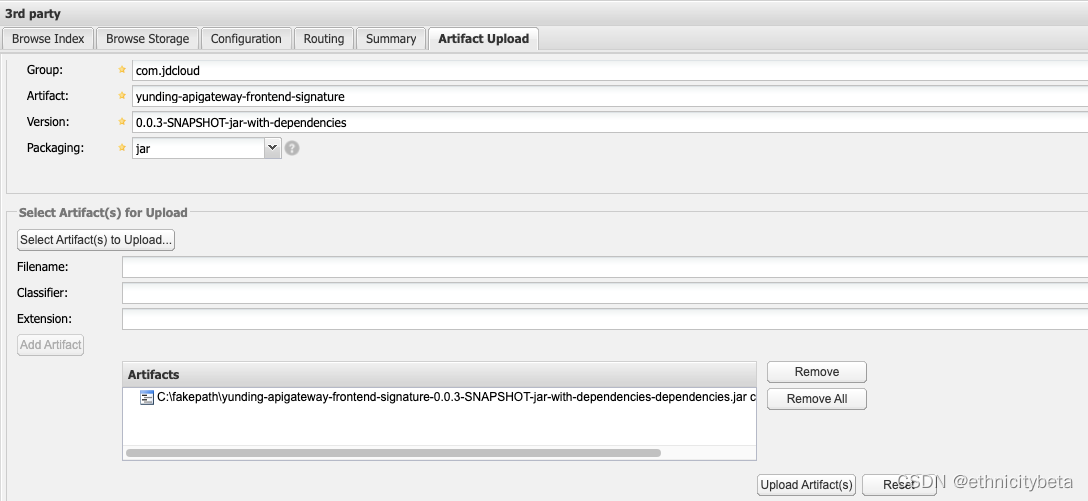
SNAPSHOT包只能通过如下命令上传,界面是不支持的(这个千万需要注意)
mvn deploy:deploy-file -DgroupId=org.deppon.com -DartifactId=dop-sdk -Dversion=0.0.1-SNAPSHOT -Dpackaging=jar -Dfile=/nexus-bak/repository/dop-sdk-0.0.1-SNAPSHOT.jar -Durl=http://x.x.x.x/nexus/content/groups/public/ -DrepositoryId=public

更多推荐


 0
0 0
0- 0


 已为社区贡献18条内容

所有评论(0)