
uniapp--微信小程序长按识别二维码
·
首先要知道,想要实现该功能,你的二维码必须是以下几种码⬇️
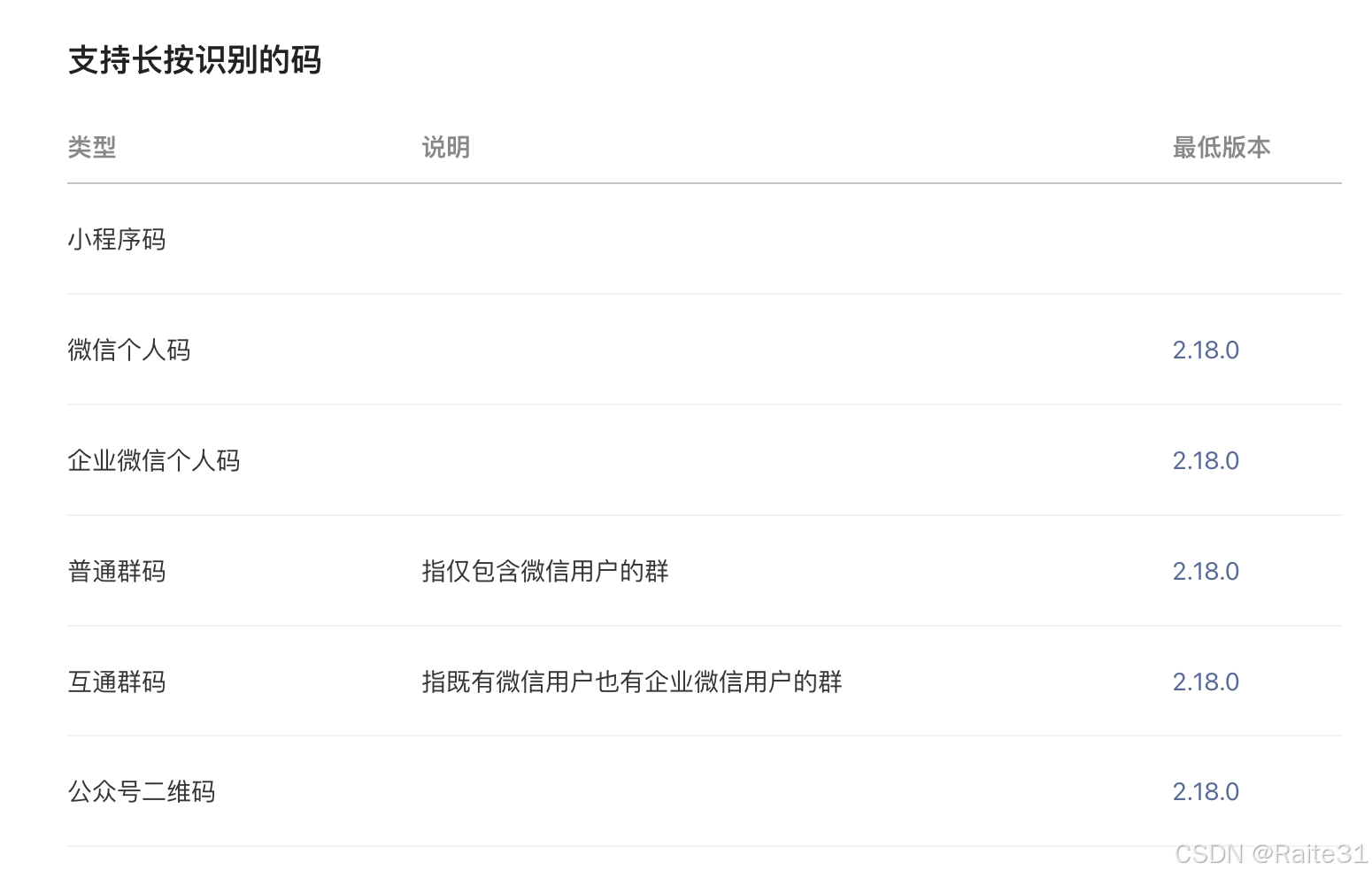
知道了这个首要条件之后,不是这几种码的就不会白费功夫了。
那么只要当你的码是这几种码就很好办了,只需要在image标签添加属性 :show-menu-by-longpress=“true” 即可,那么当不是这几种码的话,我的做法是长按保存到相册,然后再用微信扫码扫刚才保存的码。
我个人是使用l-qrcode这个组件实现的二维码展示,这个组件有个问题就是保存到相册的二维码是.png格式的,重点来了,微信扫码在相册选图片的情况下,扫不到.png格式的二维码!!
所以我的做法是,在使用l-qrcode组件生成图片二维码的时候,再对其用画布画一层白色背景,具体做法如下:
<view class="qr_code">
  <canvas
      type="2d"
      id="imageCanvas"
      style="position: absolute; left: -9999px;"
      :style="{ width: canvasWidth + 'px', height: canvasHeight + 'px' }"
  ></canvas>
  <l-qrcode
      v-show="false"
      :value="check_code"
      size="200rpx"
      useCanvasToTempFilePath
      @success="success"
  ></l-qrcode>
  <image
      v-if="processedImageUrl"
      :src="processedImageUrl"
      mode="aspectFill"
      :show-menu-by-longpress="true"
  ></image>
  <image v-else src="/static/icon/image_none.svg"></image>
</view>
const success = async (img) => {
  qr_image.value = img;
  await processImage()
};
const processImage = async () => {
  try {
    // 获取 canvas 实例
    const canvas = await new Promise((resolve) => {
      uni.createSelectorQuery()
          .select('#imageCanvas')
          .fields({node: true, size: true})
          .exec((res) => {
            resolve(res[0].node)
          })
    })

    const ctx = canvas.getContext('2d')

    // 创建图片对象
    const img = canvas.createImage()

    // 加载图片
    await new Promise((resolve, reject) => {
      img.onload = resolve
      img.onerror = reject
      img.src = qr_image.value
    })

    // 设置画布尺寸
    canvas.width = img.width
    canvas.height = img.height
    canvasWidth.value = img.width
    canvasHeight.value = img.height

    // 填充白色背景
    ctx.fillStyle = 'white'
    ctx.fillRect(0, 0, canvas.width, canvas.height)

    // 绘制图片
    ctx.drawImage(img, 0, 0)

    // 转换为临时文件路径
    const tempFilePath = await new Promise((resolve, reject) => {
      uni.canvasToTempFilePath({
        canvas,
        success: (res) => resolve(res.tempFilePath),
        fail: reject
      })
    })

    processedImageUrl.value = tempFilePath
  } catch (error) {
    console.error('处理图片失败:', error)
  }
}
这样就可以实现长按保存到相册,然后再用微信扫码扫刚才保存的码啦 🎉🎉
更多推荐


 4
 0
- 0


 已为社区贡献2条内容

所有评论(0)