
记录下paddlepaddle (飞桨)安装错误:(untimeError: (PreconditionNotMet) The third-party dynamic library...)
·
转载:https://blog.csdn.net/qq_39740690/article/details/127835544
实测有用

Running verify PaddlePaddle program …
W1113 18:32:35.265188 1600 gpu_resources.cc:61] Please NOTE: device: 0, GPU Compute Capability: 5.0, Driver API Version: 11.6, Runtime API Version: 11.2
W1113 18:32:35.273442 1600 gpu_resources.cc:91] device: 0, cuDNN Version: 8.6.

untimeError: (PreconditionNotMet) The third-party dynamic library (cublas64_112.dll;cublas64_11.dll) that Paddle depends on is not configured correctly. (error code is 126)
Suggestions:
- Check if the third-party dynamic library (e.g. CUDA, CUDNN) is installed correctly and its version is matched with paddlepaddle you installed.
- Configure third-party dynamic library environment variables as follows:
- Linux: set LD_LIBRARY_PATH by
export LD_LIBRARY_PATH=... - Windows: set PATH by `set PATH=XXX; (at …\paddle\phi\backends\dynload\dynamic_loader.cc:303)
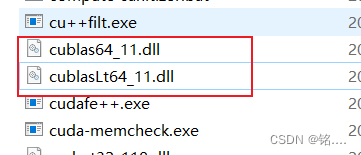
需要把cublas64_11.dll 和 cublasLt64_11.dll 复制到C:\Windows\System32目录下
更多推荐



 2
2 0
0- 0


 已为社区贡献1条内容

所有评论(0)