
Idea maven项目添加阿里云仓库地址
·
方式1:添加repository
针对每个项目需要添加 ,缺点 每个项目需要添加
直接添加如下文件即可:
    <repositories>
        <repository>
            <id>nexus-aliyun</id>
            <name>nexus-aliyun Repository</name>
            <url>http://maven.aliyun.com/nexus/content/groups/public/</url>
            <releases>
                <enabled>true</enabled>
            </releases>
            <snapshots>
                <enabled>true</enabled>
            </snapshots>
        </repository>
    </repositories>
方式二:修改settings.xml文件
优点:一劳永逸,每个项目可使用
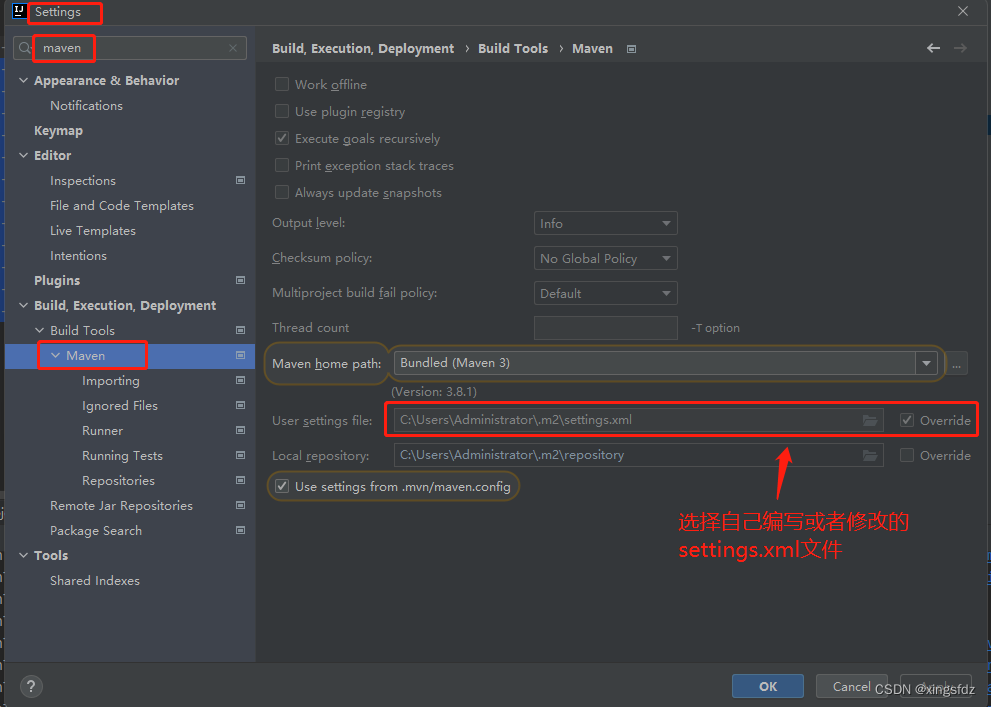
没有文件 新建一个文件即可:
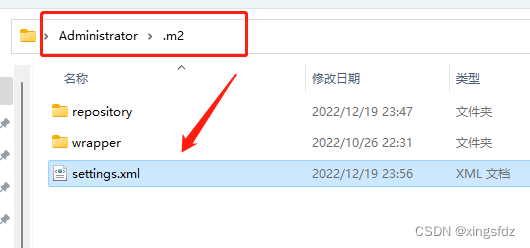
settings.xml文件的内容如下:
<settings xmlns="http://maven.apache.org/SETTINGS/1.0.0"
      xmlns:xsi="http://www.w3.org/2001/XMLSchema-instance"
      xsi:schemaLocation="http://maven.apache.org/SETTINGS/1.0.0
                          https://maven.apache.org/xsd/settings-1.0.0.xsd">
      <mirrors>
        <mirror>
            <id>alimaven</id>
            <name>aliyun maven</name>
            <url>http://maven.aliyun.com/nexus/content/groups/public/</url>
            <mirrorOf>central</mirrorOf>
        </mirror>
      </mirrors>
</settings>
保存-应用即可。
更多推荐



 0
0 0
0- 0


 已为社区贡献3条内容

所有评论(0)