
佬,excel接入deepseek是真的能提效,不信你看看
目标
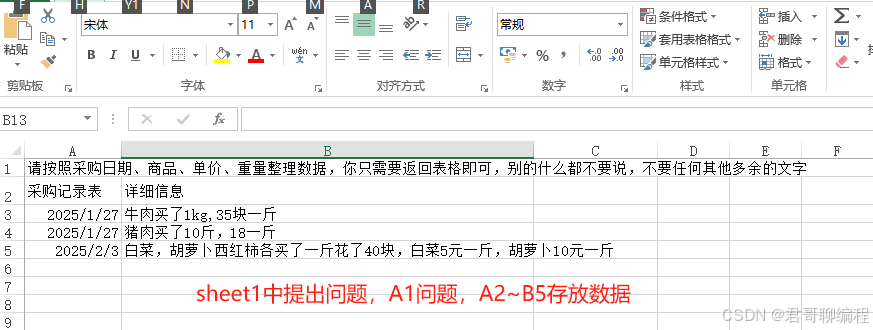
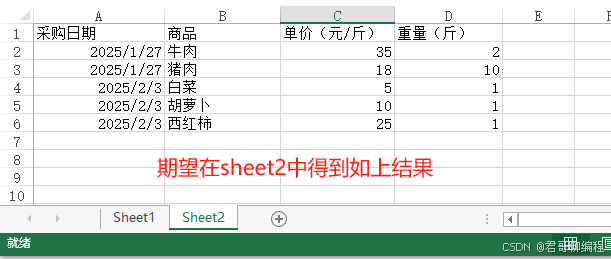
使用deepseeek整理优化Excel数据,详见如下2张图片
本文相关资源存放在:
链接: https://pan.baidu.com/s/1kDf5U1NMsGRN6oa97euWAg?pwd=qkmf
提取码: qkmf
关键步骤
- 获取大模型apikey
- 配置excel环境
- 理解需求,并通过聊天的方式获取deepseek的回答
- 编写vba接入api
- 初步实现上述需求
- 优化上一步的实现
获取apikey
详见文章 https://blog.csdn.net/ron03129596/article/details/145491745
通过聊天问deepseek
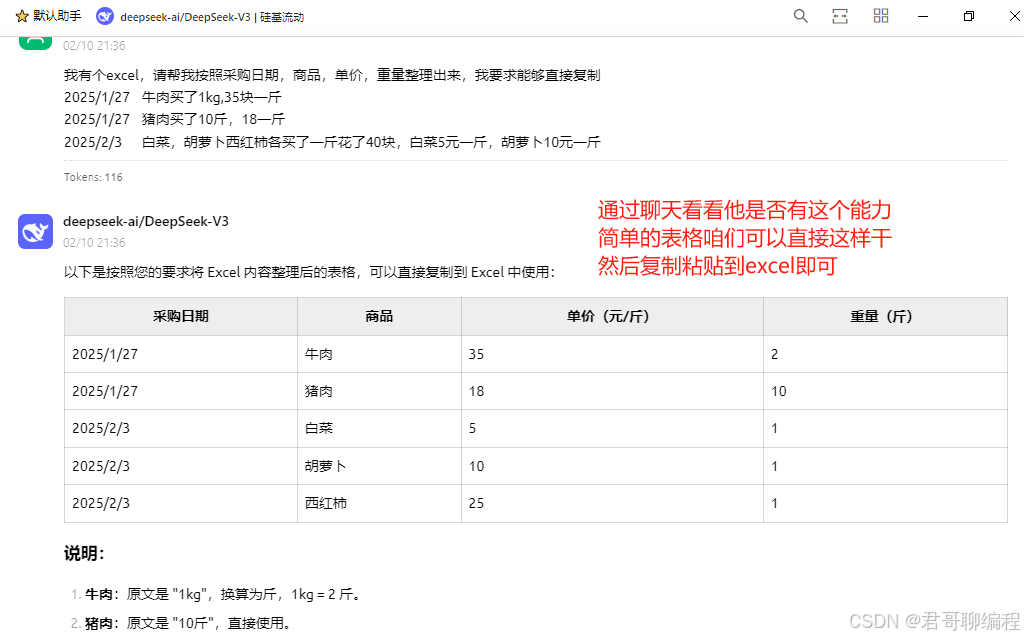
deepseek虽然能回答,但是有一些行数显示限制,简单的题目我们直接这样扔给它即可,但是如果行数较多,它回复的内容会有丢失或页面显示不全分页等,那就还需要接着往下看
excel环境配置
- 准备好JsonConverter.bas
- 按alt+f11打开vba编辑器
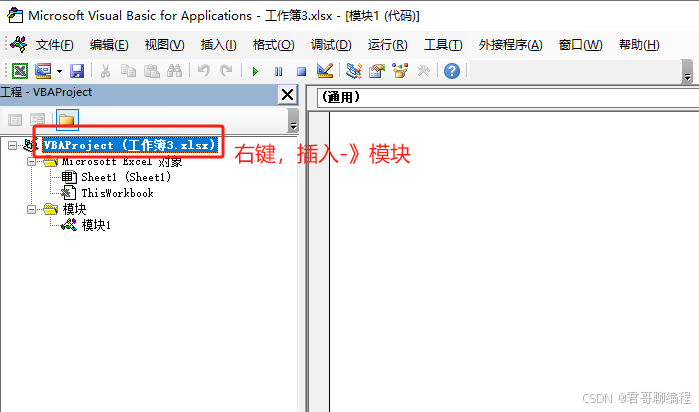
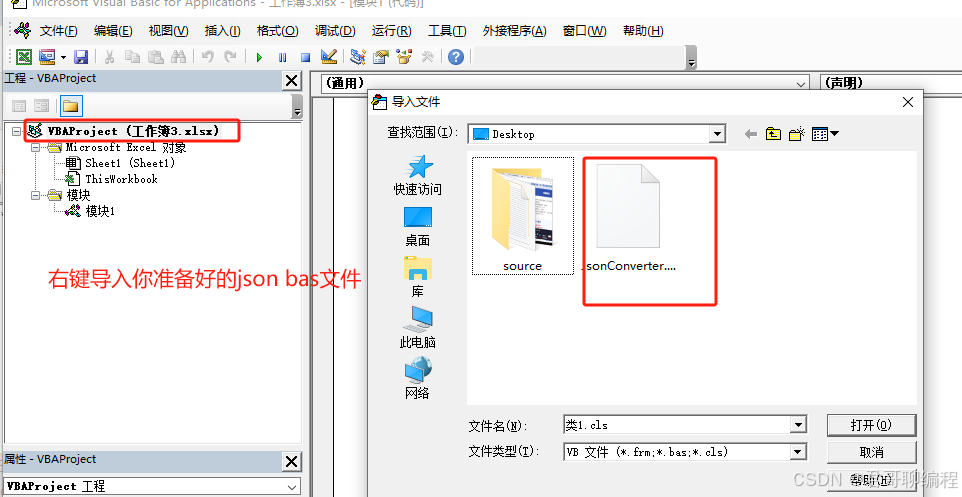
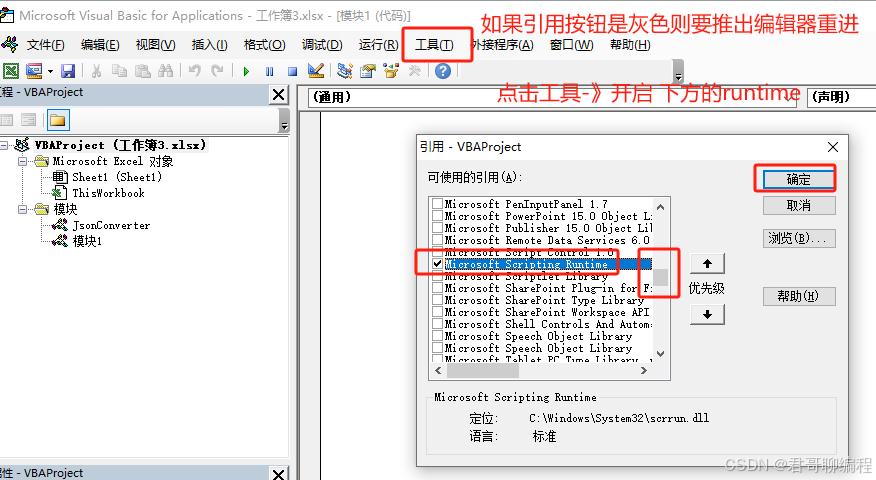
到这里环境准备好了,可以开始运行下一段代码了
跑通第一个api
   Sub CallDeepSeekAPI()
       Dim api_url As String, api_key As String
       Dim question As String, response As String
       Dim httpReq As Object

       ' 配置API参数
       api_url = "https://api.siliconflow.cn/v1/chat/completions"  ' 替换为实际API地址
       api_key = "sk-xxxxx"             ' 注意这里替换为你的API密钥
       question = Range("A1").Value          ' 从单元格A1读取问题

       ' 创建HTTP请求对象
       Set httpReq = CreateObject("MSXML2.ServerXMLHTTP")
       httpReq.Open "POST", api_url, False
       httpReq.setRequestHeader "Content-Type", "application/json"
       httpReq.setRequestHeader "Authorization", "Bearer " & api_key

       ' 构建请求体(JSON格式)
       Dim requestBody As String
       requestBody = "{""model"": ""deepseek-ai/DeepSeek-V3"", ""messages"": [{""role"": ""user"", ""content"": """ & question & """}], ""temperature"": 0}"

       ' 发送请求并获取响应
       httpReq.send requestBody
       response = httpReq.responseText

       ' 解析JSON响应中的content字段(需引用JSON解析库如VBA-JSON)
       Dim parsedResponse As Dictionary
       Set parsedResponse = JsonConverter.ParseJson(response)
       Range("B1").Value = parsedResponse("choices")(1)("message")("content")
   End Sub
保存后退出编辑器,在A1单元格中写下一个问题:我1990年出生,请问我今年多少岁?
按alt+f8调用vba程序,然后执行,稍等一会B1单元格中就会有结果出现,到这里你的接入就基本OK了,接下来我们解决复杂需求。
来个新需求
问题内容如下,可自取:
请按照采购日期、商品、单价、重量整理数据,你只需要返回表格即可,别的什么都不要说,不要任何其他多余的文字
采购记录表 详细信息
2025/1/27 牛肉买了1kg,35块一斤
2025/1/27 猪肉买了10斤,18一斤
2025/2/3 白菜,胡萝卜西红柿各买了一斤花了40块,白菜5元一斤,胡萝卜10元一斤
将上述题目按照文章最前部分放置(注意这里的题目有明确说明只需要返回表格,这个很关键,因为一旦有其他文字插入到答案中我们程序将无法解析)
使用alt+f11按钮打开编辑器,插入如下代码:
Sub CallDeepSeekAPI()
    Dim http As Object
    Dim apiUrl As String
    Dim apiKey As String
    Dim requestBody As String
    Dim response As String
    Dim ws As Worksheet
    Dim i As Integer

    ' 设置 API 信息
    apiUrl = "https://api.siliconflow.cn/v1/chat/completions" ' 替换为实际的 API URL
    apiKey = "sk-ervggzoenrzixueavrzfdqwazjxbnhenhqpfzotzntmrrcxu" ' 替换为您的 API Key

    ' 创建 HTTP 对象
    Set http = CreateObject("MSXML2.ServerXMLHTTP")

    ' 设置请求内容(根据 API 文档调整)
    'requestBody = "{""query"": ""请按照采购日期、商品、单价、重量整理数据""}"'


    ' 获取查询内容和数据
    With ThisWorkbook.Sheets("Sheet1") ' 假设数据和问题在 Sheet1 中
        question = .Range("A1").Value & vbCrLf & .Range("A2").Value & vbCrLf & _
               .Range("B2").Value & vbCrLf & .Range("A3").Value & vbCrLf & _
               .Range("B3").Value & vbCrLf & .Range("A4").Value & vbCrLf & _
               .Range("B4").Value & vbCrLf & .Range("A5").Value & vbCrLf & _
               .Range("B5").Value ' 采集 A2:A3 和 B1:B3 中的数据
    End With

    Dim result As String
    result = Replace(question, "\", "\\")
    result = Replace(result, """", "\""")
    result = Replace(result, vbCr, "\r")
    result = Replace(result, vbLf, "\n")
    result = Replace(result, vbTab, "\t")
    result = Replace(result, vbBack, "\b")
    result = Replace(result, Chr(12), "\f")

    requestBody = "{""model"": ""deepseek-ai/DeepSeek-V3"", ""messages"": [{""role"": ""user"", ""content"": """ & result & """}], ""temperature"": 0}"

    ' 发送 POST 请求
    http.Open "POST", apiUrl, False
    http.setRequestHeader "Content-Type", "application/json"
    http.setRequestHeader "Authorization", "Bearer " & apiKey
    http.Send requestBody

    ' 获取响应
    response = http.ResponseText

    ' 解析 JSON 响应(需要引用 JSON 解析库,如 VBA-JSON)
    ' 假设响应格式为:[{"采购日期":"2025/1/27","商品":"牛肉","单价":35,"重量":2}, ...]
     'Set parsedResponse = JsonConverter.ParseJson(response) 需导入 VBA-JSON 库

    Dim parsedResponse As Dictionary
    Set parsedResponse = JsonConverter.ParseJson(response)
    Range("B10").Value = parsedResponse("choices")(1)("message")("content")


    ' 提示完成
    MsgBox "数据已成功写入 Sheet2!", vbInformation
End Sub
上述调用后,你发现deepseek回复的markdown答案已经出现了
优化
如果要把答案解析出来,放到sheet2那应该怎么做呢?没错就是下面这段代码
Sub CallDeepSeekAPI()
    Dim http As Object
    Dim apiUrl As String
    Dim apiKey As String
    Dim requestBody As String
    Dim response As String
    Dim ws As Worksheet
    Dim i As Integer

    Dim lines() As String
    Dim columns() As String

    ' 设置 API 信息
    apiUrl = "https://api.siliconflow.cn/v1/chat/completions" ' 替换为实际的 API URL
    apiKey = "sk-ervggzoenrzixueavrzfdqwazjxbnhenhqpfzotzntmrrcxu" ' 替换为您的 API Key

    ' 创建 HTTP 对象
    Set http = CreateObject("MSXML2.ServerXMLHTTP")

    ' 设置请求内容(根据 API 文档调整)
    'requestBody = "{""query"": ""请按照采购日期、商品、单价、重量整理数据""}"'


    ' 获取查询内容和数据
    With ThisWorkbook.Sheets("Sheet1") ' 假设数据和问题在 Sheet1 中
        question = .Range("A1").Value & vbCrLf & .Range("A2").Value & vbCrLf & _
               .Range("B2").Value & vbCrLf & .Range("A3").Value & vbCrLf & _
               .Range("B3").Value & vbCrLf & .Range("A4").Value & vbCrLf & _
               .Range("B4").Value & vbCrLf & .Range("A5").Value & vbCrLf & _
               .Range("B5").Value ' 采集 A2:A3 和 B1:B3 中的数据
    End With

    Dim result As String
    result = Replace(question, "\", "\\")
    result = Replace(result, """", "\""")
    result = Replace(result, vbCr, "\r")
    result = Replace(result, vbLf, "\n")
    result = Replace(result, vbTab, "\t")
    result = Replace(result, vbBack, "\b")
    result = Replace(result, Chr(12), "\f")

    requestBody = "{""model"": ""deepseek-ai/DeepSeek-V3"", ""messages"": [{""role"": ""user"", ""content"": """ & result & """}], ""temperature"": 0}"

    ' 发送 POST 请求
    http.Open "POST", apiUrl, False
    http.setRequestHeader "Content-Type", "application/json"
    http.setRequestHeader "Authorization", "Bearer " & apiKey
    http.Send requestBody

    ' 获取响应
    response = http.ResponseText

    ' 解析 JSON 响应(需要引用 JSON 解析库,如 VBA-JSON)
    ' 假设响应格式为:[{"采购日期":"2025/1/27","商品":"牛肉","单价":35,"重量":2}, ...]
     'Set parsedResponse = JsonConverter.ParseJson(response) 需导入 VBA-JSON 库

    Dim parsedResponse As Dictionary
    Set parsedResponse = JsonConverter.ParseJson(response)

    Set wsOutput = ThisWorkbook.Sheets("Sheet2") ' 输出结果

    ' 清空输出表
    wsOutput.Cells.Clear


    Dim cellValue As String
    cellValue = parsedResponse("choices")(1)("message")("content")

    ' 按行拆分
    lines = Split(cellValue, vbCrLf)

    ' 写入表头
    columns = Split(Trim(lines(0)), "|") ' 第一行是表头
    For i = 1 To UBound(columns)
        wsOutput.Cells(1, i).Value = Trim(columns(i))
    Next i

    ' 写入表格数据(跳过分隔线和表头)
    For i = 2 To UBound(lines)
        If Trim(lines(i)) <> "" And Not Left(Trim(lines(i)), 1) = "-" Then ' 跳过空行和分隔线
            columns = Split(Trim(lines(i)), "|")
            For j = 1 To UBound(columns) - 1
                wsOutput.Cells(i, j).Value = Trim(columns(j))
            Next j
        End If
    Next i

    ' 提示完成
    MsgBox "数据已成功写入 Sheet2!", vbInformation
End Sub
保存,再按alt+f8执行就可以看到效果了
以上抛一个砖,还有很多待优化的地方,甚至可以做成function直接由function调用
总结
ai大模型赋予了我们无限可能,deepseek让我们使用大模型的成本降到无限低,同时大大提高生产力,还有什么理由不赶紧跟上这波浪潮呢?
更多推荐


 22
22 0
0- 0


 已为社区贡献1条内容

所有评论(0)