
使用freemarker导出word含图片
·
步骤1:先用word创建.doc文件或者.docx文件
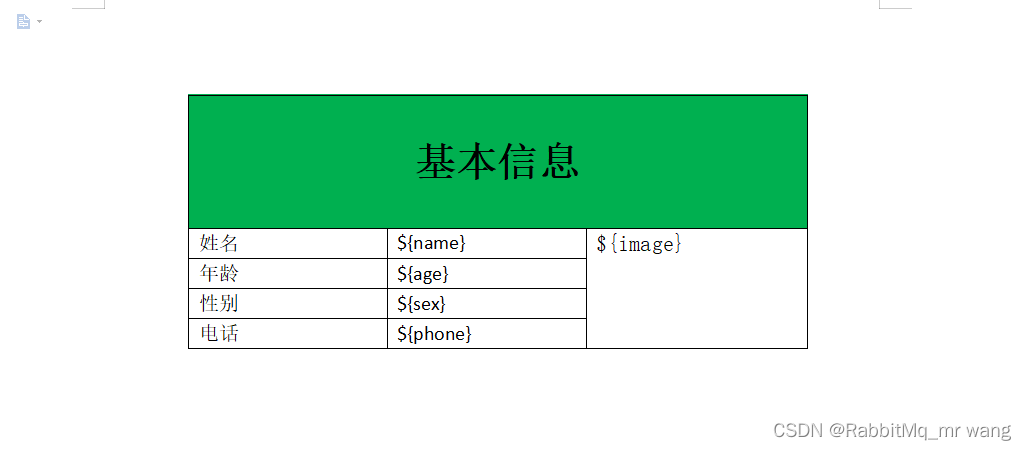
步骤2:另存模板为.xml文件
列如:person.xml
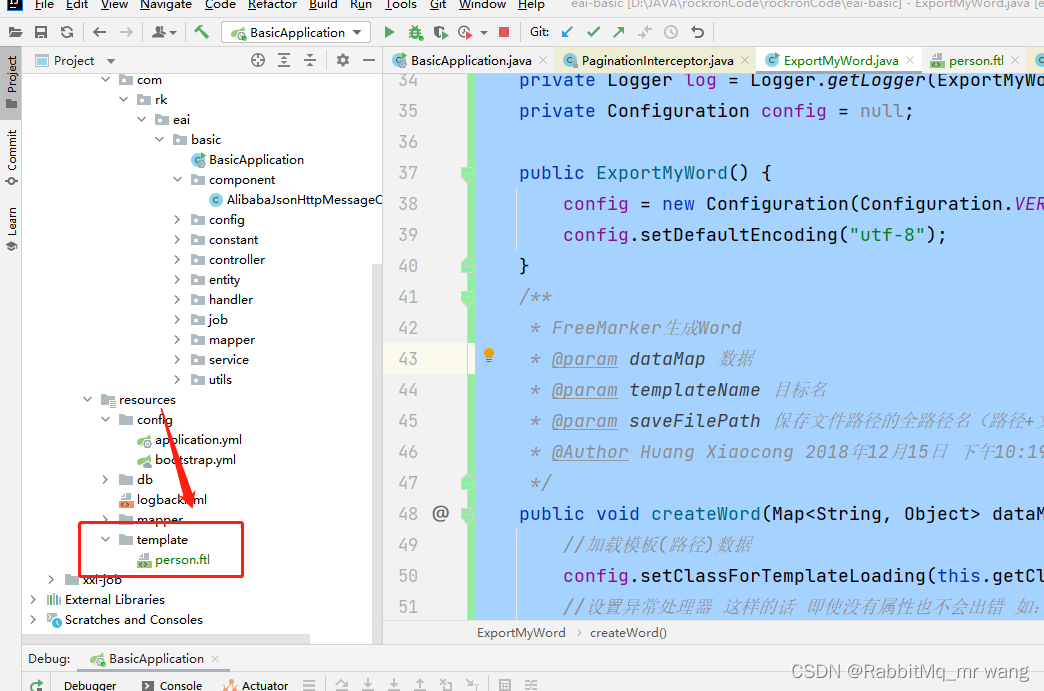
步骤3:导入到工程resource/template目录下,修改xml文件为.ftl文件格式
添加pom依赖
<dependency>
    <groupId>org.springframework.boot</groupId>
    <artifactId>spring-boot-starter-freemarker</artifactId>
</dependency>
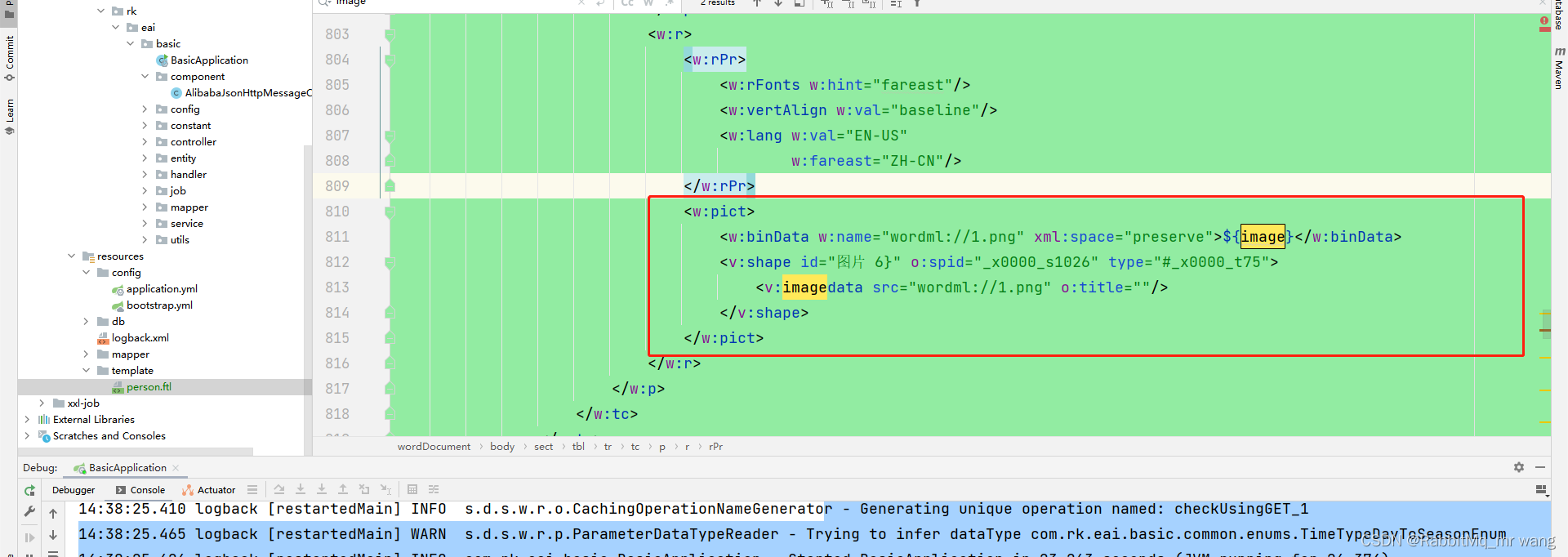
步骤四:用以下代码进行测试,如果图片加载不出来,可修改ftl文件中配置,因为后端返回是base64编码,前端需要进行图片转换成image
工具类
package com.rk.eai.basic.utils;


import java.io.BufferedWriter;
import java.io.File;
import java.io.FileInputStream;
import java.io.FileNotFoundException;
import java.io.FileOutputStream;
import java.io.IOException;
import java.io.InputStream;
import java.io.OutputStreamWriter;
import java.io.Writer;
import java.util.HashMap;
import java.util.Map;

import freemarker.core.ParseException;
import freemarker.log.Logger;
import freemarker.template.Configuration;
import freemarker.template.MalformedTemplateNameException;
import freemarker.template.Template;
import freemarker.template.TemplateException;
import freemarker.template.TemplateExceptionHandler;
import freemarker.template.TemplateNotFoundException;
import sun.misc.BASE64Encoder;

/**
 * @author wdy
 * @version 1.0
 * @date 2022/3/1 13:40
 */

public class ExportMyWord {

    private Logger log = Logger.getLogger(ExportMyWord.class.toString());
    private Configuration config = null;

    public ExportMyWord() {
        config = new Configuration(Configuration.VERSION_2_3_28);
        config.setDefaultEncoding("utf-8");
    }
    /**
     * FreeMarker生成Word
     * @param dataMap 数据
     * @param templateName 目标名
     * @param saveFilePath 保存文件路径的全路径名(路径+文件名)
     * @Author Huang Xiaocong 2018年12月15日 下午10:19:03
     */
    public void createWord(Map<String, Object> dataMap, String templateName, String saveFilePath) {
        //加载模板(路径)数据
        config.setClassForTemplateLoading(this.getClass(), "/template/");
        //设置异常处理器 这样的话 即使没有属性也不会出错 如:${list.name}...不会报错
        config.setTemplateExceptionHandler(TemplateExceptionHandler.IGNORE_HANDLER);
        Template template = null;
        if(templateName.endsWith(".ftl")) {
            templateName = templateName.substring(0, templateName.indexOf(".ftl"));
        }
        try {
            template = config.getTemplate(templateName + ".ftl");
        } catch (TemplateNotFoundException e) {
            log.error("模板文件未找到", e);
            e.printStackTrace();
        } catch (MalformedTemplateNameException e) {
            log.error("模板类型不正确", e);
            e.printStackTrace();
        } catch (ParseException e) {
            log.error("解析模板出错,请检查模板格式", e);
            e.printStackTrace();
        } catch (IOException e) {
            log.error("IO读取失败", e);
            e.printStackTrace();
        }
        File outFile = new File(saveFilePath);
        if(!outFile.getParentFile().exists()) {
            outFile.getParentFile().mkdirs();
        }
        Writer out = null;
        FileOutputStream fos = null;
        try {
            fos = new FileOutputStream(outFile);
        } catch (FileNotFoundException e) {
            log.error("输出文件时未找到文件", e);
            e.printStackTrace();
        }
        out = new BufferedWriter(new OutputStreamWriter(fos));
        //将模板中的预先的代码替换为数据
        try {
            template.process(dataMap, out);
        } catch (TemplateException e) {
            log.error("填充模板时异常", e);
            e.printStackTrace();
        } catch (IOException e) {
            log.error("IO读取时异常", e);
            e.printStackTrace();
        }
        log.info("由模板文件:" + templateName + ".ftl" + " 生成文件 :" + saveFilePath + " 成功!!");
        try {
            out.close();//web项目不可关闭
        } catch (IOException e) {
            log.error("关闭Write对象出错", e);
            e.printStackTrace();
        }
    }
    /**
     * 获得图片的Base64编码
     * @param imgFile
     * @return
     * @Author Huang Xiaocong 2018年12月15日 下午10:15:10
     */
    public String getImageStr(String imgFile) {
        InputStream in = null;
        byte[] data = null;
        try {
            in = new FileInputStream(imgFile);
        } catch (FileNotFoundException e) {
            log.error("加载图片未找到", e);
            e.printStackTrace();
        }
        try {
            data = new byte[in.available()];
            //注:FileInputStream.available()方法可以从输入流中阻断由下一个方法调用这个输入流中读取的剩余字节数
            in.read(data);
            in.close();
        } catch (IOException e) {
            log.error("IO操作图片错误", e);
            e.printStackTrace();
        }
        BASE64Encoder encoder = new BASE64Encoder();
        return encoder.encode(data);

    }

测试:
    public static void main(String[] args) {
        ExportMyWord emw = new ExportMyWord();
        Map<String, Object> dataMap = new HashMap<String, Object>();
        dataMap.put("name", "黄xx");
        dataMap.put("age", 26);
        dataMap.put("phone", "18734891349");
        dataMap.put("sex", "男");
        dataMap.put("image", emw.getImageStr("D:\\JAVA\\image.jpg"));
        emw.createWord(dataMap, "person.ftl", "D:/简历.doc");
    }
}
更多推荐
 2
2 0
0- 0


 已为社区贡献1条内容

所有评论(0)