
【计算机视觉】使用kalman filter跟踪鼠标光标
·
问题描述:
1. 首先初始化黑色图像和卡尔曼滤波器。在窗口中显示黑色图像
2. 每次窗口化应用程序处理输入 ecevts 时,使用卡尔曼滤波器预测鼠标的位置,然后,根据实际鼠标坐标校正卡尔曼滤波器的模型,在黑色图像的顶部,从旧的预测位置绘制一条红线到 新的预测位置,然后从旧的实际位置到新的实际位置画一条绿线,在窗口中显示绘图
3. 当用户按下 esc 键时,退出并将绘图保存到文件中
实现步骤:
- 初始化卡尔曼滤波器
import cv2
import numpy as np

# create a black image
img = np.zeros((800,800,3),np.uint8)

# initialize the kalman filter
# cv2.KalmanFilter(4,2)
#                       4:number of variables tracked->(xpostion,yposition,xvelocity,yvelocity)
#                       2:number of variables provided to the filter as a measurement -> (xpostion,yposition)
kalman = cv2.KalmanFilter(4,2)
kalman.measurementMatrix = np.array(
    [[1, 0, 0, 0],
     [0, 1, 0, 0]], np.float32)
kalman.transitionMatrix = np.array(
    [[1, 0, 1, 0],
     [0, 1, 0, 1],
     [0, 0, 1, 0],
     [0, 0, 0, 1]], np.float32)
kalman.processNoiseCov = np.array(
    [[1, 0, 0, 0],
     [0, 1, 0, 0],
     [0, 0, 1, 0],
     [0, 0, 0, 1]], np.float32) * 0.03
# 声明变量以保存实际和预测的鼠标坐标
last_measurement = None
last_prediction = None
- 处理鼠标的移动
'''
处理鼠标的移动
'''
def on_mouse_moved(event,x,y,flags,param):
    global img,kalman,last_measurement,last_prediction

    measurement = np.array([[x],[y]],np.float32)

    if last_measurement is None:
        # 第一个衡量
        # 更新过滤器状态去匹配衡量
        kalman.statePre = np.array(
            [[x],[y],[0],[0]],np.float32
        )
        kalman.statePost = np.array(
            [[x], [y], [0], [0]], np.float32)
        prediction = measurement
    else:
        kalman.correct(measurement)
        # 得到回应,而不是复制
        prediction = kalman.predict()
        # Trace the path of the 实际衡量 in green.
        cv2.line(img, (int(last_measurement[0]), int(last_measurement[1])),
                 (int(measurement[0]), int(measurement[1])), (0, 255, 0))

        # Trace the path of the 预测 in red.
        cv2.line(img, (int(last_prediction[0]), int(last_prediction[1])),
                 (int(prediction[0]), int(prediction[1])), (0, 0, 255))

    last_prediction = prediction.copy()
    last_measurement = measurement
- 运行
cv2.namedWindow('kalman_tracker')
cv2.setMouseCallback('kalman_tracker', on_mouse_moved)

while True:
    cv2.imshow('kalman_tracker', img)
    k = cv2.waitKey(1)
    if k == 27:  # Escape
        cv2.imwrite('kalman.png', img)
        break
运行截图:
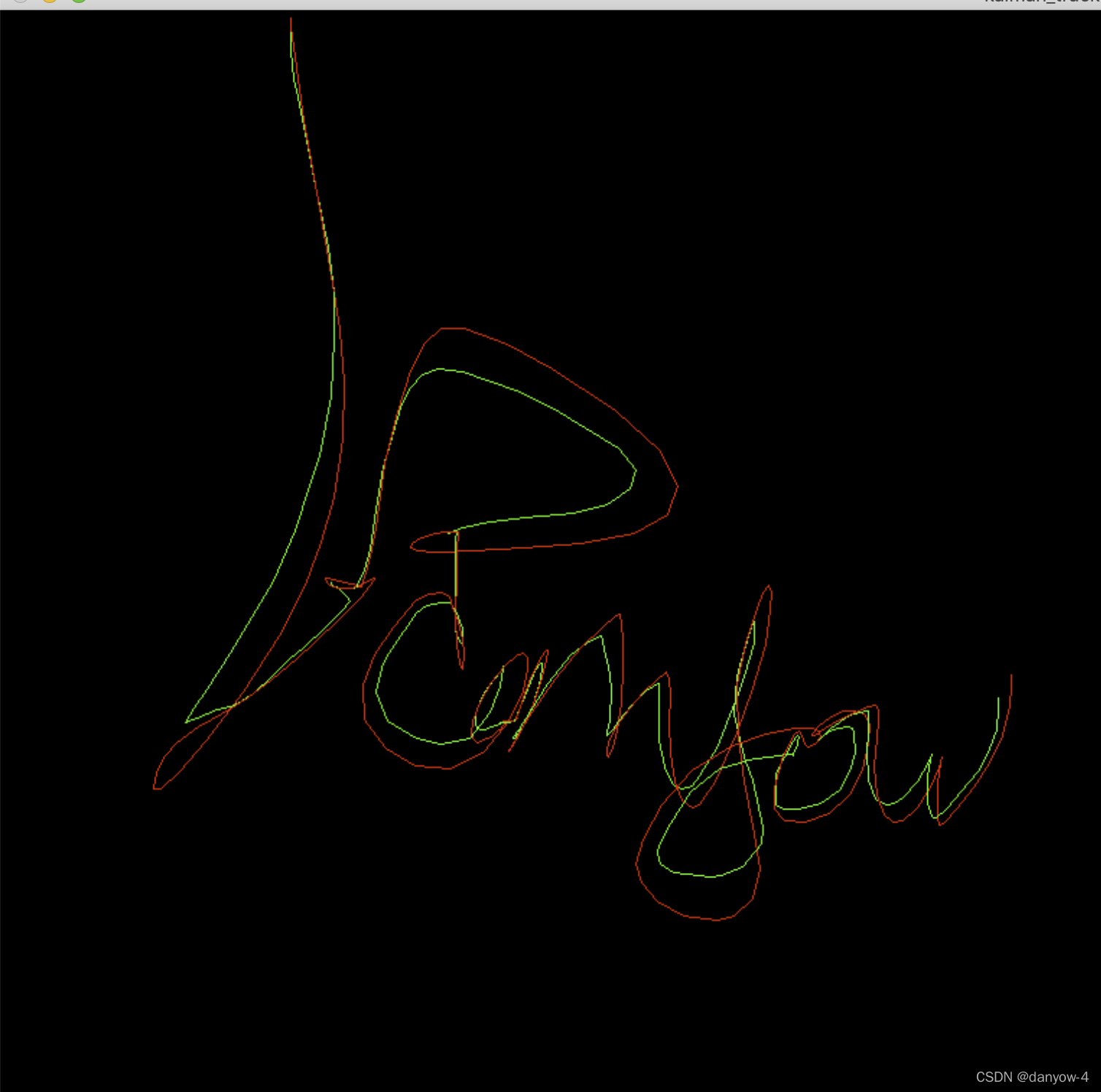
参考:
《Learning OpenCV 4 Computer Vision with Python 3 - Third Edition》
更多推荐

 1
1 0
0- 0


 已为社区贡献2条内容

所有评论(0)