
【飞桨学习赛:中文场景文字识别】22年10月第4名方案
飞桨学习赛:中文场景文字识别 2020年10月第4名方案
比赛链接:飞桨学习赛:中文场景文字识别
简介
本项目是参加飞桨常规赛:中文场景文字识别的项目
生成的预测文件为work中的result.txt文件
项目任务为识别包含中文文字的街景图片,准确识别图片中的文字
本项目源于https://aistudio.baidu.com/aistudio/projectdetail/4999430?forkThirdPart=1,在此基础上进行修改
感谢开发者为开源社区做出的贡献
注意,训练中所需的脚本放在train_code,生成版本时会带上。
赛题说明
赛题背景
中文场景文字识别技术在人们的日常生活中受到广泛关注,具有丰富的应用场景,如:拍照翻译、图像检索、场景理解等。然而,中文场景中的文字面临着包括光照变化、低分辨率、字体以及排布多样性、中文字符种类多等复杂情况。如何解决上述问题成为一项极具挑战性的任务。
本次飞桨常规赛以 中文场景文字识别 为主题,由2019第二届中国AI+创新创业全国大赛降低难度而来,提供大规模的中文场景文字识别数据,旨在为研究者提供学术交流平台,进一步推动中文场景文字识别算法与技术的突破。
比赛任务
要求选手必须使用飞桨对图像区域中的文字行进行预测,返回文字行的内容。
数据集介绍
本次竞赛数据集共包括33万张图片,其中21万张图片作为训练集,12万张作为测试集。数据集采自中国街景,并由街景图片中的文字行区域(例如店铺标牌、地标等等)截取出来而形成。所有图像都经过一些预处理,将文字区域利用仿射变化,等比映射为一张高为48像素的图片,如下图1所示:
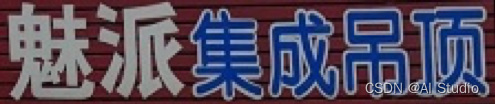
(a) 标注:魅派集成吊顶

(b) 标注:母婴用品连锁
图1
标注文件
平台提供的标注文件为.txt文件格式。样例如下:
| h | w | name | value |
|---|---|---|---|
| 128 | 48 | img_1.jpg | 文本1 |
| 56 | 48 | img_2.jpg | 文本2 |
| 其中,文件中的四列分别是图片的宽、高、文件名和文字标注。 |
** 第一步** 安装PaddleOCR库
考虑到编译环境的影响,请注意 做代码审查时,需要严格按照步骤一步一步往下做,不能跳步执行,更不能直接预测结果,否则会报错
** 第一步**
安装第三方库
注意:项目重启后,必须要重新安装如下相应的依赖。否则无法运行程序!
!cd ~/work && git clone https://gitee.com/paddlepaddle/PaddleOCR
fatal: destination path 'PaddleOCR' already exists and is not an empty directory.
注意在终端执行这一步,否则报“AttributeError: module ‘cv2’ has no attribute ‘_registerMatType’”错误
pip uninstall opencv-python
pip uninstall opencv-contrib-python
!pip install opencv-python install "opencv-python-headless<4.3"
!cd ~/work/PaddleOCR && pip install -r requirements.txt && python setup.py install
!cd ~/work && git clone https://github.com/Sanster/text_renderer
!cd ~/work/text_renderer && pip install -r requirements.txt
** 第二步** 数据预处理
-
项目重启后,需要重新做数据预处理
-
gen_label.py做以下处理:
-
把繁体字转成简体字
-
对标签label进行修改,进行四项操作,分别是“繁体->简体”、“大写->小写”、“删除空格”、“删除符号”。
-
处理数据并分割为训练集和验证集。
gen_label.py代码
import glob
import os
import cv2
import random

def get_aspect_ratio(img_set_dir):
    m_width = 0
    m_height = 0
    width_dict = {}
    height_dict = {}
    images = glob.glob(img_set_dir+'*.jpg')
    for image in images:
        img = cv2.imread(image)
        width_dict[int(img.shape[1])] = 1 if (int(img.shape[1])) not in width_dict else 1 + width_dict[int(img.shape[1])]
        height_dict[int(img.shape[0])] = 1 if (int(img.shape[0])) not in height_dict else 1 + height_dict[int(img.shape[0])]
        m_width += img.shape[1]
        m_height += img.shape[0]
    m_width = m_width/len(images)
    m_height = m_height/len(images)
    aspect_ratio = m_width/m_height
    width_dict = dict(sorted(width_dict.items(), key=lambda item: item[1], reverse=True))
    height_dict = dict(sorted(height_dict.items(), key=lambda item: item[1], reverse=True))
    return aspect_ratio,m_width,m_height,width_dict,height_dict
aspect_ratio,m_width,m_height,width_dict,height_dict = get_aspect_ratio("/home/aistudio/work/PaddleOCR/train_data/train_images/")
print("aspect ratio is: {}, mean width is: {}, mean height is: {}".format(aspect_ratio,m_width,m_height))
print("Width dict:{}".format(width_dict))
print("Height dict:{}".format(height_dict))
import pandas as pd

def Q2B(s):
    """全角转半角"""
    inside_code=ord(s)
    if inside_code==0x3000:
        inside_code=0x0020
    else:
        inside_code-=0xfee0
    if inside_code<0x0020 or inside_code>0x7e: #转完之后不是半角字符返回原来的字符
        return s
    return chr(inside_code)

def stringQ2B(s):
    """把字符串全角转半角"""
    return "".join([Q2B(c) for c in s])

def is_chinese(s):
    """判断unicode是否是汉字"""
    for c in s:
        if c < u'\u4e00' or c > u'\u9fa5':
            return False
    return True

def is_number(s):
    """判断unicode是否是数字"""
    for c in s:
        if c < u'\u0030' or c > u'\u0039':
            return False
    return True

def is_alphabet(s):
    """判断unicode是否是英文字母"""
    for c in s:
        if c < u'\u0061' or c > u'\u007a':
            return False
    return True

def del_other(s):
    """判断是否非汉字,数字和小写英文"""
    res = str()
    for c in s:
        if not (is_chinese(c) or is_number(c) or is_alphabet(c)):
            c = ""
        res += c
    return res


df = pd.read_csv("/home/aistudio/work/PaddleOCR/train_data/train_label.csv", encoding="gbk")
name, value = list(df.name), list(df.value)
for i, label in enumerate(value):
    # 全角转半角
    label = stringQ2B(label)
    # 大写转小写
    label = "".join([c.lower() for c in label])
    # 删除所有空格符号
    label = del_other(label)
    value[i] = label

# 删除标签为""的行
data = zip(name, value)
data = list(filter(lambda c: c[1]!="", list(data)))
# 保存到work目录
with open("/home/aistudio/work/PaddleOCR/train_data/train_label.txt", "w") as f:
    for line in data:
        f.write("train_images/" + line[0] + "\t" + line[1] + "\n")

# 记录训练集中最长标签
label_max_len = 0
with open("/home/aistudio/work/PaddleOCR/train_data/train_label.txt", "r") as f:
    for line in f:
        name, label = line.strip().split("\t")
        if len(label) > label_max_len:
            label_max_len = len(label)

print("label max len: ", label_max_len)
def create_label_list(train_list):
    classSet = set()
    with open(train_list) as f:
        next(f)
        for line in f:
            img_name, label = line.strip().split("\t")
            for e in label:
                classSet.add(e)
    # 在类的基础上加一个blank
    classList = sorted(list(classSet))
    with open("/home/aistudio/work/PaddleOCR/train_data/label_list.txt", "w") as f:
        for idx, c in enumerate(classList):
            f.write("{}\t{}\n".format(c, idx))

    # 为数据增广提供词库
    with open("/home/aistudio/work/text_renderer/data/chars/ch.txt", "w") as f:
        for idx, c in enumerate(classList):
            f.write("{}\n".format(c))

    return classSet

classSet = create_label_list("/home/aistudio/work/PaddleOCR/train_data/train_label.txt")
print("classify num: ", len(classSet))

def gen_val_train_data():
    with open('/home/aistudio/work/PaddleOCR/train_data/train_label.txt','r') as f:
        lines=f.readlines()
    number = len(lines)
    print(number)
    print(lines[0])
    random.shuffle(lines)
    print(lines[0])

    with open('/home/aistudio/work/PaddleOCR/train_data/train.txt','w') as f1:
        for i in range(int(len(lines)*0.95)):
            f1.write(lines[i])
    print(int(len(lines)*0.95))
    print(len(lines))
    with open('/home/aistudio/work/PaddleOCR/train_data/eval.txt','w') as f2:
        for i in range(int(len(lines)*0.95),len(lines)):
            f2.write(lines[i])


gen_val_train_data()
!cd ~/work/PaddleOCR/train_data && python gen_label.py
更改配置
根据下面的配置项来修改text_renderer/configs目录下的配置default.yaml
# Small font_size will make text looks like blured/prydown
font_size:
  min: 14
  max: 23

# choose Text color range
# color boundary is in R,G,B format
font_color:
  enable: true
  blue:
    fraction: 0.5
    l_boundary: [0,0,150]
    h_boundary: [60,60,255]
  brown:
    fraction: 0.5
    l_boundary: [139,70,19]
    h_boundary: [160,82,43]

# By default, text is drawed by Pillow with (https://stackoverflow.com/questions/43828955/measuring-width-of-text-python-pil)
# If `random_space` is enabled, some text will be drawed char by char with a random space
random_space:
  enable: false
  fraction: 0.3
  min: -0.1 # -0.1 will make chars very close or even overlapped
  max: 0.1

# Do remap with sin()
# Currently this process is very slow!
curve:
  enable: false
  fraction: 0.3
  period: 360  # degree, sin 函数的周期
  min: 1 # sin 函数的幅值范围
  max: 5

# random crop text height
crop:
  enable: false
  fraction: 0.5

  # top and bottom will applied equally
  top:
    min: 5
    max: 10 # in pixel, this value should small than img_height
  bottom:
    min: 5
    max: 10 # in pixel, this value should small than img_height

# Use image in bg_dir as background for text
img_bg:
  enable: false
  fraction: 0.5

# Not work when random_space applied
text_border:
  enable: true
  fraction: 0.3

  # lighter than word color
  light:
    enable: true
    fraction: 0.5

  # darker than word color
  dark:
    enable: true
    fraction: 0.5

# https://docs.opencv.org/3.4/df/da0/group__photo__clone.html#ga2bf426e4c93a6b1f21705513dfeca49d
# https://www.cs.virginia.edu/~connelly/class/2014/comp_photo/proj2/poisson.pdf
# Use opencv seamlessClone() to draw text on background
# For some background image, this will make text image looks more real
seamless_clone:
  enable: true
  fraction: 0.5

perspective_transform:
  max_x: 25
  max_y: 25
  max_z: 3

blur:
  enable: true
  fraction: 0.03

# If an image is applied blur, it will not be applied prydown
prydown:
  enable: true
  fraction: 0.03
  max_scale: 1.5 # Image will first resize to 1.5x, and than resize to 1x

noise:
  enable: true
  fraction: 0.3

  gauss:
    enable: true
    fraction: 0.25

  uniform:
    enable: true
    fraction: 0.25

  salt_pepper:
    enable: true
    fraction: 0.25

  poisson:
    enable: true
    fraction: 0.25

line:
  enable: false
  fraction: 0.05

  random_over:
    enable: true
    fraction: 0.2

  under_line:
    enable: false
    fraction: 0.2

  table_line:
    enable: false
    fraction: 0.3

  middle_line:
    enable: false
    fraction: 0.5

line_color:
  enable: false
  black:
    fraction: 0.5
    l_boundary: [0,0,0]
    h_boundary: [64,64,64]
  blue:
    fraction: 0.5
    l_boundary: [0,0,150]
    h_boundary: [60,60,255]

# These operates are applied on the final output image,
# so actually it can also be applied in training process as an data augmentation method.

# By default, text is darker than background.
# If `reverse_color` is enabled, some images will have dark background and light text
reverse_color:
  enable: true
  fraction: 0.3

emboss:
  enable: true
  fraction: 0.3

sharp:
  enable: true
  fraction: 0.3
删除掉text_renderer之前做的处理
!cd ~/work/text_renderer/output/default && rm ./*
使用text_renderer做增强
!cd ~/work/text_renderer && python main.py --length 1 --img_width 32 --img_height 48 --chars_file "./data/chars/ch.txt" --corpus_mode 'random' --num_img 2000
!cd ~/work/text_renderer && python main.py --length 2 --img_width 64 --img_height 48 --chars_file "./data/chars/ch.txt" --corpus_mode 'random' --num_img 2000
!cd ~/work/text_renderer && python main.py --length 3 --img_width 96 --img_height 48 --chars_file "./data/chars/ch.txt" --corpus_mode 'random' --num_img 2000
!cd ~/work/text_renderer && python main.py --length 4 --img_width 128 --img_height 48 --chars_file "./data/chars/ch.txt" --corpus_mode 'random' --num_img 2000
!cd ~/work/text_renderer && python main.py --length 5 --img_width 160 --img_height 48 --chars_file "./data/chars/ch.txt" --corpus_mode 'random' --num_img 2000
拷贝增强图片到训练集中
!cp ~/work/text_renderer/output/default/*.jpg /home/aistudio/work/PaddleOCR/train_data/train_images
将text_renderer的增强标注加到训练集中
import os

with open('/home/aistudio/work/text_renderer/output/default/tmp_labels.txt','r',encoding='utf-8') as src_label:
    with open('/home/aistudio/work/PaddleOCR/train_data/train.txt','a',encoding='utf-8') as dst_label:
        lines = src_label.readlines()
        for line in lines:
            [img,text] = line.split(' ')
            print('train_images/{}.jpg\t{}'.format(img,text),file=dst_label,end='')
下载预训练模型
!cd ~/work/PaddleOCR && mkdir pretrain_weights && cd pretrain_weights && wget https://paddleocr.bj.bcebos.com/dygraph_v2.0/ch/ch_ppocr_server_v2.0_rec_pre.tar
mkdir: cannot create directory ‘pretrain_weights’: File exists
解压预训练模型
!cd ~/work/PaddleOCR/pretrain_weights && tar -xf ch_ppocr_server_v2.0_rec_pre.tar
** 第三步** 训练
为了让蒸馏能运行,需要屏蔽一些代码,如下所示:
        self._conv = nn.Conv2D(
            in_channels=in_channels,
            out_channels=out_channels,
            kernel_size=kernel_size,
            stride=1 if is_vd_mode else stride,
            padding=(kernel_size - 1) // 2,
            groups=groups,
            #weight_attr=ParamAttr(name=name + "_weights"),
            bias_attr=False)
        if name == "conv1":
            bn_name = "bn_" + name
        else:
            bn_name = "bn" + name[3:]
        self._batch_norm = nn.BatchNorm(
            out_channels,
            act=act)
            #param_attr=ParamAttr(name=bn_name + '_scale'),
            #bias_attr=ParamAttr(bn_name + '_offset'),
            #moving_mean_name=bn_name + '_mean',
            #moving_variance_name=bn_name + '_variance')
配置蒸馏模型
Global:
  debug: false
  use_gpu: true
  epoch_num: 60
  log_smooth_window: 20
  print_batch_step: 10
  save_model_dir: ./output/r34_vd_none_bilstm_ctc_distillation
  save_epoch_step: 3
  eval_batch_step: [0, 200]
  cal_metric_during_train: true
  pretrained_model: #./pretrain_weights/ch_ppocr_server_v2.0_rec_pre/best_accuracy
  checkpoints: #./output/r34_vd_none_bilstm_ctc_distillation/best_accuracy
  save_inference_dir:
  use_visualdl: false
  infer_img: doc/imgs_words/ch/word_1.jpg
  character_dict_path: ppocr/utils/ppocr_keys_v1.txt
  max_text_length: 64
  #distort: true
  infer_mode: false
  use_space_char: true
  distributed: true
  character_type: ch
  save_res_path: ./output/rec/predicts_pp-OCRv2_distillation.txt


Optimizer:
  name: Adam
  beta1: 0.9
  beta2: 0.999
  lr:
    name: Cosine
    learning_rate: 0.0001
    warmup_epoch: 5
    #step_each_epoch: 1000
  regularizer:
    name: L2
    factor: 6.0e-05

Architecture:
  model_type: &model_type "rec"
  name: DistillationModel
  algorithm: Distillation
  Models:
    Teacher:
      pretrained: ./pretrain_weights/ch_ppocr_server_v2.0_rec_pre/best_accuracy
      freeze_params: false
      return_all_feats: true
      model_type: *model_type
      algorithm: CRNN
      Transform:
      Backbone:
        name: ResNet
        layers: 34
      Neck:
        name: SequenceEncoder
        encoder_type: rnn
        hidden_size: 256
      Head:
        name: CTCHead
        fc_decay: 0.00006
    Student:
      pretrained: ./pretrain_weights/ch_ppocr_server_v2.0_rec_pre/best_accuracy
      freeze_params: false
      return_all_feats: true
      model_type: *model_type
      algorithm: CRNN
      Transform:
      Backbone:
        name: ResNet
        layers: 34
      Neck:
        name: SequenceEncoder
        encoder_type: rnn
        hidden_size: 256
      Head:
        name: CTCHead
        fc_decay: 0.00006


Loss:
  name: CombinedLoss
  loss_config_list:
  - DistillationCTCLoss:
      weight: 1.0
      model_name_list: ["Student", "Teacher"]
      key: head_out
  - DistillationDMLLoss:
      weight: 1.0
      act: "softmax"
      use_log: true
      model_name_pairs:
      - ["Student", "Teacher"]
      key: head_out
  - DistillationDistanceLoss:
      weight: 1.0
      mode: "l2"
      model_name_pairs:
      - ["Student", "Teacher"]
      key: backbone_out

PostProcess:
  name: DistillationCTCLabelDecode
  model_name: ["Student", "Teacher"]
  key: head_out

Metric:
  name: DistillationMetric
  base_metric_name: RecMetric
  main_indicator: acc
  key: "Student"

Train:
  dataset:
    name: SimpleDataSet
    data_dir: ./train_data
    ext_op_transform_idx: 1
    label_file_list:
    - ./train_data/train.txt
    transforms:
    - DecodeImage:
        img_mode: BGR
        channel_first: false
    - RecConAug:
          prob: 0.7
          ext_data_num: 2
          image_shape: [48, 320, 3]
          max_text_length: 64
    - RecAug:
    - CTCLabelEncode:
    - RecResizeImg:
        image_shape: [3, 48, 320]
    - KeepKeys:
        keep_keys:
        - image
        - label
        - length
  loader:
    shuffle: true
    batch_size_per_card: 128
    drop_last: true
    num_sections: 1
    num_workers: 8
Eval:
  dataset:
    name: SimpleDataSet
    data_dir: ./train_data
    label_file_list:
    - ./train_data/eval.txt
    transforms:
    - DecodeImage:
        img_mode: BGR
        channel_first: false
    - CTCLabelEncode:
    - RecResizeImg:
        image_shape: [3, 48, 320]
    - KeepKeys:
        keep_keys:
        - image
        - label
        - length
  loader:
    shuffle: false
    drop_last: false
    batch_size_per_card: 128
    num_workers: 8
创建蒸馏训练脚本进行训练
!cd ~/work/PaddleOCR && python tools/train.py -c configs/rec/my_rec_r34_vd_ctc_distillation.yml
对训练好模型做验证
%cd ~/work/PaddleOCR
!python tools/eval.py -c configs/rec/my_rec_r34_vd_ctc_distillation.yml -o Global.checkpoints=./output/r34_vd_none_bilstm_ctc_distillation/best_accuracy
由于原infer_rec.py脚本输出并不符合比赛的提交要求,需要做修改
# Copyright (c) 2020 PaddlePaddle Authors. All Rights Reserved.
#
# Licensed under the Apache License, Version 2.0 (the "License");
# you may not use this file except in compliance with the License.
# You may obtain a copy of the License at
#
#     http://www.apache.org/licenses/LICENSE-2.0
#
# Unless required by applicable law or agreed to in writing, software
# distributed under the License is distributed on an "AS IS" BASIS,
# WITHOUT WARRANTIES OR CONDITIONS OF ANY KIND, either express or implied.
# See the License for the specific language governing permissions and
# limitations under the License.

from __future__ import absolute_import
from __future__ import division
from __future__ import print_function

import numpy as np

import os
import sys
import json

__dir__ = os.path.dirname(os.path.abspath(__file__))
sys.path.append(__dir__)
sys.path.insert(0, os.path.abspath(os.path.join(__dir__, '..')))

os.environ["FLAGS_allocator_strategy"] = 'auto_growth'

import paddle

from ppocr.data import create_operators, transform
from ppocr.modeling.architectures import build_model
from ppocr.postprocess import build_post_process
from ppocr.utils.save_load import load_model
from ppocr.utils.utility import get_image_file_list
import tools.program as program


def main():
    global_config = config['Global']

    # build post process
    post_process_class = build_post_process(config['PostProcess'],
                                            global_config)

    # build model
    if hasattr(post_process_class, 'character'):
        char_num = len(getattr(post_process_class, 'character'))
        if config['Architecture']["algorithm"] in ["Distillation",
                                                   ]:  # distillation model
            for key in config['Architecture']["Models"]:
                if config['Architecture']['Models'][key]['Head'][
                        'name'] == 'MultiHead':  # for multi head
                    out_channels_list = {}
                    if config['PostProcess'][
                            'name'] == 'DistillationSARLabelDecode':
                        char_num = char_num - 2
                    out_channels_list['CTCLabelDecode'] = char_num
                    out_channels_list['SARLabelDecode'] = char_num + 2
                    config['Architecture']['Models'][key]['Head'][
                        'out_channels_list'] = out_channels_list
                else:
                    config['Architecture']["Models"][key]["Head"][
                        'out_channels'] = char_num
        elif config['Architecture']['Head'][
                'name'] == 'MultiHead':  # for multi head loss
            out_channels_list = {}
            if config['PostProcess']['name'] == 'SARLabelDecode':
                char_num = char_num - 2
            out_channels_list['CTCLabelDecode'] = char_num
            out_channels_list['SARLabelDecode'] = char_num + 2
            config['Architecture']['Head'][
                'out_channels_list'] = out_channels_list
        else:  # base rec model
            config['Architecture']["Head"]['out_channels'] = char_num
    model = build_model(config['Architecture'])

    load_model(config, model)

    # create data ops
    transforms = []
    for op in config['Eval']['dataset']['transforms']:
        op_name = list(op)[0]
        if 'Label' in op_name:
            continue
        elif op_name in ['RecResizeImg']:
            op[op_name]['infer_mode'] = True
        elif op_name == 'KeepKeys':
            if config['Architecture']['algorithm'] == "SRN":
                op[op_name]['keep_keys'] = [
                    'image', 'encoder_word_pos', 'gsrm_word_pos',
                    'gsrm_slf_attn_bias1', 'gsrm_slf_attn_bias2'
                ]
            elif config['Architecture']['algorithm'] == "SAR":
                op[op_name]['keep_keys'] = ['image', 'valid_ratio']
            elif config['Architecture']['algorithm'] == "RobustScanner":
                op[op_name][
                    'keep_keys'] = ['image', 'valid_ratio', 'word_positons']
            else:
                op[op_name]['keep_keys'] = ['image']
        transforms.append(op)
    global_config['infer_mode'] = True
    ops = create_operators(transforms, global_config)

    save_res_path = config['Global'].get('save_res_path',
                                         "./output/rec/predicts_rec.txt")
    if not os.path.exists(os.path.dirname(save_res_path)):
        os.makedirs(os.path.dirname(save_res_path))

    model.eval()

    with open(save_res_path, "w") as fout:
        for file in get_image_file_list(config['Global']['infer_img']):
            logger.info("infer_img: {}".format(file))
            with open(file, 'rb') as f:
                img = f.read()
                data = {'image': img}
            batch = transform(data, ops)
            if config['Architecture']['algorithm'] == "SRN":
                encoder_word_pos_list = np.expand_dims(batch[1], axis=0)
                gsrm_word_pos_list = np.expand_dims(batch[2], axis=0)
                gsrm_slf_attn_bias1_list = np.expand_dims(batch[3], axis=0)
                gsrm_slf_attn_bias2_list = np.expand_dims(batch[4], axis=0)

                others = [
                    paddle.to_tensor(encoder_word_pos_list),
                    paddle.to_tensor(gsrm_word_pos_list),
                    paddle.to_tensor(gsrm_slf_attn_bias1_list),
                    paddle.to_tensor(gsrm_slf_attn_bias2_list)
                ]
            if config['Architecture']['algorithm'] == "SAR":
                valid_ratio = np.expand_dims(batch[-1], axis=0)
                img_metas = [paddle.to_tensor(valid_ratio)]
            if config['Architecture']['algorithm'] == "RobustScanner":
                valid_ratio = np.expand_dims(batch[1], axis=0)
                word_positons = np.expand_dims(batch[2], axis=0)
                img_metas = [
                    paddle.to_tensor(valid_ratio),
                    paddle.to_tensor(word_positons),
                ]
            images = np.expand_dims(batch[0], axis=0)
            images = paddle.to_tensor(images)
            if config['Architecture']['algorithm'] == "SRN":
                preds = model(images, others)
            elif config['Architecture']['algorithm'] == "SAR":
                preds = model(images, img_metas)
            elif config['Architecture']['algorithm'] == "RobustScanner":
                preds = model(images, img_metas)
            else:
                preds = model(images)
            post_result = post_process_class(preds)
            info = None
            if isinstance(post_result, dict):
                rec_info = dict()
                for key in post_result:
                    if key == 'Student' and len(post_result[key][0]) >= 2:
                        info = post_result[key][0][0] + "\t"
                        break
                        #rec_info[key] = {
                        #    "label": post_result[key][0][0],
                        #    "score": float(post_result[key][0][1]),
                        #}
                #info = json.dumps(rec_info, ensure_ascii=False)
            else:
                if len(post_result[0]) >= 2:
                    #info = post_result[0][0] + "\t" + str(post_result[0][1])
                    info = post_result[0][0] + "\t"

            if info is not None:
                logger.info("\t result: {}".format(info))
                filepath = file.replace("/home/aistudio/data/data62843/test_images/", '')
                #print("file=",filepath)
                fout.write('{}\t{}\n'.format(filepath,info))
                #fout.write(file + "\t" + info + "\n")
    logger.info("success!")


if __name__ == '__main__':
    config, device, logger, vdl_writer = program.preprocess()
    main()
对官方测试集做测试,获取测试结果
%cd ~/work/PaddleOCR
!python tools/infer_rec_my.py -c configs/rec/my_rec_r34_vd_ctc_distillation.yml -o Global.checkpoints=./output/r34_vd_none_bilstm_ctc_distillation/best_accuracy Global.infer_img=/home/aistudio/data/data62843/test_images
由于预测结果并没有按顺序排序,需要增加sort.py脚本
f = open('/home/aistudio/work/PaddleOCR/output/rec/predicts_pp-OCRv2_distillation.txt', 'r', encoding='utf8')
something = f.readlines()
#print(something)
new = []
for x in something:
    first = x.strip('\n')
    second = first.split()
    new.append(second)
#print(new)
print(new[1][1])


for i in range(0,10000):
    print(new[i][0])
    new[i][0]=new[i][0].replace('.jpg', '')
    new[i][0]=int(new[i][0])


print(new)
f = open('test1112.txt', mode='w', encoding='utf8')  ###
f.write('new_name\tvalue\n')  ###
b = 0

for j in range(10000):
    for i in range(0,10000):
        if new[i][0] == b:
            if len(new[i]) == 2:
                f.write('{}.jpg\t{}\n'.format(new[i][0], new[i][1]))
            else:
                f.write('{}.jpg\t{}\n'.format(new[i][0], ''))

    b = b+1
print(j)
f.close()
print("finish")
排序后生成最终的提交文件
    print(new[i][0])
    new[i][0]=new[i][0].replace('.jpg', '')
    new[i][0]=int(new[i][0])


print(new)
f = open('test1112.txt', mode='w', encoding='utf8')  ###
f.write('new_name\tvalue\n')  ###
b = 0

for j in range(10000):
    for i in range(0,10000):
        if new[i][0] == b:
            if len(new[i]) == 2:
                f.write('{}.jpg\t{}\n'.format(new[i][0], new[i][1]))
            else:
                f.write('{}.jpg\t{}\n'.format(new[i][0], ''))

    b = b+1
print(j)
f.close()
print("finish")
排序后生成最终的提交文件
!cd ~/work/PaddleOCR/tools && python sort.py
方案说明书
1. 比赛介绍+赛题重点难点剖析
-
比赛介绍:本项目是参加飞桨常规赛:中文场景文字识别的项目,项目任务为识别包含中文文字的街景图片,准确识别图片中的文字。
-
赛题重点难点剖析:中文场景中的文字面临着包括光照变化、低分辨率、字体以及排布多样性、中文字符种类多等复杂情况。如何解决上述问题成为一项极具挑战性的任务。此外,从自然场景图片中进行文字识别,需要包括2个步骤: 1)文字检测:解决的问题是哪里有文字,文字的范围有多少? 2)文字识别:对定位好的文字区域进行识别,主要解决的问题是每个文字是什么,将图像中的文字区域进转化为字符信息。
2. 思路介绍+方案亮点
-
思路介绍:第一步是针对中文场景下的数据预处理(包括:把繁体字转成简体字,大写->小写,删除空格,删除符号等操作),结合相应的中文字典来提升文字识别的准确率。第二步是在飞桨框架下采用当前业界最经典的CRNN算法架构来建模与求解,以保证模型的性能。
-
方案亮点:结合中文场景下的字典资源来完成数据的预处理,可以更好的构建训练模型的语料;使用蒸馏算法来训练,进一步提升性能
3. 具体方案分享
-

-
图1文字识别的流程图
-
上图展示了整个识别过程的流程,CRNN模型的框架和相应超参数设置如下所示:
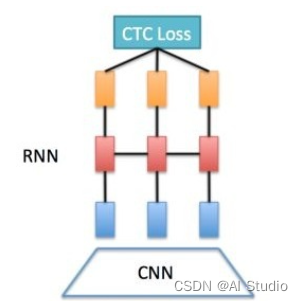
-
图2:RCNN模型的网络层次结构图
-
Global:
algorithm: CRNN
use_gpu: true
epoch_num: 30
log_smooth_window: 20
print_batch_step: 100
save_model_dir: output/rec_CRNN_aug_341
save_epoch_step: 1
eval_batch_step: 1800
train_batch_size_per_card: 256
test_batch_size_per_card: 128
image_shape: [3, 32, 256]
max_text_length: 64
character_type: ch
loss_type: ctc
reader_yml: ./configs/rec/rec_icdar15_reader.yml
pretrain_weights: /home/aistudio/work/PaddleOCR/model/latest
checkpoints:
save_inference_dir: /home/aistudio/work/test
character_dict_path: /home/aistudio/work/dict.txt -
Architecture:
function: ppocr.modeling.architectures.rec_model,RecModel -
Backbone:
function: ppocr.modeling.backbones.rec_resnet_vd,ResNet
layers: 34 -
Head:
function: ppocr.modeling.heads.rec_ctc_head,CTCPredict
encoder_type: rnn
SeqRNN: -
hidden_size: 256
-
Loss:
function: ppocr.modeling.losses.rec_ctc_loss,CTCLoss -
Optimizer:
function: ppocr.optimizer,AdamDecay
base_lr: 0.00001
beta1: 0.9
beta2: 0.999
4. 总结+改进完善方向
- 总结
通过参加本次比赛,大大的扩宽了自己的眼界,对模型有更加深刻的认识,可以根据不同的应用场景,去阅读国内外最新的文献,并将相关算法进行改造用以解决实际问题。在中文场景文字识别任务上,可以采用本模型来解决相关实际问题。 - 改进完善方向
- 可以进一步加大高质量的标注数据集来训练模型,以增强模型的泛化性能;
- 后续可以进一步优化损失函数和训练策略,以便提升模型的收敛速度。
此文章为搬运
原项目链接
更多推荐

 0
0 0
0- 0


 已为社区贡献13条内容

所有评论(0)