
如何使用nssm及nginx部署.net core项目
1、发布服务端和客户端程序

2、将发布后的文件与nginx和nssm.exe放在同一文件夹下(切记:路径不可有中文)
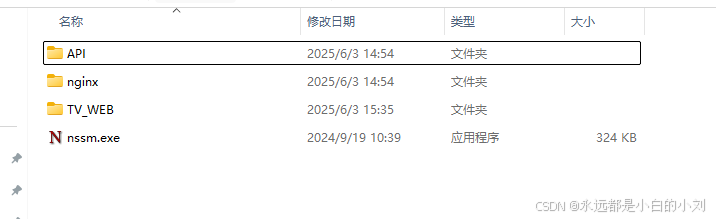
3、修改nginx.con文件:
worker_processes 1;
events {
worker_connections 1024;
}
http {
include mime.types;
default_type application/octet-stream;
sendfile on;
keepalive_timeout 65;
upstream API{
ip_hash;
server localhost:8100;
}
server {
listen 8005;
server_name localhost;
location / {
root '../TV_WEB';
index index.html;
try_files $uri $uri/ /index.html;
proxy_http_version 1.1;
proxy_set_header Host $host;
proxy_set_header X-Real-IP $remote_addr;
proxy_set_header X-Forwarded-For $proxy_add_x_forwarded_for;
proxy_set_header Upgrade $http_upgrade;
proxy_set_header Connection $http_connection;
}
location ~* ^/(manage) {
proxy_pass http://tvserver;
proxy_http_version 1.1;
proxy_set_header Host $host;
proxy_set_header X-Real-IP $remote_addr;
proxy_set_header X-Forwarded-For $proxy_add_x_forwarded_for;
proxy_set_header Upgrade $http_upgrade;
proxy_set_header Connection $http_connection;
}
}
}
4、使用nssm安装服务并指定url地址:
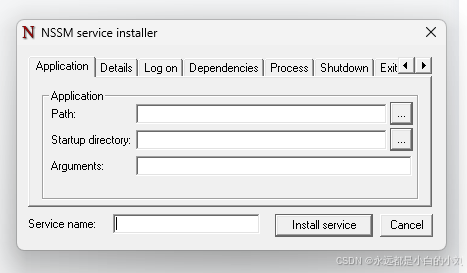
在Arguments:中输入--urls="http://localhost:8100"即可指定地址及端口。
5、在Windows服务中启动服务。
6、在浏览器中访问localhost:8005即可访问index页面。
更多推荐


 3
3 0
0- 0


 已为社区贡献3条内容

所有评论(0)