
react学习笔记4——React UI组件库与redux
流行的开源React UI组件库
material-ui(国外)
- 官网: http://www.material-ui.com/#/
- github: GitHub - mui/material-ui: Material UI: Comprehensive React component library that implements Google's Material Design. Free forever.
ant-design(国内蚂蚁金服)
- 官网: Ant Design - 一套企业级 UI 设计语言和 React 组件库
- Github: GitHub - ant-design/ant-design: An enterprise-class UI design language and React UI library
redux
redux理解
学习文档
- 英文文档: Redux - A JS library for predictable and maintainable global state management | Redux
- 中文文档: Redux | Redux 中文文档
- Github: GitHub - reduxjs/redux: A JS library for predictable global state management
redux是什么
- redux是一个专门用于做状态管理的JS库(不是react插件库)。
- 它可以用在react, angular, vue等项目中, 但基本与react配合使用。
- 作用: 集中式管理react应用中多个组件共享的状态。
什么情况下需要使用redux
- 某个组件的状态,需要让其他组件可以随时拿到(共享)。
- 一个组件需要改变另一个组件的状态(通信)。
- 总体原则:能不用就不用, 如果不用比较吃力才考虑使用。
redux工作流程
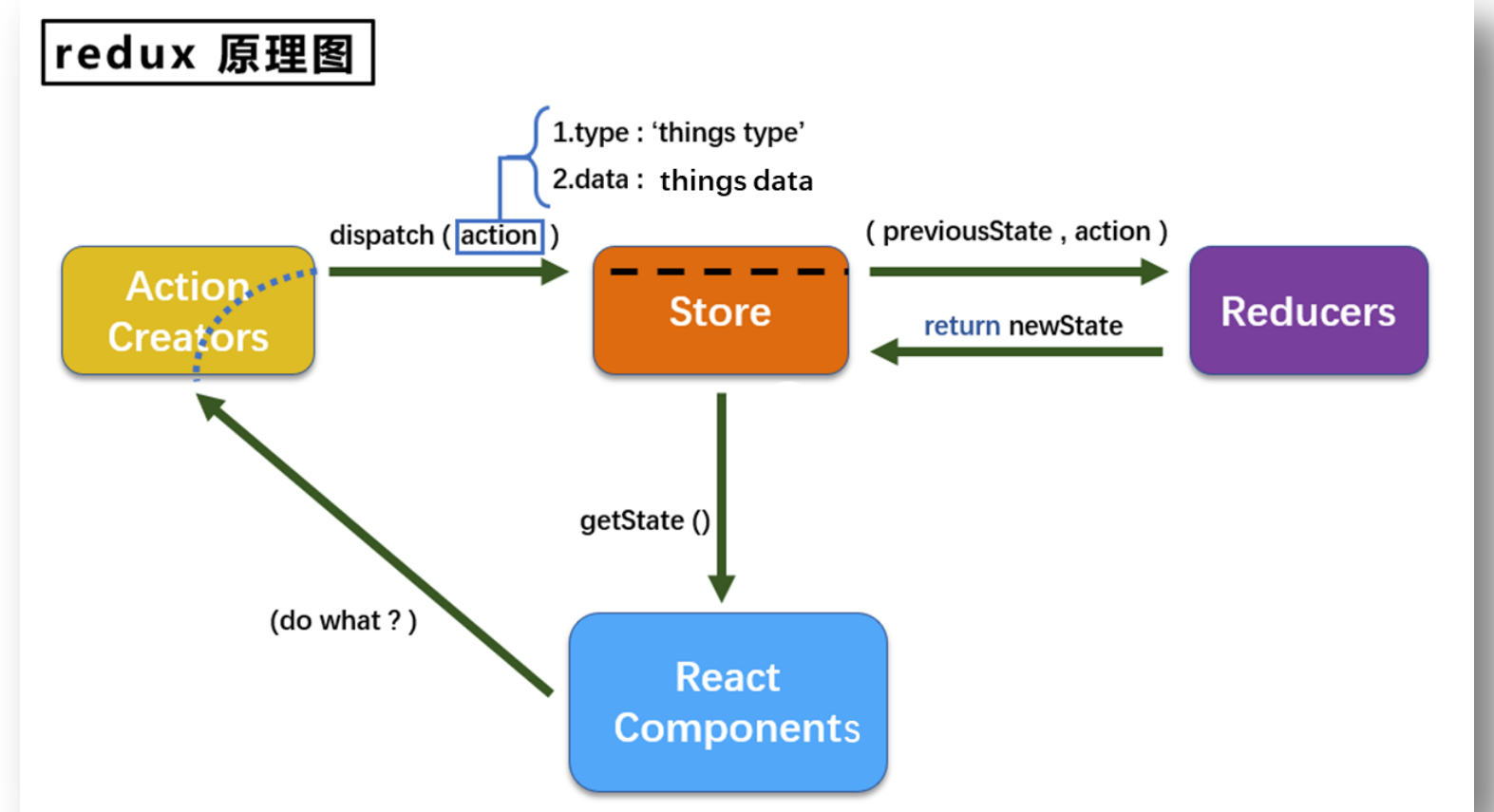
redux的三个核心概念
action
- 动作的对象
- 包含2个属性
- type:标识属性, 值为字符串, 唯一, 必要属性
- data:数据属性, 值类型任意, 可选属性
- 例子:{ type: 'ADD_STUDENT',data:{name: 'tom',age:18} }
reducer
- 用于初始化状态、加工状态。
- 加工时,根据旧的state和action, 产生新的state的纯函数。
store
- 将state、action、reducer联系在一起的对象
- 如何得到此对象?
import {createStore} from 'redux'
import reducer from './reducers'
const store = createStore(reducer)
- 此对象的功能?
1.getState(): 得到state
2.dispatch(action): 分发action, 触发reducer调用, 产生新的state
3.subscribe(listener): 注册监听, 当产生了新的state时, 自动调用
redux的核心API
createstore()
作用:创建包含指定reducer的store对象
store对象
- 作用: redux库最核心的管理对象
- 它内部维护着:
1.state
2.reducer
3.核心方法:
1.getState()
2.dispatch(action)
3.subscribe(listener)
4.具体编码:
1.store.getState()
2.store.dispatch({type:'INCREMENT', number})
3.store.subscribe(render)
applyMiddleware()
作用:应用上基于redux的中间件(插件库)
combineReducers()
作用:合并多个reducer函数
使用redux编写应用
redux异步编程
理解:
- redux默认是不能进行异步处理的,
- 某些时候应用中需要在redux中执行异步任务(ajax, 定时器)
使用异步中间件
npm install --save redux-thunk
react-redux
react-redux模型
理解
- 一个react插件库
- 专门用来简化react应用中使用redux
react-Redux将所有组件分成两大类
- UI组件
- 容器组件
1.负责管理数据和业务逻辑,不负责UI的呈现
2.使用 Redux 的 API
3.一般保存在containers文件夹下
相关API
- Provider:让所有组件都可以得到state数据
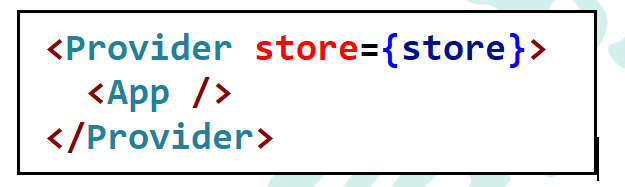
2.connect:用于包装 UI 组件生成容器组件
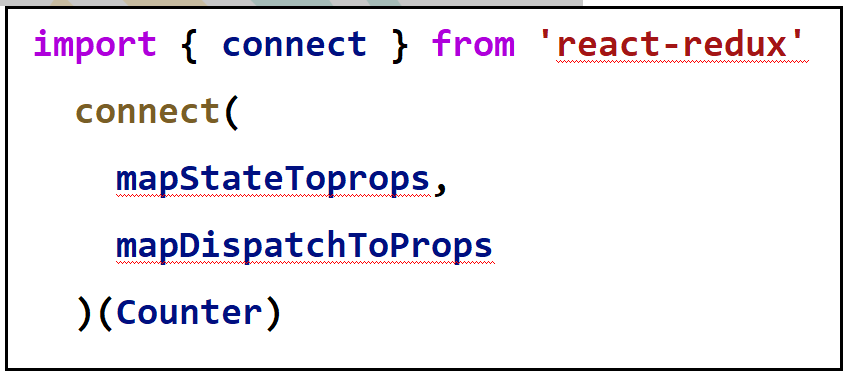
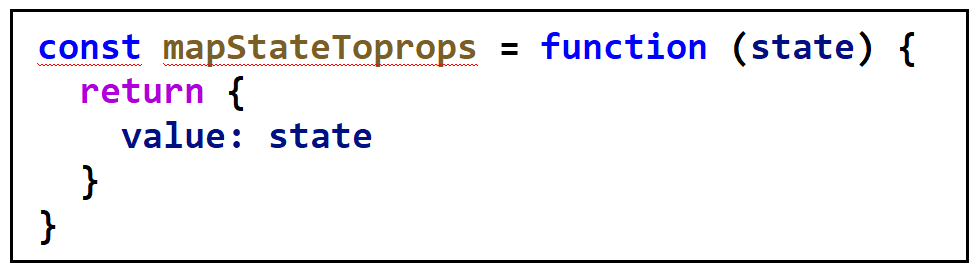
3.mapStateToprops:将外部的数据(即state对象)转换为UI组件的标签属性
4.mapDispatchToProps:将分发action的函数转换为UI组件的标签属性
使用上redux调试工具
安装chrome浏览器插件
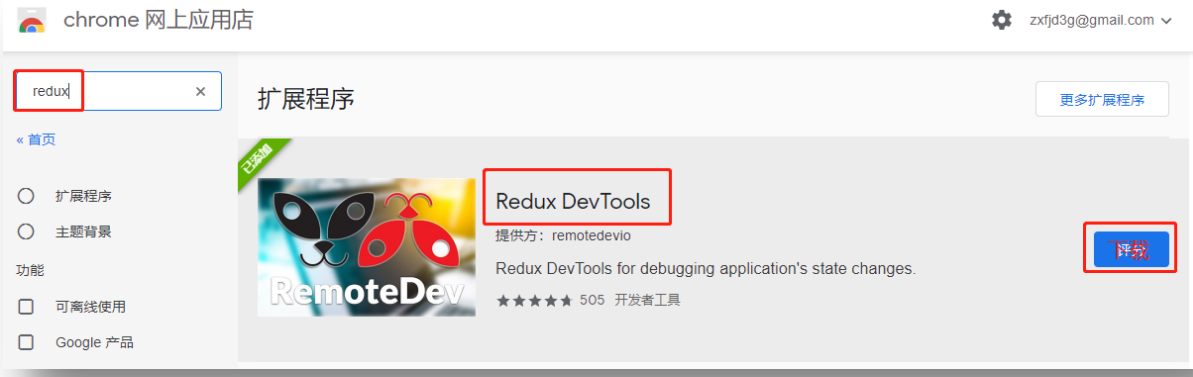
下载工具依赖包
npm install --save-dev redux-devtools-extension
redux插件常用部分
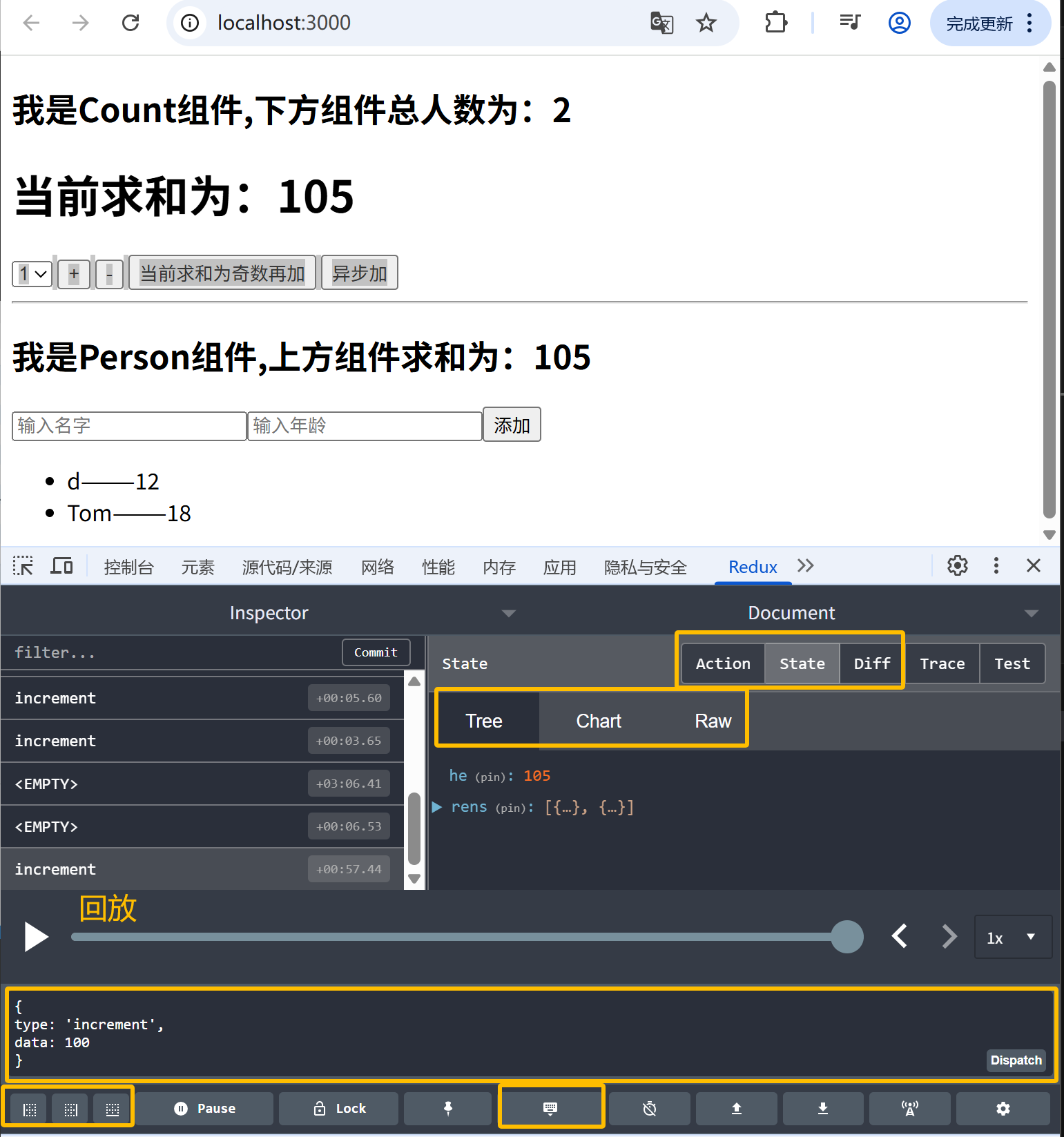
纯函数和高阶函数
纯函数
- 一类特别的函数: 只要是同样的输入(实参),必定得到同样的输出(返回)
- 必须遵守以下一些约束
-
- 不得改写参数数据
- 不会产生任何副作用,例如网络请求,输入和输出设备
- 不能调用Date.now()或者Math.random()等不纯的方法
-
- redux的reducer函数必须是一个纯函数
高阶函数
- 理解: 一类特别的函数
1.情况1: 参数是函数
2.情况2: 返回是函数
2.常见的高阶函数:
1.定时器设置函数
2.数组的forEach()/map()/filter()/reduce()/find()/bind()
3.promise
4.react-redux中的connect函数
3.作用: 能实现更加动态, 更加可扩展的功能
相关代码:
主要文件:index.js, App.jsx, redux文件, components文件, pages文件,有相同代码
纯react版
App.jsx
import React, { Component } from "react";
import Count from './components/Count'
export default class App extends Component {
  render() {
    return <div>
      <Count/>
    </div>;
  }
}
components/Count/index.jsx
import React, { Component } from 'react'
export default class Count extends Component {
state = {
count:0
}
// 加法
increment=()=>{
const {value} = this.selectNumber
const {count} = this.state
this.setState({
count:count+value*1 //强制类型转换,value是一个字符串
})
}
// 减法
decrement=()=>{
const {value} = this.selectNumber
const {count} = this.state
this.setState({
count: count-value*1
})
}
//奇数在加
incrementIfOdd=()=>{
const {value} = this.selectNumber
const {count} = this.state
if(count %2 != 0){
this.setState({
count: count+value*1
})
}
}
//异步加
incrementAsync=()=>{
const {value} = this.selectNumber
const {count} = this.state
setTimeout(()=>{
this.setState({
count: count+value*1
})
}, 500)
}
render() {
return (
<div>
<h1>当前求和为:{this.state.count}</h1>
<select ref={c => this.selectNumber = c} name="" id="">
<option value="1">1</option>
<option value="2">2</option>
<option value="3">3</option>
</select>
<button onClick={this.increment}>+</button>
<button onClick={this.decrement}>-</button>
<button onClick={this.incrementIfOdd}>当前求和为奇数再加</button>
<button onClick={this.incrementAsync}>异步加</button>
</div>
)
}
}
redux精简版
index.js
import React from "react";
import ReactDOM from "react-dom/client";
import App from "./App";
import store from "./redux/store";
const root = ReactDOM.createRoot(document.getElementById("root"));
root.render(<App />);
// 将这个App重新调用一下render
// 由于DOM的diff算法在,所以不会引起页面的大部分重绘与重排
store.subscribe(() => {
  root.render(<App />);
});
App.jsx
import React, { Component } from "react";
import Count from './components/Count'
export default class App extends Component {
  render() {
    return <div>
      <Count/>
    </div>;
  }
}
redux/store.js
/*
  该文件用于暴露一个store对象,整个应用只有一个store对象
*/
//引入createStore,专门用于创建redux中最为核心的store对象
import { createStore } from "redux";
// 引入为Count组件服务的reducer
import countReducer from "./count_reduce";
const store = createStore(countReducer);
// 暴露store
export default store;
redux/count_reduce.js
/*
  1.该文件是用于创建一个为Count组件服务的reducer,reducer的本质就是一个函数
  2.reducer函数会接收到两个参数,分别为:之前的状态(preState),动作对象(action)
*/
const initState = 0; //初始化状态
export default function countReducer(preState = initState, action) {
  console.log(preState, action, "99");
  if (preState === undefined) preState = 0;
  // 从action对象中获取:type、data
  const { type, data } = action;
  //根据type决定如何加工数据
  switch (type) {
    case "increment": //如果是加
      return preState + data;
    case "decrement": //如果是减
      return preState - data;
    default:
      return preState;
  }
}
components/Count/index.jsx
import React, { Component } from 'react'
// 引入store
import store from '../../redux/store'
export default class Count extends Component {
state = {
// count: 0, //将这个地方的count去掉
carName: '奔驰c63'
}
// 如果页面很多的话,每个组件都这样写,redux状态更改之后,要render页面更新一下
// componentDidMount(){
// // 检测redux中状态的变化,只要变化,就调用render
// store.subscribe(() =>{
// // 直接调用不起作用
// // this.render()
// // 更新state里面的状态,但是什么都不写
// // 只要调用了setState,紧接着就是调用render
// this.setState({})
// })
// }
// 加法
increment=()=>{
const {value} = this.selectNumber
store.dispatch({type: 'increment',data:value*1})
}
// 减法
decrement=()=>{
const {value} = this.selectNumber
store.dispatch({type: 'decrement',data:value*1})
}
//奇数在加
incrementIfOdd=()=>{
const {value} = this.selectNumber
const count = store.getState()
if(count %2 !== 0){
store.dispatch({type: 'increment',data:value*1})
}
}
//异步加
incrementAsync=()=>{
const {value} = this.selectNumber
setTimeout(()=>{
store.dispatch({type: 'increment',data:value*1})
}, 500)
}
render() {
return (
<div>
<h1>当前求和为:{store.getState()}</h1>
<select ref={c => this.selectNumber = c} name="" id="">
<option value="1">1</option>
<option value="2">2</option>
<option value="3">3</option>
</select>
<button onClick={this.increment}>+</button>
<button onClick={this.decrement}>-</button>
<button onClick={this.incrementIfOdd}>当前求和为奇数再加</button>
<button onClick={this.incrementAsync}>异步加</button>
</div>
)
}
}
redux完整版
其他文件代码相同:
redux
store.js
/*
  该文件用于暴露一个store对象,整个应用只有一个store对象
*/
//引入createStore,专门用于创建redux中最为核心的store对象
import { createStore } from "redux";
// 引入为Count组件服务的reducer
import countReducer from "./count_reduce";
const store = createStore(countReducer);
// 暴露store
export default store;
count_reduce.js
/*
  1.该文件是用于创建一个为Count组件服务的reducer,reducer的本质就是一个函数
  2.reducer函数会接收到两个参数,分别为:之前的状态(preState),动作对象(action)
*/
import { INCREMENT, DECREMENT } from "./constant.js";
const initState = 0; //初始化状态
export default function countReducer(preState = initState, action) {
  console.log(preState, action, "99");
  if (preState === undefined) preState = 0;
  // 从action对象中获取:type、data
  const { type, data } = action;
  //根据type决定如何加工数据
  switch (type) {
    case INCREMENT: //如果是加
      return preState + data;
    case DECREMENT: //如果是减
      return preState - data;
    default:
      return preState;
  }
}
count_action.js
/*
  该文件专门为Count组件生成action对象
*/
// 这样写会被认为是函数体的对象
export const createIncrementAction = (data) => ({ type: "increment", data });

export const createDecrementAction = (data) => ({ type: "decrement", data });
constant.js
/*
  该模块是用于定义action对象中type类型的常量值,目的只有一个:便于管理的同时防止程序员单词写错
*/
export const INCREMENT = "increment";
export const DECREMENT = "decrement";
components/Count/index.jsx
import React, { Component } from 'react'
// 引入store,用于获取redux中保存状态
import store from '../../redux/store'
// 引入actionCreator,专门用于创建action对象
import {createIncrementAction,createDecrementAction} from '../../redux/count_action'
export default class Count extends Component {
state = {
// count: 0, //将这个地方的count去掉
carName: '奔驰c63'
}
// 如果页面很多的话,每个组件都这样写,redux状态更改之后,要render页面更新一下
// componentDidMount(){
// // 检测redux中状态的变化,只要变化,就调用render
// store.subscribe(() =>{
// // 直接调用不起作用
// // this.render()
// // 更新state里面的状态,但是什么都不写
// // 只要调用了setState,紧接着就是调用render
// this.setState({})
// })
// }
// 加法
increment=()=>{
const {value} = this.selectNumber
store.dispatch(createIncrementAction(value*1))
}
// 减法
decrement=()=>{
const {value} = this.selectNumber
store.dispatch(createDecrementAction(value*1))
}
//奇数在加
incrementIfOdd=()=>{
const {value} = this.selectNumber
const count = store.getState()
if(count %2 !== 0){
store.dispatch(createIncrementAction(value*1))
}
}
//异步加
incrementAsync=()=>{
const {value} = this.selectNumber
setTimeout(()=>{
store.dispatch(createIncrementAction(value*1))
}, 500)
}
render() {
return (
<div>
<h1>当前求和为:{store.getState()}</h1>
<select ref={c => this.selectNumber = c} name="" id="">
<option value="1">1</option>
<option value="2">2</option>
<option value="3">3</option>
</select>
<button onClick={this.increment}>+</button>
<button onClick={this.decrement}>-</button>
<button onClick={this.incrementIfOdd}>当前求和为奇数再加</button>
<button onClick={this.incrementAsync}>异步加</button>
</div>
)
}
}
redux异步action
redux文件
store.js
/*
  该文件用于暴露一个store对象,整个应用只有一个store对象
*/
//引入createStore,专门用于创建redux中最为核心的store对象
import { createStore, applyMiddleware } from "redux";
// 引入为Count组件服务的reducer
import countReducer from "./count_reduce";
// const store = createStore(countReducer);
// 引入redux-thunk,用于支持异步action
import { thunk } from "redux-thunk";
// 暴露store
export default createStore(countReducer, applyMiddleware(thunk));
count-reduce.js
/*
  1.该文件是用于创建一个为Count组件服务的reducer,reducer的本质就是一个函数
  2.reducer函数会接收到两个参数,分别为:之前的状态(preState),动作对象(action)
*/
import { INCREMENT, DECREMENT } from "./constant.js";
const initState = 0; //初始化状态
export default function countReducer(preState = initState, action) {
  console.log(preState, action, "99");
  if (preState === undefined) preState = 0;
  // 从action对象中获取:type、data
  const { type, data } = action;
  //根据type决定如何加工数据
  switch (type) {
    case INCREMENT: //如果是加
      return preState + data;
    case DECREMENT: //如果是减
      return preState - data;
    default:
      return preState;
  }
}
count_action.js
/*
  该文件专门为Count组件生成action对象
*/
import { INCREMENT, DECREMENT } from "./constant.js";
// import store from "./store";
// 这样写会被认为是函数体的对象————见demo.html解释
// 同步action,就是指action的值为Object类型的一般对象
export const createIncrementAction = (data) => ({ type: INCREMENT, data });

export const createDecrementAction = (data) => ({ type: DECREMENT, data });
// 所谓的异步action就是指action的值为函数,异步action中一般都会调用同步action,异步action不是必须要用的
export const createIncrementAsyncAction = (data, time) => {
  return (dispatch) => {
    setTimeout(() => {
      dispatch(createIncrementAction(data));
    }, time);
  };
};
components/Count/index.jsx
import React, { Component } from 'react'
// 引入store,用于获取redux中保存状态
import store from '../../redux/store'
// 引入actionCreator,专门用于创建action对象
import {
createIncrementAction,
createDecrementAction,
createIncrementAsyncAction
} from '../../redux/count_action'
export default class Count extends Component {
state = {
// count: 0, //将这个地方的count去掉
carName: '奔驰c63'
}
// 如果页面很多的话,每个组件都这样写,redux状态更改之后,要render页面更新一下
// componentDidMount(){
// // 检测redux中状态的变化,只要变化,就调用render
// store.subscribe(() =>{
// // 直接调用不起作用
// // this.render()
// // 更新state里面的状态,但是什么都不写
// // 只要调用了setState,紧接着就是调用render
// this.setState({})
// })
// }
// 加法
increment=()=>{
const {value} = this.selectNumber
store.dispatch(createIncrementAction(value*1))
}
// 减法
decrement=()=>{
const {value} = this.selectNumber
store.dispatch(createDecrementAction(value*1))
}
//奇数在加
incrementIfOdd=()=>{
const {value} = this.selectNumber
const count = store.getState()
if(count %2 !== 0){
store.dispatch(createIncrementAction(value*1))
}
}
//异步加
incrementAsync=()=>{
const {value} = this.selectNumber
// setTimeout(()=>{
store.dispatch(createIncrementAsyncAction(value*1,500))
// }, 500)
}
render() {
return (
<div>
<h1>当前求和为:{store.getState()}</h1>
<select ref={c => this.selectNumber = c} name="" id="">
<option value="1">1</option>
<option value="2">2</option>
<option value="3">3</option>
</select>
<button onClick={this.increment}>+</button>
<button onClick={this.decrement}>-</button>
<button onClick={this.incrementIfOdd}>当前求和为奇数再加</button>
<button onClick={this.incrementAsync}>异步加</button>
</div>
)
}
}
react-redux的基本使用
index.js
import React from "react";
import ReactDOM from "react-dom/client";
import App from "./App";
import store from "./redux/store";
const root = ReactDOM.createRoot(document.getElementById("root"));
root.render(<App />);
// 将这个App重新调用一下render
// 由于DOM的diff算法在,所以不会引起页面的大部分重绘与重排
// 监测redux中状态的改变,如果redux的状态改变了,那么重新渲染App组件
store.subscribe(() => {
  root.render(<App />);
});
App.jsx
import React, { Component } from "react";
import Count from './containers/Count'
import store from './redux/store'
export default class App extends Component {
  render() {
    return (
      <div>
        {/* 给容器组件传递store */}
        <Count store={store} />
      </div>
    );
  }
}
redux文件
store.js
/*
  该文件用于暴露一个store对象,整个应用只有一个store对象
*/
//引入createStore,专门用于创建redux中最为核心的store对象
import { createStore, applyMiddleware } from "redux";
// 引入为Count组件服务的reducer
import countReducer from "./count_reduce";
// const store = createStore(countReducer);
// 引入redux-thunk,用于支持异步action
import { thunk } from "redux-thunk";
// 暴露store
export default createStore(countReducer, applyMiddleware(thunk));
count_reduce.js
/*
  1.该文件是用于创建一个为Count组件服务的reducer,reducer的本质就是一个函数
  2.reducer函数会接收到两个参数,分别为:之前的状态(preState),动作对象(action)
*/
import { INCREMENT, DECREMENT } from "./constant.js";
const initState = 0; //初始化状态
export default function countReducer(preState = initState, action) {
  console.log(preState, action, "99");
  if (preState === undefined) preState = 0;
  // 从action对象中获取:type、data
  const { type, data } = action;
  //根据type决定如何加工数据
  switch (type) {
    case INCREMENT: //如果是加
      return preState + data;
    case DECREMENT: //如果是减
      return preState - data;
    default:
      return preState;
  }
}
count_action.js
/*
  该文件专门为Count组件生成action对象
*/
import { INCREMENT, DECREMENT } from "./constant.js";
// import store from "./store";
// 这样写会被认为是函数体的对象————见demo.html解释
// 同步action,就是指action的值为Object类型的一般对象
export const createIncrementAction = (data) => ({ type: INCREMENT, data });

export const createDecrementAction = (data) => ({ type: DECREMENT, data });
// 所谓的异步action就是指action的值为函数,异步action中一般都会调用同步action,异步action不是必须要用的
export const createIncrementAsyncAction = (data, time) => {
  return (dispatch) => {
    setTimeout(() => {
      dispatch(createIncrementAction(data));
    }, time);
  };
};
Container/index.jsx
// 引入Count组件的UI组件
import CountUI from '../../components/Count'
// 引入store
// import store from '../../redux/store'
// 引入action
import {
  createIncrementAction,
  createDecrementAction,
  createIncrementAsyncAction
} from '../../redux/count_action'
// 引入connect用于连接UI组件与redux
import {connect} from 'react-redux'

// mapStateToProps函数的返回值作为状态传递给了UI组件
/*
  1.mapStateToProps函数返回的是一个对象
  2.mapStateToProps函数返回的对象中的key就作为传递给UI组件props的key,value就作为传递给UI组件props的value————状态
  3.mapStateToProps用于传递状态
*/
// 在调用mapStateToProps函数的时候,别人已经帮你调用完了store.getState(),而且把返回的状态传递给了mapStateToProps函数,只需要接收递给UI组件就行
function mapStateToProps(state){
  return {count: state}
}  //这样写相当于<CountUI n={900} />
/*
  1.mapDispatchToProps函数返回的是一个对象
  2.mapDispatchToProps函数返回的对象中的key就作为传递给UI组件props的key,value就作为传递给UI组件props的value————操作状态的方法(dispatch)
  3.mapDispatchToProps用于传递操作状态的方法(dispatch)
*/
function mapDispatchToProps(dispatch){
  return {
     // 通知redux执行加法
    jia:number=>dispatch(createIncrementAction(number)),
    jian:number=>dispatch(createDecrementAction(number)),
    jiaAsync:(number,time)=>dispatch(createIncrementAsyncAction(number,time)),
  }
}
// connect()的返回值是一个函数
// const CountContainer = connect()(CountUI)
// 使用connect()()创建并暴露一个Count的容器组件
// export default CountContainer
// 这个地方的父子关系不是靠标签形成的父子关系,没有这样写<CountUI a="1" />,也就传递不了参数,那么就将要传递的参数在第一个()里面传递
export default connect(mapStateToProps,mapDispatchToProps)(CountUI)
Components/Count/index.jsx
import React, { Component } from 'react'
// 在UI组件中看不到任何与redux相关的API
export default class Count extends Component {
state = {
// count: 0, //将这个地方的count去掉
carName: '奔驰c63'
}
// 加法
increment=()=>{
const {value} = this.selectNumber
this.props.jia(value*1)
}
// 减法
decrement=()=>{
const {value} = this.selectNumber
this.props.jian(value*1)
}
//奇数在加
incrementIfOdd=()=>{
const {value} = this.selectNumber
if(this.props.count %2 !== 0){
this.props.jia(value*1)
}
}
//异步加
incrementAsync=()=>{
const {value} = this.selectNumber
this.props.jiaAsync(value*1,500)
}
render() {
// console.log('UI组件接收到的props是',this.props);
return (
<div>
<h1>当前求和为:{this.props.count}</h1>
<select ref={c => this.selectNumber = c} name="" id="">
<option value="1">1</option>
<option value="2">2</option>
<option value="3">3</option>
</select>
<button onClick={this.increment}>+</button>
<button onClick={this.decrement}>-</button>
<button onClick={this.incrementIfOdd}>当前求和为奇数再加</button>
<button onClick={this.incrementAsync}>异步加</button>
</div>
)
}
}
react-redux优化
index.js
import React from "react";
import ReactDOM from "react-dom/client";
import App from "./App";
import store from "./redux/store";
import { Provider } from "react-redux";
const root = ReactDOM.createRoot(document.getElementById("root"));
// 优化2
// 谁需要store,就给那个组件传递
// 批量给每个容器组件都传递了store对象
root.render(
  <Provider store={store}>
    <App />
  </Provider>
);
App.jsx
import React, { Component } from "react";
import Count from './containers/Count'

export default class App extends Component {
  render() {
    return (
      <div>
        {/* 给容器组件传递store */}
        <Count />
      </div>
    );
  }
}
redux文件
store.js
/*
  该文件用于暴露一个store对象,整个应用只有一个store对象
*/
//引入createStore,专门用于创建redux中最为核心的store对象
import { createStore, applyMiddleware } from "redux";
// 引入为Count组件服务的reducer
import countReducer from "./count_reduce";
// const store = createStore(countReducer);
// 引入redux-thunk,用于支持异步action
import { thunk } from "redux-thunk";
// 暴露store
export default createStore(countReducer, applyMiddleware(thunk));
count_reduce.js
/*
  1.该文件是用于创建一个为Count组件服务的reducer,reducer的本质就是一个函数
  2.reducer函数会接收到两个参数,分别为:之前的状态(preState),动作对象(action)
*/
import { INCREMENT, DECREMENT } from "./constant.js";
const initState = 0; //初始化状态
export default function countReducer(preState = initState, action) {
  console.log(preState, action, "99");
  if (preState === undefined) preState = 0;
  // 从action对象中获取:type、data
  const { type, data } = action;
  //根据type决定如何加工数据
  switch (type) {
    case INCREMENT: //如果是加
      return preState + data;
    case DECREMENT: //如果是减
      return preState - data;
    default:
      return preState;
  }
}
count_action.js
/*
  该文件专门为Count组件生成action对象
*/
import { INCREMENT, DECREMENT } from "./constant.js";
// import store from "./store";
// 这样写会被认为是函数体的对象————见demo.html解释
// 同步action,就是指action的值为Object类型的一般对象
export const createIncrementAction = (data) => ({ type: INCREMENT, data });

export const createDecrementAction = (data) => ({ type: DECREMENT, data });
// 所谓的异步action就是指action的值为函数,异步action中一般都会调用同步action,异步action不是必须要用的
export const createIncrementAsyncAction = (data, time) => {
  return (dispatch) => {
    setTimeout(() => {
      dispatch(createIncrementAction(data));
    }, time);
  };
};
contsiners/Count/index.jsx
// 引入Count组件的UI组件
import React, { Component } from 'react'
// 引入action
import {
createIncrementAction,
createDecrementAction,
createIncrementAsyncAction
} from '../../redux/count_action'
// 引入connect用于连接UI组件与redux
import {connect} from 'react-redux'
// 定义UI组件
class Count extends Component {
state = {
// count: 0, //将这个地方的count去掉
carName: '奔驰c63'
}
// 加法
increment=()=>{
const {value} = this.selectNumber
this.props.jia(value*1) //这个地方接收到的是一个函数
}
// 减法
decrement=()=>{
const {value} = this.selectNumber
this.props.jian(value*1)
}
//奇数在加
incrementIfOdd=()=>{
const {value} = this.selectNumber
if(this.props.count %2 !== 0){
this.props.jia(value*1)
}
}
//异步加
incrementAsync=()=>{
const {value} = this.selectNumber
this.props.jiaAsync(value*1,500)
}
render() {
// console.log('UI组件接收到的props是',this.props);
return (
<div>
<h1>当前求和为:{this.props.count}</h1>
<select ref={c => this.selectNumber = c} name="" id="">
<option value="1">1</option>
<option value="2">2</option>
<option value="3">3</option>
</select>
<button onClick={this.increment}>+</button>
<button onClick={this.decrement}>-</button>
<button onClick={this.incrementIfOdd}>当前求和为奇数再加</button>
<button onClick={this.incrementAsync}>异步加</button>
</div>
)
}
}
// 使用connect()()创建并暴露一个Count的容器组件
// 语法精简与API精简
export default connect(
state => ({count: state}),
// mapDispatchToProps的一般写法
// dispatch =>({
// // 通知redux执行加法
// jia:number=>dispatch(createIncrementAction(number)),
// jian:number=>dispatch(createDecrementAction(number)),
// jiaAsync:(number,time)=>dispatch(createIncrementAsyncAction(number,time)),
// })
// 优化1
// mapDispatchToProps的简写
{
jia: createIncrementAction, //只需要写到action,就会自动调用dispatch
jian: createDecrementAction,
jiaAsync: createIncrementAsyncAction
}
)(Count)
react-redux数据共享版
App.jsx
import React, { Component } from "react";
import Count from './containers/Count'
import Person from './containers/Person'

export default class App extends Component {
  render() {
    return (
      <div>
        {/* 给容器组件传递store */}
        <Count />
        <hr />
        <Person />
      </div>
    );
  }
}
redux文件
store.js
/*
  该文件用于暴露一个store对象,整个应用只有一个store对象
*/
//引入createStore,专门用于创建redux中最为核心的store对象
import { createStore, applyMiddleware, combineReducers } from "redux";
// 引入为Count组件服务的reducer
import countReducer from "./reducers/count";
// 引入为Count组件服务的reducer
import personReducer from "./reducers/person";
// const store = createStore(countReducer);
// 引入redux-thunk,用于支持异步action
import { thunk } from "redux-thunk";
//多个reducer工作的时候,redux要管理多个状态,最好的办法是用一个对象去存储所有的东西,如果用数组存储,不好区分这是哪一个reducer
// 汇总所有的reducer变为一个总的reducer
const allReducer = combineReducers({
  he: countReducer,
  rens: personReducer,
});
// 暴露store
export default createStore(allReducer, applyMiddleware(thunk));
constant.js
/*
  该模块是用于定义action对象中type类型的常量值,目的只有一个:便于管理的同时防止程序员单词写错
*/
export const INCREMENT = "increment";
export const DECREMENT = "decrement";
export const ADD_PERSON = "ADD_PERSON";
reducers文件
count.js
/*
  1.该文件是用于创建一个为Count组件服务的reducer,reducer的本质就是一个函数
  2.reducer函数会接收到两个参数,分别为:之前的状态(preState),动作对象(action)
*/
import { INCREMENT, DECREMENT } from "../constant.js";
const initState = 0; //初始化状态
export default function countReducer(preState = initState, action) {
  console.log("countReducer@#@#@#");
  if (preState === undefined) preState = 0;
  // 从action对象中获取:type、data
  const { type, data } = action;
  //根据type决定如何加工数据
  switch (type) {
    case INCREMENT: //如果是加
      return preState + data;
    case DECREMENT: //如果是减
      return preState - data;
    default:
      return preState;
  }
}
perosn.js
import { ADD_PERSON } from "../constant";
// 初始化人的列表
const initState = [{ id: "001", name: "Tom", age: 18 }];
export default function personReducer(preState = initState, action) {
  console.log("personReducer@#@#@#");
  const { type, data } = action;
  switch (type) {
    case ADD_PERSON: //若是添加一个人
      return [data, ...preState];
    default:
      return preState;
  }
}
actions文件
count.js
/*
  该文件专门为Count组件生成action对象
*/
import { INCREMENT, DECREMENT } from "../constant.js";
// import store from "./store";
// 这样写会被认为是函数体的对象————见demo.html解释
// 同步action,就是指action的值为Object类型的一般对象
export const createIncrementAction = (data) => ({ type: INCREMENT, data });

export const createDecrementAction = (data) => ({ type: DECREMENT, data });
// 所谓的异步action就是指action的值为函数,异步action中一般都会调用同步action,异步action不是必须要用的
export const createIncrementAsyncAction = (data, time) => {
  return (dispatch) => {
    setTimeout(() => {
      dispatch(createIncrementAction(data));
    }, time);
  };
};
person.js
import { ADD_PERSON } from "../constant";
// 创建增加一个人的action对象
export const createAddPersonAction = (personObj) => ({
  type: ADD_PERSON,
  data: personObj,
});
containers文件
Person/index.jsx
import React, { Component } from 'react'
import { nanoid } from 'nanoid'
import { connect } from 'react-redux'
import { createAddPersonAction } from '../../redux/actions/person'
class Person extends Component {
  addPerson = () => {
    const name = this.nameNode.value
    const age = this.ageNode.value
    // console.log(name,age);
    const personObj = { id: nanoid(), name, age }
    this.props.jiaYiRen(personObj)
    this.nameNode.value = ''
    this.ageNode.value = ''
  }
  render() {
    return (
      <div>
        <h2>我是Person组件,上方组件求和为:{this.props.he}</h2>
        <input ref={c => this.nameNode = c} type="text" placeholder="输入名字" />
        <input ref={c => this.ageNode = c} type="text" placeholder="输入年龄" />
        <button onClick={this.addPerson}>添加</button>
        <ul>
          {
            this.props.yiduiren.map(p =>
              <li key={p.id}>{p.name}———{p.age}</li>
            )
          }
        </ul>
      </div>
    )
  }
}
// 默认导出只有一个
// 容器组件里面有所有redux的状态
export default connect(
  state => ({ yiduiren: state.rens, he: state.he }), //映射状态
  {
    jiaYiRen: createAddPersonAction //映射操作状态的方法
  }
)(Person)
Count/index.jsx
// 引入Count组件的UI组件
import React, { Component } from 'react'
// 引入action
import {
createIncrementAction,
createDecrementAction,
createIncrementAsyncAction
} from '../../redux/actions/count'
// 引入connect用于连接UI组件与redux
import { connect } from 'react-redux'
// 定义UI组件
class Count extends Component {
state = {
// count: 0, //将这个地方的count去掉
carName: '奔驰c63'
}
// 加法
increment = () => {
const { value } = this.selectNumber
this.props.jia(value * 1) //这个地方接收到的是一个函数
}
// 减法
decrement = () => {
const { value } = this.selectNumber
this.props.jian(value * 1)
}
//奇数在加
incrementIfOdd = () => {
const { value } = this.selectNumber
if (this.props.count % 2 !== 0) {
this.props.jia(value * 1)
}
}
//异步加
incrementAsync = () => {
const { value } = this.selectNumber
this.props.jiaAsync(value * 1, 500)
}
render() {
// console.log('UI组件接收到的props是',this.props);
return (
<div>
<h2>我是Count组件,下方组件总人数为:{this.props.renshu}</h2>
<h1>当前求和为:{this.props.count}</h1>
<select ref={c => this.selectNumber = c} name="" id="">
<option value="1">1</option>
<option value="2">2</option>
<option value="3">3</option>
</select>
<button onClick={this.increment}>+</button>
<button onClick={this.decrement}>-</button>
<button onClick={this.incrementIfOdd}>当前求和为奇数再加</button>
<button onClick={this.incrementAsync}>异步加</button>
</div>
)
}
}
// 使用connect()()创建并暴露一个Count的容器组件
// 语法精简与API精简
export default connect(
// 现在redux管理的是一个对象,所以state是一个对象,需要取出里面的数值
state => ({ count: state.he, renshu: state.rens.length }),
// mapDispatchToProps的简写
{
jia: createIncrementAction, //只需要写到action,就会自动调用dispatch
jian: createDecrementAction,
jiaAsync: createIncrementAsyncAction
}
)(Count)
react-redux_开发者工具的使用
redux文件
stoe.js
/*
  该文件用于暴露一个store对象,整个应用只有一个store对象
*/
//引入createStore,专门用于创建redux中最为核心的store对象
import { createStore, applyMiddleware, combineReducers } from "redux";
// 引入为Count组件服务的reducer
import countReducer from "./reducers/count";
// 引入为Count组件服务的reducer
import personReducer from "./reducers/person";
// const store = createStore(countReducer);
// 引入redux-thunk,用于支持异步action
import { thunk } from "redux-thunk";
// 引入redux-devtools-extension
import { composeWithDevTools } from "redux-devtools-extension";
//多个reducer工作的时候,redux要管理多个状态,最好的办法是用一个对象去存储所有的东西,如果用数组存储,不好区分这是哪一个reducer
// 汇总所有的reducer变为一个总的reducer
const allReducer = combineReducers({
  he: countReducer,
  rens: personReducer,
});
// 暴露store
export default createStore(
  allReducer,
  composeWithDevTools(applyMiddleware(thunk))
);
reducers
count.js
/*
  1.该文件是用于创建一个为Count组件服务的reducer,reducer的本质就是一个函数
  2.reducer函数会接收到两个参数,分别为:之前的状态(preState),动作对象(action)
*/
import { INCREMENT, DECREMENT } from "../constant.js";
const initState = 0; //初始化状态
export default function countReducer(preState = initState, action) {
  console.log("countReducer@#@#@#");
  if (preState === undefined) preState = 0;
  // 从action对象中获取:type、data
  const { type, data } = action;
  //根据type决定如何加工数据
  switch (type) {
    case INCREMENT: //如果是加
      return preState + data;
    case DECREMENT: //如果是减
      return preState - data;
    default:
      return preState;
  }
}
person.js
import { ADD_PERSON } from "../constant";
// 初始化人的列表
const initState = [{ id: "001", name: "Tom", age: 18 }];
export default function personReducer(preState = initState, action) {
  console.log("personReducer@#@#@#");
  const { type, data } = action;
  switch (type) {
    case ADD_PERSON: //若是添加一个人
      // 错误的写法,
      // 这样写会破坏一个规则,你的reducer就不是一个纯函数了
      // preState.unshift(data);  //这种写法影响的是原数组,改写了参数数据,此处不可以这样写,这样会导致preState被改写了,personReducer就不是纯函数了
      // 会影响redux不能识别状态的改变
      // console.log(preState);
      // return preState;
      return [data, ...preState]; //拿到之前的人,放到了一个新的数组,这个数组和preState不是同一个数组
    // redux底层会判断操作的preState与返回的preState是不是一个,判断的是地址值,是不是指向了同一个
    default:
      return preState;
  }
}
// 举例,即便是推进去了一个数据,但是他们的地址值都是一样的
// let arr = [1, 3, 5, 7, 9];
// arr.push(10);
// 第一次调用和第二次调用的返回值不一样
// function demo(a) {
//   // a = 9  改写了参数就不纯函数了
//   return Math.random() + a;
// }
actions
count.js
/*
  该文件专门为Count组件生成action对象
*/
import { INCREMENT, DECREMENT } from "../constant.js";
// import store from "./store";
// 这样写会被认为是函数体的对象————见demo.html解释
// 同步action,就是指action的值为Object类型的一般对象
export const createIncrementAction = (data) => ({ type: INCREMENT, data });

export const createDecrementAction = (data) => ({ type: DECREMENT, data });
// 所谓的异步action就是指action的值为函数,异步action中一般都会调用同步action,异步action不是必须要用的
export const createIncrementAsyncAction = (data, time) => {
  return (dispatch) => {
    setTimeout(() => {
      dispatch(createIncrementAction(data));
    }, time);
  };
};
person.js
import { ADD_PERSON } from "../constant";
// 创建增加一个人的action对象
export const createAddPersonAction = (personObj) => ({
  type: ADD_PERSON,
  data: personObj,
});
最终版
index.js
import React from "react";
import ReactDOM from "react-dom/client";
import App from "./App";
import store from "./redux/store";
import { Provider } from "react-redux";
const root = ReactDOM.createRoot(document.getElementById("root"));
// 优化2
// 谁需要store,就给那个组件传递
// 批量给每个容器组件都传递了store对象
root.render(
  // 此处需要用Provider包裹App,目的是让App所有后代容器组件都能接收到store
  <Provider store={store}>
    <App />
  </Provider>
);
App.jsx
import React, { Component } from "react";
import Count from './containers/Count' //引入Count的容器组件
import Person from './containers/Person' //引入Person的容器组件

export default class App extends Component {
  render() {
    return (
      <div>
        {/* 给容器组件传递store */}
        <Count />
        <hr />
        <Person />
      </div>
    );
  }
}
redux文件
store.js
/*
  该文件用于暴露一个store对象,整个应用只有一个store对象
*/
//引入createStore,专门用于创建redux中最为核心的store对象
import { createStore, applyMiddleware, combineReducers } from "redux";
// 引入汇总之后的reducer
import reducer from "./reducers";
// const store = createStore(countReducer);
// 引入redux-thunk,用于支持异步action
import { thunk } from "redux-thunk";
// 引入redux-devtools-extension
import { composeWithDevTools } from "redux-devtools-extension";

// 暴露store
export default createStore(
  reducer,
  composeWithDevTools(applyMiddleware(thunk))
);
constant.js
/*
  该模块是用于定义action对象中type类型的常量值,目的只有一个:便于管理的同时防止程序员单词写错
*/
export const INCREMENT = "increment";
export const DECREMENT = "decrement";
export const ADD_PERSON = "ADD_PERSON";
reducers文件
count.js
/*
  1.该文件是用于创建一个为Count组件服务的reducer,reducer的本质就是一个函数
  2.reducer函数会接收到两个参数,分别为:之前的状态(preState),动作对象(action)
*/
import { INCREMENT, DECREMENT } from "../constant.js";
const initState = 0; //初始化状态
export default function countReducer(preState = initState, action) {
  console.log("countReducer@#@#@#");
  if (preState === undefined) preState = 0;
  // 从action对象中获取:type、data
  const { type, data } = action;
  //根据type决定如何加工数据
  switch (type) {
    case INCREMENT: //如果是加
      return preState + data;
    case DECREMENT: //如果是减
      return preState - data;
    default:
      return preState;
  }
}
person.js
import { ADD_PERSON } from "../constant";
// 初始化人的列表
const initState = [{ id: "001", name: "Tom", age: 18 }];
export default function personReducer(preState = initState, action) {
  console.log("personReducer@#@#@#");
  const { type, data } = action;
  switch (type) {
    case ADD_PERSON: //若是添加一个人
      // 错误的写法,
      // 这样写会破坏一个规则,你的reducer就不是一个纯函数了
      // preState.unshift(data);  //这种写法影响的是原数组,改写了参数数据,此处不可以这样写,这样会导致preState被改写了,personReducer就不是纯函数了
      // 会影响redux不能识别状态的改变
      // console.log(preState);
      // return preState;
      return [data, ...preState]; //拿到之前的人,放到了一个新的数组,这个数组和preState不是同一个数组
    // redux底层会判断操作的preState与返回的preState是不是一个,判断的是地址值,是不是指向了同一个
    default:
      return preState;
  }
}
// 举例,即便是推进去了一个数据,但是他们的地址值都是一样的
// let arr = [1, 3, 5, 7, 9];
// arr.push(10);
// 第一次调用和第二次调用的返回值不一样
// function demo(a) {
//   // a = 9  改写了参数就不纯函数了
//   return Math.random() + a;
// }
index.js
// 该文件用于汇总所有的reducer为一个总的reducer
// 引入combineReducers,用于汇总多个reducer
import { combineReducers } from "redux";

// 引入为Count组件服务的reducer
import count from "./count";
// 引入为Person组件服务的reducer
import persons from "./person";

//多个reducer工作的时候,redux要管理多个状态,最好的办法是用一个对象去存储所有的东西,如果用数组存储,不好区分这是哪一个reducer
// 汇总所有的reducer变为一个总的reducer
const allReducer = combineReducers({
  count,
  persons
});
export default allReducer;
actions
count.js
/*
  该文件专门为Count组件生成action对象
*/
import { INCREMENT, DECREMENT } from "../constant.js";
// import store from "./store";
// 这样写会被认为是函数体的对象————见demo.html解释
// 同步action,就是指action的值为Object类型的一般对象
export const increment = (data) => ({ type: INCREMENT, data });

export const decrement = (data) => ({ type: DECREMENT, data });
// 所谓的异步action就是指action的值为函数,异步action中一般都会调用同步action,异步action不是必须要用的
export const incrementAsync = (data, time) => {
  return (dispatch) => {
    setTimeout(() => {
      dispatch(increment(data));
    }, time);
  };
};
person.js
import { ADD_PERSON } from "../constant";
// 创建增加一个人的action对象
export const addPerson = (personObj) => ({
  type: ADD_PERSON,
  data: personObj,
});
containers文件
Person/index.jsx
import React, { Component } from 'react'
import { nanoid } from 'nanoid'
import { connect } from 'react-redux'
import { addPerson } from '../../redux/actions/person'
class Person extends Component {
  addPerson = () => {
    const name = this.nameNode.value
    const age = this.ageNode.value * 1
    // console.log(name,age);
    const personObj = { id: nanoid(), name, age }
    this.props.addPerson(personObj)
    this.nameNode.value = ''
    this.ageNode.value = ''
  }
  render() {
    return (
      <div>
        <h2>我是Person组件,上方组件求和为:{this.props.count}</h2>
        <input ref={c => this.nameNode = c} type="text" placeholder="输入名字" />
        <input ref={c => this.ageNode = c} type="text" placeholder="输入年龄" />
        <button onClick={this.addPerson}>添加</button>
        <ul>
          {
            this.props.persons.map(p =>
              <li key={p.id}>{p.name}———{p.age}</li>
            )
          }
        </ul>
      </div>
    )
  }
}
// 默认导出只有一个
// 容器组件里面有所有redux的状态
export default connect(
  state => ({ persons: state.persons, count: state.count }), //映射状态
  {
    addPerson //映射操作状态的方法
  }
)(Person)
Count/index.jsx
// 引入Count组件的UI组件
import React, { Component } from 'react'
// 引入action
import {
increment,
decrement,
incrementAsync
} from '../../redux/actions/count'
// 引入connect用于连接UI组件与redux
import { connect } from 'react-redux'
// 定义UI组件
class Count extends Component {
state = {
// count: 0, //将这个地方的count去掉
carName: '奔驰c63'
}
// 加法
increment = () => {
const { value } = this.selectNumber
this.props.increment(value * 1) //这个地方接收到的是一个函数
}
// 减法
decrement = () => {
const { value } = this.selectNumber
this.props.decrement(value * 1)
}
//奇数在加
incrementIfOdd = () => {
const { value } = this.selectNumber
if (this.props.count % 2 !== 0) {
this.props.increment(value * 1)
}
}
//异步加
incrementAsync = () => {
const { value } = this.selectNumber
this.props.incrementAsync(value * 1, 500)
}
render() {
// console.log('UI组件接收到的props是',this.props);
return (
<div>
<h2>我是Count组件,下方组件总人数为:{this.props.personCount}</h2>
<h1>当前求和为:{this.props.count}</h1>
<select ref={c => this.selectNumber = c} name="" id="">
<option value="1">1</option>
<option value="2">2</option>
<option value="3">3</option>
</select>
<button onClick={this.increment}>+</button>
<button onClick={this.decrement}>-</button>
<button onClick={this.incrementIfOdd}>当前求和为奇数再加</button>
<button onClick={this.incrementAsync}>异步加</button>
</div>
)
}
}
// 使用connect()()创建并暴露一个Count的容器组件
// 语法精简与API精简
export default connect(
// 现在redux管理的是一个对象,所以state是一个对象,需要取出里面的数值
state => ({ count: state.count, personCount: state.persons.length }),
// mapDispatchToProps的简写
{
increment, //只需要写到action,就会自动调用dispatch
decrement,
incrementAsync
}
)(Count)
测试代码:
<!DOCTYPE html>
<html lang="en">
  <head>
    <meta charset="UTF-8" />
    <meta name="viewport" content="width=device-width, initial-scale=1.0" />
    <title>Document</title>
  </head>
  <body>
    <script type="text/javascript">
      // const a = (b) => {
      //   data: b;
      // };  //undefined
      // const a = (b) => {
      //   return { data: b };
      // }; //{data: 9}
      const a = (b) => ({ data: b }); //{data: 9}
      console.log(a(9));
    </script>
  </body>
</html>
笔记:
## 1.求和案例 redux 精简版

(1).去除 Count 组件自身的状态

(2).src 下建立:
-redux
-store.js
-count_reducer.js

(3).store.js:
1).引入 redux 中的 createStore 函数,创建一个 store
2).createStore 调用时要传入一个为其服务的 reducer
3).记得暴露 store 对象

(4).count_reducer.js:
1).reducer 的本质是一个函数,接收:prestate,action,返回加工后的状态
2).reducer 有两个作用:初始化状态,加工状态
3).reducer 被第一次调用时,是 store 自动触发的,传递的 prestate 是 undefined,action:@@REDUX/INIT

(5).在 index.js 中监测 store 中状态的改变,一旦发生改变重新渲染<App/>
备注:redux 只负责管理状态,至于状态的改变驱动着页面的展示,要靠我们自己写。

## 2.求和案例 redux 完整版

新增文件:
1.count_action.js 专门用于创建 action 对象
2.constant.js 放置容易写错的 type 值

## 3.求和案例 redux 异步 action 版

(1).明确:延迟的动作不想交给组件自身,想交给 action

(2).何时需要异步 action:想要对状态进行操作,但是具体的数据靠异步任务返回。

(3).具体编码:
1).yarn add redux-thunk,并配置在 store 中
2).创建 action 的函数不再返回一般对象,而是一个函数,该函数中写异步任务。
3),异步任务有结果后,分发一个同步的 action 去真正操作数据。

(4).备注:异步 action 不是必须要写的,完全可以自己等待异步任务的结果了再去分发同步 action。

## 4.求和案例 react-redux 基本使用

(1).明确两个概念:
1).UI 组件:不能使用任何 redux 的 api,只负责页面的呈现、交互等。
2).容器组件:负责和 redux 通信,将结果交给 UI 组件。

(2).如何创建一个容器组件————带 react-redux 的 connect 函数
connect(mapStateToProps,mapDispatchToProps)(UI 组件)
-mapStateToProps:映射状态,返回值是一个对象-mapDispatchToProps:映射操作状态的方法,返回值是一个对象

(3).备注 1:容器组件中的 store 是靠 props 传进去的,而不是在容器组件中直接引入

(4).备注 2:mapDispatchToProps,也可以是一个对象

## 5.求和条例 react-redux 优化

(1).容器组件和 UI 组件整合一个文件
(2).无需自己给容器组件传递 store,给<App/>包裹一个<Provider store={store}>即可。
(3).使用了 react-redux 后也不用再自己检测 redux 中状态的改变了,容器组件可以自动完成这个工作。
(4).mapDispatchToProps 也可以简单的写成一个对象
(5).一个组件要和 redux“打交道”要经过哪几步?
(1).定义好 UI 组件---不暴露
(2).引入 connect 生成一个容器组件,并暴露,写法如下:connect(
state =>({key:value}), //映射状态
{key:xxxxxAction} //映射操作状态的方法
)(UI 组件)
(4).在 UI 组件中通过 this.props.xxxxxxx 读取和操作状态

## 6.求和案例 react-redux 数据共享版

(1).定义一个 Person 组件,和 Count 组件通过 redux 共享数据。
(2).为 Person 组件编号:reducer、action,配置 constant 常量。
(3).重点:Person 的 reducer 和 Count 的 Reducer 要使用 combineReducers 进行分并,合并后的总状态是一个对象!!!
(4).交给 store 的是总 reducer,最后注意在组件中取出状态的时候,记得“取到位”。

## 7.求和案例 react-redux 开发者工具的使用

(1)、yarn add redux-devtools-extension
(2).store 中进行配置
import {composeWithDevTools} from "redux-devtools-extension"
const store = createStore(allReducer,composeWithDevTools(applyMiddleware(thunk)))

## 8.求和案例 react-redux最终版
(1).所有变量名字要规范,尽量触发对象的简写形式。(2).reducers文件夹中,编写index.js专门用于汇总并暴露所有的reducer
更多推荐


 19
19 0
0- 0


 已为社区贡献3条内容

所有评论(0)