
netty-socketio + springboot + redis适配器 消息推送服务 + netty-socketio跨域
·
netty-socketio + springboot + redis适配器 + netty-socketio跨域解决 消息推送服务
-
背景:后端业务代码中调用这个消息推送服务,主动推送消息给客户端。前端(客户端)连接 消息推送服务,并可以实时的收到服务器发来的消息。
-
注意点:
- 客户端与服务器(netty-socketio)版本不兼容会导致:客户端链接服务端成功,但是收不到服务端发来的消息。官方推荐的版本匹配。
- 客户端发送消息需要序列化处理,否则服务端会报错:Can’t read value: [“push_event”,““zudhfb””] for type: class com.corundumstudio.socketio.protocol.Event
- 服务端和客户端必须配置cors,否则会出现跨域错误:from origin ‘null’ has been blocked by CORS policy: No ‘Access-Control-Allow-Origin’ header is present on the requested resource.,参考:https://www.jianshu.com/p/1c966c74ac26
-
文章参考文档放在最后
后端
1. 目录结构:
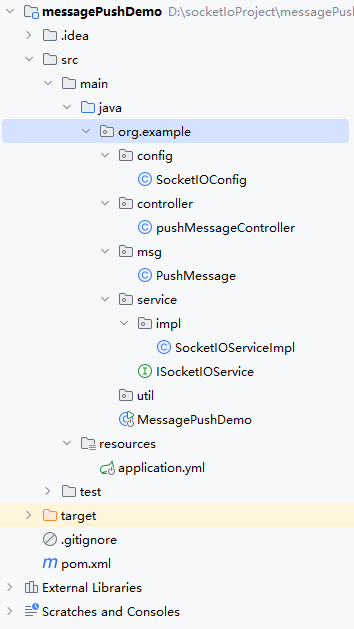
代码
pom文件:
<project xmlns="http://maven.apache.org/POM/4.0.0" xmlns:xsi="http://www.w3.org/2001/XMLSchema-instance"
  xsi:schemaLocation="http://maven.apache.org/POM/4.0.0 http://maven.apache.org/xsd/maven-4.0.0.xsd">
  <modelVersion>4.0.0</modelVersion>

  <groupId>org.example</groupId>
  <artifactId>messagePushDemo</artifactId>
  <version>1.0-SNAPSHOT</version>

  <properties>
<!--    <maven.compiler.source>11</maven.compiler.source>-->
<!--    <maven.compiler.target>11</maven.compiler.target>-->
    <swagger.core.version>1.6.2</swagger.core.version>
    <java.version>1.8</java.version>
  </properties>
<!--  <packaging>jar</packaging>-->

<!--  <name>messagePushDemo</name>-->
<!--  <url>http://maven.apache.org</url>-->

  <parent>
    <artifactId>spring-boot-starter-parent</artifactId>
    <groupId>org.springframework.boot</groupId>
    <version>2.0.0.RELEASE</version>
  </parent>

  <dependencies>
    <dependency>
      <groupId>org.apache.commons</groupId>
      <artifactId>commons-lang3</artifactId>
      <version>3.13.0</version>
    </dependency>

    <!-- Swagger 依赖配置 -->
    <dependency>
      <groupId>io.swagger</groupId>
      <artifactId>swagger-models</artifactId>
      <version>${swagger.core.version}</version>
    </dependency>
    <dependency>
      <groupId>io.swagger</groupId>
      <artifactId>swagger-annotations</artifactId>
      <version>${swagger.core.version}</version>
    </dependency>

    <!-- Spring MVC依赖 -->
    <dependency>
      <groupId>org.springframework.boot</groupId>
      <artifactId>spring-boot-starter-web</artifactId>
    </dependency>
    <!-- springBoot的Test依赖 -->
    <dependency>
      <groupId>org.springframework.boot</groupId>
      <artifactId>spring-boot-starter-test</artifactId>
    </dependency>

<!--    <dependency>-->
<!--      <groupId>io.netty</groupId>-->
<!--      <artifactId>netty-all</artifactId>-->
<!--      <version>4.1.49.Final</version>-->
<!--    </dependency>-->
    <dependency>
      <groupId>com.corundumstudio.socketio</groupId>
      <artifactId>netty-socketio</artifactId>
      <version>2.0.11</version>
    </dependency>

    <dependency>
      <groupId>com.alibaba</groupId>
      <artifactId>fastjson</artifactId>
      <version>1.2.73</version>
    </dependency>
    <dependency>
      <groupId>org.projectlombok</groupId>
      <artifactId>lombok</artifactId>
      <scope>provided</scope>
    </dependency>

    <!-- Redis -->
    <dependency>
      <groupId>org.springframework.boot</groupId>
      <artifactId>spring-boot-starter-data-redis</artifactId>
    </dependency>
    <!-- Redisson -->
    <dependency>
      <groupId>org.redisson</groupId>
      <artifactId>redisson</artifactId>
      <version>3.19.3</version>
    </dependency>

  </dependencies>


  <build>
    <plugins>
      <plugin>
        <groupId>org.apache.tomcat.maven</groupId>
        <artifactId>tomcat7-maven-plugin</artifactId>
        <version>2.1</version>
      </plugin>
    </plugins>
  </build>

</project>
application.yml:
# Tomcat
server:
  port: 8080

socketio:
  # host在本地测试可以设置为localhost或者本机IP
  host: localhost
  port: 9099
  # 在Linux服务器跑可换成服务器外网IP
  public:
    host: localhost
  allowCustomRequests: true
  # socket连接数大小(如只监听一个端口boss线程组为1即可)
  bossCount: 1
  # 设置最大每帧处理数据的长度,防止他人利用大数据来攻击服务器
  maxFramePayloadLength: 1048576
  # 设置http交互最大内容长度
  maxHttpContentLength: 1048576
  # Ping消息间隔(毫秒),默认25秒。客户端向服务器发送一条心跳消息间隔
  pingInterval: 25000
  # Ping消息超时时间(毫秒),默认60秒,这个时间间隔内没有接收到心跳消息就会发送超时事件
  pingTimeout: 6000000
  # 协议升级超时时间(毫秒),默认10秒。HTTP握手升级为ws协议超时时间
  upgradeTimeout: 1000000
  workCount: 100

redisson:
  address: redis://127.0.0.1:6379 //替换为你自己的redis地址
  password: xxxxxxx //你的redis密码
RedissonConfig
import org.redisson.Redisson;
import org.redisson.api.RedissonClient;
import org.redisson.config.Config;
import org.springframework.beans.factory.annotation.Value;
import org.springframework.context.annotation.Bean;
import org.springframework.context.annotation.Configuration;

@Configuration
public class RedissonConfig {

    @Value("${redisson.address}")
    private String address;

    @Value("${redisson.password}")
    private String password;

    @Bean
    public RedissonClient redissonClient() {
        Config redissonConfig = new Config();
        redissonConfig.useSingleServer().setAddress(address);
        redissonConfig.useSingleServer().setPassword(password);
        return Redisson.create(redissonConfig);
    }
}
SocketIOConfig:
import com.corundumstudio.socketio.SocketConfig;
import org.springframework.beans.factory.annotation.Value;
import org.springframework.context.annotation.Bean;
import org.springframework.context.annotation.Configuration;
import com.corundumstudio.socketio.SocketIOServer;

@Configuration
public class SocketIOConfig {

    @Value("${socketio.host}")
    private String host;

    @Value("${socketio.port}")
    private Integer port;

    @Value("${socketio.bossCount}")
    private int bossCount;

    @Value("${socketio.workCount}")
    private int workCount;

    @Value("${socketio.allowCustomRequests}")
    private boolean allowCustomRequests;

    @Value("${socketio.upgradeTimeout}")
    private int upgradeTimeout;

    @Value("${socketio.pingTimeout}")
    private int pingTimeout;

    @Value("${socketio.pingInterval}")
    private int pingInterval;

    /**
     * 以下配置在上面的application.properties中已经注明
     * @return
     */
    @Bean
    public SocketIOServer socketIOServer() {
        SocketConfig socketConfig = new SocketConfig();
        socketConfig.setTcpNoDelay(true);
        socketConfig.setSoLinger(0);
        com.corundumstudio.socketio.Configuration config = new com.corundumstudio.socketio.Configuration();
        config.setSocketConfig(socketConfig);
        config.setHostname(host);
        config.setPort(port);
        config.setBossThreads(bossCount);
        config.setWorkerThreads(workCount);
        config.setAllowCustomRequests(allowCustomRequests);
        config.setUpgradeTimeout(upgradeTimeout);
        config.setPingTimeout(pingTimeout);
        config.setPingInterval(pingInterval);

		// 添加 CORS 支持
        config.setTransports(Transport.POLLING, Transport.WEBSOCKET);
        config.setOrigin(":*:");

        // 配置Redis适配器
        config.setStoreFactory(new RedissonStoreFactory(redissonClient));


        return new SocketIOServer(config);
    }
}
PushMessage:
package org.example.msg;

import io.swagger.annotations.ApiModelProperty;
public class PushMessage {
    @ApiModelProperty(value = "登录用户编号/唯一标识")
    private String clientId;
		@ApiModelProperty(value = "推送事件")
    private String event;
    @ApiModelProperty(value = "推送内容")
    private String content;

    public PushMessage() {
    }

    public PushMessage(String clientId, String event, String content) {
        this.clientId = clientId;
        this.event = event;
        this.content = content;
    }

    private PushMessage(Builder builder) {
        setClientId(builder.clientId);
        setEvent(builder.event);
        setContent(builder.content);
    }

    public static Builder newBuilder() {
        return new Builder();
    }

    public String getClientId() {
        return clientId;
    }

    public void setClientId(String clientId) {
        this.clientId = clientId;
    }

    public String getEvent() {
        return event;
    }

    public void setEvent(String event) {
        this.event = event;
    }

    public String getContent() {
        return content;
    }

    public void setContent(String content) {
        this.content = content;
    }

    public static final class Builder {
        private String clientId;
        private String event;
        private String content;

        private Builder() {
        }

        public Builder clientId(String val) {
            clientId = val;
            return this;
        }

        public Builder event(String val) {
            event = val;
            return this;
        }

        public Builder content(String val) {
            content = val;
            return this;
        }

        public PushMessage build() {
            return new PushMessage(this);
        }
    }
}
ISocketIOService
package org.example.service;


import org.example.msg.PushMessage;

public interface ISocketIOService {

    /**
     * 推送的事件
     */
    String PUSH_EVENT = "push_event";

    /**
     * 聊天的事件
     */
    String IM_EVENT = "im_event";

    /**
     * 登录的事件
     */
    String LOGIN_EVENT = "login_event";

    /**
     * 启动服务
     */
    void start() throws Exception;

    /**
     * 停止服务
     */
    void stop();

    /**
     * 推送信息
     */
    void pushMessageToUser(PushMessage pushMessage);
    /**
     * 广播消息
     */
    void broadcastToAll(String event, String data);
}
SocketIOServiceImpl:
package org.example.service.impl;

import java.util.Iterator;
import java.util.Map;
import java.util.concurrent.ConcurrentHashMap;
import javax.annotation.PostConstruct;
import javax.annotation.PreDestroy;
import org.apache.commons.lang3.StringUtils;
import org.example.msg.PushMessage;
import org.example.service.ISocketIOService;
import org.slf4j.Logger;
import org.slf4j.LoggerFactory;
import org.springframework.beans.factory.annotation.Autowired;
import org.springframework.stereotype.Service;
import com.corundumstudio.socketio.SocketIOClient;
import com.corundumstudio.socketio.SocketIOServer;

import static org.example.service.ISocketIOService.IM_EVENT;
import static org.example.service.ISocketIOService.PUSH_EVENT;

@Service(value = "socketIOService")
public class SocketIOServiceImpl implements ISocketIOService {
    private Logger logger = LoggerFactory.getLogger(SocketIOServiceImpl.class);
    /**
     * 用来存已连接的客户端
     */
    private static Map<String, SocketIOClient> clientMap = new ConcurrentHashMap<>();

    @Autowired
    private SocketIOServer server;

    /**
     * Spring IoC容器创建之后,在加载SocketIOServiceImpl Bean之后启动
     * @throws Exception
     */
    @PostConstruct
    private void autoStartup() throws Exception {
        start();
    }

    /**
     * Spring IoC容器在销毁SocketIOServiceImpl Bean之前关闭,避免重启项目服务端口占用问题
     * @throws Exception
     */
    @PreDestroy
    private void autoStop() throws Exception  {
        stop();
    }

    @Override
    public void start() {
    	//客户端连接成功后,会一直循环进入该方法
        // 监听客户端连接
        server.addConnectListener(client -> {
            String clientId = getParamsByClient(client);
            if (clientId != null) {
            //循环进入,如果以及链接了,就直接跳过该部分
                if (!clientMap.containsKey(clientId)) {
                        clientMap.put(clientId, client);
                        logger.info("111clientId: {} connected...", clientId);
                        System.out.println("sessionid = " + client.getSessionId());
                    }
            }
        });

        // 监听客户端断开连接
        server.addDisconnectListener(client -> {
            String clientId = getParamsByClient(client);
            if (clientId != null) {
                clientMap.remove(clientId);
                client.disconnect();
                logger.info("clientId: {} disconnected...", clientId);
            }
        });

        // 处理自定义的事件,与连接监听类似
        server.addEventListener(PUSH_EVENT, PushMessage.class, (client, data, ackSender) -> {
            logger.info("eventListener data: {}", data);
            System.out.println(data);
            System.out.println(data.getClientId()+" " +data.getContent() + " " + data.getEvent());
        });
        server.addEventListener(IM_EVENT, PushMessage.class, (client, data, ackSender) -> {
            logger.info("eventListener data: {}", data);

        });
        server.start();
    }

    @Override
    public void stop() {
        /*Iterator<Map.Entry<String, SocketIOClient>> iterator = clientMap.entrySet().iterator();
        while (iterator.hasNext()) {
            Map.Entry<String, SocketIOClient> node = iterator.next();
            SocketIOClient cl = node.getValue();
            cl.disconnect();
        }*/
        if (server != null) {
            server.stop();
            server = null;
            logger.info("server stop!");
        }
    }

    @Override
    public void pushMessageToUser(PushMessage pushMessage) {
        String clientIds = pushMessage.getClientId();
        if (StringUtils.isNotBlank(clientIds)) {
            for (String clientId : clientIds.split(",")) {
                SocketIOClient client = clientMap.get(clientId);
                if (client != null) {
                    client.sendEvent(pushMessage.getEvent(), pushMessage.getContent());
                    logger.info("push message: {}, toClientId: {}", pushMessage.getContent(), clientId);
                }else {
                    logger.info("当前客户端无连接");
                }
            }
        }
    }

    /**
     * 此方法为获取client连接中的参数,可根据需求更改
     * @param client
     * @return
     */
    private String getParamsByClient(SocketIOClient client) {
        // 从请求的连接中拿出参数(这里的clientId必须是唯一标识)
        return client.getHandshakeData().getSingleUrlParam("clientId");
    }

    @Override
    public void broadcastToAll(String event, String data) {
        server.getBroadcastOperations().sendEvent(event, data);

    }

}
pushMessageController:
package org.example.controller;


import org.example.msg.PushMessage;
import org.example.service.ISocketIOService;
import org.springframework.beans.factory.annotation.Autowired;
import org.springframework.web.bind.annotation.GetMapping;
import org.springframework.web.bind.annotation.RequestParam;
import org.springframework.web.bind.annotation.ResponseBody;
import org.springframework.web.bind.annotation.RestController;

@RestController
public class pushMessageController {


    @Autowired
    private ISocketIOService socketIOService;


	/**
     * 向指定客户端发送消息
     * @param clientId
     * @param content
     * @return
     */
    @GetMapping("/im/push")
    @ResponseBody
    public String pushMessage(@RequestParam String clientId,
                                       @RequestParam String content){
        if (clientId == null || clientId.isEmpty()){
            return "参数为空错误";
        }
        PushMessage pushMessage = new PushMessage(clientId, ISocketIOService.IM_EVENT, content);
        socketIOService.pushMessageToUser(pushMessage);
        return "success";
    }

    /**
     * 广播到链接所有服务器的所有客户端
     * @param event
     * @param data
     * @return
     */
    @GetMapping("/im/broad")
    @ResponseBody
    public String broadMessage(@RequestParam String event,
                              @RequestParam String data){

        socketIOService.broadcastToAll(event, data);
        return "success";
    }

}
启动类:MessagePushDemo:
package org.example;

import org.springframework.boot.SpringApplication;
import org.springframework.boot.autoconfigure.SpringBootApplication;

/**
 * Hello world!
 *
 */
@SpringBootApplication
public class MessagePushDemo
{
    public static void main( String[] args )
    {
        SpringApplication.run(MessagePushDemo.class, args);
//        System.out.println( "Hello World!" );
    }
}
前端
安装客户端
npm install socket.io-client@2.4.0
我安装的2.4.0版本,注意和服务器的版本兼容
client.html
<!DOCTYPE html>
<html lang="en">

<head>
    <meta charset="UTF-8">
    <title>Netty Socket.IO Client</title>
    <script src="https://cdn.socket.io/4.4.1/socket.io.min.js"></script>
</head>

<body>
    <ul id="messages"></ul>
    <script>
        // 配置连接选项
        const options = {
            // 开启重连机制
            reconnection: true,
            // 最大重连次数
            reconnectionAttempts: Infinity,
            // 重连间隔时间,初始为 1000 毫秒
            reconnectionDelay: 100000,
            // 重连间隔时间上限,最大为 500000 毫秒
            reconnectionDelayMax: 5000,
            // 连接超时时间,设置为 10000 毫秒
            timeout: 10000,
            //配置 跨域
			transports:['websocket','xhr-polling','jsonp-polling']
        };


        // 使用配置选项连接到服务器
        const socket = io('http://localhost:9099?clientId=122', options);

        // 监听连接成功事件
        socket.on('connect', () => {
            console.log('连接成功');
        });
		// 监听事件
		socket.on('im_event', (msg) => {
		    console.log('事件内容:', msg);
		});

        // 监听连接错误事件
        socket.on('connect_error', (error) => {
            console.error('连接错误:', error);
        });

        // 客户端断开时发送原因
        socket.on('disconnect', () => {
            console.log('连接断开');
        });
    </script>
</body>

</html>
参考文档:
socket.io官方文档
代码原博主文章
Netty Socketio解决Access-Control-Allow-Origin跨域问题
更多推荐

 5
5 0
0- 0


 已为社区贡献1条内容

所有评论(0)