
[C#][winform]基于yolov11的交通违规行为检测系统C#源码+onnx模型+评估指标曲线+精美GUI界面
【重要说明】
该系统以opencvsharp作图像处理,onnxruntime做推理引擎,使用CPU进行推理,适合有显卡或者没有显卡windows x64系统均可,不支持macOS和Linux系统,不支持x86的windows操作系统。由于采用CPU推理,要比GPU慢。为了适合大部分操作系统我们暂时只写了CPU推理源码,GPU推理源码后期根据需要可能会调整,目前只考虑CPU推理,主要是为了照顾现在大部分使用该源码是学生,很多人并没有显卡的电脑情况。
【算法介绍】
随着城市化步伐的加速,交通流量的激增让交通安全问题愈发严峻。交通违规行为不仅频繁引发交通事故,更对城市交通管理和公共安全带来了巨大挑战。为积极应对这一难题,智能交通系统的构建变得愈发关键。近年来,深度学习技术的飞速发展,特别是YOLO(You Only Look Once)系列目标检测算法的崛起,为交通违规行为的自动检测开辟了新路径。
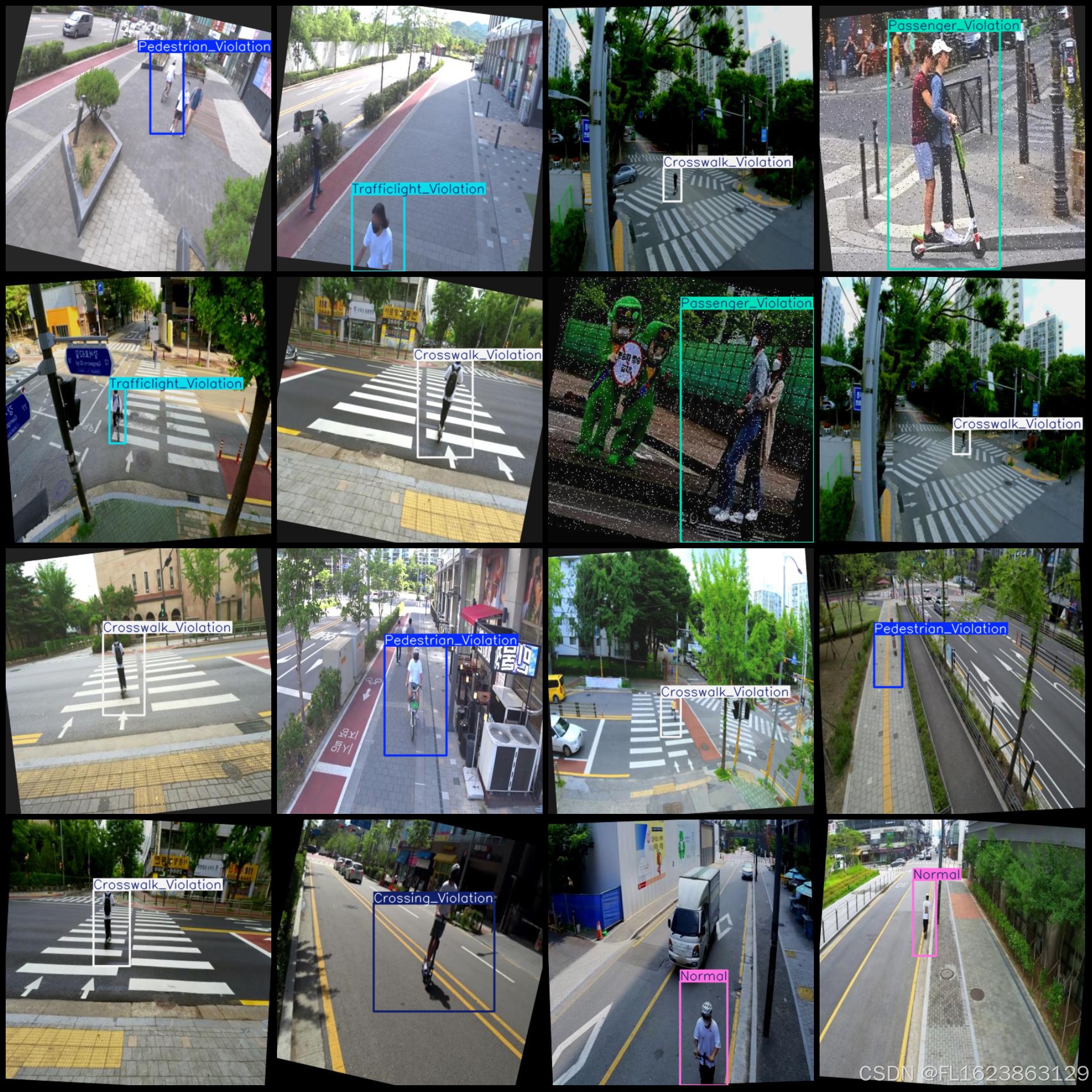
本研究聚焦于利用YOLOv11模型,打造一个高效的交通违规行为检测系统。我们精心构建了一个包含5056张图像的数据集,覆盖了行人违规过马路、行人非法进入斑马线、未佩戴安全头盔、正常行驶、乘客违规以及交通信号灯违规等多种交通违规类别。这一丰富多样的数据集为模型的训练提供了坚实基础,有助于提升检测的准确性和泛化能力。该数据集包含七个主要类别,涵盖了多种交通违规行为,具体包括:Crossing_Violation(越线违规)、Crosswalk_Violation(人行道违规)、Helmet_Violation(未佩戴头盔违规)、Normal(正常行为)、Passenger_Violation(乘客违规)、Pedestrian_Violation(行人违规)以及Trafficlight_Violation(交通信号灯违规)
通过对YOLOv11模型的调用,我们力求在保持其高效检测速度的同时,进一步增强模型对各种交通违规行为的识别精度。此系统的实施将为交通管理部门提供强有力的实时监控和数据分析支持,同时向交通参与者发出安全警示,助力提升交通文明与安全意识。此外,这一基于深度学习的交通违规行为检测系统也为智能交通系统的未来发展奠定了坚实基础,推动了交通领域的全面智能化。因此,本研究不仅具有深远的理论价值,更具备广泛的实际应用前景。
【效果展示】


【测试环境】
windows10 x64系统
VS2019
netframework4.7.2
opencvsharp4.8.0
onnxruntime1.16.3
【模型可以检测出类别】
Crossing_Violation(越线违规)、Crosswalk_Violation(人行道违规)、Helmet_Violation(未佩戴头盔违规)、Normal(正常行为)、Passenger_Violation(乘客违规)、Pedestrian_Violation(行人违规)以及Trafficlight_Violation(交通信号灯违规)
【训练数据集介绍】
数据集格式:Pascal VOC格式+YOLO格式(不包含分割路径的txt文件,仅仅包含jpg图片以及对应的VOC格式xml文件和yolo格式txt文件)
图片数量(jpg文件个数):5056
标注数量(xml文件个数):5056
标注数量(txt文件个数):5056
标注类别数:7
标注类别名称(注意yolo格式类别顺序不和这个对应,而以labels文件夹classes.txt为准):["Crossing_Violation","Crosswalk_Violation","Helmet_Violation","Normal","Passenger_Violation","Pedestrian_Violation","Trafficlight_Violation"]
每个类别标注的框数:
Crossing_Violation 框数 = 896
Crosswalk_Violation 框数 = 1056
Helmet_Violation 框数 = 486
Normal 框数 = 641
Passenger_Violation 框数 = 589
Pedestrian_Violation 框数 = 1389
Trafficlight_Violation 框数 = 278
总框数:5335
使用标注工具:labelImg
标注规则:对类别进行画矩形框
重要说明:暂无
特别声明:本数据集不对训练的模型或者权重文件精度作任何保证,数据集只提供准确且合理标注
图片预览:
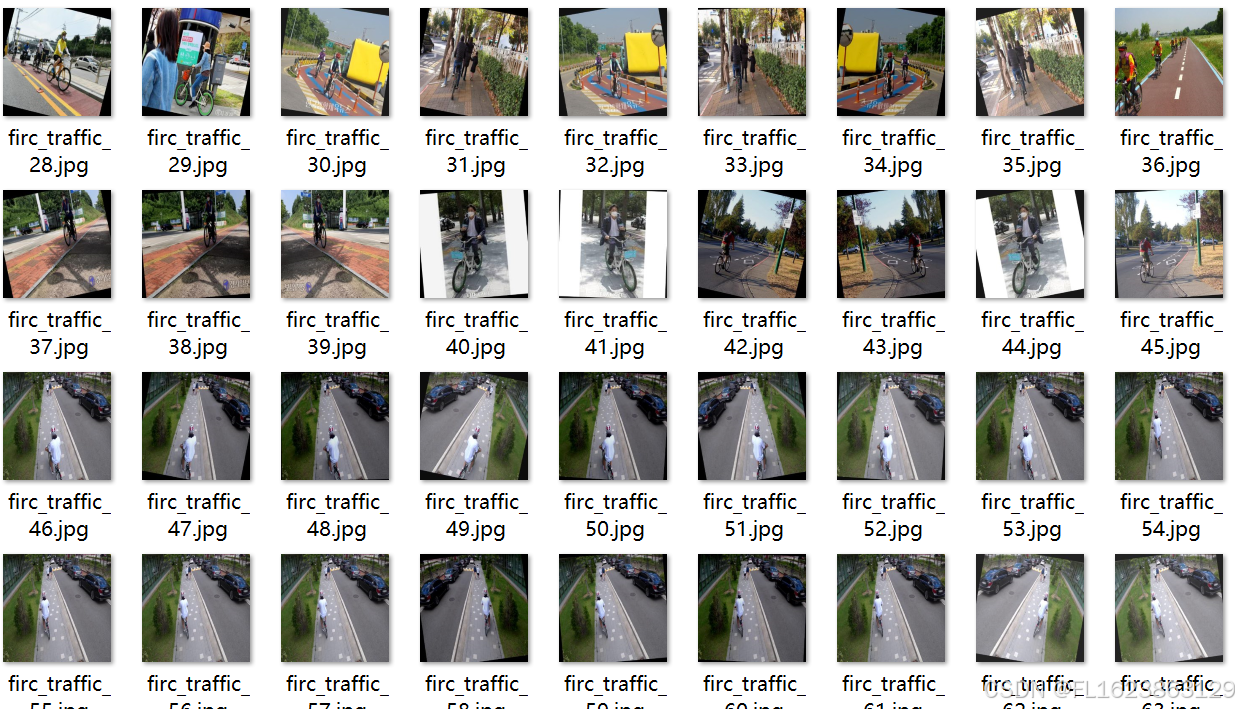
标注例子:
【训练信息】
| 参数 | 值 |
| 训练集图片数 | 4669 |
| 验证集图片数 | 390 |
| 训练map | 97.8% |
| 训练精度(Precision) | 97.2% |
| 训练召回率(Recall) | 97.6% |
验证集评估精度信息:
| Class | Images | Instances | P | R | mAP50 | mAP50-95 |
| all | 390 | 405 | 0.892 | 0.88 | 0.916 | 0.545 |
| Crossing_Violation | 72 | 72 | 0.972 | 0.977 | 0.978 | 0.504 |
| Crosswalk_Violation | 88 | 88 | 0.972 | 0.977 | 0.97 | 0.465 |
| Helmet_Violation | 25 | 27 | 0.744 | 0.815 | 0.874 | 0.592 |
| Normal | 40 | 48 | 0.856 | 0.792 | 0.849 | 0.49 |
| Passenger_Violation | 47 | 47 | 0.965 | 0.979 | 0.993 | 0.867 |
| Pedestrian_Violation | 98 | 102 | 0.847 | 0.812 | 0.883 | 0.442 |
| Trafficlight_Violation | 21 | 21 | 0.889 | 0.81 | 0.868 | 0.452 |
【界面代码】
using OpenCvSharp;
using System;
using System.Collections.Generic;
using System.ComponentModel;
using System.Data;
using System.Diagnostics;
using System.Drawing;
using System.IO;
using System.Linq;
using System.Text;
using System.Threading;
using System.Threading.Tasks;
using System.Windows.Forms;

namespace FIRC
{
    public partial class Form1 : Form
    {

        public bool videoStart = false;//视频停止标志
        string weightsPath = Application.StartupPath + "\\weights";//模型目录
        string labelTxt= Application.StartupPath + "\\weights\\class_names.txt";//类别文件
        Yolov11Manager detetor = new Yolov11Manager();//推理引擎
        public Form1()
        {
            InitializeComponent();
            CheckForIllegalCrossThreadCalls = false;//线程更新控件不报错
        }
        private void LoadWeightsFromDir()
        {
            var di = new DirectoryInfo(weightsPath);
            foreach(var fi in di.GetFiles("*.onnx"))
            {
                comboBox1.Items.Add(fi.Name);
            }
            if(comboBox1.Items.Count>0)
            {
                comboBox1.SelectedIndex = 0;
            }
            else
            {
                tssl_show.Text = "未找到模型,请关闭程序,放入模型到weights文件夹!";
                tsb_pic.Enabled = false;
                tsb_video.Enabled = false;
                tsb_camera.Enabled = false;
            }
        }
        private void Form1_Load(object sender, EventArgs e)
        {
            LoadWeightsFromDir();//从目录加载模型
        }
        public string GetResultString(Result result)
        {
            Dictionary<string, int> resultDict = new Dictionary<string, int>();
            for (int i = 0; i < result.length; i++)
            {
                if(resultDict.ContainsKey( result.classes[i]) )
                {
                    resultDict[result.classes[i]]++;
                }
                else
                {
                    resultDict[result.classes[i]]=1;
                }
            }

            var resultStr = "";
            foreach(var item in resultDict)
            {
                resultStr += string.Format("{0}:{1}\r\n",item.Key,item.Value);
            }
            return resultStr;
        }
        private void tsb_pic_Click(object sender, EventArgs e)
        {
            OpenFileDialog ofd = new OpenFileDialog();
            ofd.Filter = "*.*|*.bmp;*.jpg;*.jpeg;*.tiff;*.tiff;*.png";
            if (ofd.ShowDialog() != DialogResult.OK) return;
            tssl_show.Text = "正在检测中...";
            Task.Run(() => {
                var sw = new Stopwatch();
                sw.Start();
                Mat image = Cv2.ImRead(ofd.FileName);
                detetor.Confidence =Convert.ToSingle(numericUpDown1.Value);
                detetor.IOU = Convert.ToSingle(numericUpDown2.Value);
                var results=detetor.Inference(image);

                var resultImage = detetor.DrawImage(OpenCvSharp.Extensions.BitmapConverter.ToBitmap(image), results);

                sw.Stop();
                pb_show.Image = resultImage;
                tb_res.Text = GetResultString(results);
                tssl_show.Text = "检测已完成!总计耗时"+sw.Elapsed.TotalSeconds+"秒";
            });


        }

        public void VideoProcess(string videoPath)
        {
            Task.Run(() => {

                detetor.Confidence = Convert.ToSingle(numericUpDown1.Value);
                detetor.IOU = Convert.ToSingle(numericUpDown2.Value);
                VideoCapture capture = new VideoCapture(videoPath);
                if (!capture.IsOpened())
                {
                    tssl_show.Text="视频打开失败!";
                    return;
                }
                Mat frame = new Mat();
                var sw = new Stopwatch();
                int fps = 0;
                while (videoStart)
                {

                    capture.Read(frame);
                    if (frame.Empty())
                    {
                        Console.WriteLine("data is empty!");
                        break;
                    }
                    sw.Start();
                    var results = detetor.Inference(frame);
                    var resultImg = detetor.DrawImage(frame,results);
                    sw.Stop();
                    fps = Convert.ToInt32(1 / sw.Elapsed.TotalSeconds);
                    sw.Reset();
                    Cv2.PutText(resultImg, "FPS=" + fps, new OpenCvSharp.Point(30, 30), HersheyFonts.HersheyComplex, 1.0, new Scalar(255, 0, 0), 3);
                    //显示结果
                    pb_show.Image = OpenCvSharp.Extensions.BitmapConverter.ToBitmap(resultImg);
                    tb_res.Text = GetResultString(results);
                    Thread.Sleep(5);


                }

                capture.Release();

                pb_show.Image = null;
                tssl_show.Text = "视频已停止!";
                tsb_video.Text = "选择视频";

            });
        }
        public void CameraProcess(int cameraIndex=0)
        {
            Task.Run(() => {

                detetor.Confidence = Convert.ToSingle(numericUpDown1.Value);
                detetor.IOU = Convert.ToSingle(numericUpDown2.Value);
                VideoCapture capture = new VideoCapture(cameraIndex);
                if (!capture.IsOpened())
                {
                    tssl_show.Text = "摄像头打开失败!";
                    return;
                }
                Mat frame = new Mat();
                var sw = new Stopwatch();
                int fps = 0;
                while (videoStart)
                {

                    capture.Read(frame);
                    if (frame.Empty())
                    {
                        Console.WriteLine("data is empty!");
                        break;
                    }
                    sw.Start();
                    var results = detetor.Inference(frame);
                    var resultImg = detetor.DrawImage(frame, results);
                    sw.Stop();
                    fps = Convert.ToInt32(1 / sw.Elapsed.TotalSeconds);
                    sw.Reset();
                    Cv2.PutText(resultImg, "FPS=" + fps, new OpenCvSharp.Point(30, 30), HersheyFonts.HersheyComplex, 1.0, new Scalar(255, 0, 0), 3);
                    //显示结果
                    pb_show.Image = OpenCvSharp.Extensions.BitmapConverter.ToBitmap(resultImg);
                    tb_res.Text = GetResultString(results);
                    Thread.Sleep(5);


                }

                capture.Release();

                pb_show.Image = null;
                tssl_show.Text = "摄像头已停止!";
                tsb_camera.Text = "打开摄像头";

            });
        }
        private void tsb_video_Click(object sender, EventArgs e)
        {
            if(tsb_video.Text=="选择视频")
            {
                OpenFileDialog ofd = new OpenFileDialog();
                ofd.Filter = "视频文件(*.*)|*.mp4;*.avi";
                if (ofd.ShowDialog() != DialogResult.OK) return;
                videoStart = true;
                VideoProcess(ofd.FileName);
                tsb_video.Text = "停止";
                tssl_show.Text = "视频正在检测中...";

            }
            else
            {
                videoStart = false;

            }
        }

        private void tsb_camera_Click(object sender, EventArgs e)
        {
            if (tsb_camera.Text == "打开摄像头")
            {
                videoStart = true;
                CameraProcess(0);
                tsb_camera.Text = "停止";
                tssl_show.Text = "摄像头正在检测中...";

            }
            else
            {
                videoStart = false;

            }
        }

        private void tsb_exit_Click(object sender, EventArgs e)
        {
            videoStart = false;
            this.Close();
        }

        private void trackBar1_Scroll(object sender, EventArgs e)
        {
            numericUpDown1.Value = Convert.ToDecimal(trackBar1.Value / 100.0f);
        }

        private void trackBar2_Scroll(object sender, EventArgs e)
        {
            numericUpDown2.Value = Convert.ToDecimal(trackBar2.Value / 100.0f);
        }

        private void numericUpDown1_ValueChanged(object sender, EventArgs e)
        {
            trackBar1.Value = (int)(Convert.ToSingle(numericUpDown1.Value) * 100);
        }

        private void numericUpDown2_ValueChanged(object sender, EventArgs e)
        {
            trackBar2.Value = (int)(Convert.ToSingle(numericUpDown2.Value) * 100);
        }

        private void comboBox1_SelectedIndexChanged(object sender, EventArgs e)
        {
            tssl_show.Text="加载模型:"+comboBox1.Text;
            detetor.LoadWeights(weightsPath+"\\"+comboBox1.Text,labelTxt);
            tssl_show.Text = "模型加载已完成!";
        }
    }
}
【使用步骤】
使用步骤:
(1)首先根据官方框架ultralytics安装教程安装好yolov8环境,并根据官方export命令将自己pt模型转成onnx模型
(2)使用vs2019打开sln项目,选择x64 release并且修改一些必要的参数,比如输入shape等,点击运行即可查看最后效果
特别注意如果运行报错了,请参考我的博文进行重新引用我源码的DLL:[C#]opencvsharp报错System.Memory,Version=4.0.1.2,Culture=neutral,PublicKeyToken=cc7b13fcd2ddd51“版本高于所引_未能加载文件或程序集“system.memory, version=4.0.1.2, culture-CSDN博客
【提供文件】
C#源码
yolov11n.onnx模型(提供pytorch模型)
训练的map,P,R曲线图(在weights\results.png)
测试图片(在test_img文件夹下面)
注意提供训练的数据集
更多推荐


 17
 0
- 0


 已为社区贡献21条内容

所有评论(0)