
Nginx 配置文件 nginx.conf 说明、内置变量、常用命令
·
目录
1、nginx.conf 配置文件在 %nginx_home%/conf 目录下:

nginx.conf 文件详解
1、下面是一个 nginx.conf 配置文件的基本结构:
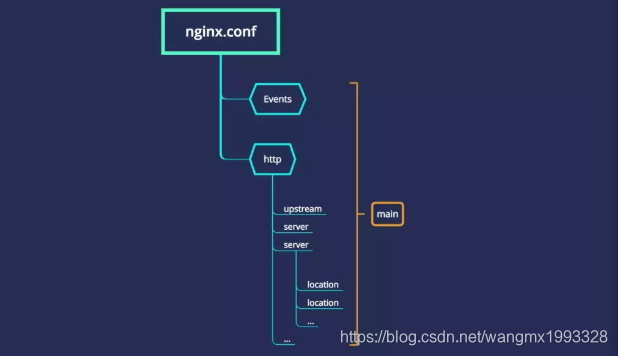
| events | 配置影响 nginx 服务器或与用户的网络连接。 |
| main | nginx 的全局配置,对全局生效。 |
| http | 可以嵌套多个 server,配置代理,缓存,日志定义等绝大多数功能和第三方模块的配置。 |
| server | 配置虚拟主机的相关参数,一个 http 中可以有多个 server,一个 Server 相当于一个虚拟主机。 |
| location | 配置请求的路由,以及各种页面的处理情况。一个 server 可以有多个 localtion 路由。 |
| upstream | 配置后端服务器具体地址,负载均衡配置不可或缺的部分。(默认是没有的,需要时得自己添加) |
2、nginx.conf 配置文件内容介绍如下:
#创建进程的用户和用户组,多个时用空格隔开
#user  nobody;
#服务进程数量,一般等于 CPU 数量
worker_processes  1;

#全局错误日志定义,建议开启error级别日志.[ debug | info | notice | warn | error | crit ]
error_log  logs/error.log;
#error_log  logs/error.log  notice;
#error_log  logs/error.log  info;

#记录进程 ID 的文件
#pid        logs/nginx.pid;

events {
	#一个 worker_processe 允许的最大并发连接数量
    worker_connections  1024;
}

http {
    include       mime.types;
    default_type  application/octet-stream;

    #log_format  main  '$remote_addr - $remote_user [$time_local] "$request" '
    #                  '$status $body_bytes_sent "$http_referer" '
    #                  '"$http_user_agent" "$http_x_forwarded_for"';

    #access_log  logs/access.log  main;

    sendfile        on;
    #tcp_nopush     on;

    #keepalive_timeout  0;
    #http连接的持续时间
    keepalive_timeout  65;

	#gzip压缩设置,开启或关闭
    #gzip  on;

	#设定负载均衡的服务器列表,可以设置多个 upstream,使用不同的名称 wmx 区分即可
	#upstream 默认是没有,需要自己添加
	upstream wmx {
	    #weigth参数表示权值,权值越高被分配到的几率越大
	    server 127.0.0.1:8081 weight=5;
	    server 127.0.0.1:8082 weight=5;
	    server 127.0.0.1:8083 weight=5;
	}

    server {
    	#nginx监听的端口号
        listen       80;
        #当前 server(虚拟主机)的域名,可以有多个,用空格隔开
        server_name  localhost;
        #字符编码方式
        #charset koi8-r;

        #设定本虚拟主机的访问日志。关闭日志可以减少IO,提高性能。
        #access_log  logs/host.access.log  main;

        #默认请求
        location / {
            #定义服务器的默认网站根目录位置
            root   html;
            #定义首页索引文件的名称
            index  index.html index.htm;

            #请求转向 wmx 定义的服务器列表
            proxy_pass http://wmx
        }

        #error_page  404              /404.html;

        # redirect server error pages to the static page /50x.html
        #
        error_page   500 502 503 504  /50x.html;
        location = /50x.html {
            root   html;
        }

        # proxy the PHP scripts to Apache listening on 127.0.0.1:80
        #
        #location ~ \.php$ {
        #    proxy_pass   http://127.0.0.1;
        #}

        # pass the PHP scripts to FastCGI server listening on 127.0.0.1:9000
        #
        #location ~ \.php$ {
        #    root           html;
        #    fastcgi_pass   127.0.0.1:9000;
        #    fastcgi_index  index.php;
        #    fastcgi_param  SCRIPT_FILENAME  /scripts$fastcgi_script_name;
        #    include        fastcgi_params;
        #}

        # deny access to .htaccess files, if Apache's document root
        # concurs with nginx's one
        #
        #location ~ /\.ht {
        #    deny  all;
        #}
    }


    # another virtual host using mix of IP-, name-, and port-based configuration
    #
    #server {
    #    listen       8000;
    #    listen       somename:8080;
    #    server_name  somename  alias  another.alias;

    #    location / {
    #        root   html;
    #        index  index.html index.htm;
    #    }
    #}


    # HTTPS server
    #
    #server {
    #    listen       443 ssl;
    #    server_name  localhost;

    #    ssl_certificate      cert.pem;
    #    ssl_certificate_key  cert.key;

    #    ssl_session_cache    shared:SSL:1m;
    #    ssl_session_timeout  5m;

    #    ssl_ciphers  HIGH:!aNULL:!MD5;
    #    ssl_prefer_server_ciphers  on;

    #    location / {
    #        root   html;
    #        index  index.html index.htm;
    #    }
    #}

}
nginx 内置全局变量
1、Nginx 作为一个成熟、久经考验的负载均衡软件,与其提供丰富、完整的内置变量是分不开的,它极大增加了对 Nginx 网络行为的控制细度。
2、这些变量大部分都是在请求进入时解析的,并把他们缓存到请求 cycle 中,方便下一次获取使用。
3、下面是 nginx 配置中常用的内置全局变量,可以在配置的任何位置使用它们:
| 名称 | 说明 |
|---|---|
| $arg_name | 请求中的name参数 |
| $args | 请求中的参数 |
| $binary_remote_addr | 远程地址的二进制表示 |
| $body_bytes_sent | 已发送的消息体字节数 |
| $content_length | HTTP请求信息里的"Content-Length" |
| $content_type | 请求信息里的"Content-Type" |
| $document_root | 针对当前请求的根路径设置值 |
| $document_uri | 与$uri相同; 比如 /test2/test.php |
| $host | 请求信息中的"Host",如果请求中没有Host行,则等于设置的服务器名 |
| $hostname | 机器名使用 gethostname系统调用的值 |
| $http_cookie | cookie 信息 |
| $http_referer | 引用地址 |
| $http_user_agent | 客户端代理信息 |
| $http_via | 最后一个访问服务器的Ip地址。 |
| $http_x_forwarded_for | 相当于网络访问路径 |
| $is_args | 如果请求行带有参数,返回“?”,否则返回空字符串 |
| $limit_rate | 对连接速率的限制 |
| $nginx_version | 当前运行的nginx版本号 |
| $pid | worker进程的PID |
| $query_string | 与$args相同 |
| $realpath_root | 按root指令或alias指令算出的当前请求的绝对路径。其中的符号链接都会解析成真是文件路径 |
| $remote_addr | 客户端IP地址 |
| $remote_port | 客户端端口号 |
| $remote_user | 客户端用户名,认证用 |
| $request | 用户请求 |
| $request_body | 这个变量(0.7.58+)包含请求的主要信息。在使用proxy_pass或fastcgi_pass指令的location中比较有意义 |
| $request_body_file | 客户端请求主体信息的临时文件名 |
| $request_completion | 如果请求成功,设为"OK";如果请求未完成或者不是一系列请求中最后一部分则设为空 |
| $request_filename | 当前请求的文件路径名,比如/opt/nginx/www/test.php |
| $request_method | 请求的方法,比如"GET"、"POST"等 |
| $request_uri | 请求的URI,带参数 |
| $scheme | 所用的协议,比如http或者是https |
| $server_addr | 服务器地址,如果没有用listen指明服务器地址,使用这个变量将发起一次系统调用以取得地址(造成资源浪费) |
| $server_name | 请求到达的服务器名 |
| $server_port | 请求到达的服务器端口号 |
| $server_protocol | 请求的协议版本,"HTTP/1.0"或"HTTP/1.1" |
| $uri | 请求的URI,可能和最初的值有不同,比如经过重定向之类的 |
nginx 常用命令
start nginx.exe //启动
nginx.exe -s reload //重启
nginx.exe -s stop //快速停止
nginx.exe -s quit //完整有序停止
没配置环境变量时,在 nginx.exe 所在目录下使用命令行即可。
location 解析过程

更多推荐


 6
6 0
0- 0


 已为社区贡献9条内容

所有评论(0)