
c#图片对比度调整
·

c#实现图片对比度调整
测试代码
static void Main()
{
    Bitmap b = file2img("test.jpg");
    Bitmap bb = img_color_contrast(b, 100);
    img2file(bb, "test1.jpg");
}
图片对比度调整代码
public static unsafe Bitmap img_color_contrast(Bitmap src, int contrast)
{
    int contrast_average = 128;
    int width = src.Width;
    int height = src.Height;
    Bitmap back = new Bitmap(width, height);
    Rectangle rect = new Rectangle(0, 0, width, height);
    //这种速度最快
    BitmapData bmpData = src.LockBits(rect, ImageLockMode.ReadWrite, PixelFormat.Format24bppRgb);//24位rgb显示一个像素,即一个像素点3个字节,每个字节是BGR分量。Format32bppRgb是用4个字节表示一个像素
    byte* ptr = (byte*)(bmpData.Scan0);
    int pix;
    for (int j = 0; j < height; j++)
    {
        for (int i = 0; i < width; i++)
        {
            //ptr[2]为r值,ptr[1]为g值,ptr[0]为b值
            int[] rgb = new int[3];
            for (int t = 0; t < 3; t++)
            {
                if (ptr[t] < contrast_average)
                {
                    pix = ptr[t] - Math.Abs(contrast);
                    if (pix < 0) pix = 0;
                }
                else
                {
                    pix = ptr[t] + Math.Abs(contrast);
                    if (pix > 255) pix = 255;
                }
                rgb[t] = pix;
            }
            back.SetPixel(i, j, Color.FromArgb(rgb[2], rgb[1], rgb[0]));
            ptr += 3; //Format24bppRgb格式每个像素占3字节
        }
        ptr += bmpData.Stride - bmpData.Width * 3;//每行读取到最后“有用”数据时,跳过未使用空间XX
    }
    src.UnlockBits(bmpData);
    return back;

}
图片读取,和存储函数
//图片读取
public static Bitmap file2img(string filepath)
{
    Bitmap b = new Bitmap(filepath);
    return b;
}
//图片生成
public static void img2file(Bitmap b, string filepath)
{
    b.Save(filepath);
}
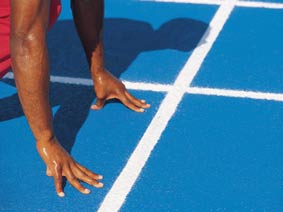
效果图:
原图
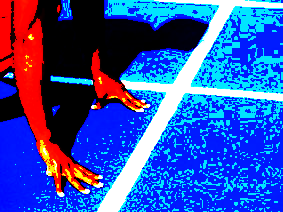
调整100个点的效果图(这和ps里面的对比值不同,不过效果是一样的)
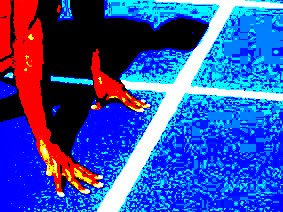
ps中的效果图(连续增大10个100点对比度)
更多推荐

 2
2 0
0- 0


 已为社区贡献31条内容

所有评论(0)