
一篇文章学会javascript
一、js基础
1.三种输出
document.write('<h1>hello word</h1>')
alert()
console.log()
2.输入
prompt()
3.变量与字面量
int a = 18 // a就是变量 18就是字面量
3.var与let与const的区别
var:一般不用了,就是变量可以重复声明
let:变量
const:常量,不能改变,只能回收后再利用
4.数据类型
基本数据类型:number,string,boolean,undefined,null
引用数据类型:object
5.隐式转换
隐式转换:+'132'就能将字符串132转成数字132
显示转换:Number('123'),parseInt('123'),parseFloat('123')
6.一元运算符
+ ++ --
7.逻辑运算符
&& || !
8.分支语句
if if...else switch(){}
9.循环
for while
10.数组
let a = []
栈:a.push()添加元素 a.pop()删除最后一个
队列:a.push()添加元素 a.shift()删除第一个元素
a.unshift()在数组最前面添加元素
a.splice(1,1)从位置1往后删一个
11.对象
let person = {}
12.数学内置对象
Math.ceil() // 向上取整
Math.floor() // 向下取整
Math.round() //四舍五入取整
Math.random() // 生成随机数
Math.pow() //幂函数
Math.abs() // 绝对值
Math.sqrt() // 平方根

Math.floor(Math.random()*(10 + 1)) //生成0到10的随机数
13.其他的一些常见对象
日期对象,事件对象,环境对象
14.排序
a.sort() //升序排序
a.sort(function(a,b){ return b-a}) //降序排序
15.函数()常用
匿名函数:
function(){ }
最普通的:
function add(a,b) {
    return a + b
}
函数表达式:
const mutiply = function(a,b) {
    return a * b
}
箭头函数:没有this
const subtract = (a, b) => a -b
二、用js操作浏览器
window.document
window.navigator
window.location
window.history
window.screen
1.dom与bom
dom就是window.document,对浏览器页面进行操作
bom就是window.history,window.navigator等其他除操作页面以外的操作
2.获取页面元素
document.querySelector()
3.添加事件
btn.addEventListener('click',function(){ })
去除:btn.removeEventListener('click',fn)
(1).click 点击事件
(2)mouseenter/mouseleave 鼠标进出
(3)focus / blur 焦点
(4)keydown / keyup 键盘
(5)input 输入
(6)load
(7)scroll 给window添加
(8)clientWidth / clientHeight 获取自身宽高
(9)offsetTop / offsetLeft 获取距离父级盒子的距离
(10)submit 提交事件
(11)touch 触摸事件 用swiper事件
4.事件流动
(1)一般情况是冒泡:点击小盒子,大盒子也会触发
(2)addEventListener('click',function(){.....},true)这样就是捕获了,与冒泡相反
(3)阻止事件流动:用到事件对象,e.stopPropagation()
(4)阻止默认行为:e.preventDefault()
5.事件委托
就是利用事件冒泡。多个子元素要同时绑定事件,就可在其父元素上绑定事件,通过事件对象控制不同
6.节点操作
查找父节点.parentNode
查找子节点.children
查找兄弟节点.nextElementSibling / .previousElementSibling
追加节点ul.appendChild(li)
删除节点ul.removeChild(ul.children[0])
7.bom对浏览器页面外的操作
location
location.href = "" //页面跳转
location.serch
location.hash
history
//后退功能
history.back()
history.go(-1)
//前进功能
history.forward()
history.go(1)
localStorage
localStorage.setItem(‘key’,‘value’) //   存
localStorage.getItem()              //   取
localStorage.removeItem()           //   删
三、一些重要的特性
1.正则
就是一些验证规则,多用于表单验证。类似
/^(?=.*[A-Za-z])(?=.*\d)[A-Za-z\d_-]{8,16}$/
2.内存泄漏
就是定义的变量,数组,对象,监听的事件等一直占用RAM,没有自动回收掉,就会卡
3.闭包
和嵌套函数长得非常像,但是它是将内部函数返回出去的,而内部函数又用了外部函数的变量,这就导致这个变量就成为这个内部函数的私有变量了,就改不了,只能他用(所以容易和全局变量一样,导致内存泄漏)
function outer() {
  const num = 10; // 外部函数的局部变量
  // 内部函数(闭包的核心:会被“带出去”)
  function inner() {
    console.log(num); // 访问外部变量
  }
  return inner; // 外部函数执行完前,把内部函数“返回出去”
}
// 1. 执行外部函数,得到内部函数(此时 outer 已经执行完了!)
const innerFunc = outer();
// 2. 外部函数执行完后,再调用内部函数
innerFunc(); // 输出 10 → 关键!此时 outer 已经执行完,但 inner 仍能访问 num
4.解构
就是把对象中要用的东西提前提出来
const user = { name: "张三", age: 20 };
const { name: userName, age: userAge } = user; // name 改名为 userName
console.log(userName, userAge); // 张三 20
5.遍历数组
const arr = [1, 2, 3, 4, 5];

//forEach,就和for循环差不多
arr.forEach((item) => {
  console.log(item);
});

//map,不仅能遍历,还能返回一个新数组
const doubleArr = arr.map((item) => {
  return item * 2;
});

//filter,遍历 + 过滤
const evenArr = arr.filter((item) => {
  return item % 2 === 0;
});
6.累加数组
arr.reduce((prev,current) => prev + current,0)
//初始值为0,然后累加
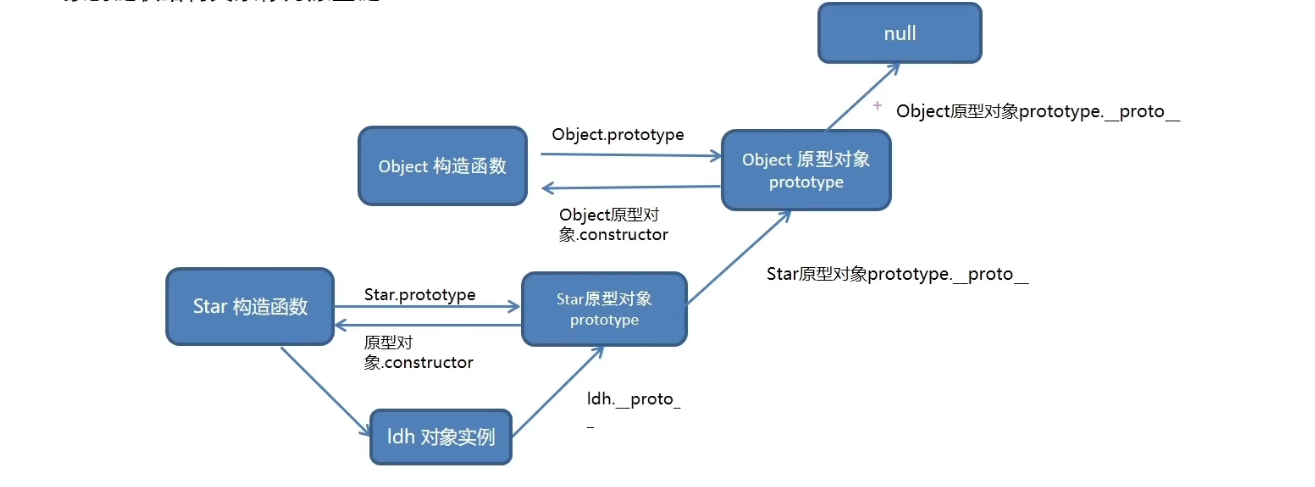
7.原型对象与对象原型
原型对象就是每个对象中的prototype,
原型对象.constructor指向其构造函数
对象原型就是每个对象._proto_,也就是它是属于谁的
8.数组常用方法
find():查找
sort():排序
splice():删除
reverse():交换
9.字符串常用方法
length长度
String()转字符串
split(',')字符串转数组以,隔开
join()数组转字符串
toUpperCase()转大写
toLowerCase()转小写
10.深拷贝
(1)导入lodash库,用o_cloneDeep(obj)即可,其实自己封装也行
(2)将对象转字符串,再把字符串转对象,
const o = JSON.pase(JSON.stringify(obj))
11.防抖
就是频繁触发某一代码,让其只执行最后一次,lodash库中也有_.debounce()
12.节流
单位时间内执行一次,lodash库中_.throttle()
更多推荐


 15
15 0
0- 0


 已为社区贡献1条内容

所有评论(0)