
windows系统下安装DeepSpeed依赖包
·
在Linux环境下
在Linux环境下,只需要
pip install DeepSpeed在Windows环境下
因为这个DeepSpeed依赖包只能在linux环境下边安装,在windows下面安装不了,所以我们需要下载DeepSpeed源码自己构建了Wheel包,然后通过pip命令安装。
Step1:克隆 DeepSpeed 仓库
git clone https://github.com/microsoft/DeepSpeed.git
可能会遇到报错情况,去github下载一个git bash,具体可以参考Git 详细安装教程(详解 Git 安装过程的每一个步骤)_git安装-CSDN博客
Step2:找到 DeepSpeed目录,并且激活对应的虚拟环境,安装项目依赖
# 激活创建好的虚拟环境
conda activate vlm
# 安装项目依赖
pip install -r requirements.txt

Step3:‘dskernels’包无法下载
有两种方式,第一种方式是在当前环境下在终端中输入python setup.py bdist_wheel,第二种方式是运行项目目录下的build_win.bat文件。不过在运行过程中可能会出现一些错误。
我在输入python setup.py bdist_wheel时,遇到了这样的问题,它说‘dskernels’包无法下载。
set KMP_DUPLICATE_LIB_OK=TRUE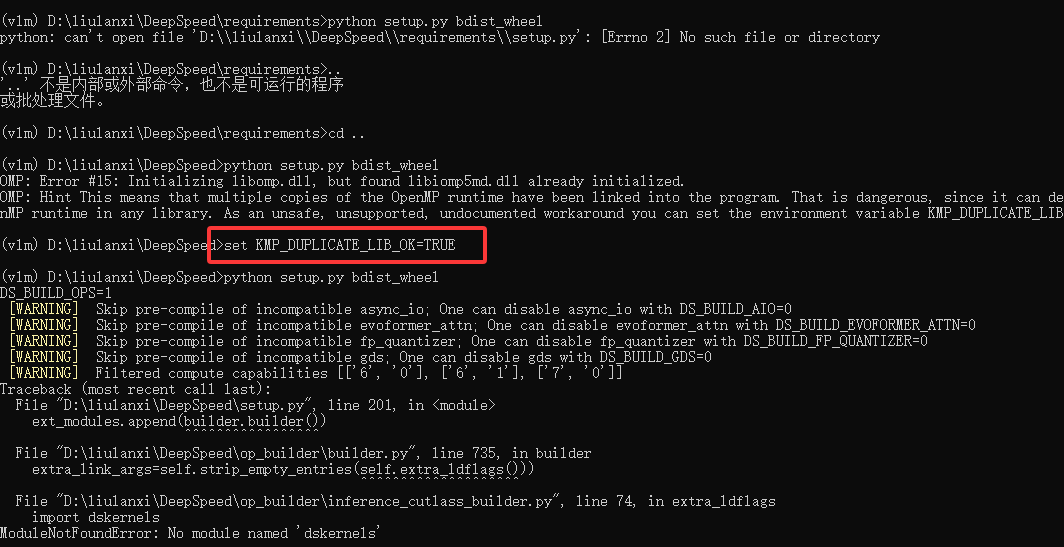

这个依赖包也是在windows系统无法安装,但是我们可以通过其他方式来规避掉这个错误。
解决方法如下:
1. 打开项目的setup.py文件,将里面的153行替换为如下代码:
# 原始代码
BUILD_OP_DEFAULT = int(get_env_if_set('DS_BUILD_OPS', BUILD_OP_PLATFORM))
# 替换后代码
BUILD_OP_DEFAULT = 0

2.找到setup.py文件下的第213行,然后进行替换
# 原始代码
if command_exists('git') and not is_env_set('DS_BUILD_STRING'):
    try:
# 替换后代码
if not is_env_set('DS_BUILD_STRING') and command_exists('git'):
    try:
        result = subprocess.check_output(git_hash_cmd)
        git_hash = result.decode('utf-8').strip()
        result = subprocess.check_output(git_branch_cmd)
        git_branch = result.decode('utf-8').strip()
    except subprocess.CalledProcessError:
        git_hash = "unknown"
        git_branch = "unknown"

然后再试一下那个指令

出了deepspeed build time = 2.09404...secs这句话说明构建成功了。构建成功之后会在DeepSpeed的dist文件夹下出现构建好的wheel包。
Step4:安装wheel包
构建成功之后会在DeepSpeed的dist文件夹下出现构建好的wheel包,此时就可以就可以在你最终想要安装DeepSpeed的虚拟环境下使用pip命令进行安装了,如图所示:
pip install D:\liulanxi\DeepSpeed\dist\deepspeed-0.18.3+53e91a09-py3-none-any.whlStep5:安装成功
参考文献:
更多推荐


 20
 0
- 0


 已为社区贡献2条内容

所有评论(0)