
基于linux系统的LIRC库学习笔记
一:什么是LIRC库
LIRC 是一个允许您解码并发送许多(但不是全部)常用的红外信号遥控器。最新的 linux 内核使得使用一些 IR 遥控器成为可能控件作为常规输入设备。有时,这会使 LIRC 冗余。但是,LIRC 提供了更多的灵活性和功能,并且仍然适用于许多场景。
LIRC 最重要的部分是 lircd 守护进程,它解码设备驱动程序接收的 IR 信号,以及提供有关套接字的信息。它还接受命令,以便在硬件支持这一点。
用户空间应用程序允许您控制带有遥控器的 computer。您可以发送 X11 事件到应用程序、启动程序等等。可能的应用是显而易见的:红外鼠标、电视调谐器卡的遥控器或 CD-ROM、通过远程关机、对VCR 进行编程和/或卫星调谐器与您的计算机等。 如今在 Raspberry Pie 上使用 lirc 非常流行。
官网:
LIRC - Linux Infrared Remote Control
LIRC库是一个开源的红外学习的库,里面有很多接入的相关协议,详细了解可以去官网研究。
二:linux系统手动编译LIRC库编译
1:先安装依赖
sudo apt update
sudo apt install -y build-essential
sudo apt install -y autoconf automake libtool
sudo apt install -y libsysfs-dev libftdi1-dev libusb-dev
sudo apt install -y help2man
sudo apt install -y xsltproc
sudo apt install -y libx11-dev libxext-dev
sudo apt install -y python3-setuptools
sudo apt install -y docbook-xsl
2:获取源码
wget https://sourceforge.net/projects/lirc/files/LIRC/0.10.1/lirc-0.10.1.tar.bz2
tar -xjvf lirc-0.10.1.tar.bz2
cd lirc-0.10.1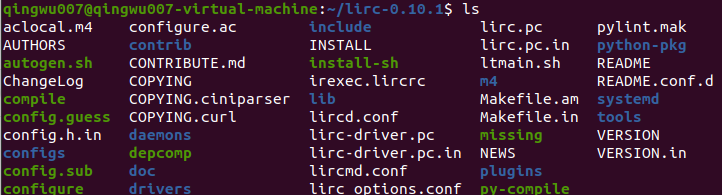
3:配置预编译
./configure
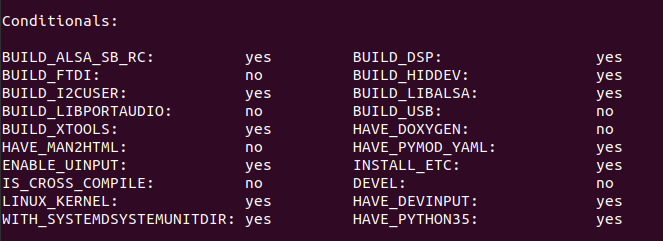
4:编译源码
make && make install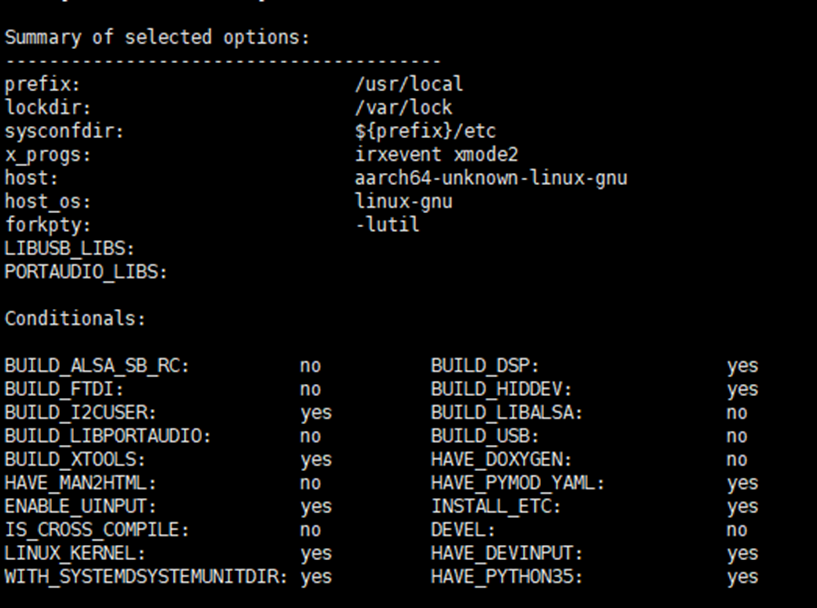
5:查看安装版本
lircd --version
三、红外按键发送
本次例子的核心功能为读取红外配置文件也就是一个.conf文件,然后解析其中的数据,然后使用rk3588设备的外设接口将红外信号发送出去。
其中使用的协议为NEC协议,简单介绍一下NEC协议 。
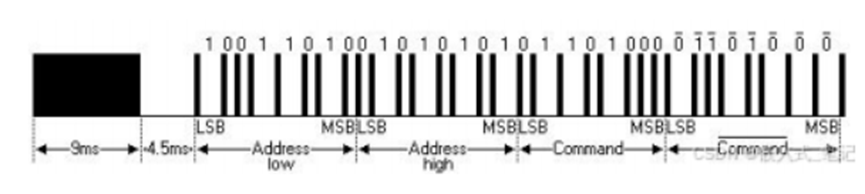
NEC传输格式
NEC协议采用PPM(Pulse Position Modulation,脉冲位置调制)的形式进行编码,数据的每一位(Bit)脉冲长度为560us,由38KHz的载波脉冲 (carrier burst) 进行调制,推荐的载波占空比为 1/3至 1/4。有载波脉冲的地方,其宽度都为 560us,而载波脉冲的间隔时间是不同的。
逻辑“1”的载波脉冲+载波脉冲间隔时间为2.25ms;逻辑“0”的载波脉冲+载波脉冲间隔时间为逻辑“1”的一半,即1.125ms.
每次信息都是按照引导码 (9ms载波脉冲+4.5ms 空闲信号)地址码、地址反码、控制码和控制反码的格式进行传输,因此,单次信息传输的时间是固定不变的。
NEC协议格式:9ms引导码 + 4.5ms间隔 + 32位数据(地址 + 反地址 + 命令 + 反命令)
采用lirc协议规范生成的红外配置文件
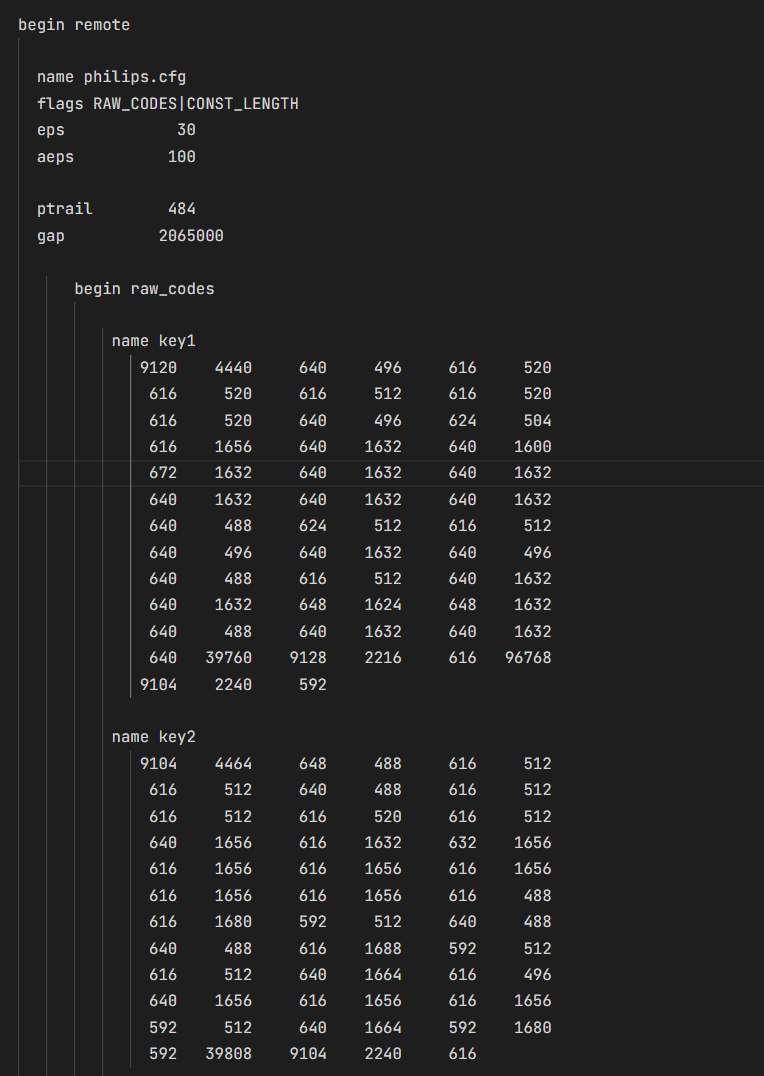
其中的name 对应的数据是红外按键名
下面的数据就是按照NEC协议规范生成的数据,其中的数据是高低电平的持续时间,顺序固定,比如9104就是高电平持续时间单位wield微妙。其中的9104 4464就对应协议引导码9ms引导码 + 4.5ms间隔。
知道了NEC协议的数据样式,就可以实现使用lirc的API函数来实现数据发送了。
其中有个关键的节点就是想要实现红外信号发射需要对应的红外发送设备,比如我使用的RK3588或者树莓派等相关嵌入式设备。

发送流程为:
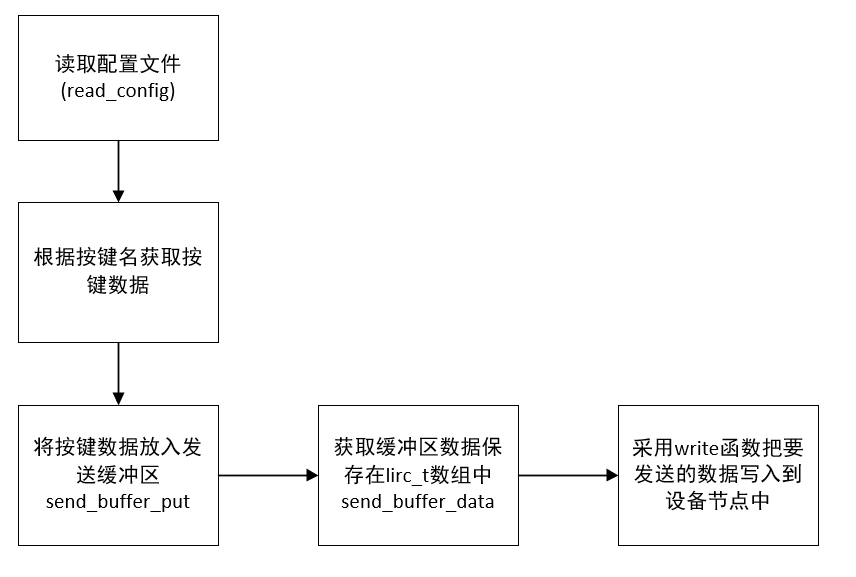
1:读取配置文件内容
/**
 * Parse a lircd.conf config file.
 *
 * @param f Open FILE* connection to file.
 * @param name Normally the path for the open file f.
 * @return Pointer to dynamically allocated ir_remote or NULL on errors,
 */
struct ir_remote* read_config(FILE* f, const char* name);
2:将按键数据放入缓冲区
/**
 * Initializes the global send buffer for transmitting the code in
 * the second argument, residing in the remote in the first.
 * @param remote ir_remote containing code to send.
 * @param code ir_ncode to send.
 * @return 0 on failures, else 1.
 */
int send_buffer_put(struct ir_remote* remote, struct ir_ncode* code);
3:获取缓冲区数据保存到lirc_t数组中
/** @return Number of items accessible in array send_buffer_data(). */
int send_buffer_length(void);
完整的红外解析发送程序:
#include <stdio.h>
#include <stdlib.h>
#include <string.h>
#include <unistd.h>
#include <fcntl.h>
#include <errno.h>
#include "lirc_private.h"  // 使用标准LIRC头文件

// 工具宏定义
#define DimOf(array) (sizeof(array) / sizeof(array[0]))  // 计算数组元素个数
#define SafeSprintf(buf, size, offset, fmt, ...) \       // 安全格式化输出宏
    do { \
        int n = snprintf((buf) + *(offset), (size) - *(offset), fmt, ##__VA_ARGS__); \
        if (n < 0 || n >= (size) - *(offset)) { \
            return -1; \
        } \
        *(offset) += n; \
    } while(0)

// 配置处理结构体定义
typedef struct {
    int cmdCnt;                 // 命令数量
    struct ir_remote *remote;   // 指向LIRC远程设备配置的指针
} IrRemoteProt_t;

// 创建配置处理结构体
static IrRemoteProt_t *newIrRemoteProt(void) {
    IrRemoteProt_t *pProt = malloc(sizeof(IrRemoteProt_t));  // 分配内存
    if (pProt) {
        memset(pProt, 0, sizeof(IrRemoteProt_t));  // 初始化内存为零
    }
    return pProt;
}

// 释放配置处理结构体
static void freeIrRemoteProt(IrRemoteProt_t *pProt) {
    if (pProt) {
        if (pProt->remote) {
            free_config(pProt->remote);  // 释放LIRC配置
        }
        free(pProt);  // 释放结构体内存
    }
}

// 初始化配置处理结构体
static void initIrRemoteProt(IrRemoteProt_t *pProt) {
    struct ir_ncode *all = pProt->remote->codes;  // 获取所有按键代码
    if (all == NULL) {
        pProt->cmdCnt = 0;  // 如果没有按键,数量设为0
        return;
    }

    pProt->cmdCnt = 0;
    while (all->name != NULL) {  // 遍历所有按键
        pProt->cmdCnt++;  // 计数增加
        all++;  // 移动到下一个按键
    }
}

// 打开配置文件并解析
static int IrRemoteOpenProt(const char *pFilePath, IrRemoteProt_t **pProt) {
    if (!pFilePath || !pProt) return -1;  // 参数检查

    // 打开配置文件
    FILE *f = fopen(pFilePath, "r");
    if (!f) return -2;  // 打开失败返回错误

    // 给核心结构体开辟空间
    IrRemoteProt_t *prot = newIrRemoteProt();
    if (!prot) {
        fclose(f);
        return -3;  // 内存分配失败
    }

    // 读取配置文件
    prot->remote = read_config(f, pFilePath);
    fclose(f);  // 关闭文件

    if (!prot->remote) {  // 配置读取失败
        freeIrRemoteProt(prot);
        return -4;
    }

    initIrRemoteProt(prot);  // 初始化配置结构
    *pProt = prot;  // 返回配置结构指针
    return 0;  // 成功返回
}

// 获取按键编码
static int IrRemoteProtGetKeyCode(IrRemoteProt_t *pProt, const char *pKeyName,
                                 lirc_t *pCodeArray, int arraySize,
                                 int *pRealSize) {
    // 参数有效性检查
    if (!pProt || !pKeyName || !pCodeArray || !pRealSize || arraySize <= 0)
        return -1;

    struct ir_remote *remote = pProt->remote;
    struct ir_ncode *code = NULL;

    // 查找按键
    struct ir_ncode *all = remote->codes;
    while (all->name != NULL) {
        if (strcmp(all->name, pKeyName) == 0) {  // 比较按键名
            code = all;  // 找到匹配的按键
            break;
        }
        all++;
    }

    if (!code) return -2;  // 未找到按键

    // 处理切换位掩码(用于某些特殊协议)
    if (remote->toggle_bit_mask > 0) {
        remote->toggle_bit_mask_state ^= remote->toggle_bit_mask;
    }

    // 将按键代码放入发送缓冲区
    if (send_buffer_put(remote, code) == 0)
        return -3;  // 放入缓冲区失败

    int length = send_buffer_length();  // 获取缓冲区长度
    if (length > arraySize)
        return -4;  // 缓冲区太大

    *pRealSize = length;  // 返回实际长度
    const lirc_t *buffer = send_buffer_data();  // 获取缓冲区数据

    // 复制数据到输出数组
    for (int i = 0; i < length; i++) {
        pCodeArray[i] = buffer[i];
    }

    return 0;  // 成功返回
}

// 显示帮助信息
static void show_help(const char *program_name) {
    printf("红外遥控信号发送工具\n");
    printf("用法: %s -d <设备> -f <配置文件> -k <按键名>\n", program_name);
    printf("选项:\n");
    printf("  -d  红外设备路径 (例如: /dev/lirc0)\n");
    printf("  -f  红外配置文件路径\n");
    printf("  -k  要发送的按键名\n");
    printf("  -l  列出配置文件中的所有按键名\n");
    printf("  -h  显示帮助信息\n\n");
    printf("示例:\n");
    printf("  %s -d /dev/lirc0 -f tv.conf -k KEY_POWER\n", program_name);
    printf("  %s -d /dev/lirc0 -f tv.conf -l\n", program_name);
}

// 列出所有按键名
static void list_keys(IrRemoteProt_t *prot) {
    if (!prot || !prot->remote || !prot->remote->codes) {
        printf("未找到按键配置\n");
        return;
    }

    printf("配置文件中的按键列表:\n");
    struct ir_ncode *all = prot->remote->codes;
    int count = 0;

    // 遍历所有按键并打印
    while (all->name != NULL) {
        printf("  %-20s", all->name);
        if (++count % 4 == 0) printf("\n");  // 每行显示4个按键
        all++;
    }

    if (count % 4 != 0) printf("\n");  // 最后换行
    printf("共找到 %d 个按键\n", count);  // 显示总数
}

// 主函数
int main(int argc, char *argv[]) {
    char *device = NULL;        // 设备路径
    char *conf_file = NULL;     // 配置文件路径
    char *key_name = NULL;      // 按键名称
    int list_keys_flag = 0;     // 列表标志
    int opt;                    // 命令行选项

    // 解析命令行参数
    while ((opt = getopt(argc, argv, "d:f:k:lh")) != -1) {
        switch (opt) {
            case 'd': device = optarg; break;           // 设备路径
            case 'f': conf_file = optarg; break;        // 配置文件
            case 'k': key_name = optarg; break;         // 按键名称
            case 'l': list_keys_flag = 1; break;        // 列出按键
            case 'h':
                show_help(argv[0]);                     // 显示帮助
                return 0;
            default:
                show_help(argv[0]);                     // 显示帮助
                return 1;
        }
    }

    // 检查必要参数
    if (!conf_file || (!device && !list_keys_flag)) {
        show_help(argv[0]);  // 参数不足时显示帮助
        return 1;
    }

    // 打开配置文件
    IrRemoteProt_t *prot = NULL;
    int ret = IrRemoteOpenProt(conf_file, &prot);
    if (ret != 0) {
        fprintf(stderr, "错误: 无法打开配置文件 '%s' (错误码: %d)\n", conf_file, ret);
        return 1;
    }

    // 如果要求列出按键
    if (list_keys_flag) {
        list_keys(prot);  // 列出所有按键
        freeIrRemoteProt(prot);  // 释放资源
        return 0;
    }

    // 检查按键名
    if (!key_name) {
        fprintf(stderr, "错误: 必须指定要发送的按键名 (-k)\n");
        freeIrRemoteProt(prot);
        return 1;
    }

    // 打开红外设备
    int fd = open(device, O_RDWR);  // 以读写模式打开设备
    if (fd < 0) {
        fprintf(stderr, "错误: 无法打开设备 '%s' (%s)\n", device, strerror(errno));
        freeIrRemoteProt(prot);
        return 1;
    }

    // 获取按键编码
    lirc_t code[512];  // 使用lirc_t类型存储编码
    int realSize = 0;
    ret = IrRemoteProtGetKeyCode(prot, key_name, code, DimOf(code), &realSize);

    if (ret != 0) {
        fprintf(stderr, "错误: 无法获取按键 '%s' 的编码 (错误码: %d)\n", key_name, ret);
        close(fd);
        freeIrRemoteProt(prot);
        return 1;
    }

    // 发送红外信号
    ssize_t written = write(fd, code, sizeof(lirc_t) * realSize);  // 写入设备
    if (written < 0) {
        fprintf(stderr, "错误: 写入设备失败 (%s)\n", strerror(errno));
    } else {
        printf("成功发送按键 '%s' 的红外信号 (%d 个脉冲)\n", key_name, realSize);
    }

    // 清理资源
    close(fd);  // 关闭设备
    freeIrRemoteProt(prot);  // 释放配置结构
    return 0;
}
lirc_private.h
/*
 * lirc.h - linux infrared remote control header file
 * last modified 2010/06/03 by Jarod Wilson
 */

/**
 * @defgroup  private_api  Internal API
 * @file lirc_private.h
 * @brief Main include file for lirc applications.
 */


#ifndef _LIRC_PRIVATE_H
#define _LIRC_PRIVATE_H

#include "lirc/ir_remote_types.h"
#include "lirc/lirc_log.h"
#include "lirc/lirc_options.h"
#include "lirc/config_file.h"
#include "lirc/dump_config.h"
#include "lirc/input_map.h"
#include "lirc/driver.h"
#include "lirc/ir_remote_types.h"
#include "lirc/drv_admin.h"
#include "lirc/ir_remote.h"
#include "lirc/receive.h"
#include "lirc/release.h"
#include "lirc/serial.h"
#include "lirc/transmit.h"
#include "lirc/ciniparser.h"

#endif
Makefile
# 设置SDK根目录
SYSROOT := /home/qingwu007/aarch64-buildroot-linux-gnu_sdk-buildroot

# 设置工具链前缀
BUILD_TOOL_DIR := $(SYSROOT)
BUILD_TOOL_PREFIX := $(BUILD_TOOL_DIR)/bin/aarch64-buildroot-linux-gnu-

# 定义工具链
CC := $(BUILD_TOOL_PREFIX)gcc
AR := $(BUILD_TOOL_PREFIX)ar
LD := $(BUILD_TOOL_PREFIX)gcc

# 编译参数
CFLAGS := -g -Wall \
          --sysroot=$(SYSROOT) \
          -I$(SYSROOT)/include \
          -I$(SYSROOT)/usr/include \
	  -I$(SYSROOT)/cjson \
          -I$(SYSROOT)/usr/include/aarch64-buildroot-linux-gnu \
          -I./include

# 链接参数
LDFLAGS := --sysroot=$(SYSROOT) \
           -L$(SYSROOT)/lib64 \
           -L$(SYSROOT)/usr/lib64 \
           -Wl,-rpath-link,$(SYSROOT)/lib64 \
           -Wl,-rpath-link,$(SYSROOT)/usr/lib64 \
           -Wl,-rpath,/opt/app/bin       # 添加这一行,指定运行时库路径
           -Wl,--dynamic-linker=/lib64/ld-linux-aarch64.so.1 \
           -fPIC

# 需要链接的库
LIBS :=  -lpthread -lm -lcjson -llirc_client -llirc -llirc_driver

# 目标设置
TARGET := lirc_send

# 源文件处理 - 自动查找src目录下的所有.c文件
SRC_DIR := src
SRCS := $(wildcard $(SRC_DIR)/*.c)
OBJS := $(patsubst $(SRC_DIR)/%.c,%.o,$(SRCS))

.PHONY: all clean

all: $(TARGET)

$(TARGET): $(OBJS)
	$(LD) -o $@ $^ $(LDFLAGS) $(LIBS)

# 模式规则:编译源文件
%.o: $(SRC_DIR)/%.c
	@echo "Compiling $<..."
	$(CC) $(CFLAGS) -c $< -o $@

# 静态库目标示例
libexample.a: $(OBJS)
	$(AR) rcs $@ $^

clean:
	rm -f $(TARGET) $(OBJS) libexample.a

# 安装目标
install: $(TARGET)
	cp $(TARGET) /usr/local/bin

# 调试目标
debug: CFLAGS += -DDEBUG -O0
debug: clean all

.PHONY: install debug
更多推荐

 30
 0
- 0


 已为社区贡献5条内容

所有评论(0)