
RK3568-rk官方android11适配ov8858摄像头
·
环境
soc  : rk3568
board: lubancat2v1
软  件:Android 11
Linux:4.19.232
参考链接
https://blog.csdn.net/daocaokafei/article/details/127621511
相关接口
dvp:digital video port 数字视频接口
mipi_csi:camera serial interface 摄像头串行接口
mipi_dsi:display serial interface 显示串行接口
cif:camera interface 摄像头接口
相关协议
cif:camera interface 摄像头接口,Rockchip芯片中的VIP(Video Input Processor)模块,接收Sensor数据并保存到内存中,仅转存数据,无ISP功能。
isp:image signal processor 图像信号处理器
图像格式
raw:raw图像就是图像感应器将捕捉到的光源信号转化为数字信号的原始数据,是无损的,包含了物体原始的颜色信息等。
	raw数据是sensor输出的原始数据,一般有raw8, raw10, raw12等,分别表示一个像素点有8bit、10bit、12bit数据。
rgb:rgb图像是一种数字图像格式,其名称既指代了该图像格式所使用的颜色空间(红、绿、蓝),也指代了图像本身,其中包含了红、绿、蓝三色通道的像素值。
	rgb565表示每个像素点使用16位来表示。rgb888表示每个像素点使用24位来表示。
yuv:yuv图像是一种将图像亮度(Y)和颜色(U、V)分离的数字图像格式,常用于视频编码和数字图像处理的领域。
ISP
摄像头采集的原始图像格式为raw。
支持 YUV/RGB 格式的模组,一般会在模组上集成 ISP(Image Single Processor),经过A/D 转换过的原始数据经过 ISP 处理生成 YUV 标准格式传到 BB。一般来说,这种设计适用于低像素 Camera 的要求,会在主板上省去一个 DSP,可降低成本。在调试过程中,YUV/RGB 格式的摄像头,其所有参数都可在 kernel 层通过寄存器来控制。调试一般由 sensor的原厂支持。
支持 RawData 格式的模组,由于感光区域的需求,不会再模组内集成 ISP 以最大程度的增大感光区域的面积,提高照片质量。模组把原始的数字信号传给 BB 上的 DSP 进行处理,MTK 自带的 DSP 一般包含 ISP、JPEG encoder、和 DSP 控制芯片。在调试的时候图像的效果需要 MTK 在 HAL 层的参数进行支持。
一、摄像头连接图
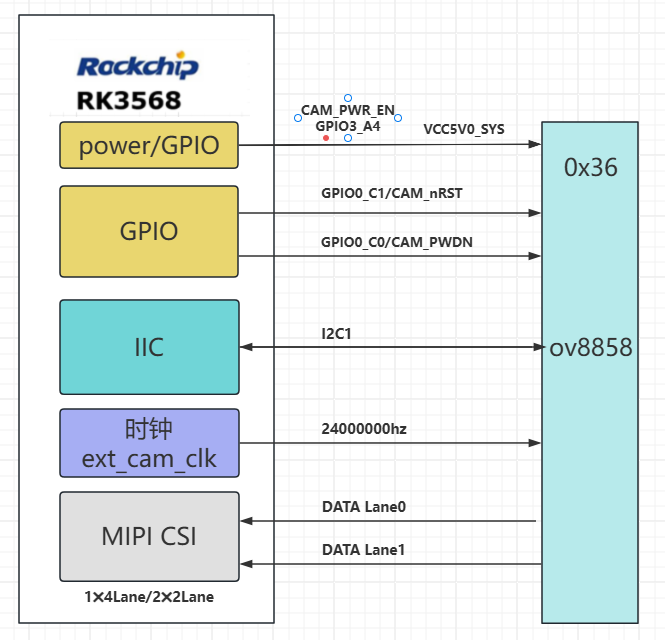
参考上图,摄像头详细信息如下:
- 摄像头有rst、pwdn、电源引脚引脚
- 摄像头连接在I2C通道1
- 摄像头MIPI CSI 2 数据通道
- rk提供的sdk中已经提供camera时钟的设备树信息,此处选择对应时钟即可
- ov8858 用到2根lane
二、设备树
参考sdk中其他平台的ov8858节点来填写
kernel\arch\arm64\boot\dts\rockchip\rk3568-lubancat-csi2.dtsi
	&i2c1 {
		status = "okay";
		// ov5648 Camare
	    // —— 对焦 VCM 驱动 ——
		dw9714: dw9714@0c {
			compatible = "dongwoon,dw9714";
			status = "okay";
			reg = <0x0c>;
	        /* VCM 电流及时序配置(单位通常是 mA 或步进单位) */
			rockchip,camera-module-index = <0>;
			rockchip,vcm-max-current = <100>;   // 最大驱动电流
			rockchip,vcm-start-current = <0>;   // 启动电流
			rockchip,vcm-rated-current = <100>; // 额定电流
			rockchip,vcm-step-mode = <0xd>;     // 驱动步进(L/R 模式编码)
			rockchip,vcm-dlc-enable = <0>;      // 是否启用数字线性校正
			rockchip,vcm-mclk = <0>;	        // 外部 MCLK 选择索引(如无 MCLK 则 0)
			rockchip,vcm-t-src = <0>;           // 时钟源选择(平台定义)
			rockchip,camera-module-facing = "back"; // 摄像头朝向
		};
	    // —— OV8858 摄像头传感器 ——
		ov8858: ov8858@36 {
			compatible = "ovti,ov8858";
			status = "okay";
			reg = <0x36>;   // I²C 从地址 0x36
	        /* 时钟 */
			clocks = <&ext_cam_clk>;    // 外部 XI(XVCLK)时钟
			clock-names = "xvclk";
	        /* 电源域 */
			dovdd-supply= <&cam_dovdd>; /* 1.8v */  // 模拟 I/O 1.8 V
			avdd-supply = <&cam_avdd>;  /* 2.8v */  // 模拟 Core 2.8 V
			dvdd-supply = <&cam_dvdd>;  /* 1.2v */  // 数字 1.2 V
			rotation = <180>;   // 传感器旋转 180°
	        /* Rockchip 摄像头子系统定制属性 */
			rockchip,camera-module-index = <1>; // 模块索引
			rockchip,camera-module-facing = "back"; // 前/后
			rockchip,camera-module-name = "HS5885-BNSM1018-V01";
			rockchip,camera-module-lens-name = "default";
	        /* 与上面 dw9714 节点做关联,用来做自动对焦 */
			lens-focus = <&dw9714>;

			port {
				/* MIPI CSI-2 bus endpoint */
	            /* MIPI CSI-2 总线的端点定义 */
				ov8858_out: endpoint {
	                /* 对应上层 DPHY 节点的输入端点 */
					remote-endpoint = <&dphy0_in_ov8858>;
					clock-lanes = <0>;  // 时钟 Lane 索引
					data-lanes = <1 2>; // 两条数据 Lane,CSI-2 v2格式常见
				};
			};
		};
	};

	&csi2_dphy_hw {
		status = "okay";
	};
	/* csi2_dphy0: 用于CSI2 DPHY全模式,与CSI2_DPHY1和CSI2_DPHY2互斥 */
	&csi2_dphy0 {
		status = "okay";

		ports {
			#address-cells = <1>;
			#size-cells = <0>;

			port@0 {
				reg = <0>;
				#address-cells = <1>;
				#size-cells = <0>;

				dphy0_in_ov8858: endpoint@1 {
					reg = <1>;
					remote-endpoint = <&ov8858_out>;
					data-lanes = <1 2>;
				};
			};

			port@1 {
				reg = <1>;
				#address-cells = <1>;
				#size-cells = <0>;

				dphy0_out: endpoint@1 {
					reg = <1>;
					remote-endpoint = <&isp0_in>;
				};
			};
		};
	};

	&rkisp {
		status = "okay";
	};

	&rkisp_mmu {
		status = "okay";
	};

	&rkisp_vir0 {
		status = "okay";

		port {
			#address-cells = <1>;
			#size-cells = <0>;

			isp0_in: endpoint@0 {
				reg = <0>;
				// csi2 dphy端的 port名
				remote-endpoint = <&dphy0_out>;
			};
		};
	};

	&rkcif_mmu {
		status = "okay";
	};

	&rkcif {
		status = "okay";
	};

	&ov8858 {
		pwdn-gpios = <&gpio0 RK_PC0 GPIO_ACTIVE_HIGH>;
		reset-gpios = <&gpio0 RK_PC1 GPIO_ACTIVE_HIGH>;
	};
设备树的信息最终转换成i2c_client,并传递给ov8858驱动ov8858_probe()
compatible = “ovti,ov8858”;与驱动的of_match_table 保持一致
kernel\drivers\media\i2c\ov8858.c
#if IS_ENABLED(CONFIG_OF)
static const struct of_device_id ov8858_of_match[] = {
	{ .compatible = "ovti,ov8858" },
	{},
};
MODULE_DEVICE_TABLE(of, ov8858_of_match);
#endif

static const struct i2c_device_id ov8858_match_id[] = {
	{ "ovti,ov8858", 0 },
	{ },
};

static struct i2c_driver ov8858_i2c_driver = {
	.driver = {
		.name = OV8858_NAME,
		.pm = &ov8858_pm_ops,
		.of_match_table = of_match_ptr(ov8858_of_match),
	},
	.probe		= &ov8858_probe,
	.remove		= &ov8858_remove,
	.id_table	= ov8858_match_id,
};
三、安卓配置文件
1、配置摄像头信息
在以下两个文件增加对应摄像头信息
hardware/rockchip/camera/etc/camera/camera3_profiles_rk356x.xml
hardware/rockchip/camera/etc/camera/camera3_profiles.xml
参考相近型号的摄像头修改
2、配置ISP相关信息
如果不配置这个的话,在打开摄像头app时候会报错
[  467.991062] ov8858 1-0036: ov8858_g_mbus_config(2870) enter!
[  468.247355] init: Untracked pid 2114 exited with status 0
[  468.255906] init: Untracked pid 2116 exited with status 0
[  468.269429] binder: release 2059:2103 transaction 73978 in, still active
[  468.269471] binder: send failed reply for transaction 73978 to 334:786
[  468.273961] init: Service 'vendor.camera-provider-2-4' (pid 2059) received signal 11
[  468.274308] init: Sending signal 9 to service 'vendor.camera-provider-2-4' (pid 2059) process group...
[  468.275527] libprocessgroup: Successfully killed process cgroup uid 1047 pid 2059 in 0ms
[  468.279271] type=1400 audit(1752729905.110:107): avc: denied { unlink } for comm="init" name="camera_tool" dev="tmpfs" ino=19966 scontext=u:r:init:s0 tcontext=u:object_r:socket_device:s0 tclass=sock_file permissive=0
[  468.288965] init: starting service 'vendor.camera-provider-2-4'...
[  468.289480] init: Could not create socket 'camera_tool': Failed to unlink old socket 'camera_tool': Permission denied
[  468.289557] type=1400 audit(1752729905.120:108): avc: denied { unlink } for comm="init" name="camera_tool" dev="tmpfs" ino=19966 scontext=u:r:init:s0 tcontext=u:object_r:socket_device:s0 tclass=sock_file permissive=0
[  468.315430] libprocessgroup: Failed to open /dev/cpuset/camera-daemon/tasks: No such file or directory: No such file or directory
[  468.315536] libprocessgroup: Failed to apply CameraServiceCapacity task profile: No such file or directory
配置文件:
external\camera_engine_rkaiq\iqfiles\isp21\ov8858_HS5885-BNSM1018-V01_default.json
external\camera_engine_rkaiq\iqfiles\isp21\ov8858_HS5885-BNSM1018-V01_default.xml
四、查看摄像头信息
1、开机初始化log
rk3568_r:/ # dmesg | grep "ov8858"
[    1.039920] ov8858 1-0036: driver version: 00.01.06
[    1.039970] ov8858 1-0036: Failed to get power-gpios, maybe no use
[    1.040084] ov8858 1-0036: Linked as a consumer to regulator.11
[    1.040138] ov8858 1-0036: Linked as a consumer to regulator.10
[    1.040208] ov8858 1-0036: Linked as a consumer to regulator.12
[    1.040229] ov8858 1-0036: lane_num(2)  pixel_rate(144000000)
[    1.046048] ov8858 1-0036: Detected OV008858 sensor, REVISION 0xb2
[    1.517966] rockchip-csi2-dphy csi2-dphy0: dphy0 matches m01_b_ov8858 1-0036:bus type 4
[    1.518071] ov8858 1-0036: ov8858_g_mbus_config(2870) enter!
[    1.520750] ov8858 1-0036: ov8858_g_mbus_config(2870) enter!
[    1.520836] ov8858 1-0036: ov8858_g_mbus_config(2870) enter!
2、打开摄像头app的log
console:/ $ [  385.648695] init: Unable to set property 'sys.gmali.version' from uid:10085 gid:10085 pid:1794: SELinux permission check failed
[  385.649115] type=1107 audit(1752831939.396:70): uid=0 auid=4294967295 ses=4294967295 subj=u:r:init:s0 msg='avc: denied { set } for property=sys.gmali.version pid=1794 uid=10085 gid=10085 scontext=u:r:platform_app:s0:c512,c768 tcontext=u:object_r:system_prop:s0 tclass=property_service permissive=0'
[  385.765556] type=1400 audit(1752831939.513:71): avc: denied { write } for comm="Binder:337_3" name="property_service" dev="tmpfs" ino=11623 scontext=u:r:cameraserver:s0 tcontext=u:object_r:property_socket:s0 tclass=sock_file permissive=0
[  386.154862] type=1400 audit(1752831939.903:72): avc: denied { read } for comm="HwBinder:273_2" name="u:object_r:default_prop:s0" dev="tmpfs" ino=11483 scontext=u:r:hal_camera_default:s0 tcontext=u:object_r:default_prop:s0 tclass=file permissive=0
[  386.155489] type=1400 audit(1752831939.903:73): avc: denied { read } for comm="HwBinder:273_2" name="u:object_r:default_prop:s0" dev="tmpfs" ino=11483 scontext=u:r:hal_camera_default:s0 tcontext=u:object_r:default_prop:s0 tclass=file permissive=0
[  386.419775] ov8858 1-0036: ov8858_g_mbus_config(2870) enter!
[  386.475999] ov8858 1-0036: ov8858_g_mbus_config(2870) enter!
[  386.494651] rockchip-csi2-dphy0: dphy0, data_rate_mbps 720
[  386.494692] ov8858 1-0036: ov8858_g_mbus_config(2870) enter!
[  386.494723] rockchip-csi2-dphy csi2-dphy0: csi2_dphy_s_stream stream on:1, dphy0
[  386.494731] ov8858 1-0036: ov8858_s_stream: on: 1, 3264x2448@15
[  386.986134] init: Unable to set property 'vendor.rga_api.version' from uid:1047 gid:1005 pid:273: SELinux permission check failed
[  386.986174] type=1107 audit(1752831940.736:74): uid=0 auid=4294967295 ses=4294967295 subj=u:r:init:s0 msg='avc: denied { set } for property=vendor.rga_api.version pid=273 uid=1047 gid=1005 scontext=u:r:hal_camera_default:s0 tcontext=u:object_r:vendor_default_prop:s0 tclass=property_service permissive=0'
[  386.987593] init: Unable to set property 'vendor.rga_built.version' from uid:1047 gid:1005 pid:273: SELinux permission check failed
[  386.991736] type=1107 audit(1752831940.736:75): uid=0 auid=4294967295 ses=4294967295 subj=u:r:init:s0 msg='avc: denied { set } for property=vendor.rga_built.version pid=273 uid=1047 gid=1005 scontext=u:r:hal_camera_default:s0 tcontext=u:object_r:vendor_default_prop:s0 tclass=property_service permissive=0'
3、查看ov8858设备
# 列出设备
v4l2-ctl --list-devices

# 列出某个设备支持的参数
v4l2-ctl -d /dev/video0 -l  // dev/video0为设备名称
v4l2-ctl -d /dev/video0 --list-ctrls

# 获取某个控制参数的值
v4l2-ctl -d /dev/video0 --get-ctrl=brightness  // dev/video0为设备名称

# 获取支持的编码格式
# v4l2-ctl  --list-formats -d /dev/video4

# 设置免征额控制参数
v4l2-ctl -d /dev/video0 --set-ctrl=brightness=0  // set-ctrl=<name>=<value>
v4l2-ctl -d /dev/video0 --set-ctrl analogue_gain=240  // 增加图片亮度

 v4l2-ctl -d /dev/video0 --list-ctrls 查看gain设置值

# 预览支持的格式
v4l2-ctl --list-formats-ext --device /dev/video0

# 获取指定设备的所有信息
v4l2-ctl --all --device /dev/video0

# 增加曝光
v4l2-ctl -d /dev/video0 --set-ctrl exposure=3324  // exposure 4-3324
增加曝光exposure
exposure值区间为: 4-3324
命令实例:
v4l2-ctl -d /dev/video0 --set-ctrl exposure=3324

#增加图片亮度analogue_gain
analogue_gain用于设置显示的图像的亮度
analogue_gain值区间:16-2048
v4l2-ctl -d /dev/video0 --set-ctrl analogue_gain=240


# 抓帧
v4l2-ctl -d /dev/video0 --set-fmt-video=width=800,height=600,pixelformat=NV12 --stream-mmap=3 --stream-to=/sdcard/out.yuv --stream-skip=9 --stream-count=1
--stream-mmap=3 --stream-to=/sdcard/out.yuv --stream-skip=9 --stream-count=1

# 测试画面
v4l2-ctl -d /dev/video0 --set-ctrl test_pattern=0


media-ctl -d /dev/media0 -p
4、查看拓扑
media-ctl -d /dev/media0 -p
rk3568_r:/ # media-ctl -d /dev/media0 -p
Opening media device /dev/media0
Enumerating entities
Found 14 entities
Enumerating pads and links
Media controller API version 0.0.193

Media device information
------------------------
driver          rkisp-vir0
model           rkisp0
serial
bus info
hw revision     0x0
driver version  0.0.193

Device topology
- entity 1: rkisp-isp-subdev (4 pads, 7 links)
            type V4L2 subdev subtype Unknown
            device node name /dev/v4l-subdev0
        pad0: Sink
                [fmt:SBGGR10/3264x2448
                 crop.bounds:(0,0)/3264x2448
                 crop:(0,0)/3264x2448]
                <- "rkisp-csi-subdev":1 []
                <- "rkisp_rawrd0_m":0 []
                <- "rkisp_rawrd2_s":0 []
        pad1: Sink
                <- "rkisp-input-params":0 []
        pad2: Source
                [fmt:YUYV2X8/3264x2448
                 crop.bounds:(0,0)/3264x2448
                 crop:(0,0)/3264x2448]
                -> "rkisp_mainpath":0 []
                -> "rkisp_selfpath":0 []
        pad3: Source
                -> "rkisp-statistics":0 []

- entity 6: rkisp-csi-subdev (6 pads, 5 links)
            type V4L2 subdev subtype Unknown
            device node name /dev/v4l-subdev1
        pad0: Sink
                <- "rockchip-csi2-dphy0":1 []
        pad1: Source
                -> "rkisp-isp-subdev":0 []
        pad2: Source
                -> "rkisp_rawwr0":0 []
        pad3: Source
        pad4: Source
                -> "rkisp_rawwr2":0 []
        pad5: Source
                -> "rkisp_rawwr3":0 []

- entity 13: rkisp_mainpath (1 pad, 1 link)
             type Node subtype V4L
             device node name /dev/video0
        pad0: Sink
                <- "rkisp-isp-subdev":2 []

- entity 19: rkisp_selfpath (1 pad, 1 link)
             type Node subtype V4L
             device node name /dev/video1
        pad0: Sink
                <- "rkisp-isp-subdev":2 []

- entity 25: rkisp_rawwr0 (1 pad, 1 link)
             type Node subtype V4L
             device node name /dev/video2
        pad0: Sink
                <- "rkisp-csi-subdev":2 []

- entity 31: rkisp_rawwr2 (1 pad, 1 link)
             type Node subtype V4L
             device node name /dev/video3
        pad0: Sink
                <- "rkisp-csi-subdev":4 []

- entity 37: rkisp_rawwr3 (1 pad, 1 link)
             type Node subtype V4L
             device node name /dev/video4
        pad0: Sink
                <- "rkisp-csi-subdev":5 []

- entity 43: rkisp_rawrd0_m (1 pad, 1 link)
             type Node subtype V4L
             device node name /dev/video5
        pad0: Source
                -> "rkisp-isp-subdev":0 []

- entity 49: rkisp_rawrd2_s (1 pad, 1 link)
             type Node subtype V4L
             device node name /dev/video6
        pad0: Source
                -> "rkisp-isp-subdev":0 []

- entity 55: rkisp-statistics (1 pad, 1 link)
             type Node subtype V4L
             device node name /dev/video7
        pad0: Sink
                <- "rkisp-isp-subdev":3 []

- entity 61: rkisp-input-params (1 pad, 1 link)
             type Node subtype V4L
             device node name /dev/video8
        pad0: Source
                -> "rkisp-isp-subdev":1 []

- entity 67: rockchip-csi2-dphy0 (2 pads, 2 links)
             type V4L2 subdev subtype Unknown
             device node name /dev/v4l-subdev2
        pad0: Sink
                <- "m01_b_ov8858 1-0036":0 []
        pad1: Source
                -> "rkisp-csi-subdev":0 []

- entity 70: m01_b_ov8858 1-0036 (1 pad, 1 link)
             type V4L2 subdev subtype Sensor
             device node name /dev/v4l-subdev3
        pad0: Source
                [fmt:SBGGR10/3264x2448]
                -> "rockchip-csi2-dphy0":0 []

- entity 74: m00_b_dw9714 1-000c (0 pad, 0 link)
             type V4L2 subdev subtype Lens
             device node name /dev/v4l-subdev4
从entity70信息中可以看到:
- 该Entity完整的名称是:m01_b_ov8858 1-0036
- 它是一个V4L2 subdev(Sub-Device) Sensor
- 它对应的节点是/dev/v4l-subdev3,应用程序(如v4l2-ctl)可以打开它,并进行配置
- 它仅有一个输出(Source)节点,记为pad0
- 它的输出格式是[fmt:SBGGR10/3264x2448],其中SBGGR10是一种mbus-code的简称
- 它的Source pad0 链接到"rockchip-csi2-dphy0"的pad0,并且当前的状态是 ENABLED。
更多推荐


 3
 0
- 0


 已为社区贡献1条内容

所有评论(0)