
Poetry安装,windows自定义安装位置
遇事不会看官网
Introduction | Documentation | Poetry - Python dependency management and packaging made easy
前言官网提供了四种安装方式
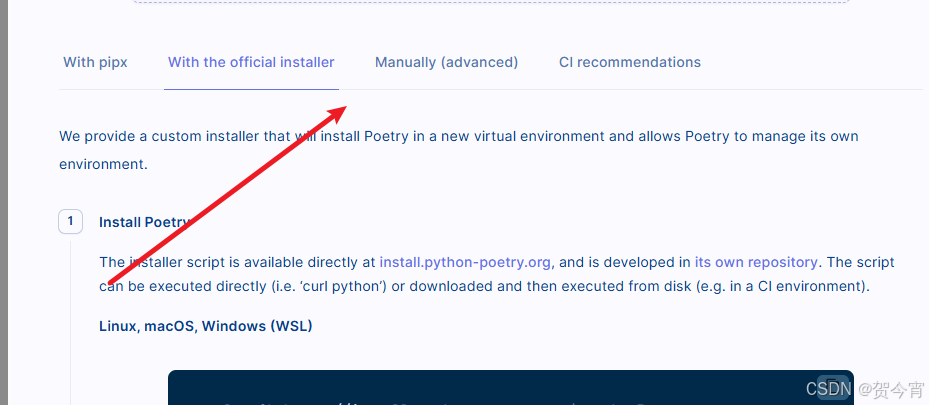
由于pipx容易出问题这里选择了powerShell直装
1.win+R,输入powershell,调出工具

2.自定义poetry的安装位置,在目标位置建Poetry文件夹,在命令行中指令输入预装位置,此处为F:\Poetry,执行此操作poetry才会安装在自定义目录,否则默认安在
%APPDATA%\pypoetryon Windows.
$env:POETRY_HOME = "F:\Poetry"3.安装poetry,此时需要已经安装了python,并与poetry的最新版本相匹配,如果需要安旧版本需要带上版本号,否则会报错,在日志中可以看到match不到某一版本的python,安装那个版本
(Invoke-WebRequest -Uri https://install.python-poetry.org -UseBasicParsing).Content | python -中途报错日志,版本不匹配
ERROR: Ignored the following versions that require a different python version: 1.6.0 Requires-Python >=3.8,<4.0; 1.6.1 Requires-Python >=3.8,<4.0; 1.7.0 Requires-Python >=3.8,<4.0; 1.7.1 Requires-Python >=3.8,<4.0; 1.8.0 Requires-Python >=3.8,<4.0; 1.8.1 Requires-Python >=3.8,<4.0; 1.8.2 Requires-Python >=3.8,<4.0; 1.8.3 Requires-Python <4.0,>=3.8; 1.8.4 Requires-Python <4.0,>=3.8; 1.8.5 Requires-Python <4.0,>=3.8; 2.0.0 Requires-Python <4.0,>=3.9; 2.0.1 Requires-Python <4.0,>=3.9; 2.1.0 Requires-Python <4.0,>=3.9; 2.1.1 Requires-Python <4.0,>=3.9
ERROR: Could not find a version that satisfies the requirement poetry==2.1.1 (from versions: 0.1.0, 0.2.0, 0.3.0, 0.4.0, 0.4.0.post1, 0.4.1, 0.4.2, 0.5.0b1, 0.5.0b2, 0.5.0, 0.6.0, 0.6.1, 0.6.2, 0.6.3b1, 0.6.3b2, 0.6.3b3, 0.6.3b4, 0.6.3b5, 0.6.3b6, 0.6.3b7, 0.6.3, 0.6.4b1, 0.6.4, 0.6.5, 0.7.0b1, 0.7.0b2, 0.7.0b3, 0.7.0b4, 0.7.0, 0.7.1, 0.8.0a0, 0.8.0a1, 0.8.0a2, 0.8.0a3, 0.8.0a4, 0.8.0, 0.8.1a0, 0.8.1, 0.8.2, 0.8.3, 0.8.4, 0.8.5a0, 0.8.5, 0.8.6, 0.9.0a0, 0.9.0a1, 0.9.0a2, 0.9.0a3, 0.9.0, 0.9.1, 0.10.0a0, 0.10.0a1, 0.10.0a2, 0.10.0a3, 0.10.0, 0.10.1, 0.10.2, 0.10.3, 0.11.0a0, 0.11.0a1, 0.11.0a2, 0.11.0a3, 0.11.0a4, 0.11.0, 0.11.1, 0.11.2, 0.11.3, 0.11.4, 0.11.5, 0.12.0a0, 0.12.0a1, 0.12.0a2, 0.12.0a3, 0.12.0a4, 0.12.0a5, 0.12.0, 0.12.1, 0.12.2, 0.12.3, 0.12.4, 0.12.5, 0.12.6, 0.12.7, 0.12.8, 0.12.9, 0.12.10, 0.12.11, 0.12.12, 0.12.13, 0.12.14, 0.12.15, 0.12.16, 0.12.17, 1.0.0a0, 1.0.0a1, 1.0.0a2, 1.0.0a3, 1.0.0a4, 1.0.0a5, 1.0.0b1, 1.0.0b2, 1.0.0b3, 1.0.0b4, 1.0.0b5, 1.0.0b6, 1.0.0b7, 1.0.0b8, 1.0.0b9, 1.0.0, 1.0.1, 1.0.2, 1.0.3, 1.0.4, 1.0.5, 1.0.6, 1.0.7, 1.0.8, 1.0.9, 1.0.10, 1.1.0a1, 1.1.0a2, 1.1.0a3, 1.1.0b1, 1.1.0b2, 1.1.0b3, 1.1.0b4, 1.1.0rc1, 1.1.0, 1.1.1, 1.1.2, 1.1.3, 1.1.4, 1.1.5, 1.1.6, 1.1.7, 1.1.8, 1.1.9, 1.1.10, 1.1.11, 1.1.12, 1.1.13, 1.1.14, 1.1.15, 1.2.0a1, 1.2.0a2, 1.2.0b1, 1.2.0b2, 1.2.0b3, 1.2.0rc1, 1.2.0rc2, 1.2.0, 1.2.1, 1.2.2, 1.3.0, 1.3.1, 1.3.2, 1.4.0, 1.4.1, 1.4.2, 1.5.0, 1.5.1)
ERROR: No matching distribution found for poetry==2.1.1
在同一台电脑上装不同版本pythonwindows装多版本python-CSDN博客
4.下载成功配置环境变量,下载成功会有提示,跟据提示选择永久配置环境变量(A),或者每次运行poetry命令前配置(b)复制引号内容
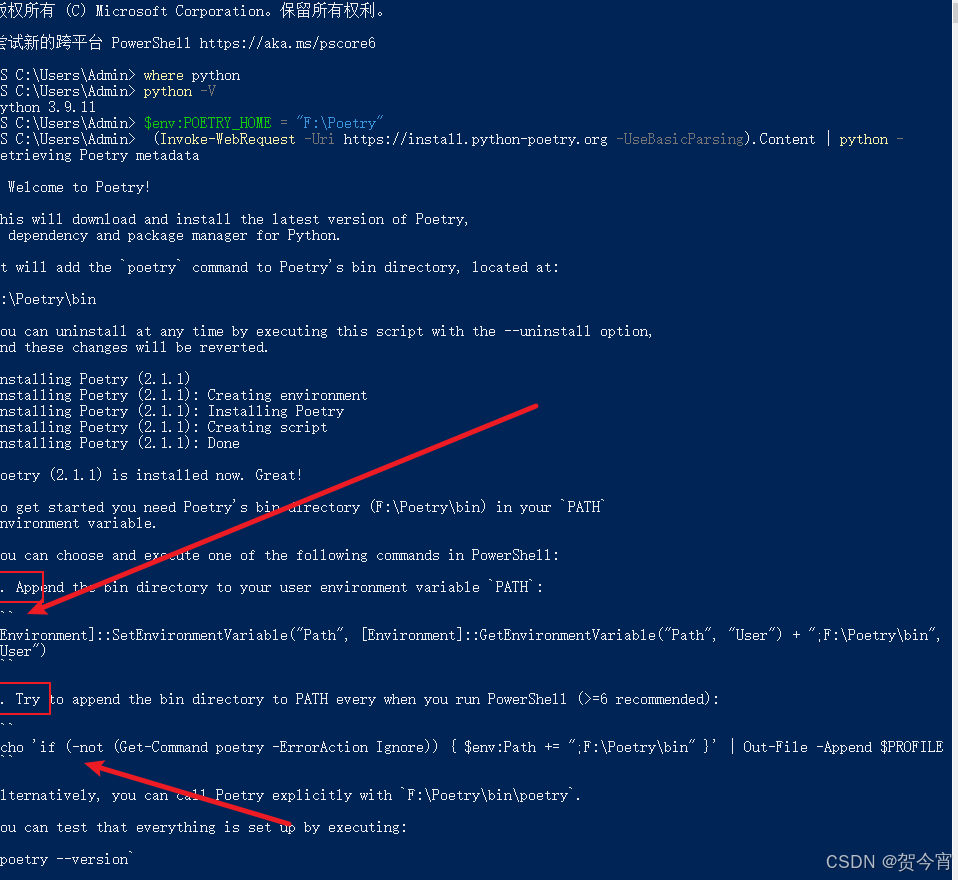
这里永久添加
[Environment]::SetEnvironmentVariable("Path", [Environment]::GetEnvironmentVariable("Path", "User") + ";D:\Poetry\bin", "User")5.检查命令,重新打开cmd
poetry --version
6.使用
更多推荐

 4
 0
- 0


 已为社区贡献3条内容

所有评论(0)