
linux image-webpack-loader下载异常安装依赖不全 webpack 打包图片压缩配置 安装依赖 imagemin-mozjpeg 失败等问题
·
vue.config.js 中开启打包图片压缩配置
// 开启图片压缩
		          config.module
		        .rule('images')
		        .test(/\.(png|jpe?g|gif|svg)(\?.*)?$/)
		        .use('image-webpack-loader')
		        .loader('image-webpack-loader')
		        .options({ bypassOnDebug: true });


//或者指定图片压缩配置

		      config.module
		        .rule('images')
		        .test(/\.(png|jpe?g|gif|svg)(\?.*)?$/)
		        .use('image-webpack-loader')
		        .loader('image-webpack-loader')
//		        .options({ bypassOnDebug: true });
		        .options({
			        mozjpeg: { progressive: true, quality: 65 },
			        optipng: { enabled: false },
			        pngquant: { quality: [0.8, 0.9], speed: 4 },
			        gifsicle: { interlaced: false },
			        webp: { quality: 75 },
			      });
安装依赖
npm install image-webpack-loader --save-dev
通过jenkins 自动化部署时,安装依赖报错
mozjpeg pre-build test failed configure: error: no nasm (Netwide Assembler) found
在linux 安装依赖 提示 nasm缺失 执行如下指令
sudo yum install nasm
然后在安装 imagemin-mozjpeg 依赖
npm install imagemin-mozjpeg --save-dev
linux 安装如下命令时
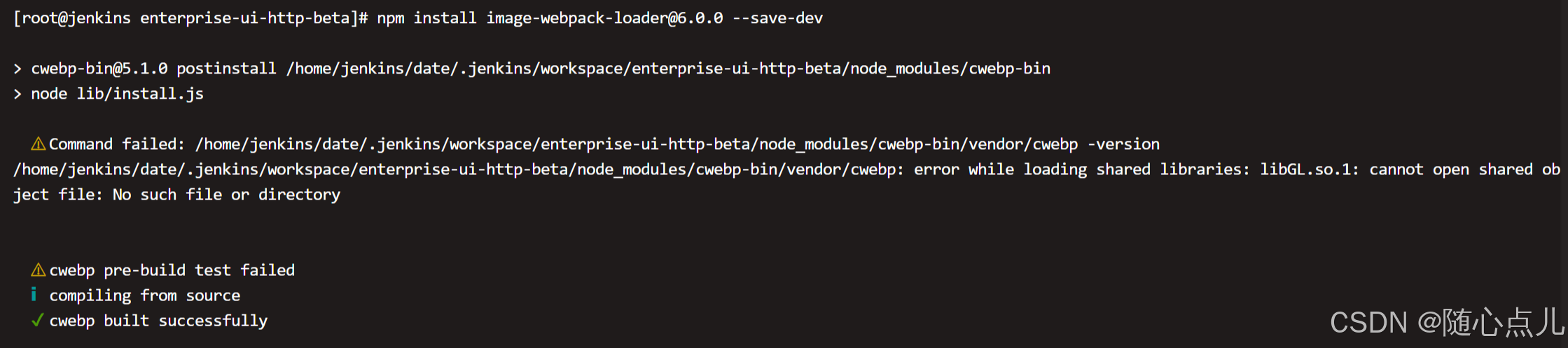
安装如下依赖命令
sudo yum install mesa-libGL
再安装命令 终于没报错
npm install image-webpack-loader@6.0.0 --save-dev
安装过程中 报错

linux需按照libXi,命令如下
sudo yum install libXi
更多推荐


 8
 0
- 0


 已为社区贡献3条内容

所有评论(0)