
Absent Code attribute in method that is not native or abstract in class file android/app/Application
·
问题
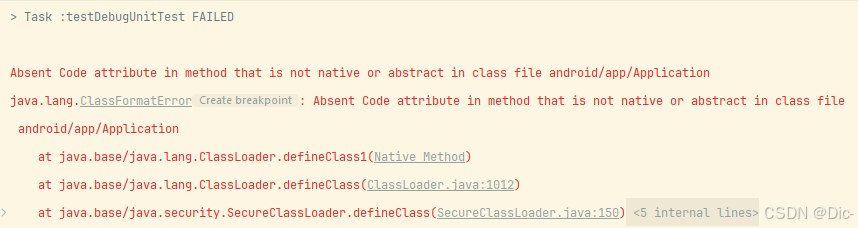
> Task :testDebugUnitTest FAILED
Absent Code attribute in method that is not native or abstract in class file android/app/Application
java.lang.ClassFormatError: Absent Code attribute in method that is not native or abstract in class file android/app/Application
at java.base/java.lang.ClassLoader.defineClass1(Native Method)
一个典型的 Java 类格式错误,通常发生在尝试加载或使用损坏或不完整的类文件时。这种情况下,肯定与单元测试库或框架的兼容性问题有关。具体来说,这样的错误可能与以下几个方面相关:
Robolectric依赖库版本冲突。
不兼容的Android SDK版本。
运行环境中缺失必要的类或代码属性。
解决方案
方法一:更新依赖库版本
确保所有的依赖库版本彼此兼容。尝试使用较新的版本,或者在版本之间找到一个适用的组合。
dependencies {
    testImplementation 'junit:junit:4.13.2'
    testImplementation 'org.robolectric:robolectric:4.7.3'
    testImplementation 'org.mockito:mockito-core:3.11.2'
    testImplementation 'org.mockito:mockito-inline:3.11.2'
}
方法二:检查Compile SDK和Robolectric版本兼容性
确保Robolectric的版本与您的Compile SDK版本兼容。例如,如果您的项目使用API 30(Android 11),请确保Robolectric支持此API级别。
android {
    compileSdkVersion 30
    ...
}

testOptions {
    unitTests {
        includeAndroidResources = true
    }
}
方法三:排查类路径问题
确保在Robolectric配置中使用正确的类路径,避免冲突。例如,在测试的build.gradle配置中,确保指向适当的资源:
testImplementation ('org.robolectric:shadows-framework:4.7.3') {
    exclude group: 'com.google.android.material', module: 'material'
    exclude group: 'androidx.drawerlayout', module: 'drawerlayout'
    exclude group: 'androidx.coordinatorlayout', module: 'coordinatorlayout'
}
方法四:正确配置Robolectric
确保您的Robolectric配置是正确的,特别是如果您正在多模块项目中工作,可能需要自定义Robolectric的环境配置:在测试类中:
@RunWith(RobolectricTestRunner.class)
@Config(sdk = {Build.VERSION_CODES.O_MR1})
public class CarrierConfigUtilsTest {
  //... your test methods
}
更多推荐


 3
 0
- 0


 已为社区贡献7条内容

所有评论(0)