
android 11.0添加系统新字库(可兼容生僻字)并且设置为默认字体
目录
3、在目录framework/base/data/fonts/ 添加AlibabaPuHuiTi-3-55-RegularL3.ttf
4、在frameworks/base/data/fonts/fonts.mk 中添加新字体
5、在frameworks/base/data/fonts/Android.mk中添加新的字体
一、概况:
在android系统开发中,添加新字库是常有的定制化需求,原因是原生的字库不能满足某些特殊的字体需求。
需求:新增字库,可兼容生僻字,并设置为默认字体。
二、添加新字库方案:
1、下载字库
找到想下载的字库来下载,如需适配生僻字,可重点关注对应的项。目前需求是生僻字库,根据搜索,发现阿里巴巴普惠体适合需求。
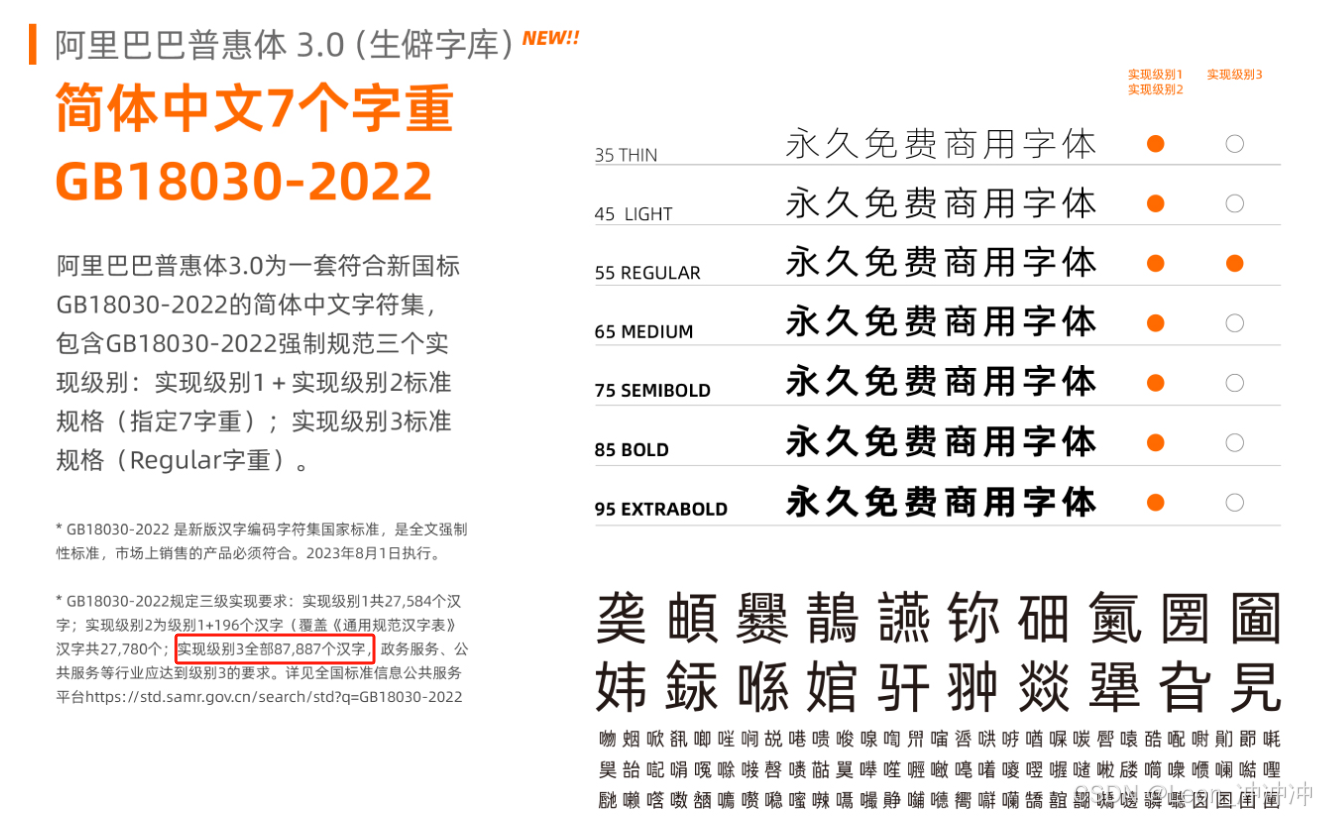
AlibabaPuHuiTi-3-55-RegularL3实现级别3涵盖全部87887个汉字,可使用;
下载了字库需要知道对应的字重weight,后续会用到;
字重对应关系:
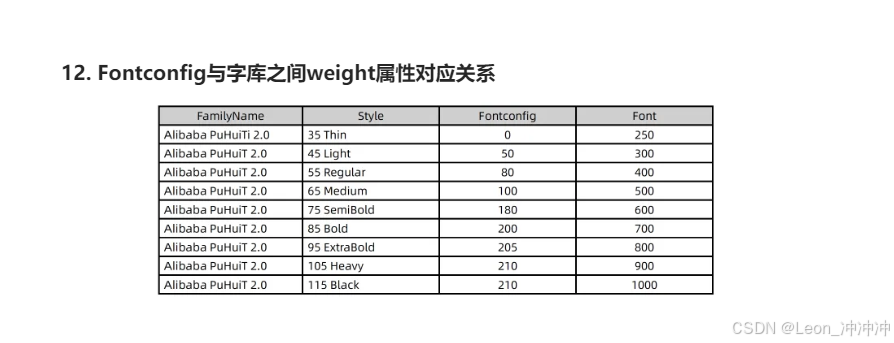
AlibabaPuHuiTi-3-55-RegularL3对应的字重是400。
AlibabaPuHuiTi-3-55-RegularL3字库我已经下载好,需要的也可在这里下载。
下载地址:AlibabaPuHuiTi-3-55-RegularL3.zip
2、核心文件
frameworks/base/data/fonts/
frameworks/base/data/fonts/fonts.mk
frameworks/base/data/fonts/Android.mk
frameworks/base/data/fonts/fonts.xml
3、在目录framework/base/data/fonts/ 添加AlibabaPuHuiTi-3-55-RegularL3.ttf
解压后,把AlibabaPuHuiTi-3-55-RegularL3.ttf文件复制到framework/base/data/fonts/目录。
4、在frameworks/base/data/fonts/fonts.mk 中添加新字体
PRODUCT_PACKAGES := \
    DroidSansMono.ttf \
    AndroidClock.ttf \
+    AlibabaPuHuiTi-3-55-RegularL3.ttf \
    fonts.xml
5、在frameworks/base/data/fonts/Android.mk中添加新的字体
在font_src_files 添加新增的字体格式,如下:
################################
# Build the rest of font files as prebuilt.
# $(1): The source file name in LOCAL_PATH.
#       It also serves as the module name and the dest file name.
define build-one-font-module
$(eval include $(CLEAR_VARS))\
$(eval LOCAL_MODULE := $(1))\
$(eval LOCAL_SRC_FILES := $(1))\
$(eval LOCAL_MODULE_CLASS := ETC)\
$(eval LOCAL_MODULE_TAGS := optional)\
$(eval LOCAL_MODULE_PATH := $(TARGET_OUT)/fonts)\
$(eval include $(BUILD_PREBUILT))
endef
font_src_files := \
    AndroidClock.ttf \
+    AlibabaPuHuiTi-3-55-RegularL3.ttf
三、设置为默认字体
fonts.xml配置默认字体作为默认系统字体
frameworks/base/data/fonts/fonts.xml 中替换默认字体
先看下fonts.xml
<?xml version="1.0" encoding="utf-8"?>
<!--
    WARNING: Parsing of this file by third-party apps is not supported. The
    file, and the font files it refers to, will be renamed and/or moved out
    from their respective location in the next Android release, and/or the
    format or syntax of the file may change significantly. If you parse this
    file for information about system fonts, do it at your own risk. Your
    application will almost certainly break with the next major Android
    release.


    In this file, all fonts without names are added to the default list.
    Fonts are chosen based on a match: full BCP-47 language tag including
    script, then just language, and finally order (the first font containing
    the glyph).


    Order of appearance is also the tiebreaker for weight matching. This is
    the reason why the 900 weights of Roboto precede the 700 weights - we
    prefer the former when an 800 weight is requested. Since bold spans
    effectively add 300 to the weight, this ensures that 900 is the bold
    paired with the 500 weight, ensuring adequate contrast.
-->
<familyset version="23">
    <!-- first font is default -->
    <family name="sans-serif">
        <font weight="100" style="normal">Roboto-Thin.ttf</font>
        <font weight="100" style="italic">Roboto-ThinItalic.ttf</font>
        <font weight="300" style="normal">Roboto-Light.ttf</font>
        <font weight="300" style="italic">Roboto-LightItalic.ttf</font>
        <font weight="400" style="normal">Roboto-Regular.ttf</font>
        <font weight="400" style="italic">Roboto-Italic.ttf</font>
        <font weight="500" style="normal">Roboto-Medium.ttf</font>
        <font weight="500" style="italic">Roboto-MediumItalic.ttf</font>
        <font weight="900" style="normal">Roboto-Black.ttf</font>
        <font weight="900" style="italic">Roboto-BlackItalic.ttf</font>
        <font weight="700" style="normal">Roboto-Bold.ttf</font>
        <font weight="700" style="italic">Roboto-BoldItalic.ttf</font>
    </family>


    <!-- Note that aliases must come after the fonts they reference. -->
    <alias name="sans-serif-thin" to="sans-serif" weight="100" />
    <alias name="sans-serif-light" to="sans-serif" weight="300" />
    <alias name="sans-serif-medium" to="sans-serif" weight="500" />
    <alias name="sans-serif-black" to="sans-serif" weight="900" />
    <alias name="arial" to="sans-serif" />
    <alias name="helvetica" to="sans-serif" />
    <alias name="tahoma" to="sans-serif" />
    <alias name="verdana" to="sans-serif" />


    <family name="sans-serif-condensed">
        <font weight="300" style="normal">RobotoCondensed-Light.ttf</font>
        <font weight="300" style="italic">RobotoCondensed-LightItalic.ttf</font>
        <font weight="400" style="normal">RobotoCondensed-Regular.ttf</font>
        <font weight="400" style="italic">RobotoCondensed-Italic.ttf</font>
        <font weight="500" style="normal">RobotoCondensed-Medium.ttf</font>
        <font weight="500" style="italic">RobotoCondensed-MediumItalic.ttf</font>
        <font weight="700" style="normal">RobotoCondensed-Bold.ttf</font>
        <font weight="700" style="italic">RobotoCondensed-BoldItalic.ttf</font>
    </family>
。。。。。
通过阅读代码发现第一个family 就是默认的字体,所以要把新添加的字库AlibabaPuHuiTi-3-55-RegularL3.ttf添加在第一条就行,注意:前面记住的字重weight就派上用场了,AlibabaPuHuiTi-3-55-RegularL3.ttf的字重是400。
所以修改如下:
<familyset version="23">
     <!-- first font is default -->
     <family name="sans-serif">
+           <font weight="400" style="normal">AlibabaPuHuiTi-3-55-RegularL3.ttf</font>
         <font weight="100" style="normal">Roboto-Thin.ttf</font>
         <font weight="100" style="italic">Roboto-ThinItalic.ttf</font>
         <font weight="300" style="normal">Roboto-Light.ttf</font>
         <font weight="300" style="italic">Roboto-LightItalic.ttf</font>
-        <font weight="400" style="normal">Roboto-Regular.ttf</font>
+        <!--font weight="400" style="normal">Roboto-Regular.ttf</font-->
         <font weight="400" style="italic">Roboto-Italic.ttf</font>
         <font weight="500" style="normal">Roboto-Medium.ttf</font>
         <font weight="500" style="italic">Roboto-MediumItalic.ttf</font>
@@ -545,10 +546,7 @@
     <family>
同时注意要注释掉相同属性的Roboto-Regular.ttf的字体,不然系统会抛异常开不了机,在加载系统默认字体的时候 weight 400的字体已经存在了,所以注释掉这一个即可。
更多推荐


 20
20 0
0- 0


 已为社区贡献1条内容

所有评论(0)