
k8s集群部署mysql8主备
·
一、搜索mysql8版本
# helm repo add bitnami https://charts.bitnami.com/bitnami

# helm search repo mysql

# helm pull bitnami/mysql --version 11.1.2

# tar -zxf mysql-11.1.2.tgz

# cd mysql
二、修改value.ysqml文件
动态存储类自己提前搭建。

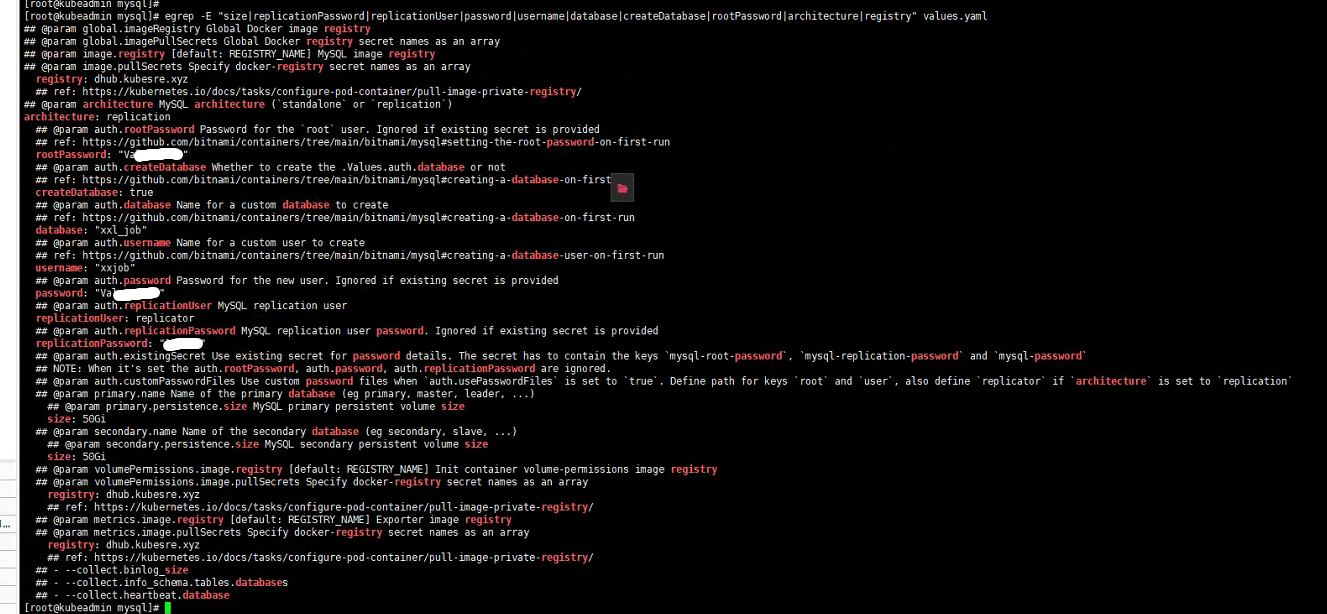
# kubectl create ns mysql8
# helm install mysql8 -n mysql-cluster ./ -f values.yaml
NAME: mysql8
LAST DEPLOYED: Thu Jul 11 21:47:23 2024
NAMESPACE: mysql-cluster
STATUS: deployed
REVISION: 1
TEST SUITE: None
NOTES:
CHART NAME: mysql
CHART VERSION: 11.1.2
APP VERSION: 8.4.0

** Please be patient while the chart is being deployed **

Tip:

  Watch the deployment status using the command: kubectl get pods -w --namespace mysql-cluster

Services:

  echo Primary: mysql8-primary.mysql-cluster.svc.cluster.local:3306
  echo Secondary: mysql8-secondary.mysql-cluster.svc.cluster.local:3306

Execute the following to get the administrator credentials:

  echo Username: root
  MYSQL_ROOT_PASSWORD=$(kubectl get secret --namespace mysql-cluster mysql8 -o jsonpath="{.data.mysql-root-password}" | base64 -d)

To connect to your database:

  1. Run a pod that you can use as a client:

      kubectl run mysql8-client --rm --tty -i --restart='Never' --image  dhub.kubesre.xyz/bitnami/mysql:8.4.0-debian-12-r3 --namespace mysql-cluster --env MYSQL_ROOT_PASSWORD=$MYSQL_ROOT_PASSWORD --command -- bash

  2. To connect to primary service (read/write):

      mysql -h mysql8-primary.mysql-cluster.svc.cluster.local -uroot -p"$MYSQL_ROOT_PASSWORD"

  3. To connect to secondary service (read-only):

      mysql -h mysql8-secondary.mysql-cluster.svc.cluster.local -uroot -p"$MYSQL_ROOT_PASSWORD"


WARNING: There are "resources" sections in the chart not set. Using "resourcesPreset" is not recommended for production. For production installations, please set the following values according to your workload needs:
  - primary.resources
  - secondary.resources
+info https://kubernetes.io/docs/concepts/configuration/manage-resources-containers/

⚠ SECURITY WARNING: Original containers have been substituted. This Helm chart was designed, tested, and validated on multiple platforms using a specific set of Bitnami and Tanzu Application Catalog containers. Substituting other containers is likely to cause degraded security and performance, broken chart features, and missing environment variables.

Substituted images detected:
  - dhub.kubesre.xyz/bitnami/mysql:8.4.0-debian-12-r3
  - dhub.kubesre.xyz/bitnami/os-shell:12-debian-12-r22
  - dhub.kubesre.xyz/bitnami/mysqld-exporter:0.15.1-debian-12-r17


三、检查及测试

登录master:

登录备库:

四、自定义资源限制:

# grep "resources: {}" values.yaml -A 10 -B 2
  ##      memory: 8096Mi
  ##
  resources: {}
  resources:
    requests:
      cpu: 2000m
      memory: 2048Mi
    limits:
      cpu: 4000m
      memory: 8096Mi

  ## Configure extra options for liveness probe
  ## ref: https://kubernetes.io/docs/tasks/configure-pod-container/configure-liveness-readiness-probes/#configure-probes
--
  ##      memory: 4096Mi
  ##
  resources: {}
  resources:
    requests:
      cpu: 2
      memory: 2048Mi
    limits:
      cpu: 4
      memory: 4096Mi
  ## Configure extra options for liveness probe
  ## ref: https://kubernetes.io/docs/tasks/configure-pod-container/configure-liveness-readiness-probes/#configure-probes
  ## @param secondary.livenessProbe.enabled Enable livenessProbe
--
  ##      memory: 2048Mi
  ##
  resources: {}
  resources:
    requests:
      cpu: 1
      memory: 1024Mi
    limits:
      cpu: 2
      memory: 2048Mi
## @section Metrics parameters
##

--
  ##      memory: 1024Mi
  ##
  resources: {}
  resources:
    requests:
      cpu: 2
      memory: 512Mi
    limits:
      cpu: 3
      memory: 1024Mi
  ## Mysqld Prometheus exporter liveness probe
  ## ref: https://kubernetes.io/docs/concepts/workloads/pods/pod-lifecycle/#container-probes
  ## @param metrics.livenessProbe.enabled Enable livenessProbe
五、默认资源使用限制说明:
文档:
GitHub - bitnami/charts: Bitnami Helm Charts

## @param primary.resourcesPreset Set container resources according to one common preset (allowed values: none, nano, micro, small, medium, lar     ge, xlarge, 2xlarge). This is ignored if primary.resources is set (primary.resources is recommended for production).


#small 是values.yaml的默认配置。
选项包括:none, nano, micro, small, medium, lar     ge, xlarge, 2xlarge

修改可通过values.yaml中的 resourcesPreset: 进行设置更多推荐


 1
 0
- 0


 已为社区贡献7条内容

所有评论(0)