
VS Code -> terminated with exit code: 3221225477.【日常记录, 可供参考】
·
前言
刚安装的
VS Code无法使用terminal终端,经过尝试后终于得以解决,此文作为记录留存,可供需要的朋友参考使用
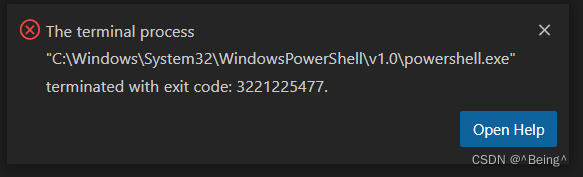
The terminal process
"C:\Windows\System32\WindowsPowerShell\v1.0\powershell.exe"
terminated with exit code: 3221225477.
解决方式
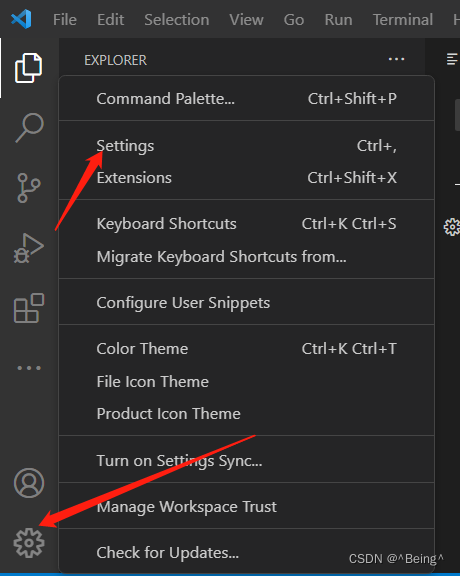
打开
设置/Settings,也可使用快捷键ctr + ,打开, 如下图:
找到输入框并输入
terminal.integrated.defaultProfile.windows内容,定位到terminal设置模块,如下图:

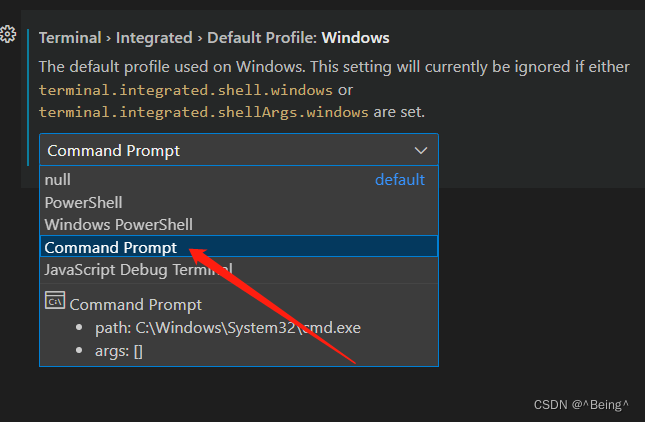
最后找到列表中的
Command Prompt并选中完成设置,如下图:
✅到此问题解决,再次尝试打开 terminal 查看效果,希望对你有所帮助
:: 更多内容 ::
更多推荐


 3
 0
- 0


 已为社区贡献4条内容

所有评论(0)