
qt 富文本 html,Qt对Html富文本支持的控件以及QLabel两种打开超链接的方式
原创文章,欢迎转载。转载请注明:转载自 祥的博客
原文链接:https://blog.csdn.net/humanking7/article/details/80685893
1.说明
2.演示
2.1. 代码
2.2. 关于打开超链接的两种方式说明
3.支持的标签 Tags
4. 对CSS的支持
1.说明
Qt的文本窗体部件能够显示富文本,使用HTML4 标记。能够以这种方式显示富文本的窗体控件有: QTextDocument, 以及 QLabel and QTextEdit。
Qt’s text widgets are able to display rich text, specified using a subset of HTML4 markup. Widgets that use QTextDocument, such as QLabel and QTextEdit, are able to display rich text specified in this way.
2.演示
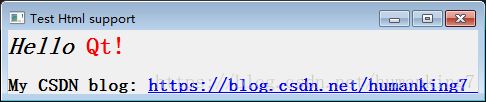
2.1. 代码
#include
#include
int main(int argc, char *argv[])
{
QApplication a(argc, argv);
QString str;
str = QString(new QLabel(str);
lab->setOpenExternalLinks(true);//如果没有这句,就只能通过linkActivated信号,连接到自定义槽函数中打开
lab->setWindowTitle("Test Html support");
lab->show();
return a.exec();
}
2.2. 关于打开超链接的两种方式说明
简单方式,用Qt自带的setOpenExternalLinks(true)函数进行设置;
用通过linkActivated信号,连接到自定义槽函数中打开超链接。
用第二种方式实现超链接[重新继承了一个QDialog类,在里面进行操作]:
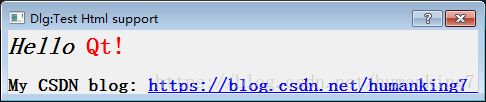
文件1. main.cpp
#include
#include "dlgShow.h"
int main(int argc, char *argv[])
{
QApplication a(argc, argv);
dlgShow* w = new dlgShow();
w->show();
return a.exec();
}
文件2. dlgshow.h
#ifndef DLGSHOW_H
#define DLGSHOW_H
#include
#include
class dlgShow : public QDialog
{
Q_OBJECT
public:
dlgShow(QWidget *parent = 0);
~dlgShow();
protected slots:
void openURL(QString url);
};
#endif // DLGSHOW_H
文件3. dlgshow.cpp
#include
#include
#include "dlgshow.h"
dlgShow::dlgShow(QWidget *parent)
: QDialog(parent)
{
setWindowTitle("Dlg:Test Html support");//设置标题
QString str;
str = QString(new QLabel(str, this);//添加label
lab->show();
//绑定超链接与信号槽
connect(lab, SIGNAL(linkActivated(QString)), this, SLOT(openURL(QString)));
}
void dlgShow::openURL(QString url)
{//槽函数
//打开对应url的网址
QDesktopServices::openUrl(QUrl(url));
}
dlgShow::~dlgShow()
{
}
3.支持的标签 Tags
下表列出了Qt富文本引擎支持的Html标签:
Tag
Description
Comment
a
Anchor or link
Supports the href and name attributes.
address
Address
b
Bold
big
Larger font
blockquote
Indented paragraph
body
Document body
Supports the bgcolor attribute, which can be a Qt color name or a #RRGGBB color specification.
br
Line break
center
Centered paragraph
cite
Inline citation
Same as i.
code
Code
Same as tt.
dd
Definition data
dfn
Definition
Same as i.
div
Document division
Supports the standard block attributes.
dl
Definition list
Supports the standard block attributes.
dt
Definition term
Supports the standard block attributes.
em
Emphasized
Same as i.
font
Font size, family, and/or color
Supports the following attributes: size, face, and color (Qt color names or #RRGGBB).
h1
Level 1 heading
Supports the standard block attributes.
h2
Level 2 heading
Supports the standard block attributes.
h3
Level 3 heading
Supports the standard block attributes.
h4
Level 4 heading
Supports the standard block attributes.
h5
Level 5 heading
Supports the standard block attributes.
h6
Level 6 heading
Supports the standard block attributes.
head
Document header
hr
Horizontal line
Supports the width attribute, which can be specified as an absolute or relative (%) value.
html
HTML document
i
Italic
img
Image
Supports the src, source (for Qt 3 compatibility), width, and height attributes.
kbd
User-entered text
meta
Meta-information
If a text encoding is specified using the meta tag, it is picked up by Qt::codecForHtml(). Likewise, if an encoding is specified to QTextDocument::toHtml(), the encoding is stored using a meta tag, for example:
li
List item
nobr
Non-breakable text
ol
Ordered list
Supports the standard list attributes.
p
Paragraph
Left-aligned by default. Supports the standard block attributes.
pre
Preformated text
qt
Qt rich-text document
Synonym for html. Provided for compatibility with earlier versions of Qt.
s
Strikethrough
samp
Sample code
Same as tt.
small
Small font
span
Grouped elements
strong
Strong
Same as b.
sub
Subscript
sup
Superscript
table
Table
Supports the following attributes: border, bgcolor (Qt color names or #RRGGBB), cellspacing, cellpadding, width (absolute or relative), and height.
tbody
Table body
Does nothing.
td
Table data cell
Supports the standard table cell attributes.
tfoot
Table footer
Does nothing.
th
Table header cell
Supports the standard table cell attributes.
thead
Table header
If the thead tag is specified, it is used when printing tables that span multiple pages.
title
Document title
The value specified using the title tag is available through QTextDocument::metaInformation().
tr
Table row
Supports the bgcolor attribute, which can be a Qt color name or a #RRGGBB color specification.
tt
Typewrite font
u
Underlined
ul
Unordered list
Supports the standard list attributes.
var
Variable
Same as i.
4. 对CSS的支持
下表列出了Qt富文本引擎支持的css:
Property
Values
Description
background-color
Background color for elements
background-image
Background image for elements
color
Text foreground color
font-family
Font family name
font-size
[ small
medium
font-style
[ normal
italic
font-weight
[ normal
bold
text-decoration
none
[ underline
font
[ [
text-indent
px
First line text indentation in pixels
white-space
normal
pre
margin-top
px
Top paragraph margin in pixels
margin-bottom
px
Bottom paragraph margin in pixels
margin-left
px
Left paragraph margin in pixels
margin-right
px
Right paragraph margin in pixels
padding-top
px
Top table cell padding in pixels
padding-bottom
px
Bottom table cell padding in pixels
padding-left
px
Left table cell padding in pixels
padding-right
px
Right table cell padding in pixels
padding
px
Shorthand for setting all the padding properties at once.
vertical-align
baseline
sub
border-color
Border color for text tables.
border-style
none
dotted
background
[
page-break-before
[ auto
always ]
page-break-after
[ auto
always ]
float
[ left
right
text-transform
[ uppercase
lowercase ]
font-variant
small-caps
Perform the smallcaps transformation on the text prior to displaying it.
word-spacing
px
Specifies an alternate spacing between each word.

更多推荐


 0
 0
- 0


 已为社区贡献8条内容

所有评论(0)