
vs2019运行asp.netcore2.2程序报错HTTP Error 500.31 - ANCM Failed to Find Native Dependencies
·
1、报错如下:
Common solutions to this issue:
The specified version of Microsoft.NetCore.App or Microsoft.AspNetCore.App was not found.
Specific error detected by ANCM:

It was not possible to find any compatible framework version The framework 'Microsoft.AspNetCore.App', version '2.2.0' was not found.
- The following frameworks were found:
2.1.27 at [C:\Program Files\dotnet\shared\Microsoft.AspNetCore.App]
3.1.14 at [C:\Program Files\dotnet\shared\Microsoft.AspNetCore.App]
5.0.5 at [C:\Program Files\dotnet\shared\Microsoft.AspNetCore.App]
You can resolve the problem by installing the specified framework and/or SDK.
The specified framework can be found at:- https://aka.ms/dotnet-core-applaunch?framework=Microsoft.AspNetCore.App&framework_version=2.2.0&arch=x64&rid=win10-x64 
3、上面表示已经不支持2.2了,此时需要单击Download链接

4、单击All.Net downloads,再点开Out of support versions,出现下图

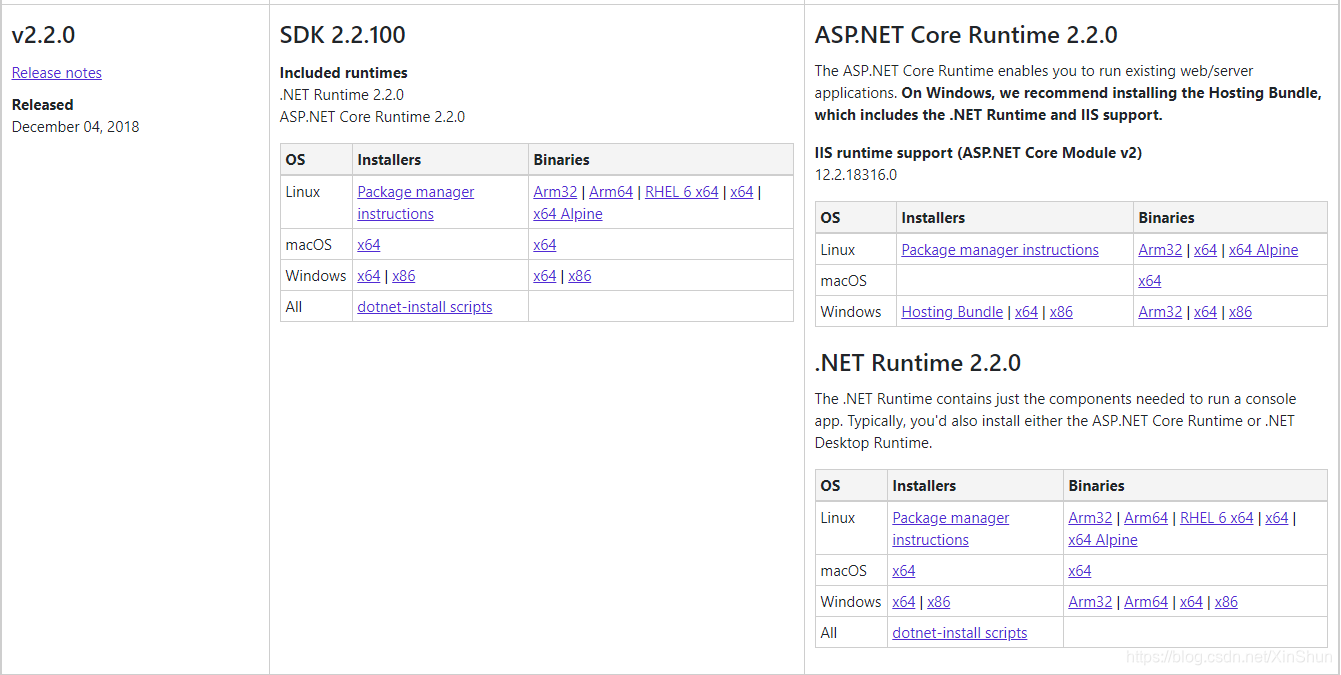
5、单击Net Core2.2,并滚动页面到如下图所示位置,下载Asp.NET Core Runtime2.2.0中的Windows中的X64和Net Runtime 2.2.0中Windows下的X64,然后安装,这个版本根据
自身的平台情况选择。
更多推荐


 1
 0
- 0


 已为社区贡献3条内容

所有评论(0)