
Spring的java项目本地jar包依赖项目改为maven依赖(mavn项目引入本地外部jar包)
原文链接:https://blog.csdn.net/u012288582/article/details/135092912
转载 https://zhuanlan.zhihu.com/p/664024176?utm_id=0
1.简介
我们在做项目的时候,可能会偶尔接手较为古老的项目,这些项目使用了较为老旧的版本管理或依赖管理方法,对于新开发项目来说,这些老旧的依赖管理方式会影响开发效率,所以,一般我们会选择将老项目的依赖管理修改为maven方式,简化依赖管理与测试打包等步骤
2.方式
传统项目转为maven项目有两种方法
- mavne依赖本地jar包(不推荐)
- 本地依赖上传maven私服(推荐)
3.具体实现
3.1maven依赖本地jar包(不推荐)
该方式适用于没有maven私服,而又需要将项目改为maven的场景。由于该方式是使用maven关联本地jar包,本地jar包放在项目中,会导致项目体积较大,因此不太推荐。 以下为改造步骤
① 将本地jar包放到项目中,位置随意,只要pom文件中能关联到文件即可


<dependency>
  <groupId>com.alibaba</groupId>
  <artifactId>fastjson</artifactId>
  <version>1.2.73</version>
  <scope>system</scope>
  <systemPath>${pom.basedir}/src/lib/fastjson-1.2.73.jar</systemPath>
</dependency> 请参考:maven私服搭建详细教程(看完必会)_maven私有仓库搭建-CSDN博客
3.2.2引入依赖
上传完jar包后,在maven私服中,搜索刚刚上传的jar包,点击jar,再点击usage,将maven的坐标复制,粘贴到项目的pom文件中即可使用。 依赖的正常使用,需要正确配置maven的远程仓库,否则无法使用,若没有配置maven,请配置一下
——————————————————————————————
篇外话题,基于本地方式我的解决方法:


<dependency>
    <groupId>org.jfxtras</groupId>
    <artifactId>jfxtras-controls</artifactId>
    <version>8.0.2</version>
    <scope>system</scope>
    <systemPath>${project.basedir}/src/lib/jfxtras-controls-8.0.2.jar</systemPath>
</dependency>
然后打包好使了,运行时报错仍然找不到类,后来通过下面一片文章完美解决,感谢博主
maven引入第三方包但在最终的包中却找不到该第三方包的问题_maven找不到包但是确实引入了-CSDN博客
<plugin>
<groupId>org.springframework.boot</groupId>
<artifactId>spring-boot-maven-plugin</artifactId>
<version>2.3.7.RELEASE</version>
<configuration>
<includeSystemScope>true</includeSystemScope>
</configuration>
<executions>
<execution>
<goals>
<goal>repackage</goal>
</goals>
</execution>
</executions>
</plugin>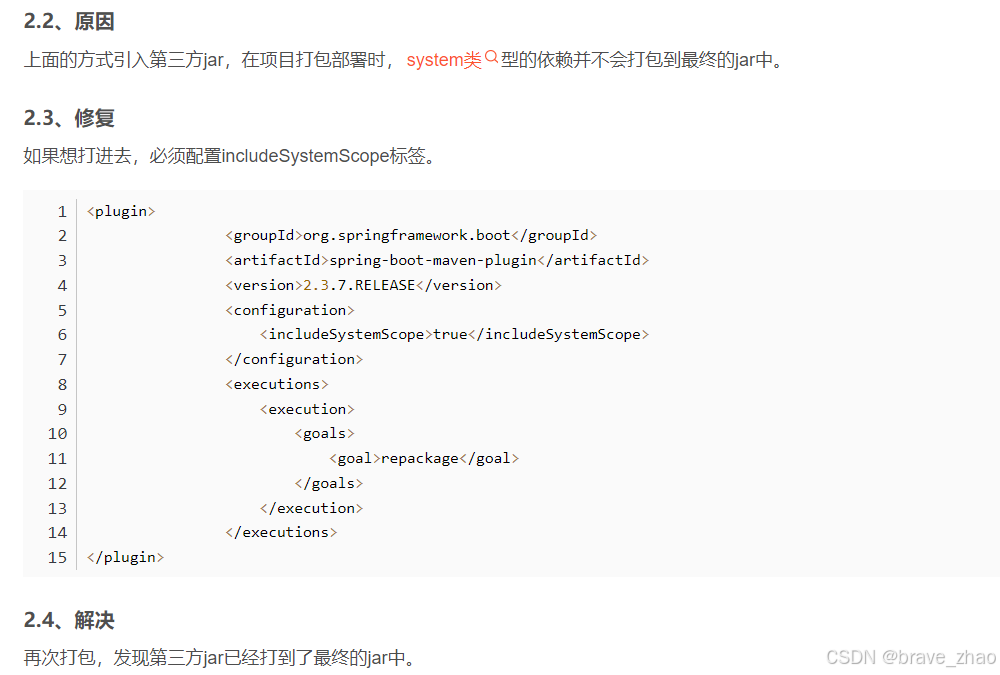
——————————————————————————
整理下思路
项目中需要使用的一个jar包是第三方厂商提供的,在maven仓库中没有,一般这样的jar通常称为本地jar,这样的jar的使用有两种方式,一种是使用mvn install命令将其安装到本地仓库,另一种是在项目中建一个目录,然后将其放到新建的目录中,在dependency中进行引用,由于我的事故就出现在第二种方式中,因此本文主要介绍第二种方式的具体操作。
2、解决过程
2.1、问题描述
项目引入第三方jar,打包可以通过,但是启动时报错——类找不到。
我是这样引入第三方jar包的,
<dependency>
<groupId>com.thunisoft</groupId>
<artifactId>authority-api</artifactId>
<version>0.0.1-SNAPSHOT</version>
<scope>system</scope>
<systemPath>${project.basedir}/lib/xxx-api-0.0.1-SNAPSHOT.jar</systemPath>
</dependency>
2.2、原因
上面的方式引入第三方jar,在项目打包部署时,system类型的依赖并不会打包到最终的jar中。
2.3、修复
如果想打进去,必须配置includeSystemScope标签。
<plugin>
<groupId>org.springframework.boot</groupId>
<artifactId>spring-boot-maven-plugin</artifactId>
<version>2.3.7.RELEASE</version>
<configuration>
<includeSystemScope>true</includeSystemScope>
</configuration>
<executions>
<execution>
<goals>
<goal>repackage</goal>
</goals>
</execution>
</executions>
</plugin>
2.4、解决
再次打包,发现第三方jar已经打到了最终的jar中。
3、总结
本文介绍了如何解决systemPath引入本地jar无法打到最终jar中的问题,至于使用mvn install安装到本地,当然也是可以的,这里就不介绍了。
最终我的pom是这样的,红色部分就是我的解决,
jfxtras-controls-8.0.2.jar
这个就是我的出问题的jar
<?xml version="1.0" encoding="UTF-8"?>
<project xmlns="http://maven.apache.org/POM/4.0.0" xmlns:xsi="http://www.w3.org/2001/XMLSchema-instance"
xsi:schemaLocation="http://maven.apache.org/POM/4.0.0 https://maven.apache.org/xsd/maven-4.0.0.xsd">
<modelVersion>4.0.0</modelVersion>
<parent>
<groupId>org.springframework.boot</groupId>
<artifactId>spring-boot-starter-parent</artifactId>
<version>2.7.4</version>
<relativePath/> <!-- lookup parent from repository -->
</parent>
<groupId>com.excellent</groupId>
<artifactId>riskArchimedes</artifactId>
<version>0.0.1-SNAPSHOT</version>
<name>riskArchimedes</name>
<description>riskArchimedes</description>
<properties>
<java.version>1.8</java.version>
</properties>
<dependencies>
<dependency>
<groupId>org.springframework.boot</groupId>
<artifactId>spring-boot-starter-web</artifactId>
</dependency>
<dependency>
<groupId>org.mybatis.spring.boot</groupId>
<artifactId>mybatis-spring-boot-starter</artifactId>
<version>2.2.2</version>
</dependency>
<dependency>
<groupId>mysql</groupId>
<artifactId>mysql-connector-java</artifactId>
<scope>runtime</scope>
</dependency>
<dependency>
<groupId>com.dameng</groupId>
<artifactId>DmJdbcDriver18</artifactId>
<version>8.1.1.193</version>
</dependency>
<!-- <dependency>-->
<!-- <groupId>com.dameng</groupId>-->
<!-- <artifactId>Dm8JdbcDriver18</artifactId>-->
<!-- <version>8.1.1.49</version>-->
<!-- </dependency><!–达梦数据库方言–>-->
<dependency>
<groupId>com.dameng</groupId>
<artifactId>DmDialect-for-hibernate5.3</artifactId>
<version>8.1.1.49</version>
</dependency>
<dependency>
<groupId>org.springframework.boot</groupId>
<artifactId>spring-boot-starter-test</artifactId>
<scope>test</scope>
</dependency>
<dependency>
<groupId>org.apache.commons</groupId>
<artifactId>commons-lang3</artifactId>
</dependency>
<dependency>
<groupId>com.zaxxer</groupId>
<artifactId>HikariCP</artifactId>
</dependency>
<dependency>
<groupId>com.belerweb</groupId>
<artifactId>pinyin4j</artifactId>
<version>2.5.0</version>
</dependency>
<!-- 分页插件pagehelper -->
<!-- <dependency>
<groupId>com.github.pagehelper</groupId>
<artifactId>pagehelper-spring-boot-starter</artifactId>
<version>1.2.5</version>
</dependency>-->
<!-- 分页插件pagehelper -->
<!--json转换-->
<dependency>
<groupId>org.openjfx</groupId>
<artifactId>javafx-controls</artifactId>
<version>11.0.2</version>
</dependency>
<dependency>
<groupId>net.synedra</groupId>
<artifactId>validatorfx</artifactId>
<version>0.1.12</version>
</dependency>
<dependency>
<groupId>com.alibaba</groupId>
<artifactId>fastjson</artifactId>
<version>1.2.8</version>
</dependency>
<dependency>
<groupId>com.jcraft</groupId>
<artifactId>jsch</artifactId>
<version>0.1.55</version>
</dependency>
<dependency>
<groupId>org.jfxtras</groupId>
<artifactId>jfxtras-controls</artifactId>
<version>8.0.2</version>
<scope>system</scope>
<systemPath>${project.basedir}/src/lib/jfxtras-controls-8.0.2.jar</systemPath>
</dependency>
</dependencies>
<build>
<plugins>
<plugin>
<groupId>org.springframework.boot</groupId>
<artifactId>spring-boot-maven-plugin</artifactId>
</plugin>
<!--在这里修改版本-->
<plugin>
<groupId>org.apache.maven.plugins</groupId>
<artifactId>maven-resources-plugin</artifactId>
<version>2.4.3</version>
</plugin>
<!---->
<plugin>
<groupId>org.springframework.boot</groupId>
<artifactId>spring-boot-maven-plugin</artifactId>
<version>2.3.7.RELEASE</version>
<configuration>
<includeSystemScope>true</includeSystemScope>
</configuration>
<executions>
<execution>
<goals>
<goal>repackage</goal>
</goals>
</execution>
</executions>
</plugin>
</plugins>
</build>
</project>
原文链接:https://blog.csdn.net/u012288582/article/details/135092912
更多推荐


 1
 0
- 0


 已为社区贡献15条内容

所有评论(0)