
创建Eureka Server(注册中心)详解
·
一、创建Eureka Server (注册中心)
1. 创建SpringBoot项目
使用 Spring Initializr 创建SpringBoot项目。选择添加 Eureka Server 的依赖。


2. 配置依赖
如果你手动创建了项目,你需要确保你的构建文件中包含了Eureka Server的依赖。
通过引入spring-cloud-dependencies BOM来确保所有Spring Cloud相关依赖的版本一致性。BOM(Bill of Materials)可以帮助你管理依赖版本,避免版本冲突。
(1)依赖管理:dependencyManagement
    <properties>
        <spring-cloud.version>2023.0.4</spring-cloud.version>
    </properties>

    <!-- 引入Spring Cloud BOM以确保版本兼容性 -->
    <dependencyManagement>
        <dependencies>
            <dependency>
                <groupId>org.springframework.cloud</groupId>
                <artifactId>spring-cloud-dependencies</artifactId>
                <version>${spring-cloud.version}</version>
                <type>pom</type>
                <scope>import</scope>
            </dependency>
        </dependencies>
    </dependencyManagement>

(2)配置 Eureka Server 依赖
		<dependency>
			<groupId>org.springframework.cloud</groupId>
			<artifactId>spring-cloud-starter-netflix-eureka-server</artifactId>
		</dependency>
3. 配置Eureka Server的基本设置(application.yml)
配置Eureka Server的基本设置。例如,在 application.yml 中可以这样配置:
spring:
  application:
    name: hello-eureka-server

server:
  port: 8761 # Eureka Server默认端口

eureka:
  instance:
    hostname: localhost # 设置Eureka Server的主机名
  client:
    register-with-eureka: false # 不向Eureka注册自己
    fetch-registry: false # 不从Eureka获取注册表信息
    service-url:
      defaultZone: http://${eureka.instance.hostname}:${server.port}/eureka/ # 指定Eureka Server的地址
4. 启用Eureka Server
在主应用类上添加@EnableEurekaServer注解,以启用Eureka Server功能。例如:
package com.example.hello.eureka.server;

import org.springframework.boot.SpringApplication;
import org.springframework.boot.autoconfigure.SpringBootApplication;
import org.springframework.cloud.netflix.eureka.server.EnableEurekaServer;

@EnableEurekaServer
@SpringBootApplication
public class HelloEurekaServerApplication {

	public static void main(String[] args) {
		SpringApplication.run(HelloEurekaServerApplication.class, args);
	}

}
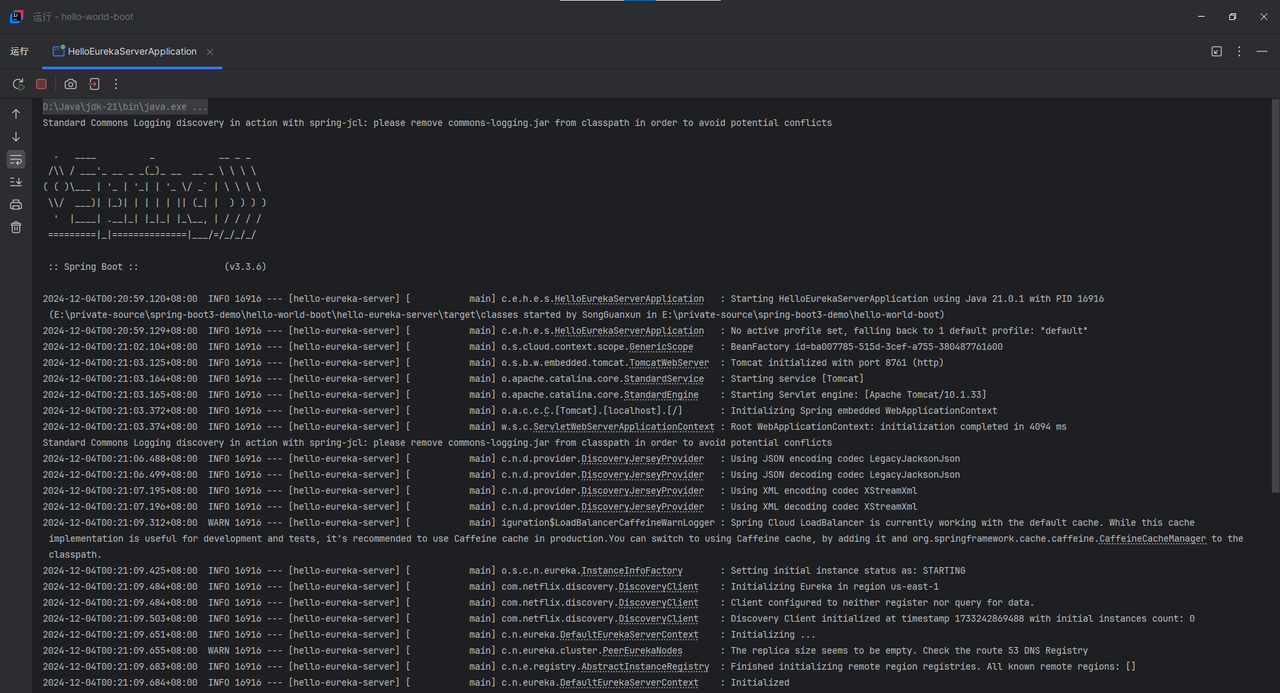
5. 应用启动成功

6. Eureka的管理界面

二、创建Eureka Server的方式
Eureka Server(注册中心),是必须要使用SpringBoot自己创建吗?
官方是否有已经打包好直接可用的可执行程序提供?
Eureka Server作为Netflix开源的一款服务注册与发现中心,其设计和使用方式具有一定的灵活性。针对您的问题,以下是对Eureka Server创建方式的详细解答:
1. Eureka Server的创建方式
-
使用SpringBoot创建:
- 这是最常见和推荐的方式。通过Spring Initializr或Spring Boot CLI等工具,可以快速创建一个包含Eureka Server依赖的Spring Boot项目。
- 在项目中,需要添加
@EnableEurekaServer注解来启用Eureka Server功能。 - 通过配置文件(如
application.yml或application.properties)来设置Eureka Server的相关参数,如服务端口、服务名称、注册中心地址等。 - 使用这种方式,可以充分利用Spring Boot的自动装配和依赖管理功能,简化Eureka Server的搭建和配置过程。
-
非SpringBoot方式创建:
- 理论上,Eureka Server也可以在不使用Spring Boot的情况下进行搭建。但这需要手动配置和启动Eureka Server所需的各种组件和服务,包括Servlet容器、Spring框架、Eureka Server核心类等。
- 这种方式相对复杂,需要较高的技术水平和丰富的Java开发经验。因此,在实际应用中并不常见。
2. 官方可执行程序
- 官方并没有提供已经打包好直接可用的Eureka Server可执行程序。Eureka Server通常是以库(jar包)的形式提供,需要开发者将其集成到自己的项目中,并根据自己的需求进行配置和启动。
3. 总结
Eureka Server的创建方式主要依赖于开发者的技术选型和项目需求。使用Spring Boot创建Eureka Server是最常见和推荐的方式,因为它能够简化搭建和配置过程,并提供丰富的功能和灵活性。而官方并没有提供已经打包好直接可用的Eureka Server可执行程序,需要开发者自行集成和配置。
更多推荐

 25
 0
- 0


 已为社区贡献6条内容

所有评论(0)