
鸿蒙开发进阶(HarmonyOS )应用账号密码更新保存
鸿蒙NEXT开发实战往期必看文章:
一分钟了解”纯血版!鸿蒙HarmonyOS Next应用开发!
“非常详细的” 鸿蒙HarmonyOS Next应用开发学习路线!(从零基础入门到精通)
HarmonyOS NEXT应用开发案例实践总结合(持续更新......)
HarmonyOS NEXT应用开发性能优化实践总结(持续更新......)
密码保险箱在应用的登录、注册、修改密码等场景具备自动保存用户名和密码的能力。
保存后的用户名和密码可以在下次登录、修改密码时中自动填充到界面上的对应输入框,用户可以在密码保险箱内对已保存的用户名和密码进行查看,修改,添加备注,删除。
应用界面触发账号密码自动保存时,若密码保险箱中不存在同应用下的相同账号,则弹出账号密码保存提示框,用户点击“保存密码”按钮,即可将本次使用的账号和密码保存至密码保险箱。
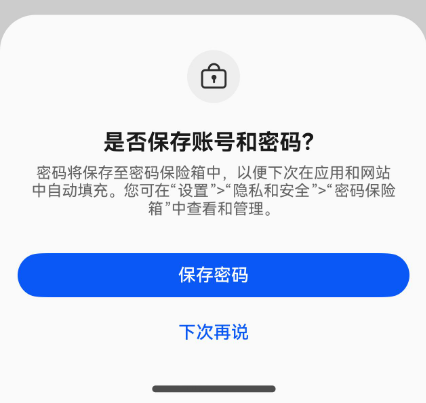
应用触发账号登录或注册时,均可触发保存功能,下面分别介绍两种布局的标准适配场景。
触发条件及注意事项:
- 已设置锁屏密码并且开启密码保险箱自动保存和填入账号和密码开关。
- 界面中TextInput输入框组件的enableAutoFill属性的值应为true(默认为true)。
- 密码保险箱的自动保存功能只适用用户名和密码保存场景,在界面中必须同时存在用户名和密码的TextInput输入框组件。
用户名输入框应设置type属性为InputType.USER_NAME。
密码输入框应设置type属性为InputType.password或InputType.NEW_PASSWORD。
其中,InputType.password表示普通密码输入框,适用于登录界面的密码和修改密码界面的旧密码,
InputType.NEW_PASSWORD表示新密码输入框,适用于注册界面和修改密码界面的新密码。
- 用户名和密码输入框中需要输入内容,不能为空也不能超长。用户名长度不能超过128字符,密码长度不能超过256字符。
- 页面跳转时触发保存功能。
- 在只有type为InputType.USER_NAME和InputType.password的两个TextInput组件时,如果使用账号密码填充-修改密码自动填充了用户名和密码并没有修改,则不会触发保存和更新功能。
账号密码登录
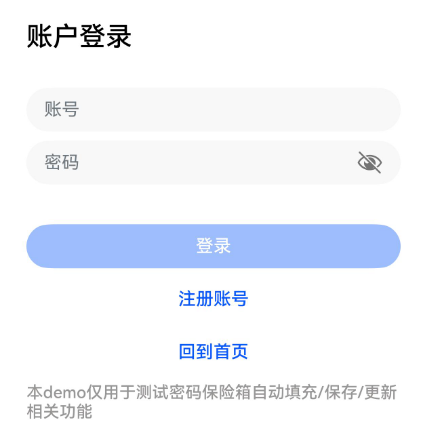
示例代码如下:
import router from '@ohos.router';

@Entry
@Component
struct LoginPage {
  @State ReserveAccount: string = '';
  @State ReservePassword: string = '';
  private length: number = 0;

  onBackPress() {
    router.back();
    return true;
  }

  build() {
    Column() {
      Text("账户登录")
        .fontSize(24)
        .fontColor('#000000')
        .fontWeight(FontWeight.Medium)
        .textAlign(TextAlign.Start)
        .width('100%')
        .margin({ top: 18 })

      TextInput({ placeholder: '用户名' })
        .opacity(0.6)
        .type(InputType.USER_NAME)
        .placeholderColor(0x182431)
        .width('100%')
        .placeholderFont({ size: 16, weight: FontWeight.Regular })
        .margin({ top: 32, bottom: 8 })
        .onChange((value: string) => {
          this.ReserveAccount = value;
          this.length = value.length;
        })
        .caretPosition(this.length)

      TextInput({ placeholder: '密码' })
        .type(InputType.Password)
        .placeholderColor(0x182431)
        .width('100%')
        .opacity(0.6)
        .showPasswordIcon(true)
        .placeholderFont({ size: 16, weight: FontWeight.Regular })
        .onChange((value: string) => {
          this.ReservePassword = value;
        })
        .margin({ bottom: 36 })

      Button('登录', { type: ButtonType.Capsule, stateEffect: false })
        .borderRadius(20)
        .width('100%')
        .height(40)
        .enabled((this.ReserveAccount !== '') && (this.ReservePassword !== ''))
        .onClick(() => {
          router.pushUrl({
            url: 'pages/Index', //此处pages/Index为跳转界面地址,请自行修改
            params: {
              src: '账户登录'
            }
          }, (err) => {
            if (err) {
              console.error(`Invoke pushUrl failed, code is ${err.code}, message is ${err.message}`);
              return;
            }
            console.info('Invoke pushUrl succeeded.');
          })
        })
    }
    .padding({ left: 24, right: 24 })
    .height('100%')
    .width('100%')
  }
}
账号密码注册
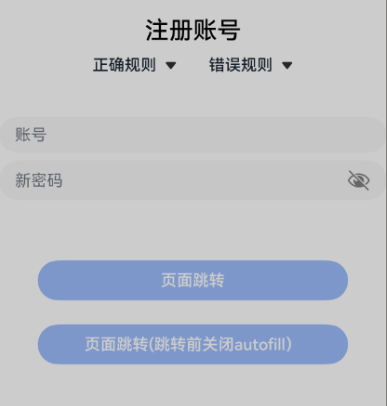
示例代码如下:
import router from '@ohos.router';

@Entry
@Component
struct RegisterPage {
  @State ReserveAccount: string = '';
  @State ReservePassword: string = '';
  @State enAbleAutoFill: boolean = true;
  private length: number = 0;

  onBackPress() {
    this.enAbleAutoFill = false;
    router.back();
    return true;
  }

  aboutToAppear() {

  }

  build() {
    Column() {
      Text('注册账号')
        .fontSize(24)
        .fontColor('#000000')
        .fontWeight(FontWeight.Medium)
        .textAlign(TextAlign.Center)
        .width('100%')
        .margin({ top: 18})

      TextInput({ placeholder: '用户名' })
        .opacity(0.6)
        .type(InputType.USER_NAME)
        .placeholderColor(0x182431)
        .width('100%')
        .placeholderFont({ size: 16, weight: FontWeight.Regular })
        .margin({ top: 32, bottom: 8 })
        .onChange((value: string) => {
          this.ReserveAccount = value;
          this.length = value.length;
        })
        .caretPosition(this.length)

      TextInput({ placeholder: '新密码' })
        .enableAutoFill(this.enAbleAutoFill)
        .type(InputType.NEW_PASSWORD)
        .passwordRules('begin:[upper],special:[yes],len:[maxlen:32,minlen:12]')
        .placeholderColor(0x182431)
        .width('100%')
        .opacity(0.6)
        .showPasswordIcon(true)
        .placeholderFont({ size: 16, weight: FontWeight.Regular })
        .onChange((value: string) => {
          this.ReservePassword = value;
        })
        .margin({ bottom: 36 })

      Button('页面跳转', { type: ButtonType.Capsule, stateEffect: false })
        .borderRadius(20)
        .width('80%')
        .height(40)
        .margin({ top: 24 })
        .enabled((this.ReserveAccount !== '') && (this.ReservePassword !== ''))
        .onClick(() => {
          router.pushUrl({
            url: 'pages/Index', //此处pages/Index为跳转界面地址,请自行修改
            params: {
              src: '注册账号'
            }
          }, (err) => {
            if (err) {
              console.error(`Invoke pushUrl failed, code is ${err.code}, message is ${err.message}`);
              return;
            }
            console.info('Invoke pushUrl succeeded.');
          })
        })

      Button('页面跳转(跳转前关闭autofill)', { type: ButtonType.Capsule, stateEffect: false })
        .borderRadius(20)
        .width('80%')
        .height(40)
        .margin({ top: 24 })
        .enabled((this.ReserveAccount !== '') && (this.ReservePassword !== ''))
        .onClick(() => {
          this.enAbleAutoFill = false;
          router.pushUrl({
            url: 'pages/Index', //此处pages/Index为跳转界面地址,请自行修改
            params: {
              src: '注册账号'
            }
          }, (err) => {
            if (err) {
              console.error(`Invoke pushUrl failed, code is ${err.code}, message is ${err.message}`);
              return;
            }
            console.info('Invoke pushUrl succeeded.');
          })
        })
    }
  }
}
账号密码更新
应用界面触发账号密码自动保存时,若密码保险箱中已存在同应用下与本次使用账号相同的账号,则弹出密码更新提示框,用户点击更新按钮,即可更新密码保险箱内对应账号的密码。
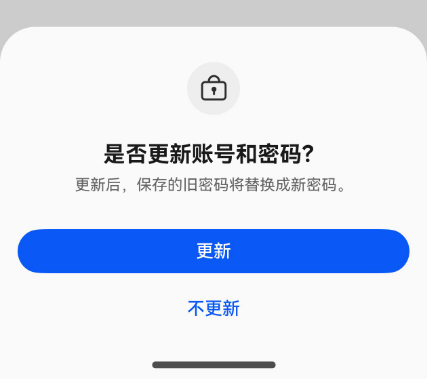
应用触发修改密码或使用已经保存过的账号手动登录时,均会触发密码更新功能。
登录的布局介绍请参考账号密码登录,以下仅介绍修改账号密码的标准适配场景。
触发条件及注意事项同账号密码保存功能。
修改账号密码
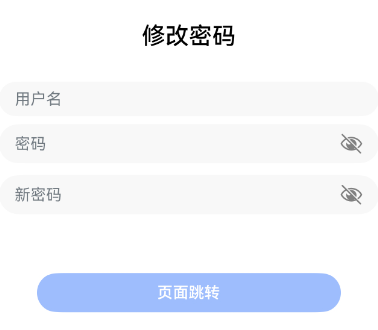
示例代码如下:
import router from '@ohos.router';

@Entry
@Component
struct RegisterPage {
  @State ReserveAccount: string = '';
  @State ReservePassword: string = '';
  @State enAbleAutoFill: boolean = true;
  private length: number = 0;

  onBackPress() {
    this.enAbleAutoFill = false;
    router.back();
    return true;
  }

  aboutToAppear() {
  }

  build() {
    Column() {
      Text('修改密码')
        .fontSize(24)
        .fontColor('#000000')
        .fontWeight(FontWeight.Medium)
        .textAlign(TextAlign.Center)
        .width('100%')
        .margin({ top: 18})

      TextInput({ placeholder: '用户名' })
        .opacity(0.6)
        .type(InputType.USER_NAME)
        .placeholderColor(0x182431)
        .width('100%')
        .placeholderFont({ size: 16, weight: FontWeight.Regular })
        .margin({ top: 32, bottom: 8 })
        .onChange((value: string) => {
          this.ReserveAccount = value;
          this.length = value.length;
        })
        .caretPosition(this.length)

      TextInput({ placeholder: '密码' })
        .type(InputType.Password)
        .placeholderColor(0x182431)
        .width('100%')
        .opacity(0.6)
        .showPasswordIcon(true)
        .placeholderFont({ size: 16, weight: FontWeight.Regular })
        .onChange((value: string) => {
          this.ReservePassword = value;
        })
        .margin({ bottom: 12 })

      TextInput({ placeholder: '新密码' })
        .enableAutoFill(this.enAbleAutoFill)
        .type(InputType.NEW_PASSWORD)
        .passwordRules('begin:[lower],special:[yes],len:[maxlen:32,minlen:12]')
        .placeholderColor(0x182431)
        .width('100%')
        .opacity(0.6)
        .showPasswordIcon(true)
        .placeholderFont({ size: 16, weight: FontWeight.Regular })
        .onChange((value: string) => {
          this.ReservePassword = value;
        })
        .margin({ bottom: 36 })

      Button('页面跳转', { type: ButtonType.Capsule, stateEffect: false })
        .borderRadius(20)
        .width('80%')
        .height(40)
        .margin({ top: 24 })
        .enabled((this.ReserveAccount !== '') && (this.ReservePassword !== ''))
        .onClick(() => {
          router.pushUrl({
            url: 'pages/Index', //此处pages/Index为跳转界面地址,请自行修改
            params: {
              src: '修改密码'
            }
          }, (err) => {
            if (err) {
              console.error(`Invoke pushUrl failed, code is ${err.code}, message is ${err.message}`);
              return;
            }
          })
        })

      Button('页面跳转(跳转前关闭autofill)', { type: ButtonType.Capsule, stateEffect: false })
        .borderRadius(20)
        .width('80%')
        .height(40)
        .margin({ top: 24 })
        .enabled((this.ReserveAccount !== '') && (this.ReservePassword !== ''))
        .onClick(() => {
          this.enAbleAutoFill = false;
          router.pushUrl({
            url: 'pages/Index', //此处pages/Index为跳转界面地址,请自行修改
            params: {
              src: '修改密码'
            }
          }, (err) => {
            if (err) {
              console.error(`Invoke pushUrl failed, code is ${err.code}, message is ${err.message}`);
              return;
            }
          })
        })
    }
  }
}
更多推荐

 12
12 0
0- 0


 已为社区贡献8条内容

所有评论(0)