
pytest-cov:好用的统计代码测试覆盖率插件
·
简介:pytest-cov是pytest统计测试代码覆盖率的一个插件。pytest-cov插件生成覆盖率报告。与只使用覆盖率相比,这个插件做了一些额外的事情。
1、可以在子流程中派生或运行东西,并且可以在没有任何麻烦的情况下进行覆盖。
2、支持xdist:可以使用pytest-xist的所有功能,并且仍然可以获得覆盖范围。
3、一致的pytest行为。运行coverage run-m pytest,您将有稍微不同的sys.path(CWD将在其中,与运行pytest时不同)。
4、覆盖率包提供的所有功能都应该可以通过pytest-cov的命令行选项或覆盖率的配置文件工作。
安装:
pip install pytest-cov
目录结构:
myProject2024

├─lib

│ └─my_add.py

├─logs

├─htmlcov

├─report

├─test_case

│ └─test_add.py

├─pytest.ini

└─main.py
使用步骤:
1、pytest.ini
# pytest.ini

[pytest]

markers = serial: mark test to run serially

addopts = --cov=lib --cov-report=html
2、./lib/my_add.py
class AddDemo:


def add_demo(self, a, b):

return a + b
3、./test_case/test_add.py
from lib.my_add import AddDemo

from logger import log


class TestAdd:

def test_add_01(self):

assert (AddDemo().add_demo(2, 3) == 5)


def test_add_02(self):

assert (AddDemo().add_demo(1, 8) == 9)
4、main.py
import os

import pytest


if __name__ == "__main__":

# step-1:use pytest run test_case


pytest.main(["-s", "-n", "auto", "--cov=lib", "--alluredir", "./report"])

# pytest.main(["-s", "-n", "auto", "--cov=year2024"])


# step-2:auto report json data,zip to allure-html

os.system("allure serve report")
5、运行结果:

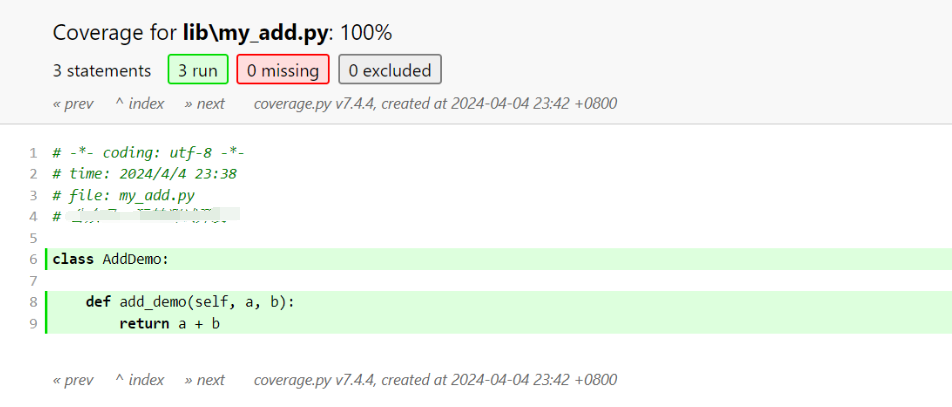
6、查看cov代码覆盖报告 和 allure报告
cov代码覆盖报告 - 汇总

cov代码覆盖报告 - 明细
allure报告:

最后感谢每一个认真阅读我文章的人,礼尚往来总是要有的,虽然不是什么很值钱的东西,如果你用得到的话可以直接拿走:【文末自行领取】

这些资料,对于【软件测试】的朋友来说应该是最全面最完整的备战仓库,这个仓库也陪伴上万个测试工程师们走过最艰难的路程,希望也能帮助到你!

更多推荐


 3
 0
- 0


 已为社区贡献41条内容

所有评论(0)