
unity-角色移动
·
目录
给idle->run的过渡添加isRun参数,并设置为true
给run->idle的过渡添加isRun参数,并设置为false
初始过程详见上一篇博客unity-角色动画的使用-CSDN博客
这里主要讲一下关键步骤
添加奔跑动画到控制器

添加一个bool参数,用于角色站立动画和奔跑动画的切换

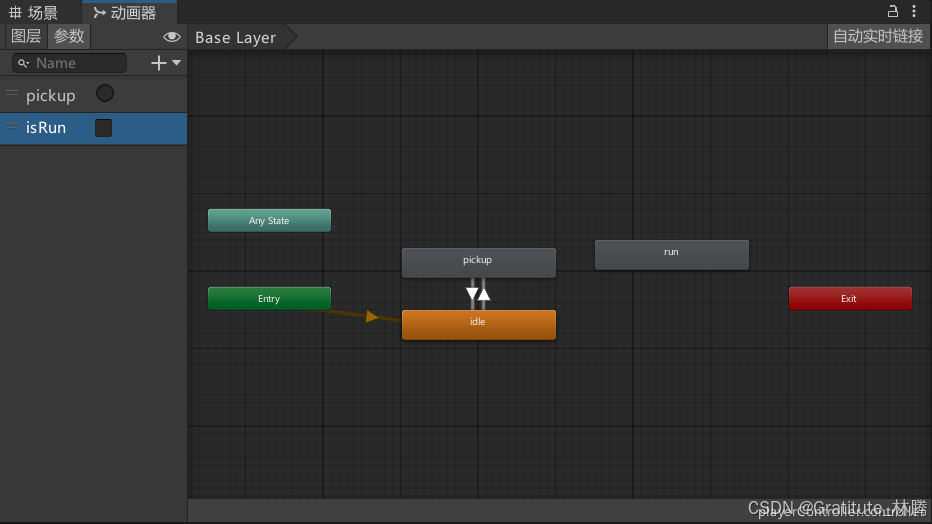
添加过渡

给idle->run的过渡添加isRun参数,并设置为true

给run->idle的过渡添加isRun参数,并设置为false
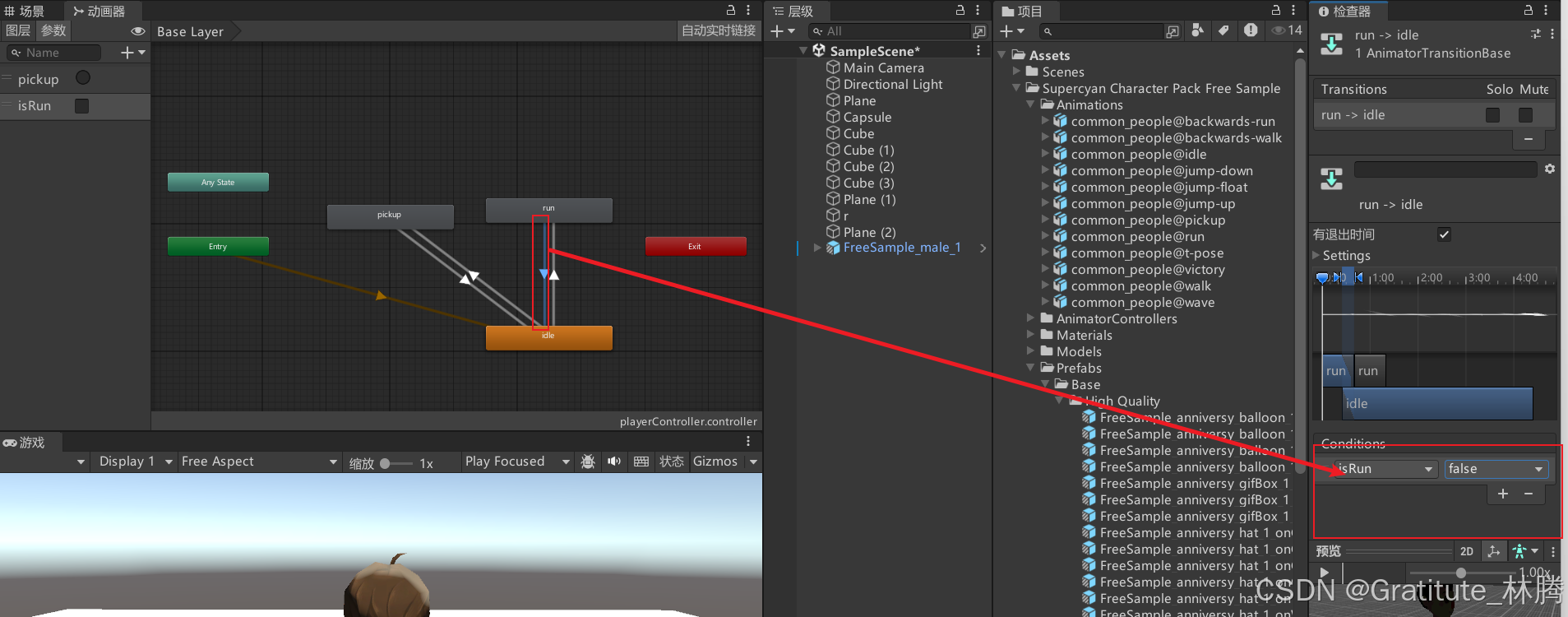
并分别取消勾选有退出时间,让切换更加平稳

角色移动脚本

脚本代码
using System;
using System.Collections;
using System.Collections.Generic;
using System.Collections.Specialized;
using System.Diagnostics;
using System.Security.Cryptography;
using UnityEngine;

public class playerController : MonoBehaviour
{

    private Animator animator; // 声明一个Animator变量

    // Start is called before the first frame update
    void Start()
    {
        animator = GetComponent<Animator>(); // 在Start函数中获取Animator组件
    }

    // Update is called once per frame
    void Update()
    {
        // 获取水平轴和垂直轴的输入
        float horizontal = Input.GetAxis("Horizontal");
        float vertical = Input.GetAxis("Vertical");

        // 创建一个新的方向向量
        Vector3 dir = new Vector3(horizontal, 0, vertical);

        // 如果用户按下了方向键
        if (dir != Vector3.zero)
        {
            // 改变面向方向
            transform.rotation = Quaternion.LookRotation(dir);
            // 播放跑步动画
            animator.SetBool("isRun", true);
            //朝向前方移动
            transform.Translate(Vector3.forward * 2 * Time.deltaTime);
        }
        else
        {
            // 播放站立动画
            animator.SetBool("isRun", false);
        }
    }

}
功能扩展
添加了跳跃功能和动画,并优化了动作,使得更加连贯

using System.Collections;
using System.Collections.Generic;
using UnityEngine;

public class playerController : MonoBehaviour
{
    private Animator animator; // 声明一个Animator变量
    private Rigidbody rb; // 声明一个Rigidbody变量
    public float jumpForce = 5f; // 跳跃力
    public float moveSpeed = 2f; // 移动速度
    private bool isGrounded = true; // 是否在地面上
    private bool isJumping = false; // 是否正在跳跃

    // Start is called before the first frame update
    void Start()
    {
        animator = GetComponent<Animator>(); // 在Start函数中获取Animator组件
        rb = GetComponent<Rigidbody>(); // 在Start函数中获取Rigidbody组件
    }

    // Update is called once per frame
    void Update()
    {
        // 获取水平轴和垂直轴的输入
        float horizontal = Input.GetAxis("Horizontal");
        float vertical = Input.GetAxis("Vertical");

        // 创建一个新的方向向量
        Vector3 dir = new Vector3(horizontal, 0, vertical);

        // 如果用户按下了方向键
        if (dir != Vector3.zero)
        {
            // 改变面向方向
            transform.rotation = Quaternion.LookRotation(dir);
            // 播放跑步动画
            animator.SetBool("isRun", true);
            //朝向前方移动
            transform.Translate(Vector3.forward * moveSpeed * Time.deltaTime);
        }
        else
        {
            // 播放站立动画
            animator.SetBool("isRun", false);
        }

        // 检测跳跃输入
        if (isGrounded && Input.GetButtonDown("Jump"))
        {
            // 施加向上的力来跳跃
            rb.AddForce(Vector3.up * jumpForce, ForceMode.Impulse);
            // 设置跳跃动画
            animator.SetBool("isJump",true);
            animator.SetBool("isGrounded", false); // 设置为不在地面上
            isGrounded = false; // 设置为不在地面上
            isJumping = true; // 设置为正在跳跃
        }

        // 检查是否在空中
        if (!isGrounded && rb.velocity.y > 0)
        {
            animator.SetBool("isFalling", false);
        }
        else if (!isGrounded && rb.velocity.y <= 0)
        {
            animator.SetBool("isFalling", true);
        }
    }

    // 碰撞检测
    void OnCollisionEnter(Collision collision)
    {
        // 如果碰到地面
        if (collision.gameObject.CompareTag("Ground") && isJumping)
        {
            isGrounded = true; // 设置为在地面上
            animator.SetBool("isJump", false);
            animator.SetBool("isGrounded", true); // 播放落地动画
            animator.SetBool("isFalling", false); // 结束滞空动画
            isJumping = false; // 设置为不在跳跃
        }
    }
}
- 为玩家对象添加一个 Rigidbody 组件,以处理跳跃的物理效果。
- 添加检测跳跃输入的逻辑,并施加向上的力。
- 使用一个地面检测逻辑,确保玩家只能在地面上跳跃。
- 在
Start方法中获取Rigidbody组件。 - 在
Update方法中添加了检测跳跃输入的逻辑。如果玩家按下跳跃键(默认是空格键),并且玩家在地面上,则施加向上的力来实现跳跃,并触发跳跃动画。 - 使用
OnCollisionEnter方法检测玩家是否碰到了地面,如果碰到地面则将isGrounded设置为true,以允许再次跳跃。
更多推荐


 7
7 0
0- 0


 已为社区贡献16条内容

所有评论(0)