
python 操作mysql 连接池的的通用方法
·
数据库连接直接可以使用的就是连接池比较方便:
DBUtils 是一套用于管理数据库连接池的Python包,为高频度高并发的数据库访问提供更好的性能,可以自动管理连接对象的创建和释放。并允许对非线程安全的数据库接口进行线程安全包装。
DBUtils提供两种外部接口:
- PersistentDB :提供线程专用的数据库连接,并自动管理连接。
- PooledDB :提供线程间可共享的数据库连接,并自动管理连接。
实测证明 PersistentDB 的速度是最高的,但是在某些特殊情况下,数据库的连接过程可能异常缓慢,而此时的Poole
dDB则可以提供相对来说平均连接时间比较短的管理方式。
DBUtils下载地址:
https://pypi.python.org/pypi/DBUtils/
实例1:简单的测试使用
稍微注意的地方就是:
DBUtils老的版本导包是:
from DBUtils.PooledDB import PooledDB, SharedDBConnection
新版本导包
from dbutils.pooled_db import PooledDB
我的版本是python3.9+DBUtils3.0.2
import time
import pymysql
import threading
# from DBUtils.PooledDB import PooledDB  #旧版本
from dbutils.pooled_db import PooledDB   #3.0以后版本


POOL = PooledDB(
    creator=pymysql,  # 使用链接数据库的模块
    maxconnections=6,  # 连接池允许的最大连接数,0和None表示不限制连接数
    mincached=2,  # 初始化时,链接池中至少创建的空闲的链接,0表示不创建

    blocking=True,  # 连接池中如果没有可用连接后,是否阻塞等待。True,等待;False,不等待然后报错

    ping=0,
    # ping MySQL服务端,检查是否服务可用。# 如:0 = None = never, 1 = default = whenever it is requested, 2 = when a cursor is created, 4 = when a query is executed, 7 = always
    host='127.0.0.1',
    port=3306,
    user='root',
    password='123456',
    database='python',
    charset='utf8'
)


#去连接池中拿一个连接
conn = POOL.connection()


cursor = conn.cursor()
cursor.execute('select * from xiyouji')
result = cursor.fetchall()
print(result)
cursor.close()
conn.close()
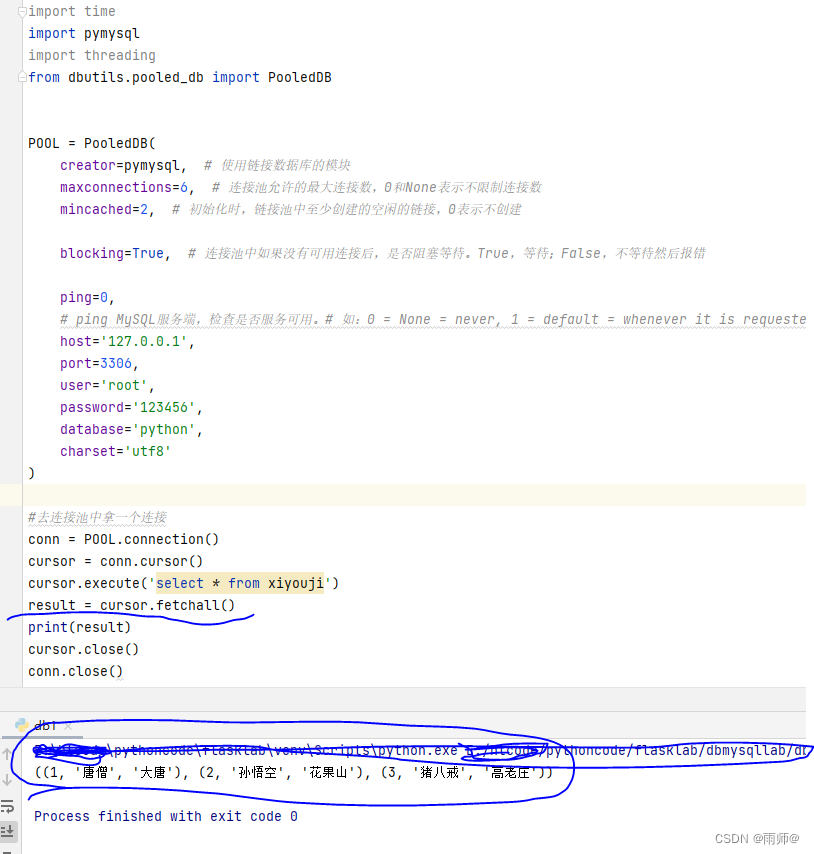
实例2:多线程的版本去调用task任务
重要的地方
maxconnections=6, # 连接池允许的最大连接数,0和None表示不限制连接数
这个是数据库的最大的连接数量
import time
import pymysql
import threading
from dbutils.pooled_db import PooledDB


POOL = PooledDB(
    creator=pymysql,  # 使用链接数据库的模块
    maxconnections=6,  # 连接池允许的最大连接数,0和None表示不限制连接数
    mincached=2,  # 初始化时,链接池中至少创建的空闲的链接,0表示不创建

    blocking=True,  # 连接池中如果没有可用连接后,是否阻塞等待。True,等待;False,不等待然后报错

    ping=0,
    # ping MySQL服务端,检查是否服务可用。# 如:0 = None = never, 1 = default = whenever it is requested, 2 = when a cursor is created, 4 = when a query is executed, 7 = always
    host='127.0.0.1',
    port=3306,
    user='root',
    password='123456',
    database='python',
    charset='utf8'
)


def task(num):
    # 去连接池中拿一个连接
    conn = POOL.connection()
    cursor = conn.cursor()
    cursor.execute('select * from xiyouji')
    #验证是否是上面的maxconnections=6,  # 连接池允许的最大连接数,0和None表示不限制连接数,6个数据一块查询的办法
    # cursor.execute('select sleep(2)')
    result = cursor.fetchall()

    cursor.close()
    conn.close()

    print(num,"--->",result)

from threading import Thread
for i in range(50):
    t=Thread(target=task,args=(i,))
    t.start()
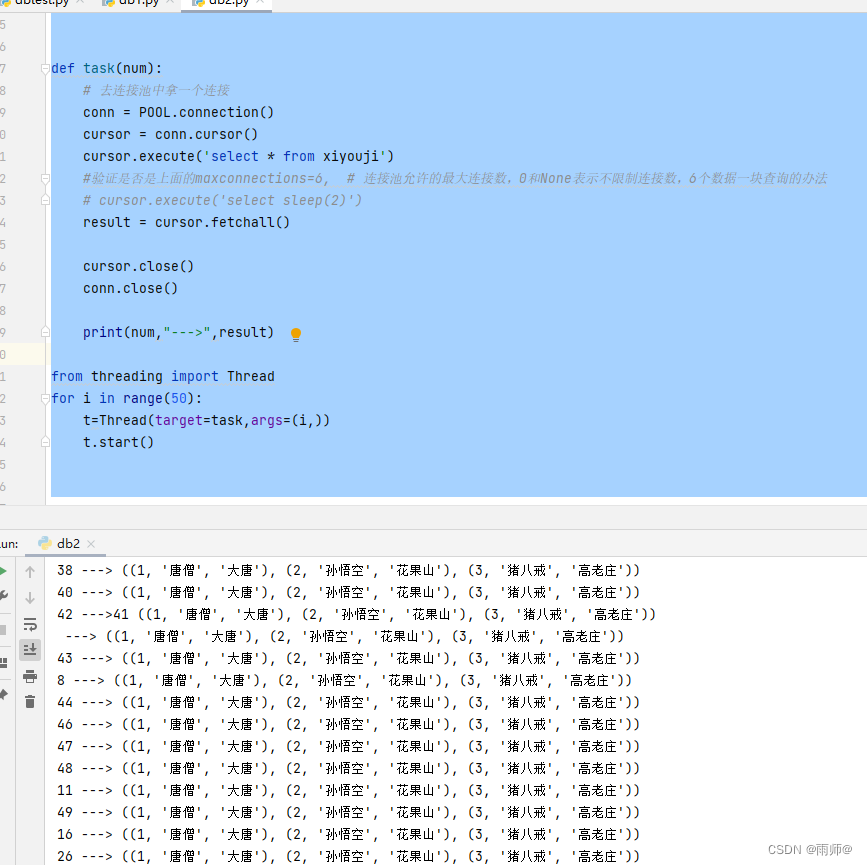
验证结果:
2.1验证数据库的最大的连接数的方法
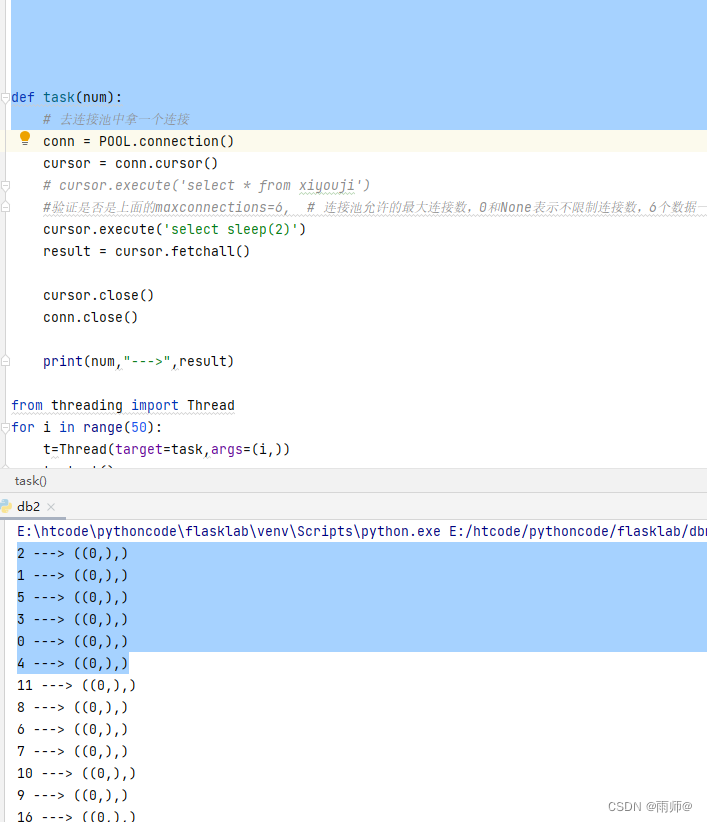
数据库查询睡眠2s的办法
# cursor.execute('select sleep(2)')
import time
import pymysql
import threading
from dbutils.pooled_db import PooledDB


POOL = PooledDB(
    creator=pymysql,  # 使用链接数据库的模块
    maxconnections=6,  # 连接池允许的最大连接数,0和None表示不限制连接数
    mincached=2,  # 初始化时,链接池中至少创建的空闲的链接,0表示不创建

    blocking=True,  # 连接池中如果没有可用连接后,是否阻塞等待。True,等待;False,不等待然后报错

    ping=0,
    # ping MySQL服务端,检查是否服务可用。# 如:0 = None = never, 1 = default = whenever it is requested, 2 = when a cursor is created, 4 = when a query is executed, 7 = always
    host='127.0.0.1',
    port=3306,
    user='root',
    password='123456',
    database='python',
    charset='utf8'
)


def task(num):
    # 去连接池中拿一个连接
    conn = POOL.connection()
    cursor = conn.cursor()
    # cursor.execute('select * from xiyouji')
    #验证是否是上面的maxconnections=6,  # 连接池允许的最大连接数,0和None表示不限制连接数,6个数据一块查询的办法
    cursor.execute('select sleep(2)')
    result = cursor.fetchall()

    cursor.close()
    conn.close()

    print(num,"--->",result)

from threading import Thread
for i in range(50):
    t=Thread(target=task,args=(i,))
    t.start()
展示效果
3-补充资料
import time
import pymysql
import threading
#老版本导包,新版本可以看上面的代码
from DBUtils.PooledDB import PooledDB, SharedDBConnection
POOL = PooledDB(
    creator=pymysql,  # 使用链接数据库的模块
    maxconnections=6,  # 连接池允许的最大连接数,0和None表示不限制连接数
    mincached=2,  # 初始化时,链接池中至少创建的空闲的链接,0表示不创建
    maxcached=5,  # 链接池中最多闲置的链接,0和None不限制
    maxshared=3,  # 链接池中最多共享的链接数量,0和None表示全部共享。PS: 无用,因为pymysql和MySQLdb等模块的 threadsafety都为1,所有值无论设置为多少,_maxcached永远为0,所以永远是所有链接都共享。
    blocking=True,  # 连接池中如果没有可用连接后,是否阻塞等待。True,等待;False,不等待然后报错
    maxusage=None,  # 一个链接最多被重复使用的次数,None表示无限制
    setsession=[],  # 开始会话前执行的命令列表。如:["set datestyle to ...", "set time zone ..."]
    ping=0,
    # ping MySQL服务端,检查是否服务可用。# 如:0 = None = never, 1 = default = whenever it is requested, 2 = when a cursor is created, 4 = when a query is executed, 7 = always
    host='127.0.0.1',
    port=3306,
    user='root',
    password='123',
    database='pooldb',
    charset='utf8'
)


def func():
    # 检测当前正在运行连接数的是否小于最大链接数,如果不小于则:等待或报raise TooManyConnections异常
    # 否则
    # 则优先去初始化时创建的链接中获取链接 SteadyDBConnection。
    # 然后将SteadyDBConnection对象封装到PooledDedicatedDBConnection中并返回。
    # 如果最开始创建的链接没有链接,则去创建一个SteadyDBConnection对象,再封装到PooledDedicatedDBConnection中并返回。
    # 一旦关闭链接后,连接就返回到连接池让后续线程继续使用。
    conn = POOL.connection()

    # print(th, '链接被拿走了', conn1._con)
    # print(th, '池子里目前有', pool._idle_cache, '\r\n')

    cursor = conn.cursor()
    cursor.execute('select * from tb1')
    result = cursor.fetchall()
    conn.close()


func()
更多推荐


 8
 0
- 0


 已为社区贡献14条内容

所有评论(0)