
Html + JavaScript 通过http方式调用Java接口的解决方案 (二)
后端实现:
接上篇初步搭建环境,
 https://blog.csdn.net/LlanyW/article/details/125209348?spm=1001.2014.3001.5502
把Android APP module的类导了几个主要 ,然后导了其中要用到接口。因为要传给前端是饮食byte[]数组对象。所以要使用到: fastjson,所以在pom.xml其依赖。
 <dependency>
            <groupId>com.alibaba</groupId>
            <artifactId>fastjson</artifactId>
            <version>1.2.45</version>
        </dependency>
在增加之后提下,后端接口调试工具,远端搭建一个完整web端即可调试服务端接口的完美工具:
Postman:调试http接口工具

导入android 的模块之后,需要转化http接口,包含byte[]对象的请求接口参考:
Java byte[]数组属性对象class转成JSON传输实现 - 接口(http)_Lan.W的博客-CSDN博客在Springboot框架下的http接口后端项目中,需要将包含byte[]数组通过JSON序列化,http接口转发出去。要求JS那边能原样转化出来 。使用fastjson 进行序列化,以下是服务端的实现。JS那边待定。测试以下byte[]数组:new byte[]{(byte) 0xff, 0x00, 0x05, 0x00, 0x07, 0x03, 0x01, 0x00, -1, 0x55对象class:包含byte[]数组属性源码:http接口实现:使用fastjson 序列化接口: https://blog.csdn.net/LlanyW/article/details/125387383?spm=1001.2014.3001.5502在@RestController的类,添加接口:使用get方法,通过FastJson序列化传输,如下:
@RestController//注解,表明这是控制层。
public class xxController {

  @GetMapping(value = "/getDetail",produces = MediaType.APPLICATION_JSON_UTF8_VALUE)
    public Object getDetail() {
        Student John = new Student("John", 16,"boy");
        John.getPacketList().add(new byte[]{0x5a, 0x00, 0x05, 0x00, 0x07, 0x03, 0x01, 0x00, 0x22, 0x55});
        LogUtils.d(String.valueOf(JSONObject.toJSON(John)));
        return JSONObject.toJSON(John);
    }

}
然后启动服务,PostMan调试结果:
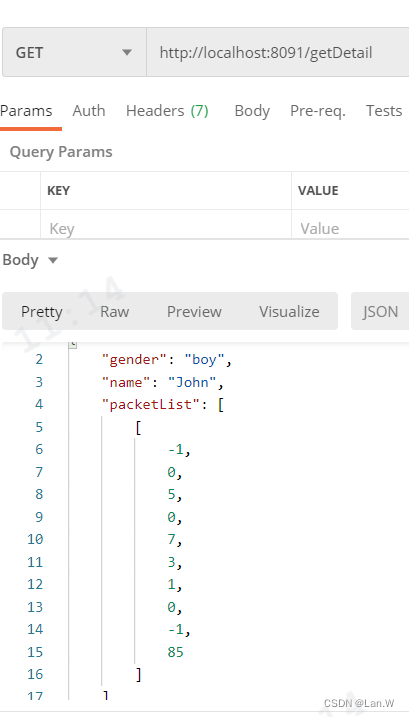
WEB 端实现:
使用到vue.js, qs.js, axios.js
index.html源码
<!DOCTYPE html>
<html>
<head>
    <meta charset="utf-8">
    <title>Vue 测试实例</title>
<!--    <script src="node_modules/vue"></script>-->
    <script src="../js/vue.js" ></script>
    <script src="../js/qs.js"></script>
    <script src="../js/axios.js"></script>
    <script src="../js/utils.js">
    </script>

    <!--    <script src="https://cdn.bootcdn.net/ajax/libs/qs/6.10.1/qs.js"></script>-->
    <!--    <script src="https://cdn.staticfile.org/axios/0.18.0/axios.min.js"></script>-->
</head>
<body>
<div id="app">
    {{ info }}

    <p id="info2">---</p>
</div>


<div id="app4">
   <span style="color: #367ebd; font-weight: bold" v-bind:title="message">
       1 鼠标悬停显示当前系统时间
   </span>
    <span style="color: #367ebd; font-weight: bold" v-bind:title="message2">
       2 鼠标悬停显示当前系统时间
   </span>
    <p id="info4"></p>
    <span title="哈哈哈哈">哈哈哈哈</span>
    <p></p>
    {{ info4 }}
</div>
<p>--
</p>

<script src="main.js" type="module">

</script>
</body>
</html>
main.js
(function (){
    /*实现一个 http GET 请求*/
    new Vue({
        el: '#app',
        data() {
            return {
                info: null
            }
        },
        mounted() {
            axios
                .get('http://localhost:8091/test/test')
                .then(response => (this.info = "通过 Get获取服务端的数据是: " + response.data))
                .catch(function (error) { // 请求失败处理
                    console.log(error);
                });
        }
    })

    /* 通过一个 http POST 请求拿到数据 */
    new Vue({
        el: '#app4',
        data() {
            return {
                message: '1 页面加载于' + new Date().toLocaleString(),
                message2: '2 页面加载于' + new Date().toLocaleString(),
                info4: null
            }
        },
        mounted() {
            var url = "http://localhost:8091/getDetail";
            var data1 = {
                address: "88888"
            }
            axios({
                url,
                data: Qs.stringify(data1),
                method: 'get',

            }).then(res => {
                this.info4 = "info4: 通过 Get获取服务端的数据是: " +  JSON.stringify(res.data)
                // console.log(Array.toString(res.data))
                console.log(">>>>")
                console.log(new Uint8Array(res.data.packetList[0]))
                let packetInfo1=new Uint8Array(res.data.packetList[0])
            }).catch(function (error) { // 请求失败处理
                console.log(error);
            });

        }
    })


})();
运行效果:
之后转成无符号byte数组:
let packetInfo1=new Uint8Array(res.data.packetList[0])

更多推荐

 0
0 0
0- 0


 已为社区贡献16条内容

所有评论(0)