
基于Intel E5V4计算刀片的RapidIO性能测试
1、背景介绍
目前使用的Intel志强系列计算刀片中使用了两片Tsi721 PCIE转RapidIO芯片,用来实现机箱内计算刀片之间通过RapidIO协议进行数据传输。关于驱动安装和测试工具下载请见这篇文章https://felven.blog.csdn.net/article/details/114099616 下文介绍测试步骤。
2、测试环境
测试环境为两块计算刀片通过背板实现互联,其中两路RapidIO走线在背板上进行了交叉,示意图如下。

左侧计算刀片设置为slave端,其Port0连接右侧master端的port1.
3、测试步骤
在驱动和测试工具安装完毕后,需要修改系统加载RapidIO配置项,文件路径为
/etc/modprobe.d/rapidio.conf
Master端修改如下:
# Configure RapidIO subsystem modules loading

# Uncomment the line below to set enumerator host destination ID on RapidIO
# network enumerator node (overrides kernel command line option).
# See included documentation for more details.

 options rapidio hdid=1,2

# Uncomment and edit the line below to change parameters of Tsi721 mport device
# driver. See Documentation/rapidio/tsi721.txt for parameter description.

 options tsi721_mport mbox_sel=0xf dma_sel=0x7f pcie_mrrs=5 dma_txqueue_sz=4096 dma_desc_per_channel=4096

# Uncomment and edit the line below to change parameters of rio_mport_cdev device
# driver if you want it to use reserved memory range for DMA data buffers.

 options rio_mport_cdev rio_res_mem=0x40000000 rio_res_size=0x10000000

# Uncomment one of the module loading options below (if needed)
# ATTN: If you use kernel mode enumeration please make sure that switch drivers
# are loaded before an enumeration/discovery process starts.

# Load RapidIO all drivers immediately after rapidio core module was loaded.
# Use command "echo -1 > /sys/bus/rapidio/scan" to start enumeration/discovery.

 softdep rapidio post: idt_gen2 idt_gen3 idtcps tsi57x tsi568 tsi721_mport rio_mport_cdev rio_cm rio-scan

# Load RapidIO switch drivers before rio-scan enumerator module is loaded
# Use this option if RIO scripts package will be installed or rio-scan module
# will be loaded manually using "modprobe rio-scan scan=1"

softdep rio-scan pre: idt_gen2 idt_gen3 idtcps tsi57x

# Load RapidIO only character mode drivers (good if only user-space enumeration is used)

# softdep rapidio post: rio_mport_cdev rio_cm
Slave端修改如下:
# Configure RapidIO subsystem modules loading

# Uncomment the line below to set enumerator host destination ID on RapidIO
# network enumerator node (overrides kernel command line option).
# See included documentation for more details.

 options rapidio hdid=-1,-2

# Uncomment and edit the line below to change parameters of Tsi721 mport device
# driver. See Documentation/rapidio/tsi721.txt for parameter description.

 options tsi721_mport mbox_sel=0xf dma_sel=0x7f pcie_mrrs=5 dma_txqueue_sz=4096 dma_desc_per_channel=4096

# Uncomment and edit the line below to change parameters of rio_mport_cdev device
# driver if you want it to use reserved memory range for DMA data buffers.

 options rio_mport_cdev rio_res_mem=0x40000000 rio_res_size=0x10000000

# Uncomment one of the module loading options below (if needed)
# ATTN: If you use kernel mode enumeration please make sure that switch drivers
# are loaded before an enumeration/discovery process starts.

# Load RapidIO all drivers immediately after rapidio core module was loaded.
# Use command "echo -1 > /sys/bus/rapidio/scan" to start enumeration/discovery.

 softdep rapidio post: idt_gen2 idt_gen3 idtcps tsi57x tsi568 tsi721_mport rio_mport_cdev rio_cm rio-scan

# Load RapidIO switch drivers before rio-scan enumerator module is loaded
# Use this option if RIO scripts package will be installed or rio-scan module
# will be loaded manually using "modprobe rio-scan scan=1"

softdep rio-scan pre: idt_gen2 idt_gen3 idtcps tsi57x

# Load RapidIO only character mode drivers (good if only user-space enumeration is used)

# softdep rapidio post: rio_mport_cdev rio_cm
配置参数的含义可以参看驱动里面的说明:

修改完毕后两块板子重启,在master端进行rio-scan操作。
Echo –l >/sys/bus/rapidio/scan
当扫描到设备后就能在/sys/bus/rapidio/devices下看到slave的设备了,如果扫描不到应该就是硬件连接故障

此时就可以进行通信了
Master端打开接收命令,如果打印speed显示LINK DOWN需要检查硬件连接故障

Slave端进行发送,由于rapidio是基于DMA进行传输,发送端可以直接指定发到接收端的地址

4、测试结果
RapidIO速率都是 5G X4,不同包长情况下重复发送10次,取平均值得到下表测试结果
| 序号 | 包大小 B | 写速率 MB/S | 读速率 MB/S |
| 1 | 1K | 52.79 | 60.45 |
| 2 | 2K | 102.64 | 116.97 |
| 3 | 4K | 189.66 | 216.32 |
| 4 | 8K | 347.38 | 379.03 |
| 5 | 16K | 555.81 | 601.63 |
| 6 | 32K | 831.21 | 855.34 |
| 7 | 64K | 1088.58 | 1084.60 |
| 8 | 128K | 1299.55 | 1257.66 |
| 9 | 256K | 1446.89 | 1366.63 |
| 10 | 512K | 1542.51 | 1428.73 |
| 11 | 1M | 1578.05 | 1446.96 |
| 12 | 2M | 1607.74 | 1475.45 |
根据测试结果,能够看到包越大速率越高,这和DMA传输原理是符合的。当包长达到64KB后,读速率低于写速率,这点暂时还不知道原因。
5、一点补充
Tsi721中最重要的几个RapidIO寄存器为
0x60 (表示RapidIO地址)
0x158 (表示port状态)
0x15c (控制port发送和接收使能)
具体可以查看Tsi721 datasheet
下面是链路正常情况下master端的寄存器值,供参考。
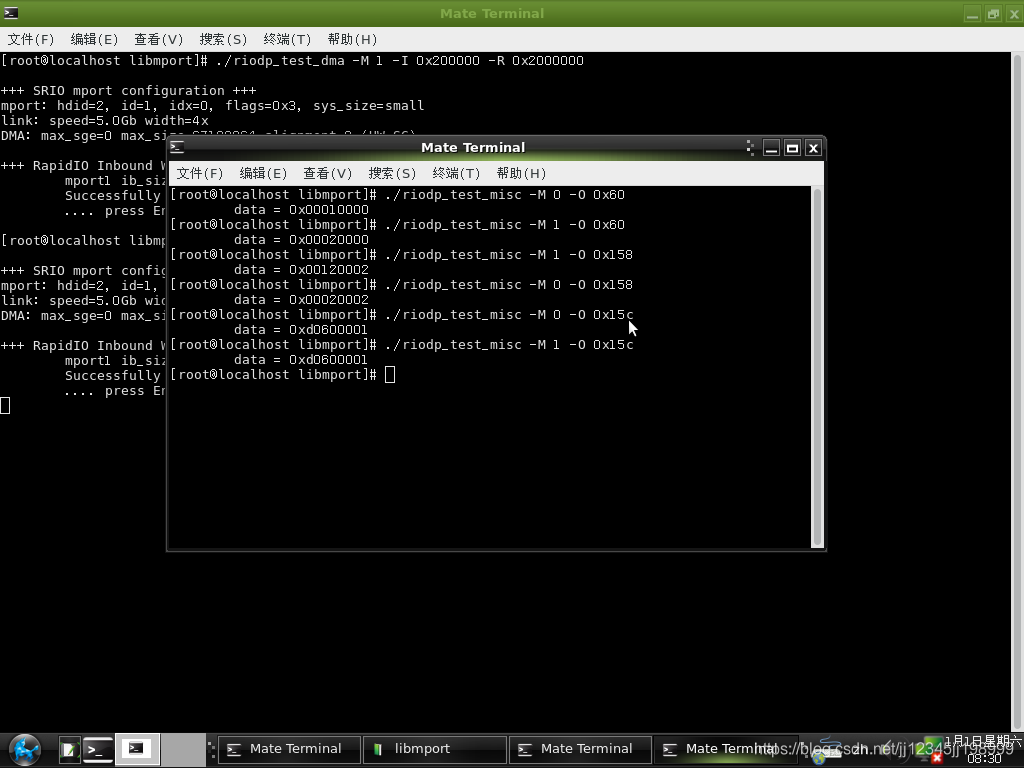
下图为slave端寄存器的值

更多推荐

 2
2 0
0- 0


 已为社区贡献10条内容

所有评论(0)