
hive基础 & hive sql练习
目录
Hive中Sort By, Order By, Cluster By, Distribute by
Hive sql: where,order, group,join
hive架构
Hive是基于Hadoop的一个数据仓库工具,可以将结构化的数据文件映射为一张表,并提供类SQL查询功能。本质是将HQL转化成MapReduce程序。
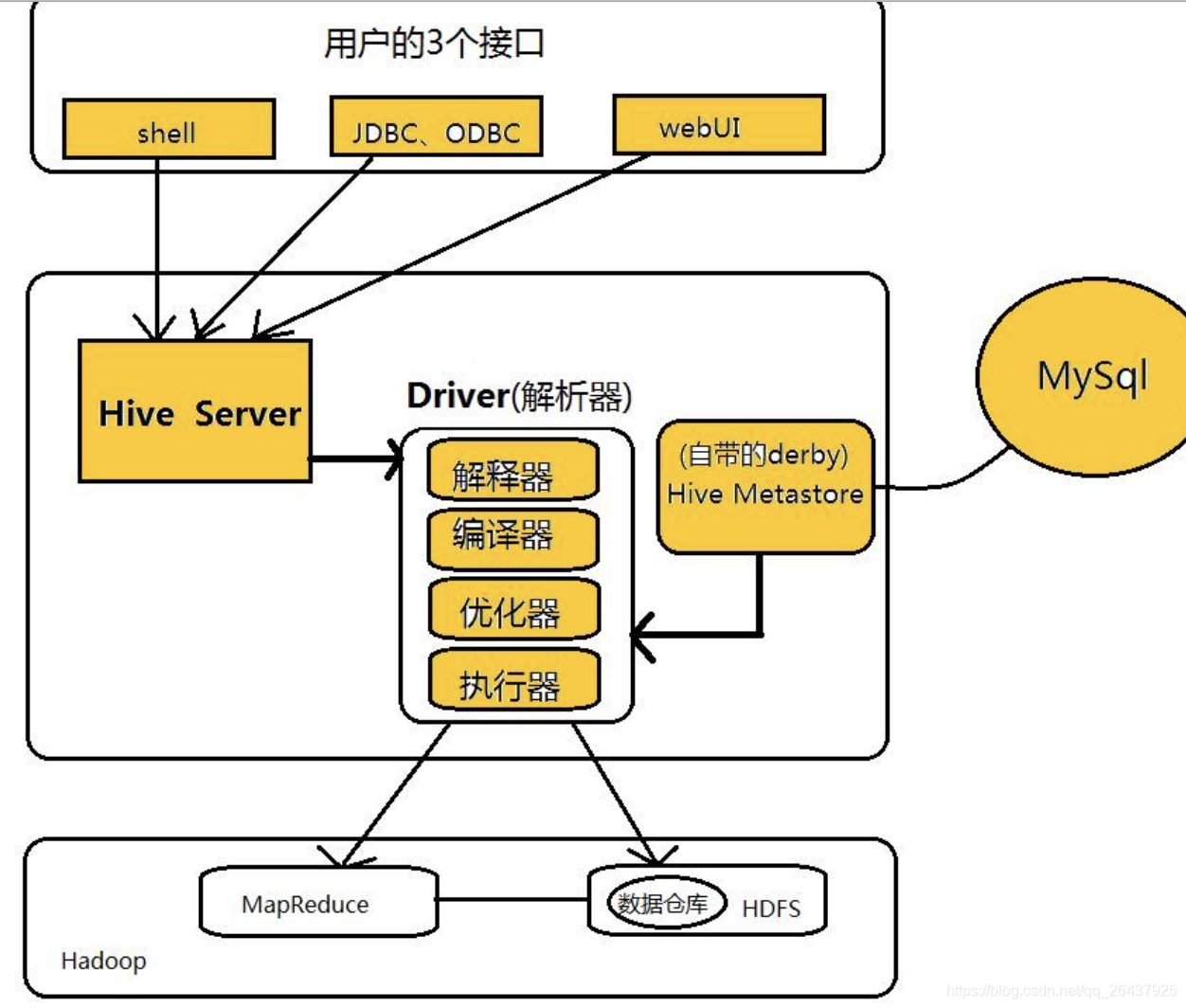
客户端组件
1、CLI:命令行接口,是最常用的一种用户接口,CLI启动时会同时启动一个Hive副本。CLI是和Hive交互的最简单也是最常用方式,只需要在一个具备完整Hive环境下的Shell终端中键入hive即可启动服务。 用户可以在CLI上输入HQL来执行创建表、更改属性以及查询等操作。不过Hive CLI不适应于高并发的生产环境,仅仅是Hive管理员的好工具。
2、JDBC/ODBC: JDBC是java database connection的规范,它定义了一系列java访问各类db的访问接口,因此hive-jdbc其实本质上是扮演一个协议转换的角色,把jdbc的标准协议转换为访问HiveServer服务的协议。hive-jdbc除了扮演网络协议转化的工作,并不承担他的工作,比如sql的合法性校验和解析,一律忽略 。ODBC是一组对数据库访问的标准AP ,它的底层实现源码是采用C/C++编写的。JDBC/ODBC都是通过hiveclient与hiveserver保持通讯的,借助thrfit rpc协议来实现交互。
3、HWI:HWI是Hive的web方为接口,提供了一种可以可以通过浏览器来访问Hive的服务。
服务端组件
1、Thrift Server:Thrift是facebook开发的一个软件框架,它用来进行可扩展且跨语言的服务的开发,hive集成了Thrift Server服务,能让不同的编程语言调用hive的接口。
2、元数据(Metastore):元数据服务组件,这个组件用于存储hive的元数据, 包括表名、表所属的数据库、表的拥有者、列/分区字段、表的类型、表的数据所在目录等内容。hive的元数据存储在关系数据库里,支持derby、mysql两种关系型数据库。元数据对于hive十分重要,因此hive支持把metastore服务独立出来,安装到远程的服务器集群里,从而解耦hive服务和metastore服务,保证hive运行的健壮性。
3、Driver组件:该组件包括Interpreter、Complier、Optimizer和Executor,它的作用是将我们写的HiveQL(类SQL)语句进行解析、编译、优化,生成执行计划,然后调用底层的mapreduce计算框架。
解释器:将SQL字符串转化为抽象语法树AST;
编译器:将AST编译成逻辑执行计划;
优化器:对逻辑执行计划进行优化;
执行器:将逻辑执行计划转成可执行的物理计划,如MR/Spark
hive 数据库/表的相关操作
表的create,load data,select
hive (default)> CREATE TABLE IF NOT EXISTS employee ( eid int, name String,
              > salary String, destination String) COMMENT 'Employee details' ROW FORMAT DELIMITED FIELDS TERMINATED BY '\t' LINES TERMINATED BY '\n' STORED AS TEXTFILE;
OK
Time taken: 0.781 seconds
hive (default)>


hive (default)> LOAD DATA LOCAL INPATH '/Users/mubi/tmp_work/sample.txt' OVERWRITE INTO TABLE employee;
Loading data to table default.employee
OK
Time taken: 6.206 seconds

hive (default)> select * from employee;
OK
employee.eid	employee.name	employee.salary	employee.destination
1201	 Gopal	45000	Technical manager
1202	 Manisha	45000	Proof reader
1203	 Masthanvali	40000	Technical writer
1204	Kiran	40000	Hr Admin
1205 	Kranthi	30000	Op Admin
Time taken: 0.253 seconds, Fetched: 5 row(s)
hive (default)>


mubi@mubideMacBook-Pro tmp_work $ cat sample.txt
1201	Gopal	45000	Technical manager
1202	Manisha	45000	Proof reader
1203	Masthanvali	40000	Technical writer
1204	Kiran	40000	Hr Admin
1205	Kranthi	30000	Op Admin
mubi@mubideMacBook-Pro tmp_work $
表的修改
ALTER TABLE employee RENAME TO emp;

ALTER TABLE emp CHANGE name ename String;

ALTER TABLE emp CHANGE salary salary Double;

ALTER TABLE emp ADD COLUMNS (dept STRING COMMENT 'Department name');
分区表
Hive组织表到分区。它是将一个表到基于分区列,如日期,城市和部门的值相关方式。使用分区,很容易对数据进行部分查询。
表或分区是细分成桶,以提供额外的结构,可以使用更高效的查询的数据。桶的工作是基于表的一些列的散列函数值。
分区表的创建,load data
create table partition_table(id int,age int,name string)
partitioned by(sex string,data string)
row format delimited fields terminated by "\t"
 collection items terminated by ","
 map keys terminated by ":"
 lines terminated by "\n"
 stored as textfile;

mubi@mubideMacBook-Pro tmp_work $ cat partition.txt
1	12	q
2	13	a
3	14	z
mubi@mubideMacBook-Pro tmp_work $ cat partition1.txt
4	15	w
5	16	s
mubi@mubideMacBook-Pro tmp_work $


load data local inpath '/Users/mubi/tmp_work/partition.txt' into table partition_table partition(sex='man',data='20180101');

load data local inpath '/Users/mubi/tmp_work/partition1.txt' into table partition_table partition(sex='woman',data='20180102');


hive (default)> select * from partition_table;
OK
partition_table.id	partition_table.age	partition_table.name	partition_table.sex	partition_table.data
1	12	q	man	20180101
2	13	a	man	20180101
3	14	z	man	20180101
4	15	w	woman	20180102
5	16	s	woman	20180102
Time taken: 0.143 seconds, Fetched: 5 row(s)
hive (default)>
mubi@mubideMacBook-Pro tmp_work $ cat partition.txt
1 12 q
2 13 a
3 14 z
mubi@mubideMacBook-Pro tmp_work $ cat partition1.txt
4 15 w
5 16 s
mubi@mubideMacBook-Pro tmp_work $

分区表的查询
hive (default)> select * from partition_table where sex="man";
OK
partition_table.id	partition_table.age	partition_table.name	partition_table.sex	partition_table.data
1	12	q	man	20180101
2	13	a	man	20180101
3	14	z	man	20180101
Time taken: 0.505 seconds, Fetched: 3 row(s)
hive (default)>
分区过多有何坏处以及分区时的注意事项?
- 当分区过多且数据很大时,可以使用严格模式,避免出发一个大的mapreduce任务。当分区数量过多且数据量较大时,执行宽范围的数据扫描会触发一个很大的mapreduce任务。在严格模式下,当where中没有分区过滤条件时会禁止执行。
- hive如果有过多的分区,由于底层是存储在HDFS上,HDFS上只用于存储大文件 而非小文件,因为过多的分区会增加namenode的负担。
- hive会转化为mapreduce,mapreduce会转化为多个task。过多小文件的话,每个文件一个task,每个task一个JVM实例,JVM的开启与销毁会降低系统效率。
Hive内置运算符
- 关系运算符
=,!=,<,<=,>,>=,is null,is not null,like,rlike,regexp
- 算术运算符
+,-,*,/,%,&,|,^,~
- 逻辑运算符
and,&&,or,||,not,!
- 复杂运算符
A[n],A是一个数组,n是一个int,返回数组A的第n个元素,第一个元素的索引0
M[key],M 是一个 Map<K, V> 并 key 的类型为K,返回对应于映射中关键字的值
S.x,S 是一个结构,返回S的s字段
Hive内置函数&聚合函数
round,floor,ceil,rand,concat,substr,upper,ucase,lower,lcase,trim,ltrim,rtrim,size,cast,from_unixtime,to_date,get_json_object
count,sum,avg,min,max
Hive视图和索引
// todo
Hive 内部表/外部表
Hive默认建立的表是内部表,内部表create之后,然后load加载hdfs上的数据,会移动物理数据到Hive的数据仓库默认目录(/user/hive/warehouse/xx.db/)下。
内部表drop之后,元数据和物理数据都会删除。
外部表在导入hdfs的数据后,数据并没有移动到自己的数据仓库目录下,也就是说外部表中的数据并不是由它自己来管理的!
外部表drop掉之后,元数据删掉了,但是实际物理数据还存在原位置。
Hive中Sort By, Order By, Cluster By, Distribute by
- Sort By:局部排序,在会reduce之前为每个reducer生成一个排序文件。
- Order By:会对全部数据进行全局排序。
- Distribute By:控制map结果的分发,将具有相同字段的map分发到一个reduce节点上做处理。
- Cluster By:通常Distribute by和Sort By一起使用。Cluster By是Distribute by和Sort By的结合体
Hive sql: where,order, group,join
hive (default)> select * from emp where salary > 40000;
OK
emp.eid	emp.ename	emp.salary	emp.destination	emp.dept
1201	Gopal	45000.0	Technical manager	NULL
1202	Manisha	45000.0	Proof reader	NULL
Time taken: 0.123 seconds, Fetched: 2 row(s)
hive (default)>


// 产生一个查询以检索每个部门的员工数量
SELECT Dept,count(*) FROM employee GROUP BY DEPT;
Hive 分桶
分区提供了一个隔离数据和优化查询的便利方式,不过并非所有的数据都可形成合理的分区,尤其是需要确定合适大小的分区划分方式,(不合理的数据分区划分方式可能导致有的分区数据过多,而某些分区没有什么数据的尴尬情况)
分桶是将数据集分解为更容易管理的若干部分的另一种技术
CREATE TABLE ft( id INT, name STRING, age INT)
row format delimited fields terminated by "\t"
 collection items terminated by ","
 map keys terminated by ":"
 lines terminated by "\n"
 stored as textfile;


load data local inpath '/Users/mubi/tmp_work/ft.txt’ into table ft;


create table bucket_table(id  int, name string, age int)clustered by(age) into 4 buckets
row format delimited fields terminated by "\t"
 collection items terminated by ","
 map keys terminated by ":"
 lines terminated by "\n"
 stored as textfile;

insert into bucket_table select id,name,age from ft;
hive (default)> select id, name, age from bucket_table tablesample(bucket 1 out of 4 on age);
OK
id	name	age
6	xiafen	48
1	zhang	12
Time taken: 0.068 seconds, Fetched: 2 row(s)
hive (default)>

hive (default)> select id, name, age from bucket_table tablesample(bucket 2 out of 4 on age);
OK
id	name	age
11	sichua	89
8	liuwu	41
5	guoji	45
Time taken: 0.059 seconds, Fetched: 3 row(s)
hive (default)>
ft.txt
mubi@mubideMacBook-Pro tmp_work $ cat ft.txt
1	zhang	12
2	lisi	34
3	wange	23
4	zhouyu	15
5	guoji	45
6	xiafen	48
7	yanggu	78
8	liuwu	41
9	zhuto	66
10	madan	71
11	sichua	89
mubi@mubideMacBook-Pro tmp_work $
Hive 窗口函数
// todo
Hive sql练习
可参考:dCHENz《一定要学习的Hive SQL的50道练习题》,如下记录常用的一些命令和sql
// 创建表
create table student(s_id string,s_name string,s_birth string,s_sex string) row format delimited fields terminated by '\t';

create table score(s_id string,c_id string,s_score int) row format delimited fields terminated by '\t';

create table course(c_id string,c_name string,t_id string) row format delimited fields terminated by '\t';

create table teacher(t_id string,t_name string) row format delimited fields terminated by '\t';

// 导入数据

load data local inpath '/Users/mubi/tmp_work/datas/teacher.csv' into table teacher;


load data local inpath '/Users/mubi/tmp_work/datas/teacher.csv' OVERWRITE into table teacher;

// 数据文件
mubi@mubideMacBook-Pro datas $ cat teacher.csv
01	张三
02	李四
03	王五
04	李卫
mubi@mubideMacBook-Pro datas $ cat course.csv
01	语文	02
02	数学	01
03	英语	03
mubi@mubideMacBook-Pro datas $
mubi@mubideMacBook-Pro datas $ cat student.csv
01	赵雷	1990-01-01	男
02	钱电	1990-12-21	男
03	孙风	1990-05-20	男
04	李云	1990-08-06	男
05	周梅	1991-12-01	女
06	吴兰	1992-03-01	女
07	郑竹	1989-07-01	女
08	王菊	1990-01-20	女
mubi@mubideMacBook-Pro datas $ cat score.csv
01	01	80
01	02	90
01	03	99
02	01	70
02	02	60
02	03	80
03	01	80
03	02	80
03	03	80
04	01	50
04	02	30
04	03	20
05	01	76
05	02	87
06	01	31
06	03	34
07	02	89
07	03	98
mubi@mubideMacBook-Pro datas $
查询"李"姓老师的数量
select count(1) from teacher where t_name like '李%';
返回

查询学生的总成绩并进行排名
查询score表获取s_id相关的课程总成绩,平均成绩等信息
select s_id,sum(s_score) sum_score,count(c_id) course_count, cast(avg(s_score) as decimal(10,2)) avg_score from score group by s_id;

执行结果如下:

s_id	sum_score	course_count	avg_score
01	269	3	89.67
02	210	3	70.00
03	240	3	80.00
04	100	3	33.33
05	163	2	81.50
06	65	2	32.50
07	187	2	93.50
Time taken: 39.599 seconds, Fetched: 7 row(s)
hive (default)>
结合student 和 score表查询
select score.s_id,s_name,sum(s_score) sum_score,count(c_id) course_count, cast(avg(s_score) as decimal(10,2)) avg_score from score, student where score.s_id=student.s_id group by score.s_id,s_name order by sum_score desc;

执行结果如下:

score.s_id	s_name	sum_score	course_count	avg_score
01	赵雷	269	3	89.67
03	孙风	240	3	80.00
02	钱电	210	3	70.00
07	郑竹	187	2	93.50
05	周梅	163	2	81.50
04	李云	100	3	33.33
06	吴兰	65	2	32.50
Time taken: 80.383 seconds, Fetched: 7 row(s)
hive (default)>
错误sql
hive (default)> select score.s_id,s_name,sum(s_score) sum_score,count(c_id) course_count, cast(avg(s_score) as decimal(10,2)) avg_score from score, student where score.s_id=student.s_id group by score.s_id order by sum_score desc;
FAILED: SemanticException [Error 10025]: Line 1:18 Expression not in GROUP BY key 's_name'
hive (default)>
加上总成绩排名
select score.s_id,s_name,sum(s_score) sum_score,count(c_id) course_count, cast(avg(s_score) as decimal(10,2)) avg_score,row_number() over(order by sum(s_score) desc) ranking from score, student where score.s_id=student.s_id group by score.s_id,s_name order by sum_score desc;

执行结果如下:

score.s_id	s_name	sum_score	course_count	avg_score	ranking
01	赵雷	269	3	89.67	1
03	孙风	240	3	80.00	2
02	钱电	210	3	70.00	3
07	郑竹	187	2	93.50	4
05	周梅	163	2	81.50	5
04	李云	100	3	33.33	6
06	吴兰	65	2	32.50	7
Time taken: 104.335 seconds, Fetched: 7 row(s)
hive (default)>
附:ROW_NUMBER() OVER语法
语法:ROW_NUMBER() OVER(PARTITION BY COLUMN ORDER BY COLUMN)

解释:
row_number() OVER (PARTITION BY COL1 ORDER BY COL2)表示根据COL1分组,在分组内部根据COL2排序,而此函数计算的值就表示每组内部排序后的顺序编号(该编号在组内是连续并且唯一的)。

例子
select id,dept,salary,ROW_NUMBER() OVER(PARTITION BY dept ORDER BY salary);

其中结果会首先按照dept分组升序排序,然后按照salary降序进行排序,而后面的row_number则是在每个dept分组中的排序号。

执行结果如下
id dept salary row_number
1 a 10000 1
2 a 9000 2
3 a 8000 3
4 b 12000 1
5 b 11000 2
查询每门课程被选修的学生数
select c_id, count(distinct s_id) from score group by c_id;

执行结果如下:

c_id	_c1
01	6
02	6
03	6
Time taken: 33.421 seconds, Fetched: 3 row(s)
hive (default)>
集合course表和score表
select sc.c_id cid, c.c_name cname, count(sc.s_id) countc from score sc, course c where sc.c_id = c.c_id group by sc.c_id, c.c_name;

执行结果如下:

cid	cname	countc
01	语文	6
02	数学	6
03	英语	6
Time taken: 41.968 seconds, Fetched: 3 row(s)
hive (default)>
或者使用join语法(结果同上)
select c.c_id cid, c.c_name cname, tmp.number countc from course c join (select c_id, count(1) as number from score group by score.c_id) tmp on c.c_id = tmp.c_id;

执行结果如下:

cid	cname	countc
01	语文	6
02	数学	6
03	英语	6
Time taken: 58.941 seconds, Fetched: 3 row(s)
hive (default)>
case when then 语句
select s_id,s_name,s_birth,s_sex, case when s_birth < '1990-01-01' then '80后' when s_birth < '1992-01-01' then '90/91' else '>=92' end as age from student order by s_birth;

执行结果如下

s_id	s_name	s_birth	s_sex	age
07	郑竹	1989-07-01	女	80后
01	赵雷	1990-01-01	男	90/91
08	王菊	1990-01-20	女	90/91
03	孙风	1990-05-20	男	90/91
04	李云	1990-08-06	男	90/91
02	钱电	1990-12-21	男	90/91
05	周梅	1991-12-01	女	90/91
06	吴兰	1992-03-01	女	>=92
Time taken: 24.882 seconds, Fetched: 8 row(s)
hive (default)>


# case when then 语法

case
    when s_birth < '1990-01-01' then '80后'
    when s_birth < '1992-01-01' then '90/91'
    else '>=92'
end as age
Having 语句
having与where不同点
- where后面不能写分组函数,而having后面可以使用分组函数。
- having只用于group by分组统计语句。
select score.s_id,s_name,sum(s_score) sum_score,count(c_id) course_count, cast(avg(s_score) as decimal(10,2)) avg_score from score, student where score.s_id=student.s_id group by score.s_id,s_name having avg(s_score) > 70.0 order by sum_score desc;

执行结果如下:

score.s_id	s_name	sum_score	course_count	avg_score
01	赵雷	269	3	89.67
03	孙风	240	3	80.00
07	郑竹	187	2	93.50
05	周梅	163	2	81.50
Time taken: 67.705 seconds, Fetched: 4 row(s)
hive (default)>
更多推荐


 1
 0
- 0


 已为社区贡献6条内容

所有评论(0)