
微信小程序 TabBar 完整配置教程
·
微信小程序 TabBar 完整配置教程
让科技服务于人民
您的支持是我继续创作及维护的动力,感谢打赏,祝您工作顺利,生活美满!!!

(app.json 直接改)
一、核心规则
pagePath路径 绝对不能以/开头。最前面不能加斜杠- 页面必须先在最外层
pages数组注册,才能放进 tabBar - tabBar 最少 2 项、最多 5 项
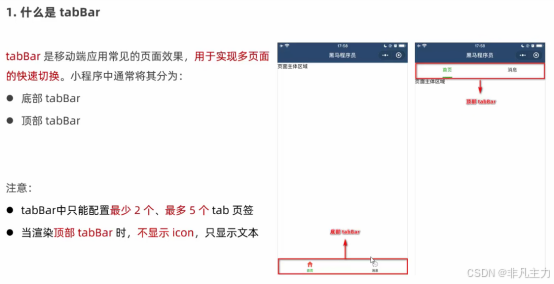
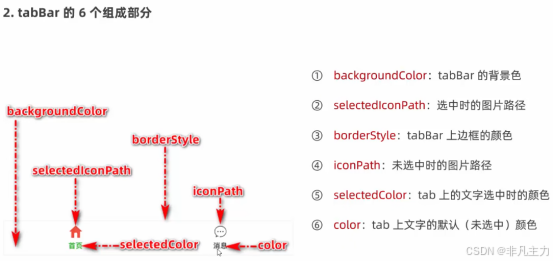
组成:
二、最简完整 app.json 模板
{
  "pages": [
    "pages/index/index",
    "pages/cart/cart",
    "pages/my/my"
  ],
  "window": {
    "navigationBarTitleText": "小程序",
  },
  "tabBar": {
    "backgroundColor": "#ffffff",
    "selectedColor": "#E4393C",
    "list": [
      {
        "pagePath": "pages/index/index",
        "text": "首页",
        "iconPath": "images/home.png",
        "selectedIconPath": "images/home-active.png"
      },
      {
        "pagePath": "pages/cart/cart",
        "text": "购物车",
        "iconPath": "images/cart.png",
        "selectedIconPath": "images/cart-active.png"
      },
      {
        "pagePath": "pages/my/my",
        "text": "我的",
        "iconPath": "images/my.png",
        "selectedIconPath": "images/my-active.png"
      }
    ]
  }
}
三、各字段说明
1. tabBar 节点 顶层常用配置项
| 属性 | 类型 | 必填 | 默认值 | 描述 |
|---|---|---|---|---|
| list | Array | 是 | tab 页签的列表 最少 2 个、最多 5 个 tab | |
| position | String | 否 | bottom | tabBar 的位置,仅支持 bottom底部 / top顶部 |
| borderStyle | String | 否 | black | tabBar 上边框的颜色,仅支持 black/white |
| color | HexColor | 否 | tab 上文字的默认(未选中)颜色 | |
| selectedColor | HexColor | 否 | tab 上的文字选中时的颜色 | |
| backgroundColor | HexColor | 否 | tabBar 的背景色 |
2. List 数组中,每一个tab项的配置对象 包含属性如下:
| 属性 | 类型 | 必填 | 描述 |
|---|---|---|---|
| pagePath | String | 是 | 页面路径,页面必须在 pages 中预先定义 |
| text | String | 是 | tab 上显示的文字 |
| iconPath | String | 否 | 未选中时的图标路径;当 position 为 top 时,不显示 icon |
| selectedIconPath | String | 否 | 选中时的图标路径;当 position 为 top 时,不显示 icon |
注意 :
pagePath:页面路径,和 pages 里写法完全一致。
四、分步操作步骤
- 在项目根目录新建文件夹(例如
images),放入 tab 图标 - 在
pages数组先声明所有 tab 需要用到的页面 - 在根层级添加
tabBar配置,粘贴list数组 - 保存 app.json,开发者工具自动编译,底部tab立即生效
五、常见报错排查
pagePath should not begin with '/'
→ 删除路径最前面的/- 点击tab提示页面不存在
→ 检查pages数组里有没有该页面路径,大小写、文件名必须完全一致 - 图标不显示
→ 图标路径写错,建议用相对根目录路径,图标尺寸建议 81px × 81px
六、隐藏tabBar(页面单独隐藏)
在对应页面的 xxx.json 里添加:
{
  "navigationBarTitleText": "详情页",
  "tabBar": {
    "visible": false
  }
}
更多推荐



 7
7 0
0- 0


 已为社区贡献2条内容

所有评论(0)