
使用python selenium OpenCV完成登录滑动拼图校验
·
该方案采用了基于边缘的匹配(Canny边缘)来提高准确性,并根据分数选择最佳匹配(没有垂直过滤器)。这种方法对重复模式和噪点更稳健
滑动拼图验证码需要拖动滑块到指定缺口位置完成验证,以下是实现方法:
-
等待缺口背景图片和拼图滑块图片出现
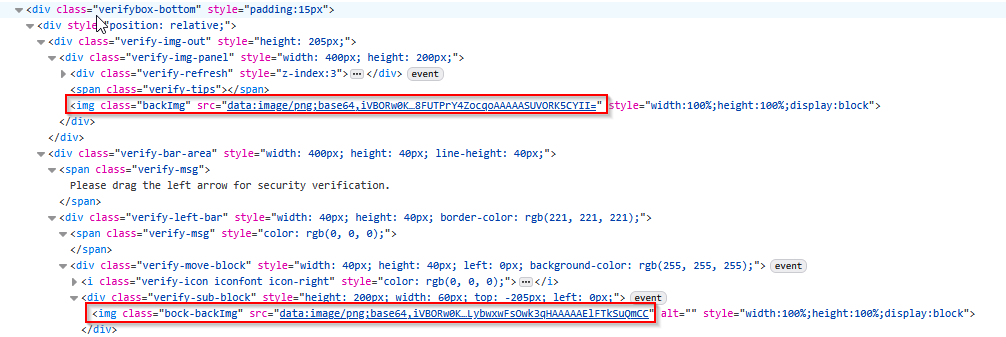
def wait_for_captcha(self): """Wait until slider CAPTCHA appears.""" self.wait.until(EC.visibility_of_element_located(( By.XPATH, "//img[contains(@class,'backImg') and normalize-space(@src) != '']" ))) self.wait.until(EC.visibility_of_element_located(( By.XPATH, "//img[contains(@class,'bock-backImg') and normalize-space(@src) != '']" ))) print(f'Start time:', datetime.now()) self.wait_for_captcha() -
将Base64图像解码为OpenCV格式
    def decode_base64_image(self, base64_str):
        """Decode Base64 image to OpenCV format."""
        image_data = base64.b64decode(base64_str.split(',')[1])
        np_array = np.frombuffer(image_data, np.uint8)
        img = cv2.imdecode(np_array, cv2.IMREAD_COLOR)
        return img
# Extract images background_img_element = self.driver.find_element(By.CLASS_NAME, "backImg") puzzle_img_element = self.driver.find_element(By.CLASS_NAME, "bock-backImg") background_base64 = background_img_element.get_attribute("src") puzzle_base64 = puzzle_img_element.get_attribute("src") background_img = self.decode_base64_image(background_base64) puzzle_img = self.decode_base64_image(puzzle_base64) -
转换为灰度并应用边缘检测
# Convert to grayscale and apply edge detection bg_gray = cv2.cvtColor(background_img, cv2.COLOR_BGR2GRAY) pz_gray = cv2.cvtColor(puzzle_img, cv2.COLOR_BGR2GRAY) # Edge detection with cv2.Canny for both background and puzzle images. bg_edges = cv2.Canny(bg_gray, 100, 200) pz_edges = cv2.Canny(pz_gray, 100, 200) # Template matching on edges result = cv2.matchTemplate(bg_edges, pz_edges, cv2.TM_CCOEFF_NORMED) -
使用cv2.minMaxLoc(无垂直过滤)按分数进行最佳匹配
# Best match by score using cv2.minMaxLoc (no vertical filtering). _, max_val, _, max_loc = cv2.minMaxLoc(result) x_offset = max_loc[0] print(f"Best match score: {max_val}, position: {max_loc}") -
获取滑块轨道宽度计算移动距离并找到滑块执行拖动
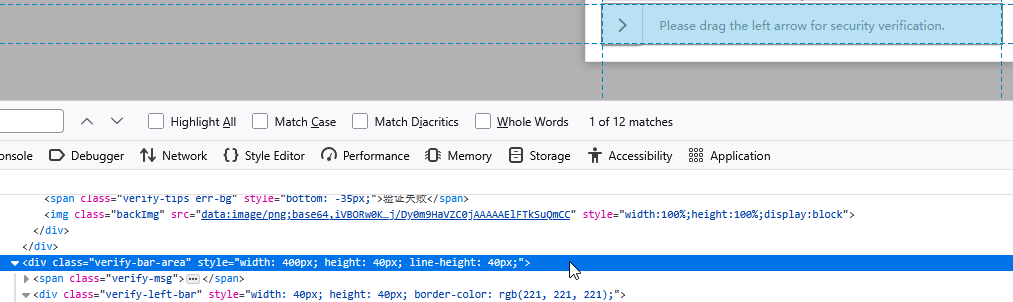
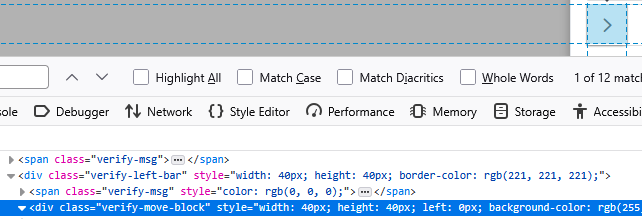
# Calculate move distance # Scale to container width # 获取滑块轨道div的宽度 track = self.driver.find_element(By.CLASS_NAME, "verify-bar-area") track_width = track.size['width'] move_distance = x_offset * (track_width / background_img.shape[1]) print(f"Move distance: {move_distance}") # Perform drag # 找到滑块 slider = self.driver.find_element(By.CLASS_NAME, "verify-move-block") actions = ActionChains(self.driver) actions.click_and_hold(slider).move_by_offset(move_distance, 0).release().perform() -
完成拖动拼图后等待滑块div(或者滑动校验div中的其他元素)消失
    def is_captcha_solved(self, timeout=3):
        """Check if captcha is solved by waiting for it to disappear."""
        try:
            WebDriverWait(self.driver, timeout).until_not(
                EC.presence_of_element_located((By.CLASS_NAME, "verify-move-block"))
            )
            return True
        except:
            return False
success = self.is_captcha_solved() if success: return True -
完整滑块验证代码及调用方式
import base64
import time
from datetime import datetime

import cv2
import numpy as np
from selenium.webdriver.common.action_chains import ActionChains
from selenium.webdriver.common.by import By
from selenium.webdriver.support import expected_conditions as EC
from selenium.webdriver.support.ui import WebDriverWait


class SliderCaptchaSolver:
    def __init__(self, driver, timeout=20):
        self.driver = driver
        self.wait = WebDriverWait(driver, timeout)
        self.timeout = timeout

    def decode_base64_image(self, base64_str):
        """Decode Base64 image to OpenCV format."""
        image_data = base64.b64decode(base64_str.split(',')[1])
        np_array = np.frombuffer(image_data, np.uint8)
        img = cv2.imdecode(np_array, cv2.IMREAD_COLOR)
        return img

    def wait_for_captcha(self):
        """Wait until slider CAPTCHA appears."""
        self.wait.until(EC.visibility_of_element_located((
            By.XPATH,
            "//img[contains(@class,'backImg') and normalize-space(@src) != '']"
        )))
        self.wait.until(EC.visibility_of_element_located((
            By.XPATH,
            "//img[contains(@class,'bock-backImg') and normalize-space(@src) != '']"
        )))

    def is_captcha_solved(self, timeout=3):
        """Check if captcha is solved by waiting for it to disappear."""
        try:
            WebDriverWait(self.driver, timeout).until_not(
                EC.presence_of_element_located((By.CLASS_NAME, "verify-move-block"))
            )
            return True
        except:
            return False

    def solve_verification(self, max_attempts=10):
        """Solve slider CAPTCHA using edge-based matching."""
        for attempt in range(max_attempts):
            print(f"\n{'=' * 50}")
            print(f"Attempt {attempt + 1}/{max_attempts}")
            print('=' * 50)
            print(f'Start time:', datetime.now())

            self.wait_for_captcha()

            # Extract images
            background_img_element = self.driver.find_element(By.CLASS_NAME, "backImg")
            puzzle_img_element = self.driver.find_element(By.CLASS_NAME, "bock-backImg")

            background_base64 = background_img_element.get_attribute("src")
            puzzle_base64 = puzzle_img_element.get_attribute("src")

            background_img = self.decode_base64_image(background_base64)
            puzzle_img = self.decode_base64_image(puzzle_base64)

            # Convert to grayscale and apply edge detection
            bg_gray = cv2.cvtColor(background_img, cv2.COLOR_BGR2GRAY)
            pz_gray = cv2.cvtColor(puzzle_img, cv2.COLOR_BGR2GRAY)
            # Edge detection with cv2.Canny for both background and puzzle images.
            bg_edges = cv2.Canny(bg_gray, 100, 200)
            pz_edges = cv2.Canny(pz_gray, 100, 200)

            # Template matching on edges
            result = cv2.matchTemplate(bg_edges, pz_edges, cv2.TM_CCOEFF_NORMED)
            # Best match by score using cv2.minMaxLoc (no vertical filtering).
            _, max_val, _, max_loc = cv2.minMaxLoc(result)
            x_offset = max_loc[0]
            print(f"Best match score: {max_val}, position: {max_loc}")

            # Calculate move distance
            # Scale to container width
            # 获取滑块轨道div的宽度
            track = self.driver.find_element(By.CLASS_NAME, "verify-bar-area")
            track_width = track.size['width']
            move_distance = x_offset * (track_width / background_img.shape[1])
            print(f"Move distance: {move_distance}")

            # Perform drag
            # 找到滑块
            slider = self.driver.find_element(By.CLASS_NAME, "verify-move-block")
            actions = ActionChains(self.driver)
            actions.click_and_hold(slider).move_by_offset(move_distance, 0).release().perform()

            success = self.is_captcha_solved()
            if success:
                return True

            print(f'End time:', datetime.now())

        print(f"\nAfter {max_attempts} attempts, verification failed.")
        return False
import time import unittest from selenium import webdriver from selenium.webdriver.common.by import By from selenium.webdriver.firefox.options import Options from selenium.webdriver.support import expected_conditions as EC from selenium.webdriver.support.ui import WebDriverWait from xxx(包名).SliderCaptchaSolver import SliderCaptchaSolver class XXX(unittest.TestCase): def setUp(self): self.driver = webdriver.Firefox(options=options) def test_xxx(self): driver = self.driver ...点击登录按钮后... verifier = SliderCaptchaSolver(driver) verifier.solve_verification()结语:由于缺口定位算法(如OpenCV模板匹配)受图片质量、噪点、颜色干扰影响,可能计算错误导致滑动定位错误的问题。因此代码中指定了默认10次尝试的机会,整体上成功率还是比较高的。
更多推荐


 7
7 0
0- 0


 已为社区贡献1条内容

所有评论(0)