
使用Python,pandas根据背景色提取cell值并根据颜色分类
·
上一篇博客尝试了 Pandas给excel表格设置边框背景色等;
这一篇将根据背景色提取cell值并根据颜色分类;
1. 效果图
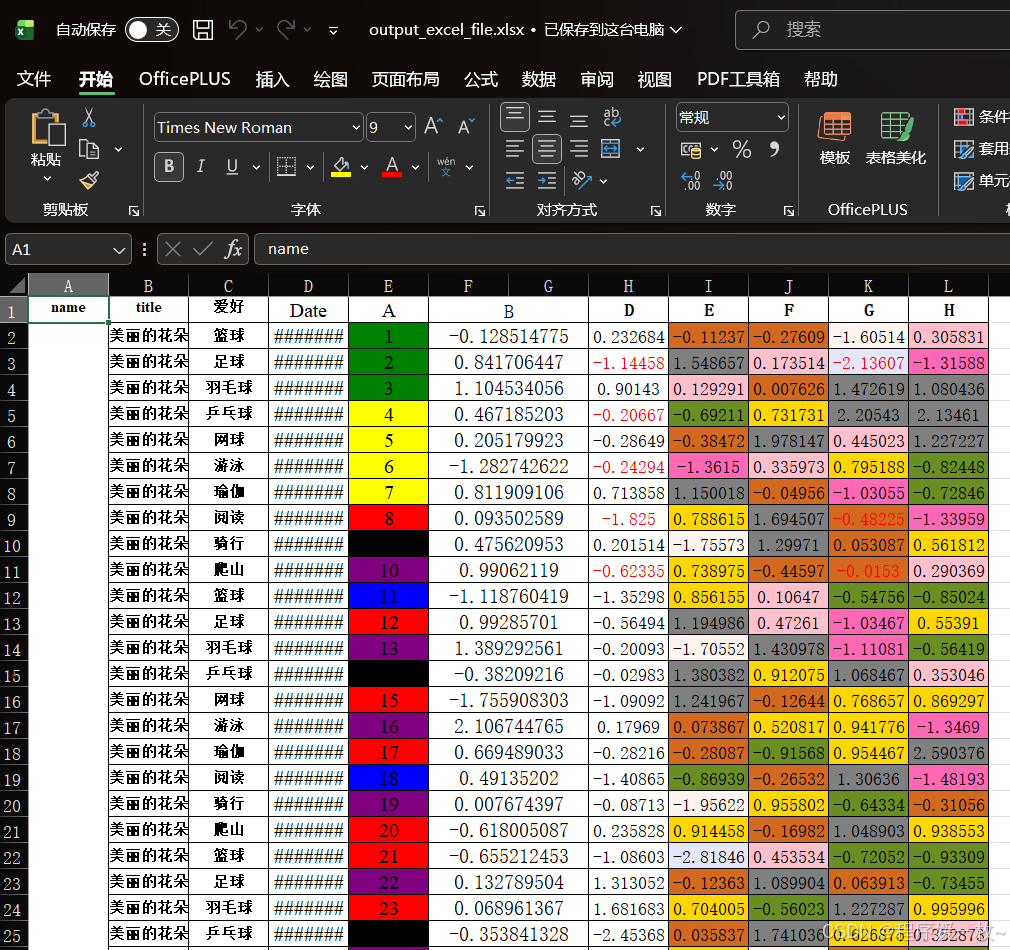
随机生成原始文件如下:原始文件生成参考 Python pandas openpyxl excel合并单元格,设置边框,背景色
提取单元格并按背景色分组后结果如下:
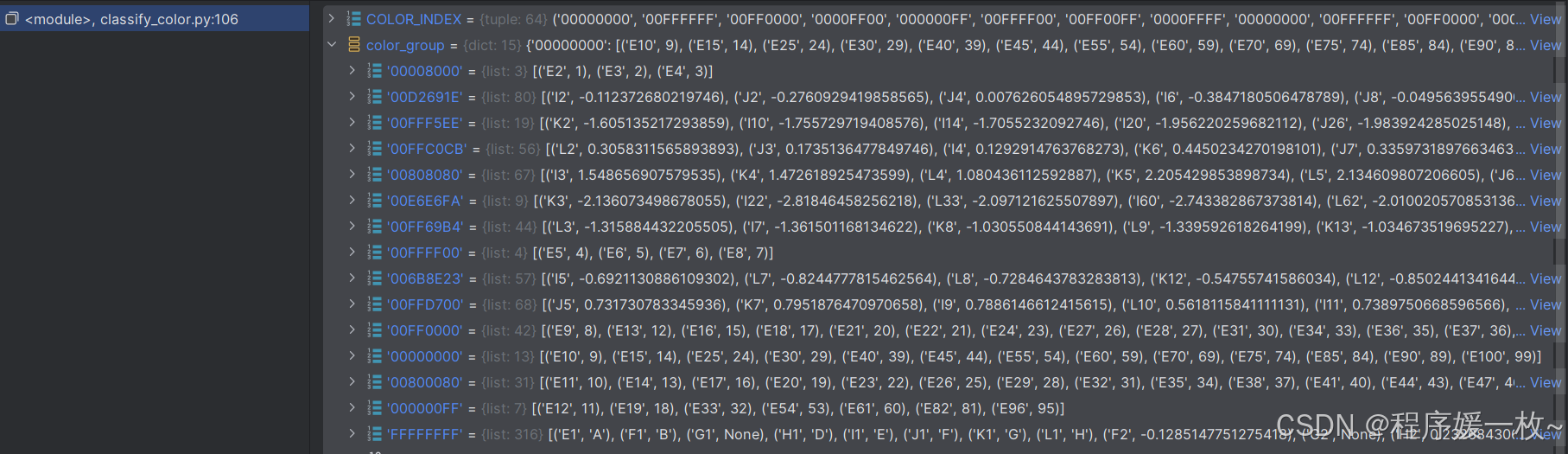
如上图所示,相同背景色的单元格数据分类到了一起。
2. 源码
# classify_color.py 根据单元格背景色进行分组
# excel数字与列名互转

import os.path

import openpyxl
import xlwings as xw
from openpyxl.styles.colors import COLOR_INDEX


# 列名转数字
def column_to_num(s: str) -> int:
    assert (isinstance(s, str))
    for i in s:
        if not 64 < ord(i) < 91:
            raise ValueError('Excel Column ValueError')
    return sum([(ord(n) - 64) * 26 ** i for i, n in enumerate(list(s)[::-1])])


# 数字转列名
def num_to_column(n: int) -> str:
    assert (isinstance(n, int) and n > 0)
    num = [chr(i) for i in range(65, 91)]
    ret = []
    while n > 0:
        n, m = divmod(n - 1, len(num))
        ret.append(num[m])
    return ''.join(ret[::-1])


def _openpyxl_color(cell):
    fill = cell.fill
    if not fill or not fill.patternType:
        return None
    c = fill.fgColor
    if c.type == 'rgb' and c.rgb:
        return c.rgb.upper()  # ARGB
    if c.type == 'indexed':
        return (COLOR_INDEX.get(c.indexed) or f'INDEXED_{c.indexed}').upper()
    if c.type == 'theme':
        # 主题色简单返回占位符,稍后用Excel COM再补
        return f'THEME_{c.theme}'
    return None


def _excel_com_color(book, sheet_name, coord):
    """
    使用xlwings 获取最终显示填充色(含条件格式结果) 返回ARGB HEX 或者 None
    :param book:
    :param sheet_name:
    :param coord:
    :return:
    """
    sht = book.sheets[sheet_name] if sheet_name else book.sheets[0]
    rng = sht.range(coord)
    v = rng.api.Interior.Color  # BGR 十进制 0=无色
    if not v:
        return None

    b = v // 65536
    g = (v // 256) % 256
    r = v % 256
    # 返回RGB转ARGB(不透明): FF+RGB
    return f'FF{int(r):02X}{int(g):02X}{int(b):02X}'


def extract_colors_group(sheet_name,
                         file_name: str = None,
                         start_col_letter: str = 'E',
                         use_com_fallback: bool = True):
    wb = openpyxl.load_workbook(file_name, data_only=True)
    ws = wb[sheet_name] if sheet_name else wb.active
    start_col = ord(start_col_letter.upper()) - 64
    color_groups = {}
    need_com_coords = []

    for row in ws.iter_rows(min_row=1, max_row=ws.max_row, min_col=start_col, max_col=ws.max_column):
        for cell in row:
            color = _openpyxl_color(cell)
            print(cell, cell.value, color)
            if color is None or color.startswith('THEME_'):
                need_com_coords.append(cell.coordinate)
                continue
            color_groups.setdefault(color, []).append((cell.coordinate, cell.value))

    if use_com_fallback and need_com_coords:
        app = xw.App(visible=False)
        book = xw.Book(os.path.abspath(file_name))
        for coord in need_com_coords:
            color = _excel_com_color(book, sheet_name, coord)
            if color:
                cell_obj = ws[coord]
                color_groups.setdefault(color, []).append((coord, cell_obj.value))
        book.close()
        app.quit()
    return color_groups


if __name__ == '__main__':
    start_col_letter = 'E'
    sheet_name = None
    file_name = 'output_excel_file.xlsx'

    color_group = extract_colors_group(sheet_name, file_name, start_col_letter)

    print()
更多推荐

 14
14 0
0- 0


 已为社区贡献2条内容

所有评论(0)