
uniapp开发微信小程序自定义Picker组件
·
uniapp开发微信小程序自定义Picker组件
在平时使用uniapp开发微信小程序时,我们会经常使用到Picker组件,虽然原生Picker组件的功能很强大,但是在一些业务上以及在深色主题颜色下就显得没那么灵活了,因为原生Picker和Picker-view组件不支持修改指示器上下蒙层的背景颜色,这个时候我们就得自定义一个Picker组件以适应小程序的主题和业务,
下面我们使用uniapp进行自定义Picker组件,该Picker组件支持单列和多列,主要就是使用scroll-view来进行滚动效果,下面是uniapp(vue2版本)的自定义Picker组件代码,需要vue3版本的可以利用Ai进行转换
<template>
  <view v-if="show" class="mp-picker">
    <!-- 遮罩层 -->
    <view class="mp-mask" @tap="cancel"></view>

    <!-- 主体 -->
    <view class="mp-body" :class="{ show: visible }">
      <view class="mp-toolbar">
        <text class="mp-btn" @tap="cancel">取消</text>
        <text class="mp-title">{{ title }}</text>
        <text class="mp-btn sure" @tap="confirm">确定</text>
      </view>

      <view class="mp-columns">
        <view
          v-for="(col, idx) in renderColumns"
          :key="idx"
          class="mp-column"
          :style="{ width: columnWidth(idx) }"
        >
          <!-- 选中区域上下边框 -->
          <view class="mp-indicator">
            <view class="mp-indicator-top"></view>
            <view class="mp-indicator-bottom"></view>
          </view>

          <!-- 顶部蒙层 -->
          <view class="mp-overlay-top"></view>

          <!-- 滚动容器 -->
          <view class="scroll-container">
            <scroll-view
              class="mp-scroll"
              scroll-y
              :scroll-top="scrollTop[idx]"
              :scroll-with-animation="true"
              @scroll="e => onScroll(e, idx)"
              @scrollend="e => onScrollEnd(e, idx)"
            >
              <view
                v-for="(item, i) in col"
                :key="i"
                class="mp-item-wrapper"
              >
                <view
                  class="mp-item"
                  :class="{
                    active: current[idx] === i,
                    disabled: !isValidIndex(i, idx)
                  }"
                  @click="selectItem(i, idx)"
                >
                  {{ item.label || (item.value !== undefined ? item.value : '') }}
                </view>
              </view>
            </scroll-view>
          </view>

          <!-- 底部蒙层 -->
          <view class="mp-overlay-bottom"></view>
        </view>
      </view>
    </view>
  </view>
</template>

<script>
const ITEM_HEIGHT = 34; // 需与CSS变量保持一致
const VISIBLE_COUNT = 7; // 需与CSS变量保持一致

export default {
  name: 'MpPicker',
  props: {
    show: { type: Boolean, default: false },
    title: { type: String, default: '' },
    columns: { type: Array, default: () => [] },
    defaultIndex: { type: [Number, Array], default: 0 }
  },
  data() {
    return {
      visible: false,
      current: [],
      scrollTop: [],
      isScrolling: false,
      scrollTimer: null,
      snapTarget: [],
      PADDING_COUNT: 3,
      lastScrollTime: 0
    };
  },
  computed: {
    normalizedColumns() {
      if (!this.columns.length) return [];

      // 确保每列都是数组,统一数据结构
      return this.columns.every(col => Array.isArray(col))
        ? this.columns.map(col => col.map(item =>
            typeof item === 'string' ? { label: item, value: item } : item
          ))
        : [this.columns.map(item =>
            typeof item === 'string' ? { label: item, value: item } : item
          )];
    },
    renderColumns() {
      const empty = Array(this.PADDING_COUNT).fill({ label: '', value: '', __isBlank: true });
      return this.normalizedColumns.map(col => [
        ...empty,
        ...col,
        ...empty
      ]);
    }
  },
  watch: {
    show(val) {
      if (val) {
        this.init();
        this.$nextTick(() => {
          this.visible = true;
          // 初始化后强制校准每列位置
          this.normalizedColumns.forEach((_, colIdx) => {
            this.ensureItemVisible(colIdx);
          });
        });
      } else {
        this.visible = false;
      }
    },
    columns: {
      handler() {
        if (this.show) this.init();
      },
      deep: true
    },
    snapTarget: {
      handler() {
        this.$nextTick(() => {
          this.snapTarget.forEach((target, colIdx) => {
            if (target !== null && this.current[colIdx] !== target) {
              this.$set(this.current, colIdx, target);
              this.ensureItemVisible(colIdx);
            }
          });
        });
      },
      deep: true
    }
  },
  methods: {
    columnWidth(colIdx) {
      const colCount = this.normalizedColumns.length;
      return colCount > 1 ? `${100 / colCount}%` : '100%';
    },
    isValidIndex(index, colIdx) {
      const realCol = this.normalizedColumns[colIdx] || [];
      return index >= this.PADDING_COUNT && index < this.PADDING_COUNT + realCol.length;
    },
    toRealIndex(blankIndex) {
      const realIndex = blankIndex - this.PADDING_COUNT;
      return Math.max(0, realIndex); // 确保不小于0
    },
    toBlankIndex(realIndex, colIdx) {
      const realCol = this.normalizedColumns[colIdx] || [];
      const maxRealIndex = realCol.length - 1;
      const safeRealIndex = Math.min(Math.max(realIndex, 0), maxRealIndex < 0 ? 0 : maxRealIndex);
      return safeRealIndex + this.PADDING_COUNT;
    },
    init() {
      const colCount = this.normalizedColumns.length;
      this.current = [];
      this.scrollTop = [];
      this.snapTarget = [];

      // 处理defaultIndex,确保为数组且元素为有效数字
      const normalizedDefaultIndex = Array.isArray(this.defaultIndex)
        ? [...this.defaultIndex].map(idx => Math.floor(Number(idx) || 0))
        : [Math.floor(Number(this.defaultIndex) || 0)];

      // 补全defaultIndex至与列数相同
      while (normalizedDefaultIndex.length < colCount) {
        normalizedDefaultIndex.push(0);
      }

      this.normalizedColumns.forEach((realCol, colIdx) => {
        // 处理空列情况
        if (realCol.length === 0) {
          console.warn(`MpPicker: 第 ${colIdx} 列数据为空`);
          this.current.push(this.PADDING_COUNT);
          this.scrollTop.push(this.calcCenterScrollTop(this.PADDING_COUNT));
          this.snapTarget.push(this.PADDING_COUNT);
          return;
        }

        let realIndex = normalizedDefaultIndex[colIdx] || 0;
        // 确保realIndex在有效范围内
        realIndex = Math.max(0, Math.min(realIndex, realCol.length - 1));
        const blankIndex = this.toBlankIndex(realIndex, colIdx);

        this.current.push(blankIndex);
        // 计算居中的滚动位置
        this.scrollTop.push(this.calcCenterScrollTop(blankIndex));
        this.snapTarget.push(blankIndex);
      });
    },
    // 计算让指定索引项居中的滚动位置
    calcCenterScrollTop(blankIndex) {
      // 中间位置偏移量 = (可见数量 - 1) / 2 * 每项高度
      const centerOffset = (VISIBLE_COUNT - 1) / 2 * ITEM_HEIGHT;
      return blankIndex * ITEM_HEIGHT - centerOffset;
    },
    ensureItemVisible(colIdx) {
      const idx = this.current[colIdx];
      const renderCol = this.renderColumns[colIdx] || [];
      // 计算居中的滚动位置
      const centerOffset = (VISIBLE_COUNT - 1) / 2 * ITEM_HEIGHT;
      let top = idx * ITEM_HEIGHT - centerOffset;

      // 限制滚动位置在有效范围内(不超出顶部和底部)
      const maxScrollTop = Math.max(0, (renderCol.length - VISIBLE_COUNT) * ITEM_HEIGHT);
      top = Math.min(Math.max(0, top), maxScrollTop);

      // 只有当位置变化明显时才更新(避免无效渲染)
      if (Math.abs(this.scrollTop[colIdx] - top) > 1) {
        this.$set(this.scrollTop, colIdx, top);
      }
    },
    onScroll(e, col) {
      this.isScrolling = true;
      const y = e.detail.scrollTop;
      const renderCol = this.renderColumns[col] || [];
      const realCol = this.normalizedColumns[col] || [];
      if (!renderCol.length) return;

      const centerIndex = Math.round((y + (VISIBLE_COUNT - 1) / 2 * ITEM_HEIGHT) / ITEM_HEIGHT);
      const maxValidIndex = this.PADDING_COUNT + realCol.length - 1;

      clearTimeout(this.scrollTimer);
      this.scrollTimer = setTimeout(() => {
          this.isScrolling = false;
          this.onScrollEnd(e, col);
      }, 200);
      this.lastScrollTime = Date.now();
    },
    onScrollEnd(e, col) {
      console.log('--onScrollEnd--', e, col);
      this.isScrolling = false;
      const y = e.detail.scrollTop;
      const realCol = this.normalizedColumns[col] || [];
      const centerIndex = Math.round((y + (VISIBLE_COUNT - 1) / 2 * ITEM_HEIGHT) / ITEM_HEIGHT);
      const maxValidIndex = this.PADDING_COUNT + realCol.length - 1;
      const validIndex = Math.min(Math.max(centerIndex, this.PADDING_COUNT), maxValidIndex);

      if (this.snapTarget[col] !== validIndex) {
        this.$set(this.snapTarget, col, validIndex);
      }
      if (this.current[col] !== validIndex) {
        this.$set(this.current, col, validIndex);
      }
      this.ensureItemVisible(col);
    },
    selectItem(index, colIdx) {
      if (this.isValidIndex(index, colIdx)) {
        this.$set(this.current, colIdx, index);
        this.$set(this.snapTarget, colIdx, index);
        this.ensureItemVisible(colIdx);
      }
    },
    confirm() {
      const value = [];
      const index = [];
      const selectedValues = [];

      this.current.forEach((blankIndex, colIdx) => {
        const realCol = this.normalizedColumns[colIdx] || [];
        const realIndex = this.toRealIndex(blankIndex);

        // 处理空列情况
        if (realCol.length === 0) {
          value.push(null);
          index.push(-1);
          selectedValues.push(null);
          return;
        }

        // 确保获取有效数据
        const item = realCol[realIndex] || realCol[0] || { label: '', value: '' };

        index.push(realIndex);
        value.push(item);
        selectedValues.push(item.value !== undefined ? item.value : item);
      });

      const result = this.normalizedColumns.length === 1
        ? { value: value[0], index: index[0], selectedValue: selectedValues[0] }
        : { value, index, selectedValues };

      this.$emit('confirm', result);
    },
    cancel() {
      this.$emit('cancel');
    }
  },
  beforeUnmount() {
    clearTimeout(this.scrollTimer);
  }
};
</script>

<style scoped>
/* 使用CSS变量统一管理高度相关值 */
:root {
  --item-height: 34px;
  --visible-count: 7;
}

/* 深色主题主色调 #47433F */
.mp-picker {
  position: fixed;
  top: 0;
  left: 0;
  right: 0;
  bottom: 0;
  z-index: 999;
}
.mp-mask {
  position: absolute;
  top: 0;
  left: 0;
  right: 0;
  bottom: 0;
  background: rgba(0, 0, 0, 0.6); /* 深色遮罩 */
}
.mp-body {
  position: absolute;
  left: 0;
  right: 0;
  bottom: 0;
  background: #47433F; /* 主体深色背景 */
  transform: translateY(100%);
  transition: transform 0.3s;
  border-radius: 16rpx 16rpx 0 0;
}
.mp-body.show {
  transform: translateY(0);
}
.mp-toolbar {
  display: flex;
  align-items: center;
  justify-content: space-between;
  height: 44px;
  border-bottom: 1rpx solid #5c5854; /* 深色边框 */
  padding: 0 12px;
}
.mp-btn {
  font-size: 15px;
  color: #ccc; /* 取消按钮浅色文字 */
  padding: 8px 16px;
}
.mp-btn.sure {
  color: #C8D92C;
}
.mp-title {
  font-size: 16px;
  color: #fff; /* 标题白色文字 */
  font-weight: 500;
}
.mp-columns {
  display: flex;
  /* 高度 = 可见数量 * 每项高度 */
  height: calc(var(--visible-count) * var(--item-height));
  overflow: hidden;
}
.mp-column {
  flex-shrink: 0;
  position: relative;
  height: 100%;
}
/* 选中区域指示器 */
.mp-indicator {
  position: absolute;
  left: 0;
  right: 0;
  /* 顶部位置 = (可见数量 - 1) / 2 * 每项高度 */
  top: calc((var(--visible-count) - 1) / 2 * var(--item-height));
  height: var(--item-height);
  pointer-events: none;
  z-index: 10;
}
.mp-indicator-top,
.mp-indicator-bottom {
  position: absolute;
  left: 0;
  right: 0;
  height: 1rpx;
  background: #666; /* 深色边框 */
}
.mp-indicator-top {
  top: 0;
}
.mp-indicator-bottom {
  bottom: 0;
}
/* 顶部蒙层 - 深色渐变 */
.mp-overlay-top {
  position: absolute;
  left: 0;
  right: 0;
  top: 0;
  /* 高度 = (可见数量 - 1) / 2 * 每项高度 */
  height: calc((var(--visible-count) - 1) / 2 * var(--item-height));
  background: linear-gradient(to bottom, #47433F 0%, rgba(71, 67, 63, 0.8) 60%, rgba(71, 67, 63, 0) 100%);
  pointer-events: none;
  z-index: 5;
}
/* 底部蒙层 - 深色渐变 */
.mp-overlay-bottom {
  position: absolute;
  left: 0;
  right: 0;
  bottom: 0;
  /* 高度 = (可见数量 - 1) / 2 * 每项高度 */
  height: calc((var(--visible-count) - 1) / 2 * var(--item-height));
  background: linear-gradient(to top, #47433F 0%, rgba(71, 67, 63, 0.8) 60%, rgba(71, 67, 63, 0) 100%);
  pointer-events: none;
  z-index: 5;
}
/* 滚动容器 */
.scroll-container {
  width: 100%;
  height: 100%;
  overflow: hidden;
  position: relative;
}
/* 隐藏滚动条 */
.mp-scroll {
  width: calc(100% + 20rpx);
  height: 100%;
  overflow-y: auto;
  -webkit-overflow-scrolling: touch;
}
.mp-scroll::-webkit-scrollbar {
  display: none;
  width: 0;
  height: 0;
  background: transparent;
}
.mp-scroll {
  scrollbar-width: none;
  scrollbar-color: transparent transparent;
}
.mp-scroll::-ms-scrollbar {
  display: none;
}
.mp-scroll::-ms-track {
  background: transparent;
}
.mp-item-wrapper {
  position: relative;
}
.mp-item {
  height: var(--item-height);
  line-height: var(--item-height);
  text-align: center;
  font-size: 16px;
  color: #e0e0e0; /* 浅色文字 */
  padding: 0 8px;
}
.mp-item.active {
  color: #ffffff;
  font-weight: 500;
}
.mp-item.disabled {
  color: transparent;
}
</style>
使用方法
// 导入Picker组件
import Picker from "@/components/Picker/index.vue";

// 在需要的地方使用组件
/**
*show {Boolean} -- 控制组件的显示和隐藏
*defaultIndex {Array} -- 默认展示的索引,单列的数组里有一个元素,两列的有两个元素
*columns {Array} -- 数据项 ,可以支持一维数组和二维数组,如[{value: 1, label: 1},{value:2, *label: 2}]
*confirm -- 确定点击事件触发
*cancel -- 取消点击事件触发
*/
<pickerCom
   :show="pickerShow"
   :defaultIndex="[0, 0]"
   :columns="Columns"
   @confirm="confirmFunction"
   @cancel="cancelFunction"
></pickerCom>
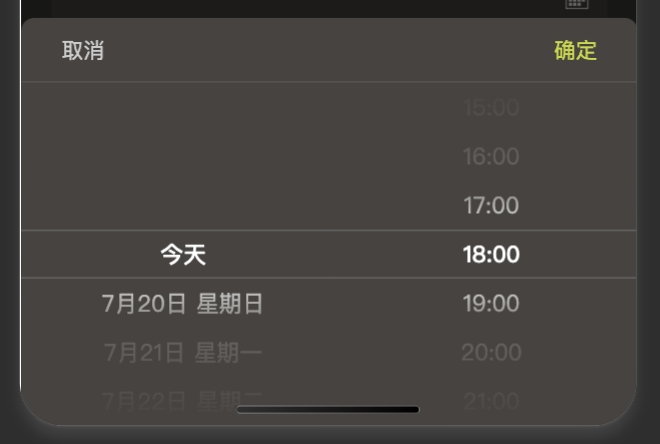
下面是效果图
更多推荐


 8
8 0
0- 0


 已为社区贡献3条内容

所有评论(0)