
maven 用3.6比较好
如果用比较新下idea 比如2023的,大家在下载一些项目,点击maven工具栏上命令可能会有这个报错
org.springframework.boot:spring-boot-starter-parent:pom:3.4.5 failed to transfer from http://0.0.0.0/ during a previous attempt. This failure was cached in the local repository and resolution is not reattempted until the update interval of maven-default-http-blocker has elapsed or updates are forced. Original error: Could not transfer artifact org.springframework.boot:spring-boot-starter-parent:pom:3.4.5 from/to maven-default-http-blocker (http://0.0.0.0/): Blocked mirror for repositories: [central (http://**-maven, default, releases+snapshots)]
Since Maven 3.8.1 http repositories are blocked.
Possible solutions:
- Check that Maven settings.xml does not contain http repositories
- Check that Maven pom files do not contain http repository http://**:80/maven
- Add a mirror(s) for http://**maven that allows http url in the Maven settings.xml
- Downgrade Maven to version 3.8.1 or earlier in settings
这个说的很清楚了,降级都3.8.1之前的版本,我们可以看下,如下图 我这个就是用了内置的maven 还是3.9.2的版本.着要求仓库是https的,r如果自己有私库,这个地方就不方便
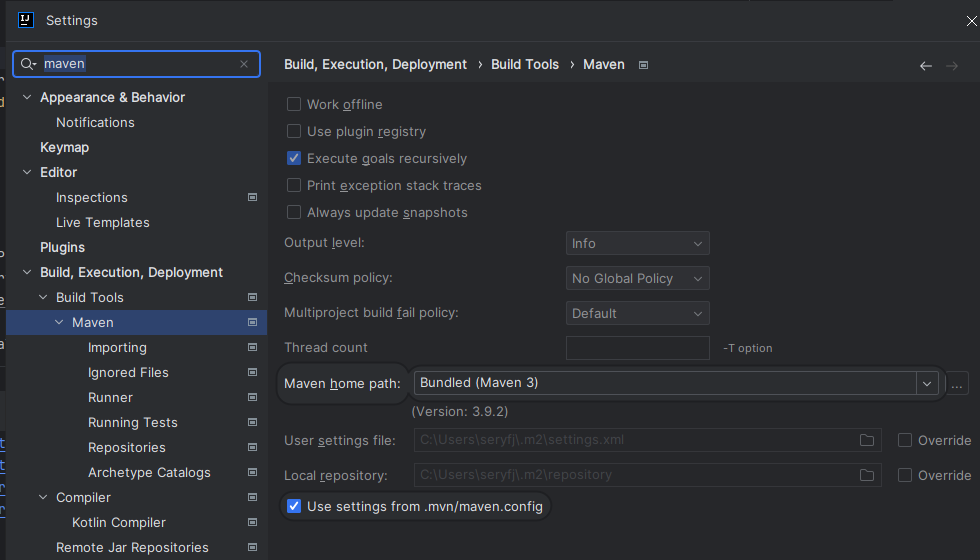
所以这里改成3.6.3的吧
还有一个原因,可以3.6.3支持的idea版本更多

更多推荐


 4
4 0
0- 0


 已为社区贡献1条内容

所有评论(0)