
uniapp 使用i18n 进行项目国际化
·
由于项目需要进行国际化所以使用vue-i18n设置npm i vue-i18n
"vue-i18n": "^10.0.4"
页面使用方式
<view class="login_submit" @click="$refs.popModalTips.showPopup=true">
			{{$t('退出登录')}}
		</view>
js使用方式
setList() {
				this.listTab = [{
						url: require(`@/static/${this.$theme}/my/msg.png`),
						name: this.$t('消息中心'),
						path: '/pages/normal/my/msg'
					}, ]
}
切换语言方式
goSumbit() {

				this.showPopup = false;
				console.log('语言一样不切换uni.getLocale()',uni.getLocale())
				console.log('语言一样不切换this.lang',this.lang)
				if(uni.getLocale()==this.lang){
					console.log('语言一样不切换')
					return
				}
				this.$nextTick(function() {
					console.log(this.lang, "切换")
					this.$i18n.locale = this.lang;
					console.log(this.$i18n.locale, "this.$i18n.locale")
					console.log(this.showPopup, "this.showPopup")
					this.$emit('submit', this.lang);
					console.log(this.lang, "this.lang")
					setLocale(this.lang);
					console.log("setLocale")

					uni.setLocale(this.lang);
				})
			},
setLocale方法
const locateKey = 'i18n_lang'

// export const defaultLang = 'zh-Hans'
export const defaultLang = 'en'

export const getLocale = () => {
  return uni.getStorageSync(locateKey) || defaultLang
}

export const setLocale = (data) => {
  return uni.setStorageSync(locateKey, data);
}
main配置
// i18n 配置
import messages from "@/locale"

const i18nConfig = {
	locale: 'en',
	messages,
	silentTranslationWarn: true // 关闭控制台提示
}
console.log(messages)
import VueI18n from 'vue-i18n' // v8.x
Vue.use(VueI18n)
const i18n = new VueI18n(i18nConfig)
const upperFirst = (str) => {
	if (str.length <= 1) return str;
	return str.trim().replace(/\s+/g, ' ').split(' ').map(item => {
		return item[0].toUpperCase() + item.slice(1)
	}).join(' ')
};

Vue.prototype.$t = (e) => {
	return upperFirst(i18n.t(e))
};
locale 文件夹内容
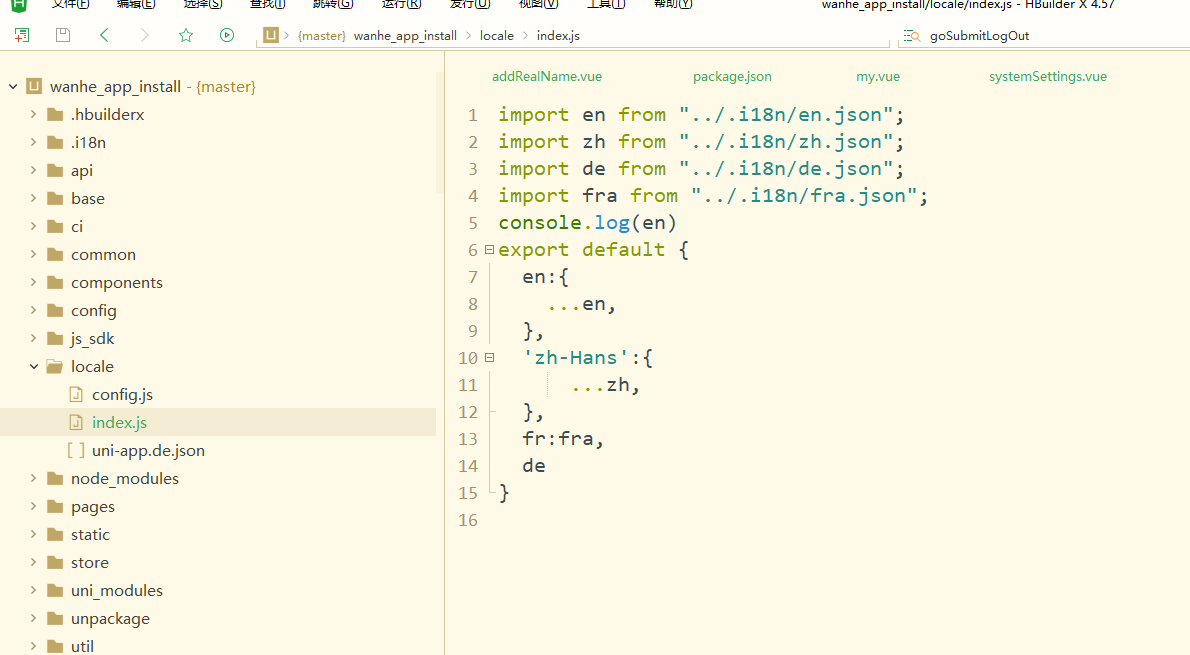
由于手动翻译很麻烦所以下载了一个插件进行翻译使用 npm install @luck-8/uni-tool 安装
"@luck-8/uni-tool": "^1.0.5",
需要手动创建.i18n文件夹
创建cache.json文件
config.js文件和
其它翻译的文件(zh.json 和en.json)里面都设置{}
内容有个cache.json 用来缓存文件进行百度翻译的时候不会重新去翻译
config.js配置文件里面配置百度的 appid和key,去百度翻译开放平台申请
config.js 文件内容
const fs = require('fs')
const path = require('path')
const jsonFile = fs.readFileSync(path.resolve(global.i18n.cacheDir, './zh.json'), 'utf-8')
const json = JSON.parse(jsonFile)

module.exports = {
//百度的appid和key
  appid: '',
  key: '',
  // 语种 https://api.fanyi.baidu.com/doc/21
  // from : 'zh',
  from: 'zh',
  to: ["en", "de", "fra"],
  ignoreDirs: [,
    '.hbuilderx', 'node_modules', 'uni_modules', 'unpackage', '.git', 'dist', 'static','ci'
  ],
  ignoreExts: [".woff2", '.jpg', '.png', '.pdf', '.keystore', '.p12', '.mobileprovision','.gif','.Zip'],
  reg: new RegExp(/\$t\(('|"|`|%)(.*?)('|"|`|%)\)/g),
  prefix: 'i18n_',
  // 收集函数
  handlerResult: (allText, nextKey, [_, $1, $2, $3]) => {
    allText[nextKey] = $2;
    return allText
  },
  // 替换函数
  handlerTemlpate: (allText, nextKey, [_, $1, $2, $3]) => {
    // 替换成key
    return `$t(${$1}${nextKey}${$3})`
  },
  // 还原函数
  backHandler: (allText, nextKey, [_, $1, $2, $3]) => {
    return `$t(${$1}${json[$2] ? json[$2] : ''}${$3})`
  }
}
注意每次翻译之前先提交代码到云端避免操作失误导致项目崩溃 ,每次翻译结束记得使用命令翻译回来
使用方式 控制台输入下面命令
npm run i18n 进行翻译
npm run i18n-back 回退成中文界面
更多推荐

 5
5 0
0- 0


 已为社区贡献4条内容

所有评论(0)