
k8s 1.30 部署crondns
·
一、安装helm
github地址:
https://github.com/helm/helm

下载地址:
https://mirrors.huaweicloud.com/helm/v3.15.2/


下载:
https://mirrors.huaweicloud.com/helm/v3.15.2/helm-v3.15.2-linux-amd64.tar.gz


部署:
# tar -zxf helm-v3.15.2-linux-amd64.tar.gz
# cd linux-amd64/
# mv helm /usr/local/bin/
# helm version
version.BuildInfo{Version:"v3.15.2", GitCommit:"1a500d5625419a524fdae4b33de351cc4f58ec35", GitTreeState:"clean", GoVersion:"go1.22.4"}

不解压压缩文件查看内容
# tar -tf helm-v3.15.2-linux-amd64.tar.gz
二、helm配置
# helm repo add coredns https://coredns.github.io/helm
# helm pull coredns/coredns

# tar -zxf coredns-1.39.1.tgz
# cd coredns/


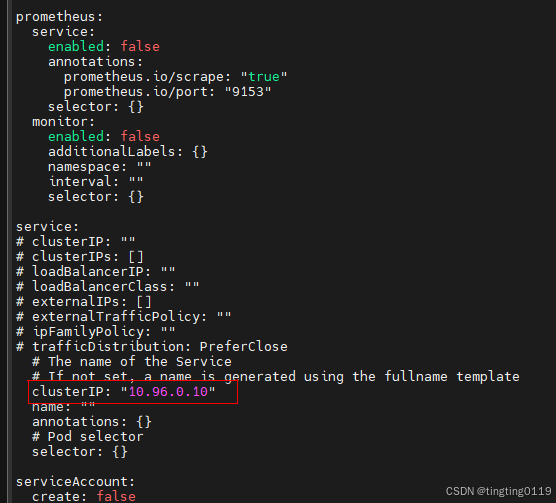
values.yaml增加下面内容:
 clusterIP: "10.96.0.10"


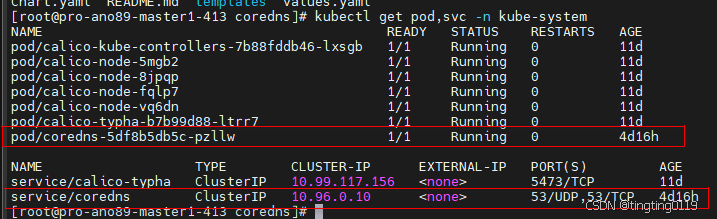
运行;
# helm install  coredns ./ -f values.yaml -n kube-system
更多推荐


 3
3 0
0- 0


 已为社区贡献3条内容

所有评论(0)