
Uniapp 微信小程序分享 - 自定义卡片内容 + 参数携带 接收
·
技术栈:Uniapp + Vue3
简介
因实际需求,需要实现微信小程序自定义分享(自定义分享卡片标题、图片、小程序路径、参数等)。
为了实现自定义分享,需要
- 本微信小程序开通分享功能,开启uni.showShareMenu(二次封装的wx.setShareMenu)
- 分享按钮设置 open-type=“share”
- onShareAppMessage 回调函数中配置参数
- onLoad内接收参数
- onShow内接收参数(如果需要)
关于onShareAppMessage内入参、出参,可查看微信官方文档。
实现
DOM
<button open-type="share" class="share-btn">
	<image class="share-img" mode="scaleToFill" src="@/static/images/share-icon.png"></image>
</button>
JS
下面分享配置分两种情况:
- 普通情况(纯手写分享配置)
- 使用了uview-plus mixin mpShare情况
因本小程序使用了uview-plus组件,其内部封装了 share对象,外部 onShareAppMessage 内返回的配置对象不会生效,需要设置uview-plus内的share对象。
普通情况
import { onLoad, onShow, onShareAppMessage } from '@dcloudio/uni-app';

// options 路由参数
onLoad((options) => {
	// 开启分享菜单
	uni.showShareMenu({
		withShareTicket: true,
		// shareAppMessage 分享到好友
		// shareTimeline 分享到朋友圈
		menus: ['shareAppMessage', 'shareTimeline']
	});
	const inviteCode = options.inviteCode // 接收参数
})


// 分享
onShareAppMessage((res) =>{
	const inviteCode = '7788';
	return {
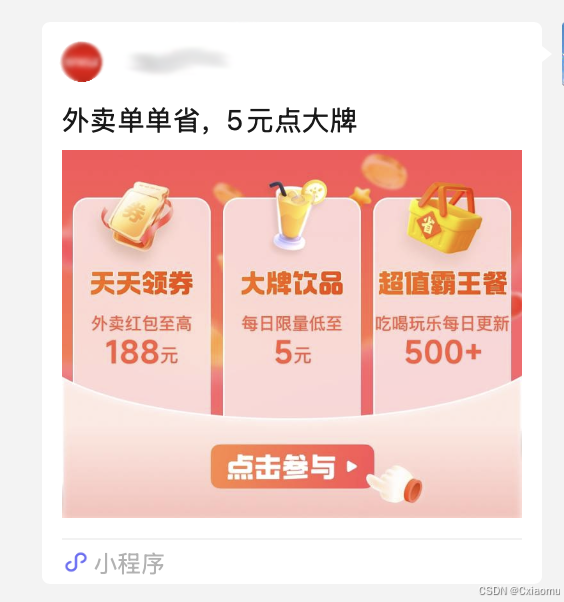
		title: '外卖单单省,5元点大牌', // 标题
		path: '/pages/tabbar/home/index '+ `?inviteCode=` + inviteCode, // 小程序路径
		imageUrl: 'https://zj-biz-gov-free-eat.oss-cn-hangzhou.aliyuncs.com/free-eat/static-example/share-default.png' // 图片
	}
});
使用了uview-plus 的mpShare
import { getCurrentInstance } from 'vue';
import { onLoad, onShow, onShareAppMessage } from '@dcloudio/uni-app';

const that = getCurrentInstance();

// options 路由参数
onLoad((options) => {
	// 开启分享菜单
	uni.showShareMenu({
		withShareTicket: true,
		// shareAppMessage 分享到好友
		// shareTimeline 分享到朋友圈
		menus: ['shareAppMessage', 'shareTimeline']
	});
	const inviteCode = options.inviteCode // 接收参数
})


// 分享
onShareAppMessage((res) =>{
	const inviteCode = '7788';
	that.proxy.mpShare.title = '外卖单单省,5元点大牌';
	that.proxy.mpShare.path = '/pages/tabbar/home/index';
	that.proxy.mpShare.path = that.proxy.mpShare.path + `?inviteCode=` + inviteCode;
	that.proxy.mpShare.imageUrl = 'https://zj-biz-gov-free-eat.oss-cn-hangzhou.aliyuncs.com/free-eat/static-example/share-default.png';
});
onShow接受参数
wx.getLaunchOptionsSync:获取小程序启动时的参数。这个用于获取小程序启动时的参数,例如通过点击某个小程序卡片启动的,可以通过这个API获取到卡片的相关信息。
import { ref } from 'vue';
import { onShow } from '@dcloudio/uni-app';

const inviteCode = ref();

onShow(() => {
	let launchOptions = wx.getLaunchOptionsSync();
	if(launchOptions.query?.inviteCode)
		inviteCode.value = launchOptions.query?.inviteCode;
})
效果
更多推荐


 3
 0
- 0


 已为社区贡献5条内容

所有评论(0)