
树莓派5 能连上csi摄像头,但是camera time out
·
今天在使用树莓派的镜像又烧了一遍,在试着预览摄像头的时候就出现了这个问题。
libcamera-hello
因为我的问题已经解决了,这是我在网上找的原因相同的报错代码
[0:37:58.547240961] [2034]  INFO Camera camera.cpp:1183 configuring streams: (0) 2304x1296-YUV420 (1) 2304x1296-BGGR_PISP_COMP1
[0:37:58.547366184] [2037]  INFO RPI pisp.cpp:1450 Sensor: /base/axi/pcie@120000/rp1/i2c@80000/imx708@1a - Selected sensor format: 2304x1296-SBGGR10_1X10 - Selected CFE format: 2304x1296-PC1B
[0:37:59.633915232] [2037]  WARN V4L2 v4l2_videodevice.cpp:2007 /dev/video4[17:cap]: Dequeue timer of 1000000.00us has expired!
[0:37:59.633945954] [2037] ERROR RPI pipeline_base.cpp:1334 Camera frontend has timed out!
[0:37:59.633950935] [2037] ERROR RPI pipeline_base.cpp:1335 Please check that your camera sensor connector is attached securely.
[0:37:59.633955787] [2037] ERROR RPI pipeline_base.cpp:1336 Alternatively, try another cable and/or sensor.
ERROR: Device timeout detected, attempting a restart!!!
就是这样,能识别到有摄像头设备,但是连接超时。
而且我的还是新版树莓派,raspi-config也没有camera选项了。
我的解决方法是无意间查看亚博文档发现的。
首先,打开树莓派终端,输入下面指令。
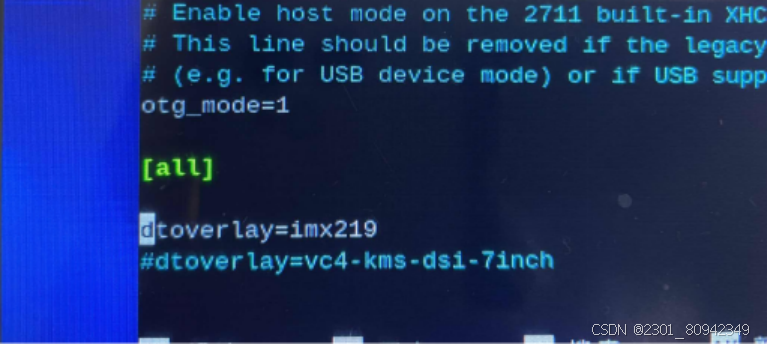
sudo nano /boot/firmware/config.txt
在结尾加上dtoverlay=imx219
dtoverlay=imx219
如图,图源亚博文档。
 按ctrl和x保存,按y和enter(回车)退出
然后,摄像头就可以正常使用了
注意!
我的摄像头是亚博官网的csi摄像头,dtoverlay=“”的参数可能要根据你的摄像头类型进行调整。
更多推荐


 4
4 0
0- 0


 已为社区贡献1条内容

所有评论(0)