
<Project-3.1 Video2SubTitle> Python Flask 音频/视频 提取字幕 CUDA ffmpge googletranslate whisper Docker部署NAS
Project-3 的改进
- 界面提升
- 支持多种视频、多种音频格式
- 多语种翻译
- 原声可以自检查或指定语言提高效率
- 端口占用 9004
- 识别 CPU GPU 使用不同的模型参数
- 可以部署在 NAS Container ( NAS Docker ) 运行
- 翻译使用多进程 3倍 cores
- 整理了凌乱的代码
- 后面有 Docker Image, Container 更新文件的操作步骤
功能与流程
- 上传音频或视频文件,系统自动提取其中的语言内容并生成对应的字幕。
- 能识别多种格式的,视频或音频文件。
- 在处理音频的过程中,使用 OpenAI-Whisper 模型。( pip install git+https://github.com/openai/whisper.git )
- 对于上传的视频文件,系统首先通过
ffmpeg提取其中的音频部分。 - 生成初始的原语言字幕后,将字幕内容并行发送给 Google 翻译 (Deep_translate)。依据系统 CPU 核心数动态调整并发线程数(3倍 cores)。翻译完成后,程序会生成多个版本的字幕文件。
- 用户界面部分使用 HTML 和 JavaScript 实现。浏览器上传文件,选择语言,并监控任务的处理进度。
- 有较完善的错误处理机制,确保即使在处理过程中发生异常,可以记录错误并反馈。主要步骤(如模型加载、音频转录、字幕翻译等)
界面
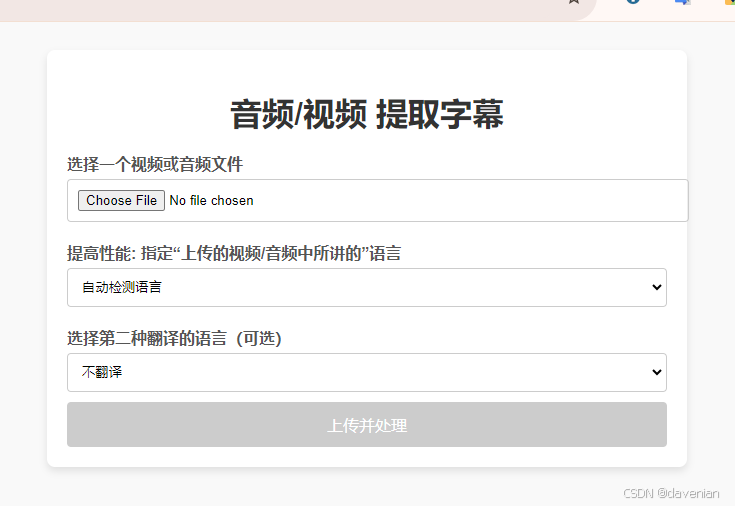
完整代码
安装正确的依赖库,可以在 Windows 11 或 QNAP NAS TS-435d Intel processor 运行。
目录结构
/video2subtitle
│
├── app.py                     # 主程序
├── Dockerfile                 # Dockerfile,用于构建 Docker 镜像
├── requirements.txt           # Python 依赖文件
├── /templates                 # HTML 文件夹
│   └── index.html             # 界面
├── /static                    #
│   └── script.js              # javascript
└── /subtitles                 # 存储生成的字幕文件
程序文件
1. app.py
from flask import Flask, request, send_file, jsonify, render_template
import os
from concurrent.futures import ThreadPoolExecutor
import tempfile
import whisper
import srt
import subprocess
from datetime import timedelta
import shutil
from deep_translator import GoogleTranslator
import threading
import uuid
import logging
from concurrent.futures import ThreadPoolExecutor
import torch
from werkzeug.utils import secure_filename

# Flask 应用启动
app = Flask(__name__, static_folder='static', template_folder='templates')

# 定义日志
logging.basicConfig(level=logging.INFO, format='%(asctime)s - %(levelname)s - %(message)s')
logger = logging.getLogger(__name__)

# 设置字幕输出目录
base_dir = os.path.abspath(os.path.dirname(__file__))
subtitle_dir = os.path.join(base_dir, '.', 'subtitle')
os.makedirs(subtitle_dir, exist_ok=True)

# 在应用启动时加载 Whisper 模型和选择设备 # 判断是否有 GPU 硬件
device = "cuda" if torch.cuda.is_available() else "cpu"
logger.info("使用 GPU 进行转录" if device == "cuda" else "使用 CPU 进行转录")
model_size = "large" if device == "cuda" else "medium" if torch.cuda.device_count() > 0 or torch.backends.mps.is_available() else "small" # 在 GPU 环境中使用 small ,在 CPU 环境中使用 base 模型.    tiny < base < small < medium < large

logger.info(f'加载 {model_size} 模型,设备:{device}, Model: tiny < base < small < medium < large')

# 加载模型时只执行一次
try:
    model = whisper.load_model(model_size, device=device)
    logger.info(f'{model_size} 模型加载成功,设备:{device}')
except Exception as e:
    logger.error(f'加载模型时出错:{e}')
    raise

# 全局字典存储任务进度 创建锁
tasks_progress = {}
task_progress_lock = threading.Lock()

# 支持的视频和音频 MIME 类型和扩展名
def is_allowed_file(file_mime_type, file_extension):
    ALLOWED_VIDEO_MIME_TYPES = ['video/mp4', 'video/x-matroska', 'video/avi', 'video/quicktime', 'video/webm', 'video/3gpp', 'video/x-ms-wmv']
    ALLOWED_AUDIO_MIME_TYPES = ['audio/mpeg', 'audio/wav', 'audio/flac', 'audio/mp4', 'audio/aac', 'audio/ogg', 'audio/x-ms-wma', 'audio/opus']
    ALLOWED_VIDEO_EXTENSIONS = ['.mp4', '.mkv', '.avi', '.mov', '.webm', '.3gp', '.wmv']
    ALLOWED_AUDIO_EXTENSIONS = ['.mp3', '.wav', '.flac', '.m4a', '.aac', '.ogg', '.wma', '.opus']

    return (
        (file_mime_type in ALLOWED_VIDEO_MIME_TYPES and file_extension in ALLOWED_VIDEO_EXTENSIONS) or
        (file_mime_type in ALLOWED_AUDIO_MIME_TYPES and file_extension in ALLOWED_AUDIO_EXTENSIONS)
    )

# 任务进程更新
def update_task_progress(task_id, progress, result=None):
    with task_progress_lock:
        if task_id in tasks_progress:
            tasks_progress[task_id]['progress'] = progress
            if result is not None:
                tasks_progress[task_id]['result'] = result

def transcribe_audio(audio_path, language=None, task_id=None):
    options = {'task': 'transcribe', 'verbose': False}

    if language:
        options['language'] = language # 使用用户指定的语言

    # 执行转录
    try:
        result = model.transcribe(audio_path, **options)
        if task_id:
            update_task_progress(task_id, 50)
        return result
    except Exception as e:
        logger.error(f"Error transcribing audio: {e}")
        raise


def translate_texts_concurrently(texts, target_language='zh-CN'):
    # 获取可用的 CPU 核心数量
    CPU_CORES = os.cpu_count() or 1  # 如果不能获取到核心数,默认使用1
    # 动态设定 max_workers,最少为2,最多为CPU核心数量的3倍
    max_workers = min(max(2, CPU_CORES * 3), len(texts))

    translated_texts = []
    logger.info(f"Using {max_workers} workers for translation tasks.")

    # 使用动态计算的 max_workers
    with ThreadPoolExecutor(max_workers=max_workers) as executor:
        futures = [executor.submit(translate_text, text, target_language) for text in texts]
        for future in futures:
            try:
                translated_texts.append(future.result())
            except Exception as e:
                logger.error(f'翻译文本时出错: {e}')
                translated_texts.append(text)  # 如果翻译失败,保留原文

    return translated_texts

def save_srt(subtitles, output_path):
    with open(output_path, 'w', encoding='utf-8') as f:
        f.write(srt.compose(subtitles))


# 任务进度的读操作
def get_task_progress(task_id):
    with task_progress_lock:
        return tasks_progress.get(task_id, None)

# 在 process_task 函数中使用进度更新函数 处理字幕的逻辑
def process_task(task_id, file_path, language, secondary_language, temp_dir, is_video):
    try:
        # 更新任务进度为 5%,文件上传完成并准备处理
        update_task_progress(task_id, 5)

        if is_video:
            # 视频文件,提取音频
            audio_path = os.path.join(temp_dir, 'extracted_audio.wav')
            extract_audio(file_path, audio_path)
            update_task_progress(task_id, 30)  # 更新进度为 30%,音频提取完成
        else:
            # 音频文件,直接使用
            audio_path = file_path
            update_task_progress(task_id, 40)  # 直接跳过提取阶段,更新到 40%

        # 转录音频
        result = transcribe_audio(audio_path, language, task_id)
        update_task_progress(task_id, 70) # 更新进度为 70%,音频转录完成

        # 生成原文字幕列表
        original_subtitles = []
        for segment in result['segments']:
            subtitle = srt.Subtitle(
                index=segment['id'],
                start=timedelta(seconds=segment['start']),
                end=timedelta(seconds=segment['end']),
                content=segment['text'].strip()
            )
            original_subtitles.append(subtitle)
        update_task_progress(task_id, 80) # 转录后的字幕生成完成,进度更新到 80%

        # 翻译字幕内容(并发处理) 中文简体
        texts_to_translate = [subtitle.content for subtitle in original_subtitles]
        translated_texts_chinese = translate_texts_concurrently(texts_to_translate, target_language='zh-CN')
        update_task_progress(task_id, 85) # 翻译完成,进度更新到 85%

        # 翻译成第二种语言
        if secondary_language:
            translated_texts_secondary  = translate_texts_concurrently(texts_to_translate, target_language=secondary_language)

        update_task_progress(task_id, 90)

        # 生成并保存各种字幕文件
        output_paths = []

         # 1. 原始语言字幕
        output_original = os.path.join(subtitle_dir, f"{os.path.splitext(os.path.basename(file_path))[0]}_original.srt")
        save_srt(original_subtitles, output_original)
        output_paths.append(('original', output_original))

        # 2. 原语言 + 中文简体
        merged_subtitles = merge_subtitles(original_subtitles, translated_texts_chinese)
        output_bilingual = os.path.join(subtitle_dir, f"{os.path.splitext(os.path.basename(file_path))[0]}_bilingual.srt")
        save_srt(merged_subtitles, output_bilingual)
        output_paths.append(('bilingual', output_bilingual))

        # 3. 中文简体字幕
        chinese_subtitles = [srt.Subtitle(index=subtitle.index, start=subtitle.start, end=subtitle.end, content=translated_text) for subtitle, translated_text in zip(original_subtitles, translated_texts_chinese)]
        output_chinese = os.path.join(subtitle_dir, f"{os.path.splitext(os.path.basename(file_path))[0]}_chinese.srt")
        save_srt(chinese_subtitles, output_chinese)
        output_paths.append(('chinese', output_chinese))

        # 4. 第二语言字幕(如果有)
        if secondary_language:
            secondary_subtitles = [srt.Subtitle(index=subtitle.index, start=subtitle.start, end=subtitle.end, content=translated_text) for subtitle, translated_text in zip(original_subtitles, translated_texts_secondary)]
            output_secondary = os.path.join(subtitle_dir, f"{os.path.splitext(os.path.basename(file_path))[0]}_{secondary_language}.srt")
            save_srt(secondary_subtitles, output_secondary)
            #output_paths.append((f'secondary ({secondary_language})', output_secondary))
            output_paths.append(('secondary', output_secondary))

        # 返回结果
        download_links = {desc: f'/download_subtitle/{os.path.basename(path)}' for desc, path in output_paths}
        update_task_progress(task_id, 100, {
            'message': '字幕生成成功。',
            'download_links': download_links,
            'subtitles_content': '\n'.join([f"{subtitle.index}\n{subtitle.start} --> {subtitle.end}\n{subtitle.content}" for subtitle in merged_subtitles])
            #'subtitles_content': '\n'.join([subtitle.content for subtitle in merged_subtitles])  # 仅用于显示原始语言+中文的内容
        })
    except Exception as e:
        logger.error(f'处理视频时出错: {e}')
        update_task_progress(task_id, -1)  # 用于表示处理失败
    finally:
        # 清理临时目录
        shutil.rmtree(temp_dir)

def extract_audio(video_path, audio_path):
    try:
        command = [
            'ffmpeg',
            '-i',
            video_path,
            '-ac',
            '1',
            '-ar',
            '16000',
            '-vn',
            audio_path,
            '-y'
        ]
        subprocess.run(command, check=True, timeout=300)  # 增加超时限制
        logger.info(f'音频提取成功: {audio_path}')
    except subprocess.CalledProcessError as e:
        logger.error(f'提取音频时出错: {e}')
        raise
    except subprocess.TimeoutExpired as e:
        logger.error(f'提取音频超时:{e}')
        raise

def translate_text(text, target_language='zh-CN'):
    try:
        translated_text = GoogleTranslator(source='auto', target=target_language).translate(text)
        return translated_text
    except Exception as e:
        logger.error(f'Error translating text: {e}')
        return text  # 如果翻译失败,返回原文

def merge_subtitles(original_subtitles, translated_subtitles):
    merged_subtitles = []
    for original, translated in zip(original_subtitles, translated_subtitles):
        merged_subtitle = srt.Subtitle(
            index=original.index,
            start=original.start,
            end=original.end,
            content=f"{original.content}\n{translated}"
        )
        merged_subtitles.append(merged_subtitle)
    return merged_subtitles


@app.route('/')
def index():
    return render_template('index.html')

@app.route('/download_subtitle/<filename>')
def download_subtitle(filename):
    # 确保文件存在
    subtitle_path = os.path.join(subtitle_dir, filename)
    if os.path.exists(subtitle_path):
        return send_file(subtitle_path, as_attachment=True)
    else:
        return jsonify({'error': '字幕文件未找到'}), 404

@app.route('/process_file', methods=['POST'])
def process_file():
    language = request.form.get('language')
    secondary_language = request.form.get('second-language')  # 获取用户选择的第二种语言
    media_file = request.files.get('file') # 支持视频与音频文件

    if not media_file:
        return jsonify({'error': '视频或音频文件没有上传。'}), 400

    # 在主线程中创建临时目录
    temp_dir = tempfile.mkdtemp()
    media_filename = secure_filename(media_file.filename)
    media_path = os.path.join(temp_dir, media_filename)
    media_file.save(media_path)

    # 生成唯一的任务ID
    task_id = str(uuid.uuid4())
    tasks_progress[task_id] = {'progress': 0}
    # 判断文件类型是视频还是音频,设置 `is_video`
    is_video = media_file.content_type in ['video/mp4', 'video/x-matroska', 'video/avi', 'video/quicktime', 'video/webm', 'video/3gpp', 'video/x-ms-wmv']

    # 在后台线程中处理文件
    thread = threading.Thread(target=process_task, args=(task_id, media_path, language, secondary_language, temp_dir, is_video))
    thread.start()

    # 返回任务ID给前端
    return jsonify({'task_id': task_id})

# 处理任务进度请求
@app.route('/progress/<task_id>')
def progress(task_id):
    task_info = get_task_progress(task_id)
    if task_info:
        progress = task_info['progress']
        if progress == 100:
            # 返回处理结果
            result = task_info.get('result', {})
            # 删除任务进度信息
            with task_progress_lock:
                del tasks_progress[task_id]
            return jsonify({'progress': progress, 'result': result})
        elif progress == -1:
            # 处理失败
            with task_progress_lock:
                del tasks_progress[task_id]
            return jsonify({'progress': progress, 'error': 'An error occurred during processing.'})
        return jsonify({'progress': progress})
    return jsonify({'error': 'Invalid task ID.'}), 404

if __name__ == '__main__':
    app.config['MAX_CONTENT_LENGTH'] = 1024 * 1024 * 1024  # 1GB
    app.run(host='0.0.0.0', port=9004)
2. ./templates/index.html
<!DOCTYPE html>
<html lang="zh-CN">
<head>
    <meta charset="UTF-8">
    <meta name="viewport" content="width=device-width, initial-scale=1.0">
    <title>音频/视频 提取字幕</title>
    <style>
        body {
            font-family: Arial, sans-serif;
            padding: 20px;
            background-color: #f9f9f9;
        }
        .container {
            max-width: 600px;
            margin: 0 auto;
            background-color: #ffffff;
            padding: 20px;
            border-radius: 8px;
            box-shadow: 0 4px 8px rgba(0, 0, 0, 0.1);
        }
        h1 {
            text-align: center;
            color: #333333;
            margin-bottom: 20px;
        }
        label {
            display: block;
            margin: 10px 0 5px;
            font-weight: bold;
            color: #555555;
        }
        input[type="file"], select {
            width: 100%;
            padding: 10px;
            margin-bottom: 10px;
            border: 1px solid #cccccc;
            border-radius: 4px;
        }
        button {
            padding: 12px 20px;
            background-color: #007BFF;
            color: #ffffff;
            border: none;
            border-radius: 4px;
            cursor: pointer;
            font-size: 16px;
            width: 100%;
            transition: background-color 0.3s ease;
        }
        button:hover {
            background-color: #0056b3;
        }
        button:disabled {
            background-color: #cccccc;
            cursor: not-allowed;
        }
        .progress {
            margin-top: 20px;
            display: none;
        }
        .progress-bar {
            width: 0%;
            height: 20px;
            background-color: #007BFF;
            text-align: center;
            color: #ffffff;
            line-height: 20px;
            transition: width 0.4s ease;
        }
        .result {
            margin-top: 20px;
            display: none;
        }
        pre {
            background-color: #f4f4f4;
            padding: 15px;
            border-radius: 4px;
            white-space: pre-wrap;
            word-wrap: break-word;
            border: 1px solid #dddddd;
        }
        #subtitles-container {
            margin-top: 20px;
        }
        @media (max-width: 600px) {
            body {
                padding: 10px;
            }
            .container {
                padding: 15px;
            }
            button {
                font-size: 14px;
            }
        }
    </style>
</head>
<body>
    <div class="container">
        <h1>音频/视频 提取字幕</h1>
        <form id="upload-form" enctype="multipart/form-data">
            <label for="file">选择一个视频或音频文件</label>
            <input type="file" id="file" name="file" accept="audio/*,video/*" required>

            <label for="language">提高性能: 指定“上传的视频/音频中所讲的”语言</label>
            <select id="language" name="language">
                <option value="">自动检测语言</option>
                <option value="zh">中文</option>
                <option value="jp">日本语</option>
                <option value="en">English</option>
                <option value="es">Spanish</option>
                <option value="fr">French</option>
                <!-- Add more languages if needed -->
            </select>

            <label for="secondary-language">选择第二种翻译的语言(可选)</label>
            <select id="secondary-language" name="secondary-language">
                <option value="">不翻译</option>
                <option value="zh-TW">中文(台湾)</option>
                <option value="en">English</option>
                <!--<option value="es">Spanish</option>
                <option value="fr">French</option> -->
                <option value="ja">日本语</option>
            </select>

            <button type="submit" id="submit-button" disabled>上传并处理</button>
        </form>

        <div class="progress">
            <p>进度: <span id="progress-percent">0%</span></p>
            <div class="progress-bar" id="progress-bar"></div>
        </div>

        <div class="result">
            <p id="result-message"></p>
            <a id="download-link-original" href="#" style="display:none;">下载原始语言字幕</a>
            <a id="download-link-bilingual" href="#" style="display:none;">下载原语言+中文简体字幕</a>
            <a id="download-link-chinese" href="#" style="display:none;">下载中文简体字幕</a>
            <a id="download-link-secondary" href="#" style="display:none;">下载第二语言字幕</a>
        </div>

        <div id="subtitles-container" style="display:none;">
            <h2>字幕内容</h2>
            <pre id="subtitles-content"></pre>
        </div>

    </div>

    <script>
        // 文件选择后,启用提交按钮
        document.getElementById('file').addEventListener('change', function () {
            var submitButton = document.getElementById('submit-button');
            if (this.files.length > 0) {
                submitButton.disabled = false;
            } else {
                submitButton.disabled = true;
            }
        });

        // 提交表单时禁用按钮,防止重复提交
        document.getElementById('upload-form').addEventListener('submit', function (event) {
            event.preventDefault(); // 阻止默认的表单提交

            var fileInput = document.getElementById('file');
            var file = fileInput.files[0];

            // 检查文件大小 (限制为 50MB)
            if (file.size > 50 * 1024 * 1024) {
                alert('文件大小不能超过 50MB');
                document.getElementById('submit-button').disabled = false;
                return;
            }

            // 初始化进度条
            document.getElementById('progress-bar').style.width = '0%';
            document.getElementById('progress-percent').innerText = '0%';
            document.querySelector('.progress').style.display = 'block';

            // 禁用按钮以防止重复提交
            document.getElementById('submit-button').disabled = true;

            // 构建 FormData 对象
            var formData = new FormData();
            formData.append('file', file);
            formData.append('language', document.getElementById('language').value);
            formData.append('second-language', document.getElementById('secondary-language').value);

            // 发送 AJAX 请求到服务器
            var xhr = new XMLHttpRequest();
            xhr.open('POST', '/process_file', true);

            xhr.onload = function () {
                if (xhr.status === 200) {
                    var response = JSON.parse(xhr.responseText);
                    if (response.task_id) {
                        // 开始监控任务进度
                        monitorProgress(response.task_id);
                    } else {
                        alert('任务创建失败,请重试。');
                        document.getElementById('submit-button').disabled = false;
                    }
                } else {
                    alert('上传过程中出错,请重试。');
                    document.getElementById('submit-button').disabled = false;
                }
            };

            xhr.onerror = function () {
                alert('请求过程中出错,请检查网络连接。');
                document.getElementById('submit-button').disabled = false;
            };

            xhr.send(formData);
        });

        function monitorProgress(taskId) {
            var interval = setInterval(function() {
                var xhr = new XMLHttpRequest();
                xhr.open('GET', '/progress/' + taskId, true);

                xhr.onload = function() {
                    if (xhr.status === 200) {
                        var response = JSON.parse(xhr.responseText);
                        var progress = response.progress;

                        document.querySelector('.progress-bar').style.width = progress + '%';
                        document.getElementById('progress-percent').innerText = progress + '%';

                        if (progress === 100) {
                            clearInterval(interval);
                            document.querySelector('.result').style.display = 'block';

                            if (response.result) {
                                document.getElementById('result-message').innerText = response.result.message;

                                var downloadLinks = response.result.download_links;
                                if (downloadLinks) {
                                    for (const [key, value] of Object.entries(downloadLinks)) {
                                        var linkElement = document.getElementById('download-link-' + key.replace(/[\u4e00-\u9fa5\(\)\s]/g, ''));
                                        if (linkElement) {
                                            linkElement.href = value;
                                            linkElement.style.display = 'block';
                                        }
                                    }
                                }

                                var subtitlesContent = response.result.subtitles_content;
                                document.getElementById('subtitles-content').innerText = subtitlesContent;
                                document.getElementById('subtitles-container').style.display = 'block';
                            }
                        } else if (progress === -1) {
                            clearInterval(interval);
                            alert('任务处理过程中出错。');
                            document.getElementById('submit-button').disabled = false;
                        }
                    }
                };

                xhr.send();
            }, 1000);
        }
    </script>
</body>
</html>
3. ./static/script.js
document.getElementById('upload-form').addEventListener('submit', function (event) {
    event.preventDefault(); // 阻止默认的表单提交

    var fileInput = document.getElementById('file');
    var file = fileInput.files[0];

    // 检查文件大小 (限制为 50MB)
    if (file.size > 1024 * 1024 * 1024) { // 1024MB
        alert('文件大小不能超过 50MB');
        document.getElementById('submit-button').disabled = false; // 重新启用按钮
        return;
    }

    // 初始化进度条
    document.getElementById('progress-bar').style.width = '0%';
    document.getElementById('progress-percent').innerText = '0%';
    document.querySelector('.progress').style.display = 'block'; // 显示进度条

    // 禁用按钮以防止重复提交
    document.getElementById('submit-button').disabled = true;

    // 构建 FormData 对象
    var formData = new FormData();
    formData.append('file', file);
    formData.append('language', document.getElementById('language').value);
    formData.append('second-language', document.getElementById('secondary-language').value);

    // 发送 AJAX 请求到服务器
    var xhr = new XMLHttpRequest();
    xhr.open('POST', '/process_file', true);

    xhr.onload = function () {
        if (xhr.status === 200) {
            var response = JSON.parse(xhr.responseText);
            if (response.task_id) {
                // 开始监控任务进度
                monitorProgress(response.task_id);
            } else {
                alert('任务创建失败,请重试。');
                document.getElementById('submit-button').disabled = false; // 启用按钮
            }
        } else {
            alert('上传过程中出错,请重试。');
            document.getElementById('submit-button').disabled = false; // 启用按钮
        }
    };

    xhr.onerror = function () {
        alert('请求过程中出错,请检查网络连接。');
        document.getElementById('submit-button').disabled = false; // 启用按钮
    };

    xhr.send(formData);
});

function monitorProgress(taskId) {
    var interval = setInterval(function() {
        var xhr = new XMLHttpRequest();
        xhr.open('GET', '/progress/' + taskId, true);

        xhr.onload = function() {
            if (xhr.status === 200) {
                var response = JSON.parse(xhr.responseText);
                var progress = response.progress;

                document.querySelector('.progress-bar').style.width = progress + '%';
                document.getElementById('progress-percent').innerText = progress + '%';

                if (progress === 100) {
                    clearInterval(interval);
                    document.querySelector('.result').style.display = 'block'; // 显示结果部分

                    if (response.result) {
                        document.getElementById('result-message').innerText = response.result.message;

                        // 更新下载链接
                        var downloadLinks = response.result.download_links;
                        if (downloadLinks) {
                            for (const [key, value] of Object.entries(downloadLinks)) {
                                var linkElement = document.getElementById('download-link-' + key);
                                if (linkElement) {
                                    linkElement.href = value;
                                    linkElement.style.display = 'block';  // 显示下载链接
                                }
                            }
                        }

                        // 显示字幕内容
                        var subtitlesContent = response.result.subtitles_content;
                        document.getElementById('subtitles-content').innerText = subtitlesContent;
                        document.getElementById('subtitles-container').style.display = 'block';
                    }
                } else if (progress === -1) {
                    clearInterval(interval);
                    alert('任务处理过程中出错。');
                    document.getElementById('submit-button').disabled = false; // 启用按钮
                }
            }
        };

        xhr.send();
    }, 1000); // 每秒钟查询一次任务进度
}

// 文件选择后,启用提交按钮
document.getElementById('file').addEventListener('change', function () {
    var submitButton = document.getElementById('submit-button');
    if (this.files.length > 0) {
        submitButton.disabled = false; // 启用按钮
    } else {
        submitButton.disabled = true;  // 禁用按钮
    }
});
4. Dockerfile
# 使用官方 Python 3.12.3 的基础镜像
FROM python:3.12.3-slim

# 设置环境变量
ENV PYTHONDONTWRITEBYTECODE=1
ENV PYTHONUNBUFFERED=1

# # 设置工作目录
WORKDIR /app/Video2subTitle

# 复制当前目录下的所有内容到容器的 /app 目录
COPY . /app/Video2subTitle

# 更新系统包管理工具并安装 ffmpeg,whisper 需要它来处理音频和视
RUN apt-get update && apt-get install -y \
    ffmpeg \
    git \
    && apt-get clean

# 升级 pip 并通过 requirements.txt 安装依赖
RUN pip install --upgrade pip \
    && pip install -r requirements.txt

# 暴露应用程序运行的端口
EXPOSE 9004

# 使用 gunicorn 启动 Flask 应用
CMD ["gunicorn", "--bind", "0.0.0.0:9004", "app:app"]
5. requirements.txt
有版本控制的,是可以正常部署在 NAS ,我用无版本号的,总有报错在 hisper torch numpy,所以对照 PC 加入版本号
Flask>=2.0.0
torch>=1.9.0 --index-url https://download.pytorch.org/whl/cpu
torchaudio>=0.9.0
torchvision>=0.10.0
openai-whisper @ git+https://github.com/openai/whisper.git
deep-translator>=1.5.0
srt>=3.5.0
gunicorn>=20.0.4
numpy>=1.21.0
Docker 部署命令
# docker build -t video2subtitle .
[/share/Multimedia/2024-MyProgramFiles/3.video2subtitle] # docker build -t video2subtitle .# docker run -d -p 9004:9004 --name video2subtitle_container video2subtitle
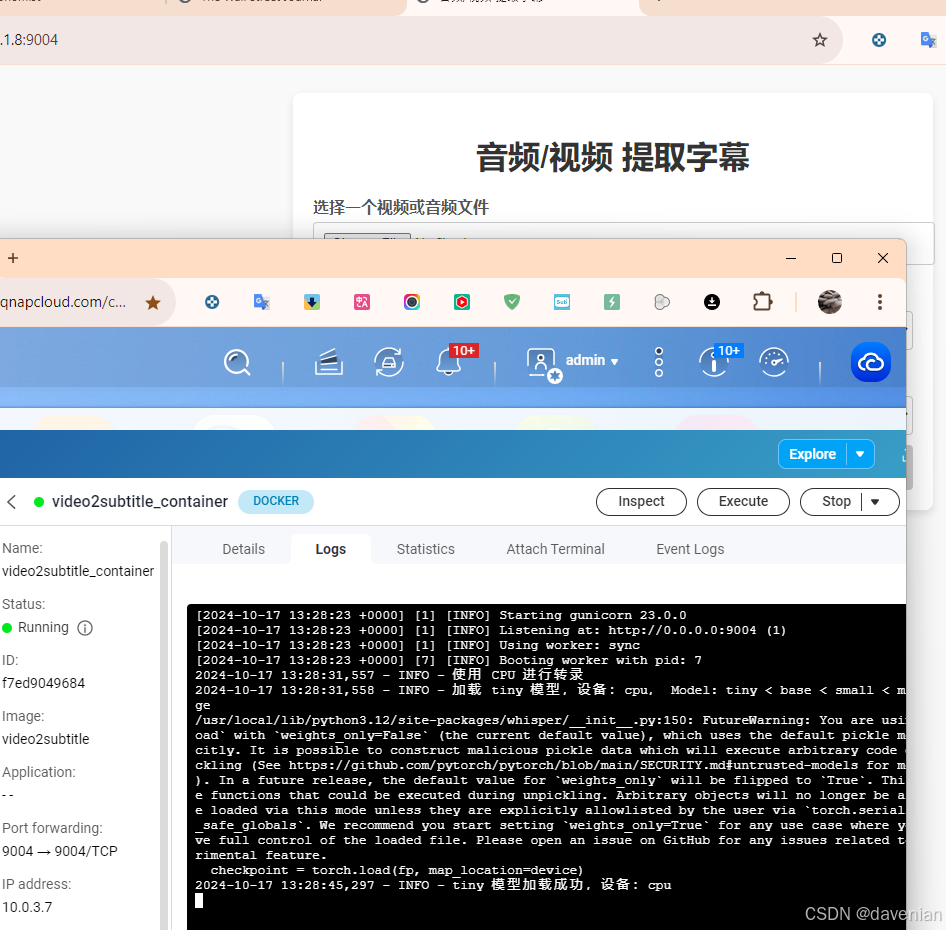
[/share/Multimedia/2024-MyProgramFiles/3.video2subtitle] # docker run -d -p 9004:9004 --name video2subtitle_container video2subtitle成功运行
全局加载 Whisper,启动后会识别 GPU/CPU,分配模型大小.模型对准确识别影响很的。
操作演示

1. 上传文件
程序会识别不超过1GB, 兼容的"视频"、"音频"文件。见主程序 def is_allowed_file()
2. 返回翻译结果
进度条结束后,会把原文+中文简体的内容在页面下方显示。
还可以下载3-4种字幕:
- 文件原声识别
- 原文+中文简体
- 中文简体
- 第二字幕 (需要在首页选择),演示里用的是日本语
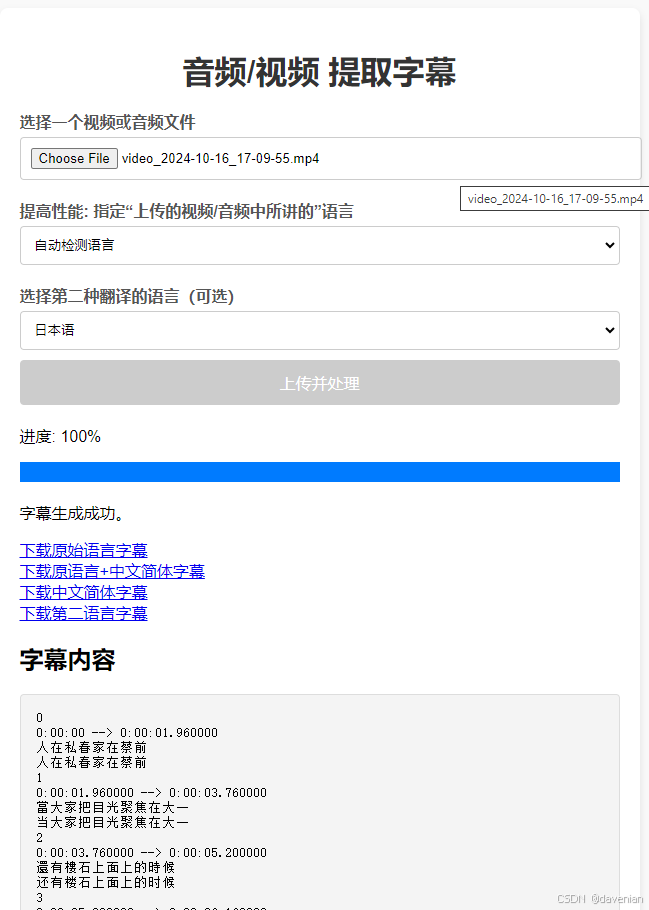
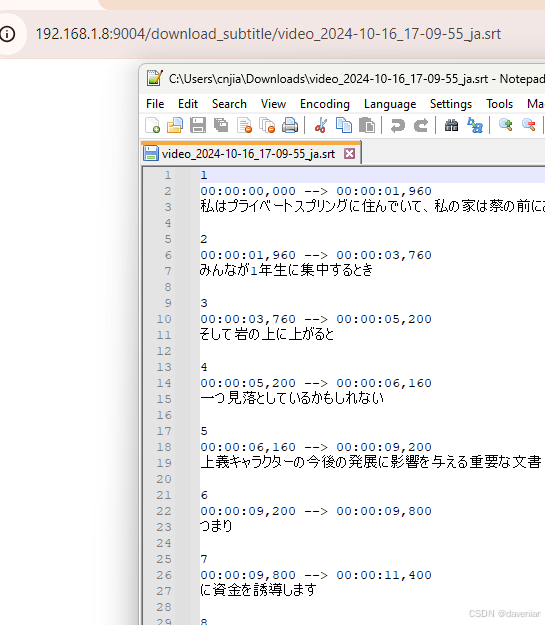
3. 下载翻页后的字幕脚本文件
默认翻译为“简体中文”,还可以添加“第二语言”,演示中的第二语言是"日本语":
troubleshooting in Docker
DOCKER CLI Ref: https://docs.docker.com/reference/cli/docker/image/
原因:
发现 script.js 中限制了上传文件大小是 50MB,故要调整到 1GB,发现 Container 不能启动,报:
AttributeError: module 'whisper' has no attribute 'load_model'
/usr/local/lib/python3.12/site-packages/torch/_subclasses/functional_tensor.py:258: UserWarning: Failed to initialize NumPy: No module named 'numpy' (Triggered internally at ../torch/csrc/utils/tensor_numpy.cpp:84.)
  cpu = _conversion_method_template(device=torch.device("cpu"))
2024-10-17 11:23:42,538 - INFO - 使用 CPU 进行转录
2024-10-17 11:23:42,539 - INFO - 加载 tiny 模型,设备:cpu, Model: tiny < base < small < medium < large
2024-10-17 11:23:42,539 - ERROR - 加载模型时出错:module 'whisper' has no attribute 'load_model'
Traceback (most recent call last):
  File "/app/Video2subTitle/app.py", line 39, in <module>
    model = whisper.load_model(model_size, device=device)
            ^^^^^^^^^^^^^^^^^^
AttributeError: module 'whisper' has no attribute 'load_model'
是 Dockerfile 与 requirements.txt 没有通过 git 去安装正确的 Whisper。 再查 Image 大小( #docker image ls ):8.57GB 如下:
[/share/Multimedia/2024-MyProgramFiles/3.video2subtitle] # docker image ls
REPOSITORY                      TAG           IMAGE ID       CREATED          SIZE
video2subtitle                  latest        165f8bc30d0e   46 minutes ago   8.57GB
pdf2tx-mm                       latest        2220487119ff   6 days ago       1.71GB
<none>                          <none>        70715c2464f6   6 days ago       1.12GB
<none>                          <none>        3b74e6b34d74   6 days ago       4.69GB
ipdf2tx                         latest        5134ad5b5fdd   10 days ago      914MB
rss2economist                   latest        781a36d42bfd   2 weeks ago      284MB
<none>                          <none>        1383127acf3a   2 weeks ago      124MB
2mp4jpg                         latest        717b2eda57e0   4 weeks ago      153MB
rss_app                         latest        2354507e250f   6 weeks ago      292MB
ghcr.io/imputnet/cobalt         7             9bc55f876ee2   2 months ago     412MB
python                          3.12.3-slim   cf001c2f8af7   6 months ago     130MB
ghcr.io/containrrr/watchtower   latest        e7dd50d07b86   11 months ago    14.7MB
如果容器(container)不能启动,只能在 Image 下手:进入 Image
docker run -it video2subtitle /bin/bash安装记录:
1. 运行容器进入终端
pip install --upgrade pip # 升级 pip 24.0 -> 24.2
root@31e3c3dd586a:/app/Video2subTitle# pip install --upgrade pip
Requirement already satisfied: pip in /usr/local/lib/python3.12/site-packages (24.0)
Collecting pip
  Downloading pip-24.2-py3-none-any.whl.metadata (3.6 kB)
Downloading pip-24.2-py3-none-any.whl (1.8 MB)
   ━━━━━━━━━━━━━━━━━━━━━━━━━━━━━━━━━━━━━━━━ 1.8/1.8 MB 3.2 MB/s eta 0:00:00
Installing collected packages: pip
  Attempting uninstall: pip
    Found existing installation: pip 24.0
    Uninstalling pip-24.0:
      Successfully uninstalled pip-24.0
Successfully installed pip-24.2
WARNING: Running pip as the 'root' user can result in broken permissions and conflicting behaviour with the system package manager. It is recommended to use a virtual environment instead: https://pip.pypa.io/warnings/venv
root@31e3c3dd586a:/app/Video2subTitle# pip install git+https://github.com/openai/whisper.git
Collecting git+https://github.com/openai/whisper.git
  Cloning https://github.com/openai/whisper.git to /tmp/pip-req-build-v7xuywnb
  ERROR: Error [Errno 2] No such file or directory: 'git' while executing command git version
ERROR: Cannot find command 'git' - do you have 'git' installed and in your PATH?
root@31e3c3dd586a:/app/Video2subTitle# apt-get update
Hit:1 http://deb.debian.org/debian bookworm InRelease
Hit:2 http://deb.debian.org/debian bookworm-updates InRelease
Hit:3 http://deb.debian.org/debian-security bookworm-security InRelease
Reading package lists... Done
2. 安装 Whisper 更新文件
apt-get install -y git # 用 apt-get 安装 git
root@31e3c3dd586a:/app/Video2subTitle# apt-get install -y git
Reading package lists... Done
Building dependency tree... Done
Reading state information... Done
The following additional packages will be installed:
  git-man less libcbor0.8 libcurl3-gnutls liberror-perl libfido2-1 libgdbm-compat4 libldap-2.5-0 libldap-common libnghttp2-14 libperl5.36 libpsl5 librtmp1
  libsasl2-2 libsasl2-modules libsasl2-modules-db libssh2-1 libssl3 libxmuu1 openssh-client openssl patch perl perl-modules-5.36 publicsuffix xauth
Suggested packages:
  gettext-base git-daemon-run | git-daemon-sysvinit git-doc git-email git-gui gitk gitweb git-cvs git-mediawiki git-svn sensible-utils libsasl2-modules-gssapi-mit
  | libsasl2-modules-gssapi-heimdal libsasl2-modules-ldap libsasl2-modules-otp libsasl2-modules-sql keychain libpam-ssh monkeysphere ssh-askpass ed diffutils-doc
  perl-doc libterm-readline-gnu-perl | libterm-readline-perl-perl make libtap-harness-archive-perl
The following NEW packages will be installed:
  git git-man less libcbor0.8 libcurl3-gnutls liberror-perl libfido2-1 libgdbm-compat4 libldap-2.5-0 libldap-common libnghttp2-14 libperl5.36 libpsl5 librtmp1
  libsasl2-2 libsasl2-modules libsasl2-modules-db libssh2-1 libxmuu1 openssh-client patch perl perl-modules-5.36 publicsuffix xauth
The following packages will be upgraded:
  libssl3 openssl
2 upgraded, 25 newly installed, 0 to remove and 13 not upgraded.
Need to get 22.8 MB of archives.
After this operation, 107 MB of additional disk space will be used.
Get:1 http://deb.debian.org/debian bookworm/main amd64 perl-modules-5.36 all 5.36.0-7+deb12u1 [2815 kB]
pip install git+https://github.com/openai/whisper.git # 安装正经的Whisper
root@31e3c3dd586a:/app/Video2subTitle# pip install git+https://github.com/openai/whisper.git
Collecting git+https://github.com/openai/whisper.git
  Cloning https://github.com/openai/whisper.git to /tmp/pip-req-build-h4lhp13n
  Running command git clone --filter=blob:none --quiet https://github.com/openai/whisper.git /tmp/pip-req-build-h4lhp13n
  Resolved https://github.com/openai/whisper.git to commit 25639fc17ddc013d56c594bfbf7644f2185fad84
  Installing build dependencies ... done
  Getting requirements to build wheel ... done
  Preparing metadata (pyproject.toml) ... done
Collecting numba (from openai-whisper==20240930)
pip install torch torchvision torchaudio --index-url https://download.pytorch.org/whl/cpu
Looking in indexes: https://download.pytorch.org/whl/cpu # 与torch有关的 torchvision torchaudio
root@31e3c3dd586a:/app/Video2subTitle# pip install torch torchvision torchaudio --index-url https://download.pytorch.org/whl/cpu
Looking in indexes: https://download.pytorch.org/whl/cpu
Requirement already satisfied: torch in /usr/local/lib/python3.12/site-packages (2.4.1)
Collecting torchvision
  Downloading https://download.pytorch.org/whl/cpu/torchvision-0.20.0%2Bcpu-cp312-cp312-linux_x86_64.whl (1.8 MB)
     ━━━━━━━━━━━━━━━━━━━━━━━━━━━━━━━━━━━━━━━━ 1.8/1.8 MB 6.0 MB/s eta 0:00:00
Collecting torchaudio
  Downloading https://download.pytorch.org/whl/cpu/torchaudio-2.5.0%2Bcpu-cp312-cp312-linux_x86_64.whl (1.7 MB)
     ━━━━━━━━━━━━━━━━━━━━━━━━━━━━━━━━━━━━━━━━ 1.7/1.7 MB 5.7 MB/s eta 0:00:00
apt-get install vi #安装 vi 编辑器
root@c38b4de62149:/app/Video2subTitle/static# apt-get install vim
Reading package lists... Done
Building dependency tree... Done
Reading state information... Done
The following additional packages will be installed:
  libgpm2 vim-common vim-runtime xxd
Suggested packages:
  gpm ctags vim-doc vim-scripts
The following NEW packages will be installed:
修改了 scritp.js 文件 把 50 -> 1024
3. 删除已经无用的 Container
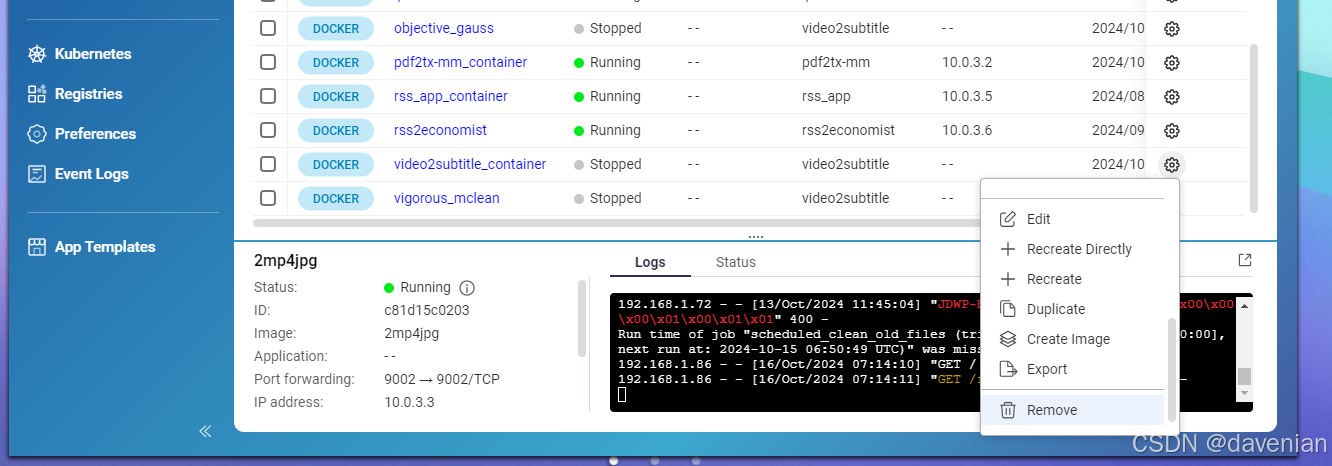
4. 退出并保存容器状态
# docker commit 6714d2114aa6 video2subtitle:latest
# docker tag <image_id> <new_image_name>:<tag> 我做第一个时没有给Image_name:tag 后面再用 docker tag/ docker commit 上一个 ID 一直报错,只好再进入IMAGE 拿到新ID后执行上面命令。
[/share/Multimedia/2024-MyProgramFiles/3.video2subtitle] # docker commit 6714d2114aa6 video2subtitle:latest5. 找到新的 Image 创建新 Container
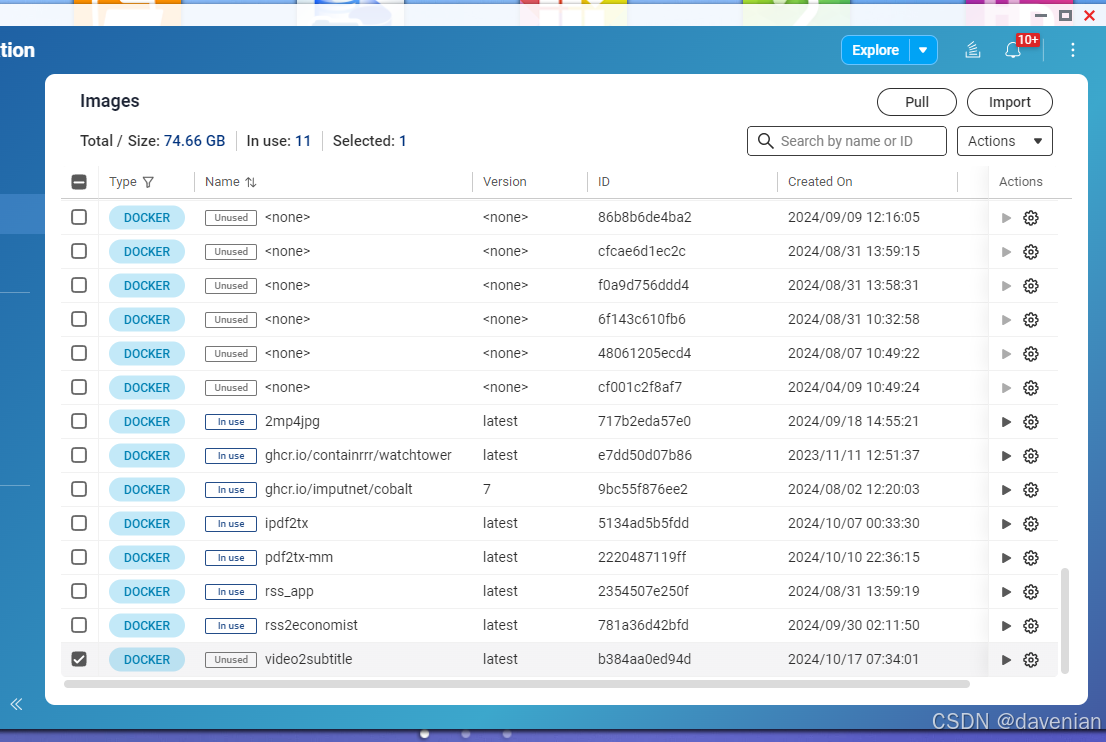
上图的 最下面一行,是新的 Image 用来创建 container 我还是喜欢用命令行,快
命令:
# docker run -d -p 9004:9004 --name video2subtitle_container video2subtitle
[/share/Multimedia/2024-MyProgramFiles/3.video2subtitle] # docker run -d -p 9004:9004 --name video2subtitle_container video2subtitle
e4e106a0573de2597e6b0fc35c6c0cef03eaac1bdfbfea2abfb14f00aaf846b8
[/share/Multimedia/2024-MyProgramFiles/3.video2subtitle] #
已知问题
模型的大小决定提取声音的准确率与速度
我没有添加 API / token 来帮助翻译,或用来提高翻译质量。
不支持多文件同时使用
docker 化后 Image 占用 9GB 空间
运行平台的硬件决定 程序选择哪种大小的库。代码里用的是BASE 与 Tiny,
分享使我愉悦
modified app.py on 26Nov24
from: model_size = "small" if device == "cuda" else "base" if torch.cuda.device_count() > 0 or torch.backends.mps.is_available() else "tiny" # 在 GPU 环境中使用 small ,
在 CPU 环境中使用 base 模型. tiny < base < small < medium < large
to: model_size = "large" if device == "cuda" else "medium" if torch.cuda.device_count() > 0 or torch.backends.mps.is_available() else "small" # 在 GPU 环境中使用 small
,在 CPU 环境中使用 medium 模型. tiny < base < small < medium < large
在我的 QNAP 453D (4GB) 可是跑 SMALL ,中文更准确。 PC(没有 GPU) 跑 medium , 有检测带 cuda 显卡,会使用 large
更多推荐



 36
36 0
0- 0


 已为社区贡献1条内容

所有评论(0)