
windows下mongodb创建账号密码
·
目录
3.重新在bin目录启动mongo.exe,然后输入以下命令
1.在bin目录启动mongo.exe
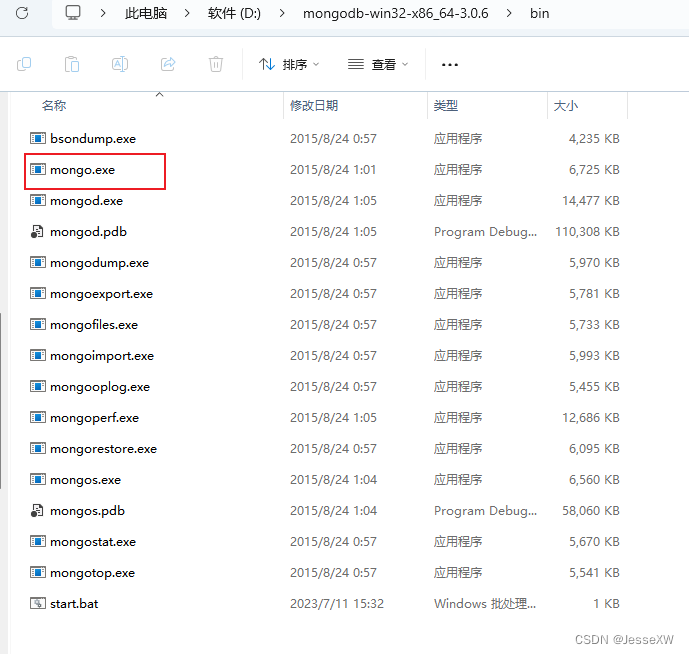
1.1 输入以下命令
use admin

db.createUser({
  user: 'admin',    // 用户名(自定义)
  pwd: '123456',  // 密码(自定义)
  roles:[{
    role: 'root',   // 使用超级用户角色
    db: 'admin'     // 指定数据库
  }]
})
1.2 输入 show users 查看是否设置成功
2.然后在mongodb启动脚本后加入 --auth
示例:
mongod.exe --dbpath D:\mongodb-3.0.6\data\db --auth3.重新在bin目录启动mongo.exe,然后输入以下命令
use admin

db.auth('admin', '123456')
或者
use admin

mongo admin -u admin -p 123456
4.为你想加的数据库创建账号(无论该库是否存在)
use dbtest

db.createUser({
  user: 'test',          // 用户名
  pwd: '123456',      // 密码
  roles:[{
    role: 'readWrite',  // 读写权限角色
    db: 'dbtest'     // 数据库名
  }]
})
5.idea的yaml同步配置
data:
  mongodb:
    host: 127.0.0.1
    port: 27017
    database: dbtest
    username: test
    authentication-database: dbtest
    password: '123456'
注意密码有 ' ' !!!
参照文章:
更多推荐



 11
11 0
0- 0


 已为社区贡献1条内容

所有评论(0)