
钢琴约课小程序(微信小程序原生,含用户端和教师端)
·
概述
钢琴约课小程序(微信小程序原生,含用户端和教师端),包含排课页面、课程详情、请假、登录、注册、个人中心等。里面是已调用了接口,静态的话,把走接口的数据用静态数据代替即可。
详细
注意:
钢琴约课小程序(微信小程序原生,含用户端和教师端),包含排课页面、课程详情、请假、登录、注册、个人中心等。里面是已调用了接口,静态的话,把走接口的数据用静态数据代替即可。
1、项目结构图
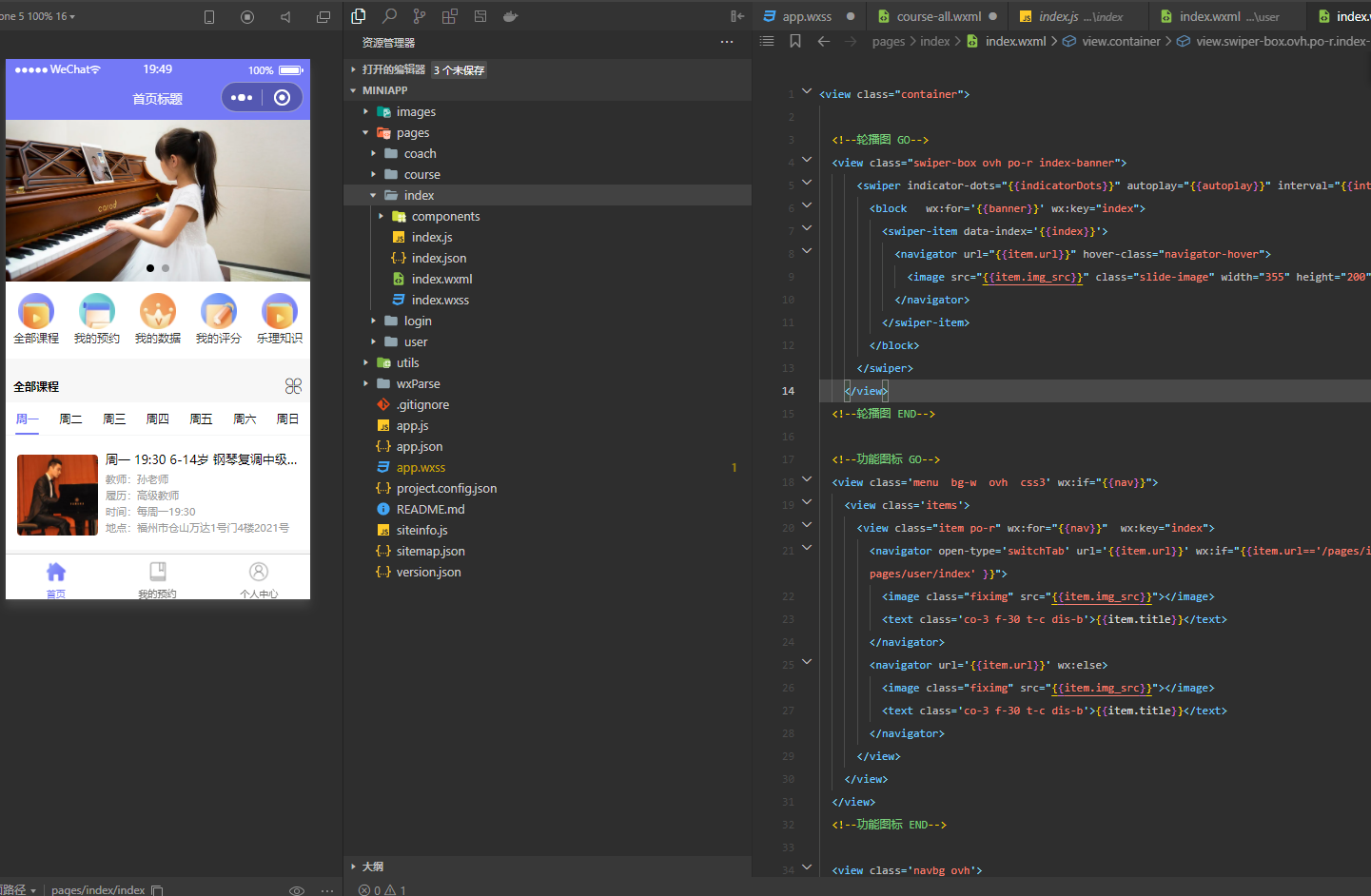
以下对小程序界面解析介绍:
2、app.css的样式重置封装使用
重要部分如下:
/**
显示方式
*/
.dis-f {display: -webkit-box;display: -webkit-flex;display: -ms-flexbox;display: flex;}
.dis-b{ display: block;}
.dis-ib{   display: inline-block;}
.dis-i{   display: inline;}
/**
背景颜色
*/
.bg-greenlack {  background: black;}
.bg-o {  background: #ff9018;}
.bg-r {  background: #ff2200;}
.bg-yellow {  background:linear-gradient(to right, #fbca30, #f3b220);}
.bg-green {  background:linear-gradient(to right, #49bf71,#55d67f, #2cb659);}
.bg-gray {  background: #7f8699;}
.bg-w{ background: #ffffff; overflow: hidden;}
.bg-3{ background: #f3f3f3; overflow: hidden;}
.bg-pri{ background: #ff6905;}
.bor{ border:1px solid #f6f6f6;}
.bor-t{ border-top:1px solid #f6f6f6;}
.bor-l{ border-left:1px solid #f6f6f6;}
.bor-b{ border-bottom:1px solid #f6f6f6;}
.bor-r{ border-right:1px solid #f6f6f6;}
.w100{ width: 100%; }
.bor-ra10{ border-radius:10rpx; }
.bor-ra20{ border-radius:10rpx; }
.bor-ra30{ border-radius:10rpx; }
.bor-ra40{ border-radius:10rpx; }
.bor-ra50{ border-radius:10rpx; }
.line{ width: 100%; height: 1px; background: #f3f3f3; clear: both;}
.nobor{ border: none;}
.jszc{ margin-top: 80rpx; color: #999999;}
/**
位置
*/
.f-l{ float: left;}
.f-c{ margin: 0 auto; float:initial;}
.f-r{ float: right;}
.po-r {  position: relative;}
.po-a {  position: absolute;}
.po-f {  position: fixed;}
.po-ft {  position: fixed; top: 0px;left: 0px;}
.po-fb {  position: fixed; bottom: 0px; left: 0px;}
.m0{margin: 0rpx;}
.m10{ margin: 10rpx; }
.m20{ margin: 20rpx; }
.m30{ margin: 30rpx; }
.m40{ margin: 40rpx; }
.mt0{margin-top: 0rpx;}
.mt10{ margin-top: 10rpx;}
.mt20{margin-top: 20rpx;}
.mt30{margin-top: 30rpx;}
.ml0{margin-left: 0rpx;}
.ml10{margin-left: 10rpx;}
.ml20{margin-left: 20rpx;}
.mr0{margin-right: 0rpx;}
.mr10{margin-right: 10rpx;}
.mr20{margin-right: 20rpx;}
.mb0{margin-bottom: 0rpx;}
.mb10{margin-bottom: 10rpx;}
.mb20{margin-bottom: 20rpx;}
.mb30{margin-bottom: 30rpx;}
.m020{margin:0 20rpx;}
.p0{ padding: 0rpx; }
.p10{ padding: 10rpx; }
.p20{ padding: 20rpx; }
.p30{ padding: 30rpx; }
.pt0{padding-top: 0rpx;}
.pt10{padding-top: 10rpx;}
.pt20{padding-top: 20rpx;}
.pl0{padding-left: 0rpx;}
.pl10{padding-left: 10rpx;}
.pl20{padding-left: 20rpx;}
.pr0{padding-right: 0rpx;}
.pr10{padding-right: 10rpx;}
.pr20{padding-right: 20rpx;}
.pb0{padding-bottom: 0rpx;}
.pb10{padding-bottom: 10rpx;}
.pb20{padding-bottom: 20rpx;}
.p010{padding:0 10rpx;}
.p020{padding:0 20rpx;}
.p030{padding:0 30rpx;}
.bg-sub{ background: #7479f6;}
.all-tip{  height: 80rpx; padding: 0 30rpx; color: #3f3f3f; line-height: 80rpx; overflow: hidden; background: #f0e4c1;}
.hide{ display: none; opacity: 0;}
.show{ display: block; opacity: 1;}
.line-30{line-height: 30rpx;}
.line-40{line-height: 40rpx;}
.line-50{line-height: 50rpx;}
.line-60{line-height: 60rpx;}
.line-70{line-height: 70rpx;}
.line-80{line-height: 80rpx;}
.line-90{line-height: 90rpx;}
.line-100{line-height: 100rpx;}
.h-30{height: 30rpx; overflow: hidden;}
.h-40{height: 40rpx; overflow: hidden;}
.h-50{height: 50rpx; overflow: hidden;}
.h-60{height: 60rpx; overflow: hidden;}
.h-70{height: 70rpx; overflow: hidden;}
.h-80{height: 80rpx; overflow: hidden;}
.h-90{height: 90rpx; overflow: hidden;}
.h-100{height: 100rpx; overflow: hidden;}
.h-120{height: 120rpx; overflow: hidden;}
.h-140{height: 140rpx; overflow: hidden;}
.h-160{height: 160rpx; overflow: hidden;}
.h-180{height: 180rpx; overflow: hidden;}
.h-200{height: 200rpx; overflow: hidden;}
.ovh{ overflow: hidden;}
/**
字体
*/
.t-c{ text-align: center;}
.t-l{ text-align: left;}
.t-r{ text-align: right;}
.f-18{ font-size: 18rpx;}
.f-24{ font-size: 24rpx;}
.f-26{ font-size: 26rpx;}
.f-28{ font-size: 28rpx;}
.f-30{ font-size: 30rpx;}
.f-32{ font-size: 32rpx;}
.f-34{ font-size: 34rpx;}
.f-36{ font-size: 34rpx;}
.f-38{ font-size: 34rpx;}
.f-40{ font-size: 40rpx;}
.f-45{ font-size: 45rpx;}
.f-50{ font-size: 50rpx;}
.f-55{ font-size: 55rpx;}
.f-60{ font-size: 60rpx;}
.ellipsis {  text-overflow: ellipsis;  white-space: nowrap;  overflow: hidden;  display: block;}
.bold{ font-weight: bold;}
/**
字体颜色
*/
.co-r{ color: #ee2b2b;}
.price{ color: #ff0000;}
.co-w{ color: #ffffff;}
.co-o{ color: #ff9000}
.co-g{ color:green;}
.co-y{ color: #fbd051}
.co-0{ color: #000000;}
.co-3{ color: #333333;}
.co-6{ color: #666666;}
.co-9{ color: #999999;}
.co-gray{color: #7f8699}
.ico1{ color:#ff1260;}
.ico2{ color:#fa741b;}
.ico3{ color:#7a67ff;}
.ico4{ color:#2cba80;}
.ico5{ color:#7479f6;}
.ico7{ color:#ff9018;}
/**
按钮
*/
.btn96{ height: 80rpx; line-height: 80rpx;font-size: 40rpx; background: #ec4e43; color: #ffffff; text-align:center; margin:40rpx auto;}
.btn96{ width:96%;}
.btn100{ width:100%;}
.btn-bottom{position: fixed; bottom: 0px; left: 0px; background: #7479f6; font-size: 36rpx; text-align: center;color: #ffffff; height: 80rpx; line-height: 80rpx;border-radius: 0px; width: 100%; }
.btn-sub{ border: 1px solid #999999; font-size: 28rpx; text-align: center;   border-radius: 10rpx; padding: 5rpx 20rpx; color: #999999; margin: 0 auto; display: block; line-height: 50rpx; height: 50rpx;  }
/**
栅格布局
*/
.row {  display: block;  margin: 0px;}
.col {  display: flex;  font-family: -apple-system-font, "Helvetica Neue", sans-serif;  font-size: 30rpx;}
.col>.col-1,.col-1, .col-2, .col-3, .col-4, .col-5, .col-6, .col-7, .col-8, .col-9,.col-10, .col-11, .col-12 {  overflow: hidden;float: left;}
.col-1 {  width: 8.33333333333333%;}
.col-2 {  width: 16.6666666666666%;}
.col-3 {  width: 25%;}
.col-4 {  width: 33.3333333333333%;}
.col-5 {  width: 41.6666666666666%;}
.col-6 {  width: 50%;}
.col-7 {  width: 58.333333333333333%;}
.col-8 {  width: 66.66666666666666%;}
.col-9 {  width: 75%;}
.col-10 {  width: 83.33333333333333%;}
.col-11 {  width: 91.66666666666666%;}
.col-12 {  width: 100%;}
.img40{ width: 80rpx; height: 80rpx;}
.img60{ width: 120rpx; height: 120rpx;}
.img80{ width: 160rpx; height: 160rpx;}
.img100{ width: 200rpx; height: 200rpx;}
.z-99{ z-index: 99;}
.navigator-hover { opacity: 1; background: none;}
.kongbai{ height: 100rpx; width: 100%; overflow: hidden;}
3、VIEW的部分源码展示
<view class="container">
  <!--轮播图 GO-->
  <view class="swiper-box ovh po-r index-banner">
      <swiper indicator-dots="{{indicatorDots}}" autoplay="{{autoplay}}" interval="{{interval}}" duration="{{duration}}">
        <block   wx:for='{{banner}}' wx:key="index">
          <swiper-item data-index='{{index}}'>
            <navigator url="{{item.url}}" hover-class="navigator-hover">
              <image src="{{item.img_src}}" class="slide-image" width="355" height="200" />
            </navigator>
          </swiper-item>
        </block>
      </swiper>
    </view>
  <!--轮播图 END-->
  <!--功能图标 GO-->
  <view class='menu  bg-w  ovh  css3' wx:if="{{nav}}">
    <view class='items'>
      <view class="item po-r" wx:for="{{nav}}"  wx:key="index">
        <navigator open-type='switchTab' url='{{item.url}}' wx:if="{{item.url=='/pages/index/index' || item.url=='/pages/user/course-res' || item.url=='/pages/user/index' }}">
          <image class="fiximg" src="{{item.img_src}}"></image>
          <text class='co-3 f-30 t-c dis-b'>{{item.title}}</text>
        </navigator>
        <navigator url='{{item.url}}' wx:else>
          <image class="fiximg" src="{{item.img_src}}"></image>
          <text class='co-3 f-30 t-c dis-b'>{{item.title}}</text>
        </navigator>
      </view>
    </view>
  </view>
  <!--功能图标 END-->
  <view class='navbg ovh'>
    <text class='title line-80 t-c f-l p020 bold'>全部课程</text>
    <icon class='line-80 t-c f-r p020 iconfont iconquanbu' bindtap="showviewfc"></icon>
  </view>
  <!--按周显示课程 GO-->
  <block wx:if="{{curriculum}}">
    <view class="menu1 line-80 bg-w ovh">
      <text bindtap="tab" data-type="1" class="{{startweek==1 ? 'active' : ''}}">周一</text>
      <text bindtap="tab" data-type="2" class="  {{startweek==2 ? 'active' : ''}}">周二</text>
      <text bindtap="tab" data-type="3" class=" {{startweek==3 ? 'active' : ''}}">周三</text>
      <text bindtap="tab" data-type="4" class=" {{startweek==4 ? 'active' : ''}}">周四</text>
      <text bindtap="tab" data-type="5" class=" {{startweek==5 ? 'active' : ''}}">周五</text>
      <text bindtap="tab" data-type="6" class=" {{startweek==6 ? 'active' : ''}}">周六</text>
      <text bindtap="tab" data-type="7" class=" {{startweek==7 ? 'active' : ''}}">周日</text>
    </view>
  <!--课程列表 GO-->
    <view class='p30 bg-w ovh m-nav pr0'>
      <view class='item po-r ovh' wx:key="key" wx:for="{{curriculum}}">
        <navigator class='dis-ib' url='/pages/course/detial-list?id={{item.id}}'>
          <form bindsubmit='submit' report-submit='true' data-type="submit">
            <image mode="aspectFill" class='f-l mt20' src='{{item.coach.avatar}}'></image>
            <view class='wrap'>
              <view class='first pl20 line-40 h-40  f-32 ellipsis t-l'>{{item.title}}</view>
              <view class='cont pl20  f-28 ellipsis t-l co-9'>教师:{{item.coach.nickname}}</view>
              <view class='cont pl20   f-28 ellipsis t-l co-9'>履历:{{item.coach.bio}}</view>
              <view class='cont pl20   f-28 ellipsis t-l co-9'>时间:{{item.starttime}}</view>
              <view class='cont pl20   f-28 ellipsis t-l co-9'>地点:{{item.address}}</view>
            </view>
          </form>
        </navigator>
      </view>
    </view>
  </block>
  <!--课程列表 GO-->
  <block>
    <view class='p30 bg-w ovh pb0 mt30'>
      <text class='f-l co-3'>推荐课程</text>
      <navigator url='/pages/course/list' class='dis-ib f-r'>
        <text class='f-r ico7 f-24'>查看更多</text>
      </navigator>
    </view>
    <view class='p30 bg-w ovh m-children t-c'>
      <image mode='aspectFit' src='../../images/child.png'></image>
    </view>
  </block>
  <!-- 底线 -->
  <view class="title-footer p-r">
    <text class="f-24 co-9 cont t-c">已经到底啦</text>
    <view class="hr"></view>
  </view>
  <!-- 返回顶部 -->
  <view bindtap="goTop" class="widget-goTop" wx:if="{{floorstatus}}">
    <text class="iconfont icon-fanhuidingbu"></text>
  </view>
  <!--课程分类弹窗-->
  <view class='searbox po-f ovh bg-w css3 {{showview?"scrolll":"scrollr"}}'>
    <view class='po-r ovh p20'>
      <text class='f-r co-9 po-a close' bindtap='showhide'>关闭</text>
      <scroll-view class="scroll-view_H t-c" scroll-y style="width: 100%; height:94vh;padding-top:6vh;" catchtouchmove="true">
      <view class='seccat ovh p020 mb10 dis-ib co-9'  bindtap='changeid' data-id='' wx:key="{{key}}">全部</view>
        <view class='seccat ovh p020 mb10 dis-ib co-9' wx:for="{{catelist}}" bindtap='changeid' data-id='{{item.id}}' wx:key="index">{{item.name}}</view>
      </scroll-view>
    </view>
  </view>
</view>
view展示注意点:
1、在小程序开发工具中,不影响运行,但是要呈现演示数据,需要js中把api的变量定义成静态数据。
2、页面中学生端和教师端是通过判断用户的教师id来区分展示对应身份的界面,所以部分涉及身份的页面是连段代码,谨记。
4、JS首页完整代码展示
let App = getApp();

Page({
  data: {
    // banner轮播组件属性
    indicatorDots: true, // 是否显示面板指示点
    autoplay: true, // 是否自动切换
    interval: 3000, // 自动切换时间间隔
    duration: 800, // 滑动动画时长
    imgHeights: {}, // 图片的高度
    imgCurrent: {}, // 当前banne所在滑块指针
    show: false,
    showview: false,
    items: {},
    category_id: '',
    startweek: 1,
    startPoint: ''
  },

  onLoad: function() {
    // 设置页面标题
    App.setTitle();
    // 获取首页数据
    this.getHomeData();
    this.getCategorylist();
    this.getIndexCurriculum();
  },

  onShow: function() {
    this.onLoad();
  },
  /**
   * 获取首页数据
   */
  getHomeData: function() {
    let that = this;
    App._get('index/index', {}, function(res) {
      that.setData(res.data);
    });
  },

  /**
   * 课程分类列表
   */
  getCategorylist: function() {
    let that = this;
    App._get('index/curriculumCategorylist', {}, function(result) {
      that.setData({
        catelist: result.data
      });
    });
  },

  /**
   * 获取分类id
   */

  changeid: function(e) {
    let that = this;
    var category_id = e.currentTarget.dataset.id;
    that.setData({
      category_id: category_id
    });
    that.getIndexCurriculum();
    that.showhide();
  },
  //触发分类弹窗
  showviewfc: function () {
    var that = this;
      that.setData({
        showview: true
      })
  },
  //关闭分类弹窗
  showhide: function () {
    var that = this;
    that.setData({
      showview: false
    })
  },

  /**
   * 获取 首页课程数据
   */
  getIndexCurriculum: function() {
    let that = this;
    App._get('index/curriculumlist', {
      startweek: that.data.startweek,
      category_id: that.data.category_id
    }, function(result) {
      that.setData(result.data);
    });
  },

  //周别切换
  tab: function(e) {
    var startweek = e.currentTarget.dataset.type;
    this.setData({
      startweek: startweek
    });
    this.getIndexCurriculum();
  },

  /**
   * 计算图片高度
   */
  imagesHeight: function(e) {
    let imgId = e.target.dataset.id,
      itemKey = e.target.dataset.itemKey,
      ratio = e.detail.width / e.detail.height, // 宽高比
      viewHeight = 750 / ratio, // 计算的高度值
      imgHeights = this.data.imgHeights;
    // 把每一张图片的对应的高度记录到数组里
    if (typeof imgHeights[itemKey] === 'undefined') {
      imgHeights[itemKey] = {};
    }
    imgHeights[itemKey][imgId] = viewHeight;
    // 第一种方式
    let imgCurrent = this.data.imgCurrent;
    if (typeof imgCurrent[itemKey] === 'undefined') {
      imgCurrent[itemKey] = Object.keys(this.data.items[itemKey].data)[0];
    }
    this.setData({
      imgHeights,
      imgCurrent
    });
  },

  //首页分享
  onShareAppMessage: function() {
    return {
      title: "小程序首页",
      desc: "",
      path: "/pages/index/index"
    };
  },
  /*
   *下拉显示
   */
  onPullDownRefresh() {
    var that = this;
    that.setData({
      show: true
    })
  },

  /**
   * 页面上拉触底事件的处理函数
   */
  move: function(e) {
    var curPoint = [e.touches[0].pageX, e.touches[0].pageY];
    var starPoint = this.data.startPoint;
    that.setData({
      show: false
    })
  },

});
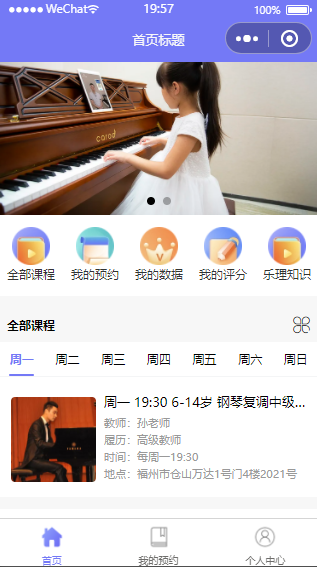
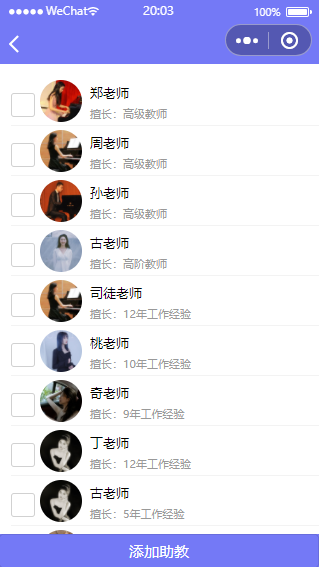
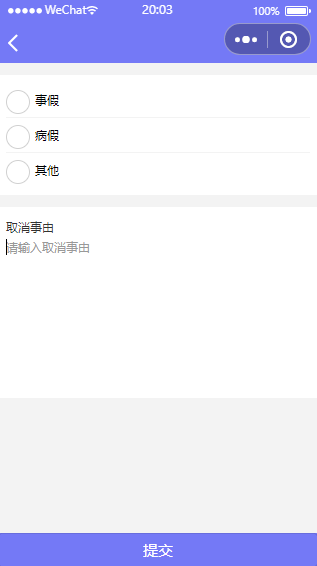
5、教师端界面截图



最后:
如果需要了解体验小程序后台及api、数据库可通过平台联系我。
更多推荐


 0
0 0
0- 0


 已为社区贡献2条内容

所有评论(0)