
微信小程序自定义凸出tabbar
·
成品
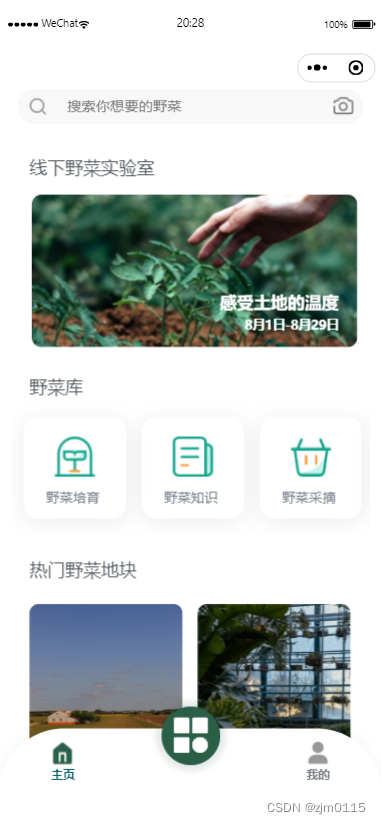
页面路径 先创建一个custom-tab-bar文件
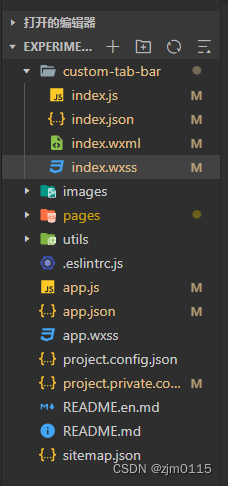
index.wxml
<!--miniprogram/custom-tab-bar/index.wxml-->
<view class="tab-bar">
  <view class="tab-bar-border"></view>
  <block wx:for="{{list}}" wx:key="index">
    <view wx:if="{{item.isSpecial}}" class="tab-bar-item" data-path="{{item.pagePath}}" data-click="{{ item.isSpecial || false }}" data-index="{{index}}" bindtap="switchTab">
      <view class="special-image">
        <image class="special-image-pic" mode="aspectFit" src="{{selected === index ? item.selectedIconPath : item.iconPath}}"></image>
      </view>
      <view style="color: {{selected === index ? selectedColor : color}}" class="special-text tab-text">{{item.text}}</view>
    </view>
    <view wx:else class="tab-bar-item" data-path="{{item.pagePath}}" data-click="{{ item.isSpecial }}" data-index="{{index}}" bindtap="switchTab">
      <image class="item-image" mode="aspectFit" src="{{selected === index ? item.selectedIconPath : item.iconPath}}"></image>
      <view class="tab-text" style="color: {{selected === index ? selectedColor : color}}">{{item.text}}</view>
    </view>
  </block>
</view>
index.wxss
.tab-bar {
  position: fixed;
  bottom: 0;
  left: 0;
  right: 0;
  height: 130rpx;
  background: rgb(255, 255, 255);
  box-shadow: 0px -4px 14px rgba(0, 0, 0, 0.03);
  border: none !important;
  border-radius:
  128rpx 128rpx 0px 0px;
  display: flex;
  padding-bottom: env(safe-area-inset-bottom);
}

.tab-bar-border {
  background-color: rgba(0, 0, 0, 0.33);
  position: absolute;
  left: 0;
  top: 0;
  width: 100%;
  height: 2rpx;
  transform: scaleY(0);
}

.tab-bar-item {
  flex: 1;
  text-align: center;
  display: flex;
  justify-content: center;
  align-items: center;
  flex-direction: column;
}

.tab-bar-item .item-image {
  width: 50rpx;
  height: 50rpx;
}
.tab-bar-item .special-image {
  position: absolute;
  top: -76rpx;
  width: 180rpx;
  height: 180rpx;
  border-radius: 50%;
  /* border-top: 2rpx solid #f2f2f3; */
  /* background-color: #fff; */
  text-align: center;
  box-sizing: border-box;
  padding: 6rpx;
}
.tab-bar-item .special-image .special-image-pic {
  width: 100%;
  height: 100%;
}

.tab-bar-item .tab-text {
  margin-top: 4rpx;
  font-weight: 600;
}

.tab-bar-item .special-text {
  margin-top: 44rpx
}

.tab-bar-item .tab-text {
  font-size: 24rpx;
}
index.js
Component({
  data: {
    selected: 0,
    color: "#7A7E83",
    selectedColor: "#015C61",
    list: [{
        pagePath: "/pages/index/index",
        iconPath: "/images/tabs/home-active.png",
        selectedIconPath: "/images/tabs/home.png",
        text: "主页"
      },
      {
        pagePath: "/pages/home/home",
        iconPath: "/images/tabs/index.png",
        selectedIconPath: "/images/tabs/index.png",
        text: "",
        isSpecial: true
      },
      {
        pagePath: "/pages/my/my",
        iconPath: "/images/tabs/my-active.png",
        selectedIconPath: "/images/tabs/my.png",
        text: "我的"
      }
    ]
  },
  attached() {},
  methods: {
    switchTab(e) {
      const data = e.currentTarget.dataset
      console.log(data)
      let path = data.path
      wx.switchTab({
        url: path
      })

    }
  }
})
index.json
{
  "component": true
}
app.js
// app.js
App({
  onLaunch() {
    // 展示本地存储能力
    const logs = wx.getStorageSync('logs') || []
    logs.unshift(Date.now())
    wx.setStorageSync('logs', logs)

    // 登录
    wx.login({
      success: res => {
        // 发送 res.code 到后台换取 openId, sessionKey, unionId
      }
    })
  },
  globalData: {
    selected: 0
  },
  getCurrentTabbar(selected, that) {
    if (typeof that.getTabBar === 'function' && that.getTabBar()) {
      that.getTabBar().setData({
        selected: selected
      })
    }
  }
})
app.json
 "tabBar": {
    "selectedColor": "#8F92A1",
    "custom": true,
    "list": [{
        "pagePath": "pages/index/index",
        "iconPath": "/images/tabs/home-active.png",
        "text": "主页",
        "selectedIconPath": "/images/tabs/home.png"
      },
      {
        "pagePath": "pages/home/home",
        "iconPath": "/images/tabs/index.png",
        "bulge":true,
        "selectedIconPath": "/images/tabs/index.png"
      },
      {
        "pagePath": "pages/my/my",
        "iconPath": "/images/tabs/my-active.png",
        "text": "我的",
        "selectedIconPath": "/images/tabs/my.png"
      }
    ]
到此就设置完成啦!!!
更多推荐
 0
0 0
0- 0


 已为社区贡献1条内容

所有评论(0)